当前位置:网站首页>013_ slider
013_ slider
2022-06-30 01:50:00 【Free and bound javajavascript】
1. Slider slider
1.1. Drag the slider to select in a fixed range .
1.2. Slider attribute
Parameters | explain | type | Optional value | The default value is |
value / v-model | Binding value | number | nothing | 0 |
min | minimum value | number | nothing | 0 |
max | Maximum | number | nothing | 100 |
disabled | Whether to disable | boolean | nothing | false |
step | step | number | nothing | 1 |
show-input | Whether to display the input box , Only valid for non range selection | boolean | nothing | false |
show-input-controls | With the input box displayed , Whether to display the control button of input box | boolean | nothing | true |
input-size | The size of the input box | string | large / medium / small / mini | small |
show-stops | Whether to show breakpoints | boolean | nothing | false |
show-tooltip | Whether or not shown tooltip | boolean | nothing | true |
format-tooltip | format tooltip message | function(value) | nothing | nothing |
range | Whether to select for the scope | boolean | nothing | false |
vertical | Vertical mode or not | boolean | nothing | false |
height | Slider Height , Vertical mode is required | string | nothing | nothing |
label | Screen reader tags | string | nothing | nothing |
debounce | Deblurring delay on input , millisecond , Only in show-input be equal to true Effective when | number | nothing | 300 |
tooltip-class | tooltip The custom class name of | string | nothing | nothing |
marks | Mark , key The type of must be number And the value is in the closed interval [min, max] Inside , Each tag can be styled individually | object | nothing | nothing |
1.3. Slider event
Event name | explain | Callback Arguments |
change | Trigger when value changes ( When dragging with the mouse , Only when you release the mouse ) | Changed value |
input | Trigger when data changes ( When dragging with the mouse , The activity process is triggered in real time ) | Changed value |
2. Slider Slider example
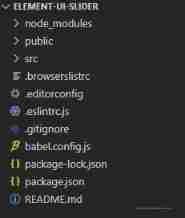
2.1. Use the scaffold to create a new one named element-ui-slider Front end projects , At the same time to install Element plug-in unit .
2.2. To write App.vue
<template>
  <div id="app">
    <h1> Basic usage </h1>
    <div class="block">
      <span> Default </span>
      <el-slider v-model="base_value1"></el-slider>
    </div>
    <div class="block">
      <span> Custom initial value </span>
      <el-slider v-model="base_value2"></el-slider>
    </div>
    <div class="block">
      <span> hide  Tooltip</span>
      <el-slider v-model="base_value3" :show-tooltip="false"></el-slider>
    </div>
    <div class="block">
      <span> format  Tooltip</span>
      <el-slider v-model="base_value4" :format-tooltip="formatTooltip"></el-slider>
    </div>
    <div class="block">
      <span> Ban </span>
      <el-slider v-model="base_value5" disabled></el-slider>
    </div>

    <h1> Discrete value </h1>
    <div class="block">
      <span> Don't show breakpoints </span>
      <el-slider v-model="step_value1" :step="10"></el-slider>
    </div>
    <div class="block">
      <span> Show breakpoints </span>
      <el-slider v-model="step_value2" :step="10" show-stops></el-slider>
    </div>

    <h1> With an input box </h1>
    <div class="block">
      <el-slider v-model="input_value" show-input></el-slider>
    </div>

    <h1> Range selection </h1>
    <div class="block">
      <el-slider v-model="range_value" range show-stops :max="10"></el-slider>
    </div>

    <h1> Vertical mode </h1>
    <div class="block">
      <el-slider v-model="vertical_value" vertical height="200px"></el-slider>
    </div>

    <h1> Show the logo </h1>
    <div class="block">
      <el-slider v-model="value" range :marks="marks"></el-slider>
    </div>
  </div>
</template>

<script>
export default {
  data () {
    return {
      base_value1: 0,
      base_value2: 50,
      base_value3: 36,
      base_value4: 48,
      base_value5: 42,
      step_value1: 0,
      input_value: 0,
      range_value: [4, 8],
      vertical_value: 0,
      value: [30, 60],
      marks: {
        0: '0°C',
        8: '8°C',
        37: '37°C',
        50: {
          style: {
            color: '#1989FA'
          },
          label: this.$createElement('strong', '50%')
        }
      }
    }
  },
  methods: {
    formatTooltip (val) {
      return val / 100
    }
  }
}
</script>

<style>
  #app {
    width: 600px;
    margin: 0 0 50px 10px;
  }
</style>
2.3. Run the project

边栏推荐
- Fake divorce turns into real divorce. What about property
- Chiffrement des cookies 8
- Varnish foundation overview 4
- 假离婚变成真离婚,财产怎么办
- AI落地制造业:智能机器人应具备这4种能力
- Varnish 基础概览7
- GeoTools WKT坐标系转换
- [graph neural network] summary of graph classification study [3]: evaluation of graph classification methods and future research directions
- 【图神经网络】图分类学习研究综述[2]:基于图神经网络的图分类
- AI landing manufacturing: intelligent robots should have these four abilities
猜你喜欢

C language number prime

Gesture digital enlightenment learning machine
![【图神经网络】图分类学习研究综述[2]:基于图神经网络的图分类](/img/5f/b23b64eed7f28ffd92c122b6859e2d.png)
【图神经网络】图分类学习研究综述[2]:基于图神经网络的图分类

Conjecture of prime pairs in C language

Thinking carefully and fearfully: a software can be transmitted online to monitor whether employees want to "run away"
![[machine learning Q & A] cosine similarity, cosine distance, Euclidean distance and the meaning of distance in machine learning](/img/34/367c66b8d10e896848b102a7f9aa89.png)
[machine learning Q & A] cosine similarity, cosine distance, Euclidean distance and the meaning of distance in machine learning

C language output integer in another format

C语言 说反话

(4) Blender source code analysis flash window display process
[graph neural network] overview of graph classification learning [2]: graph classification based on graph neural network
随机推荐
209. minimum length subarray - sliding window
(4) Blender source code analysis flash window display process
C语言 我要通过
Pytorch模型训练到哪里找预训练模型?
If mybaits cannot query the data, it can query how to change it in the database
cookie加密9
什么是幂等性?四种接口幂等性方案详解!
Gesture digital enlightenment learning machine
[mrctf2020]ezpop-1 | PHP serialization
C语言 数组元素循环右移问题
【图神经网络】图分类学习研究综述[3]:图分类方法评价及未来研究方向
[MRCTF2020]Ezpop-1|php序列化
Cookie encryption 10
Using grpcui to test asp Net core grpc service
Fake divorce turns into real divorce. What about property
Varnish 基础概览3
Varnish 基础概览2
Using face_ Recognition library reports an error reason: cudnn_ STATUS_ NOT_ SUPPORTED
Is the processor the main factor in buying a mobile phone?
搞透AQS原理(流程圖及同步隊列圖解)