当前位置:网站首页>MFC window scroll bar usage
MFC window scroll bar usage
2022-07-01 03:45:00 【Three Belle Wenzi】
Hello friends , I haven't updated my official account for several days , Because Wenzi went home to eat zongzi .
Today I want to share with you the usage of a window scroll bar . You'll wonder what a scroll bar is ? A scroll bar is a scrollable bar , As shown in the figure :

This is the scroll bar , So what's its function ? You can think about a fixed size interface , You have a lot of space , When there is no gap in the interface , At this time, you need a scroll bar to help expand the interface , Don't say anything , Look at the renderings first :

This is the effect of not using the interface scroll bar , We can see that there are 24 Button , this 24 Buttons are fixed , Then the width and height of the interface are fixed , Next, let's take a look at the renderings with scrollbars :

You can see the horizontal scroll bar and vertical scroll bar appear on the interface , You can pull the scroll bar up and down to expand the interface vertically , You can also pull the scroll bar left and right to expand the interface horizontally . however , One problem is : When you pull the scroll bar , The interface is unresponsive , It is because our code does not add the event function of the scroll bar , You need to add the response function of the scroll bar in the code of this interface .
The way to add a scroll bar to the interface is :
Select interface ;
Click interface properties , Put... In the attribute “ Vertical scroll bar ” and “ Horizontal scroll bar ” All set to True;
Then select the class of this interface in the class view , Then right-click properties , Then select the message in the attribute , Look in the message WM_HSCROLL and WM_VSCROLL, Add these two event functions :
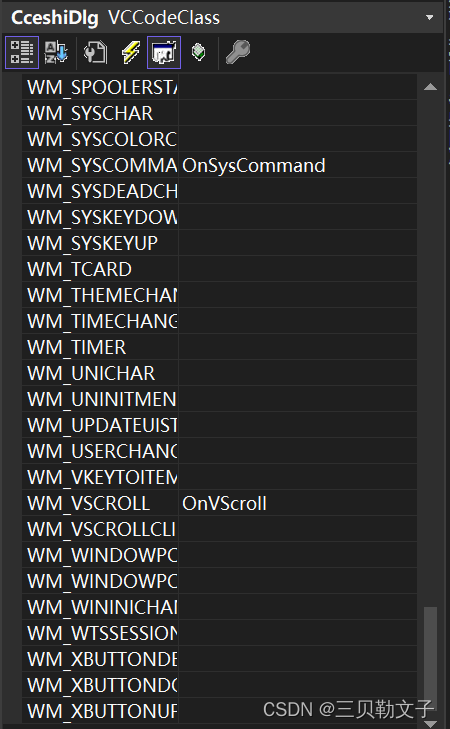

Then add the following code to these two time functions :
void CceshiDlg::OnHScroll(UINT nSBCode, UINT nPos, CScrollBar* pScrollBar)
{
// TODO: Add message handler code and / Or call the default value
CDialog::OnHScroll(nSBCode, nPos, pScrollBar);
SCROLLINFO scrollinfo;
GetScrollInfo(SB_HORZ, &scrollinfo, SIF_ALL);
//
switch (nSBCode)
{
case SB_LEFT:
ScrollWindow((scrollinfo.nPos - scrollinfo.nMin) * 10, 0);
scrollinfo.nPos = scrollinfo.nMin;
SetScrollInfo(SB_HORZ, &scrollinfo, SIF_ALL);
break;
case SB_RIGHT:
ScrollWindow((scrollinfo.nPos - scrollinfo.nMax) * 10, 0);
scrollinfo.nPos = scrollinfo.nMax;
SetScrollInfo(SB_HORZ, &scrollinfo, SIF_ALL);
break;
case SB_LINELEFT:
scrollinfo.nPos -= 1;
if (scrollinfo.nPos < scrollinfo.nMin)
{
scrollinfo.nPos = scrollinfo.nMin;
break;
}
SetScrollInfo(SB_HORZ, &scrollinfo, SIF_ALL);
ScrollWindow(10, 0);
break;
case SB_LINERIGHT:
scrollinfo.nPos += 1;
if (scrollinfo.nPos > scrollinfo.nMax)
{
scrollinfo.nPos = scrollinfo.nMax;
break;
}
SetScrollInfo(SB_HORZ, &scrollinfo, SIF_ALL);
ScrollWindow(-10, 0);
break;
case SB_PAGELEFT:
scrollinfo.nPos -= 5;
if (scrollinfo.nPos < scrollinfo.nMin)
{
scrollinfo.nPos = scrollinfo.nMin;
break;
}
SetScrollInfo(SB_HORZ, &scrollinfo, SIF_ALL);
ScrollWindow(10 * 5, 0);
break;
case SB_PAGERIGHT:
scrollinfo.nPos += 5;
if (scrollinfo.nPos > scrollinfo.nMax)
{
scrollinfo.nPos = scrollinfo.nMax;
break;
}
SetScrollInfo(SB_HORZ, &scrollinfo, SIF_ALL);
ScrollWindow(-10 * 5, 0);
break;
case SB_THUMBPOSITION:
break;
case SB_THUMBTRACK:
ScrollWindow((scrollinfo.nPos - nPos) * 10, 0);
scrollinfo.nPos = nPos;
SetScrollInfo(SB_HORZ, &scrollinfo, SIF_ALL);
break;
case SB_ENDSCROLL:
break;
}
}
void CceshiDlg::OnVScroll(UINT nSBCode, UINT nPos, CScrollBar* pScrollBar)
{
// TODO: Add message handler code and / Or call the default value
CDialog::OnVScroll(nSBCode, nPos, pScrollBar);
SCROLLINFO scrollinfo;
GetScrollInfo(SB_VERT, &scrollinfo, SIF_ALL);
switch (nSBCode)
{
case SB_LINEUP: //Scroll one line up
scrollinfo.nPos -= 1;
if (scrollinfo.nPos < scrollinfo.nMin)
{
scrollinfo.nPos = scrollinfo.nMin;
break;
}
SetScrollInfo(SB_VERT, &scrollinfo, SIF_ALL);
ScrollWindow(0, 10);
break;
case SB_LINEDOWN: //Scroll one line down
scrollinfo.nPos += 1;
if (scrollinfo.nPos + scrollinfo.nPage > scrollinfo.nMax) // Be sure to add the length of the slider here , Judge again
{
scrollinfo.nPos = scrollinfo.nMax;
break;
}
SetScrollInfo(SB_VERT, &scrollinfo, SIF_ALL);
ScrollWindow(0, -10);
break;
case SB_PAGEUP: //Scroll one page up.
scrollinfo.nPos -= 5;
if (scrollinfo.nPos <= scrollinfo.nMin)
{
scrollinfo.nPos = scrollinfo.nMin;
break;
}
SetScrollInfo(SB_VERT, &scrollinfo, SIF_ALL);
ScrollWindow(0, 10 * 5);
break;
case SB_PAGEDOWN: //Scroll one page down
scrollinfo.nPos += 5;
if (scrollinfo.nPos + scrollinfo.nPage >= scrollinfo.nMax) // Be sure to add the length of the slider here , Judge again
{
scrollinfo.nPos = scrollinfo.nMax;
break;
}
SetScrollInfo(SB_VERT, &scrollinfo, SIF_ALL);
ScrollWindow(0, -10 * 5);
break;
case SB_ENDSCROLL: //End scroll
break;
case SB_THUMBPOSITION: //Scroll to the absolute position. The current position is provided in nPos
break;
case SB_THUMBTRACK: //Drag scroll box to specified position. The current position is provided in nPos
ScrollWindow(0, (scrollinfo.nPos - nPos) * 10);
scrollinfo.nPos = nPos;
SetScrollInfo(SB_VERT, &scrollinfo, SIF_ALL);
break;
}
}
After adding, you can see the effect of the interface as shown in the following figure :

That is, the scroll bar can be pulled at will , The interface can be expanded horizontally and vertically .
边栏推荐
- [daily training] 1175 Prime permutation
- Ouc2021 autumn - Software Engineering - end of term (recall version)
- 241. Design priorities for operational expressions
- Complete knapsack problem
- Valentine's Day is nothing.
- How do I use Google Chrome 11's Upload Folder feature in my own code?
- The combination of applet container technology and IOT
- 【TA-霜狼_may-《百人計劃》】2.3 常用函數介紹
- 10. 正则表达式匹配
- Future of NTF and trends in 2022
猜你喜欢

Explain spark operation mode in detail (local+standalone+yarn)

AfxMessageBox和MessageBox的用法

Take you through a circuit board, from design to production (dry goods)

整合阿里云短信的问题:无法从静态上下文中引用非静态方法
5、【WebGIS实战】软件操作篇——服务发布及权限管理
![[TA frost wolf \u may- hundred people plan] 2.3 introduction to common functions](/img/be/325f78dee744138a865c13d2c20475.png)
[TA frost wolf \u may- hundred people plan] 2.3 introduction to common functions

How to display scrollbars on the right side of the background system and how to solve the problem of double scrollbars

The method to measure the similarity of two vectors: cosine similarity, pytorch calculate cosine similarity: torch nn. CosineSimilarity(dim=1, eps=1e-08)

Binary tree god level traversal: Morris traversal

Download and installation configuration of cygwin
随机推荐
Review column - message queue
Promql select time series
[EI search] important information conference of the 6th International Conference on materials engineering and advanced manufacturing technology (meamt 2022) in 2022 website: www.meamt Org meeting time
【伸手党福利】JSONObject转String保留空字段
Processing of menu buttons on the left and contents on the right of the background system page, and double scrolling appears on the background system page
【快捷键】
Pyramid Scene Parsing Network【PSPNet】论文阅读
168. Excel表列名称
The combination of applet container technology and IOT
【TA-霜狼_may-《百人计划》】1.3纹理的秘密
Feature pyramid networks for object detection
[small sample segmentation] interpretation of the paper: prior guided feature enrichment network for fee shot segmentation
[nine day training] content III of the problem solution of leetcode question brushing Report
pytorch nn. AdaptiveAvgPool2d(1)
72. 编辑距离
AfxMessageBox和MessageBox的用法
6. Z 字形变换
Download and installation configuration of cygwin
242. 有效的字母异位词
166. 分数到小数