当前位置:网站首页>2022-06-23 VGMP-OSPF-域间安全策略-NAT策略(更新中)
2022-06-23 VGMP-OSPF-域间安全策略-NAT策略(更新中)
2022-07-03 06:40:00 【夕阳的街道】
本文章仅供学习和参考!
欢迎交流~
一、实验拓扑图:
下载链接:https://pan.baidu.com/s/1tbrhHKz8XKXqlQP_ZnMw1A?pwd=usmk

二、实验配置:
1. 配置防火墙:
(1)配置FW1
修改设备名称
sysname FW1


配置IP
interface GigabitEthernet0/0/0
 ip address 192.168.100.1 255.255.0.0
interface GigabitEthernet0/0/1
 ip address 10.1.13.1 255.255.255.0
interface GigabitEthernet0/0/5
 ip address 10.88.12.1 255.255.255.0


添加安全区域
firewall zone trust
 add interface GigabitEthernet0/0/0
 add interface GigabitEthernet0/0/1


配置OSPF
ospf 1 router-id 123.1.1.1
 area 0.0.0.0
  network 10.1.13.1 0.0.0.0
  network 192.168.100.1 0.0.0.0


配置VRRP
interface GigabitEthernet0/0/0
 vrrp vrid 10 virtual-ip 192.168.10.254 16 master
 vrrp vrid 20 virtual-ip 192.168.20.254 16 slave
 vrrp vrid 30 virtual-ip 192.168.30.254 16 master
 vrrp virtual-mac enable


防止来回路径不一致
进行会话快速备份功能
根据VGMP状态调整OSPF Cost值功能
指定心跳口
启用双击热备
undo firewall session link-state check
hrp mirror session enable
hrp ospf-cost adjust-enable
hrp interface GigabitEthernet0/0/5
hrp enable
(2)配置FW2
修改设备名称
sysname FW2


配置IP
interface GigabitEthernet0/0/0
 ip address 192.168.100.2 255.255.0.0
interface GigabitEthernet0/0/1
 ip address 10.1.24.2 255.255.255.0
interface GigabitEthernet0/0/5
 ip address 10.88.12.2 255.255.255.0


添加安全区域
firewall zone trust
 add interface GigabitEthernet0/0/0
 add interface GigabitEthernet0/0/1


配置OSPF
ospf 1 router-id 123.2.2.2
 area 0.0.0.0
  network 10.1.24.2 0.0.0.0
  network 192.168.100.2 0.0.0.0


配置VRRP
interface GigabitEthernet0/0/0
 vrrp vrid 10 virtual-ip 192.168.10.254 16 slave
 vrrp vrid 20 virtual-ip 192.168.20.254 16 master
 vrrp vrid 30 virtual-ip 192.168.30.254 16 slave
 vrrp virtual-mac enable


防止来回路径不一致
进行会话快速备份功能
根据VGMP状态调整OSPF Cost值功能
指定心跳口
启用双击热备
undo firewall session link-state check
hrp mirror session enable
hrp ospf-cost adjust-enable
hrp interface GigabitEthernet0/0/5
hrp enable
(3)配置FW5
修改设备名称
sysname FW5

配置IP
interface GigabitEthernet0/0/0
 ip address 10.5.5.1 255.255.255.0
interface GigabitEthernet0/0/1
 ip address 10.1.35.5 255.255.255.0
interface GigabitEthernet0/0/2
 ip address 10.1.45.5 255.255.255.0
interface GigabitEthernet0/0/5
 ip address 202.103.56.5 255.255.255.0


添加信任区域
firewall zone trust
 add interface GigabitEthernet0/0/1
 add interface GigabitEthernet0/0/2


添加不信任区域
firewall zone untrust
 add interface GigabitEthernet0/0/5


添加非军事化区域
firewall zone dmz
 add interface GigabitEthernet0/0/0


配置OSPF
ospf 1 router-id 123.5.5.5
 default-route-advertise always
 area 0.0.0.0
  network 10.5.5.1 0.0.0.0
  network 10.1.35.5 0.0.0.0
  network 10.1.45.5 0.0.0.0


配置默认路由 / 公网路由可达
ip route-static 0.0.0.0 0.0.0.0 202.103.56.6


防止来回路径不一致
undo firewall session link-state check


配置区域间的安全策略:trust到dmz
policy interzone trust dmz outbound
 policy 1
  action permit


配置区域间的安全策略:untrust到dmz
policy interzone dmz untrust inbound
 policy 1
  action permit
  policy service service-set ftp
  policy service service-set http
  policy service service-set https
  policy destination 10.5.5.100 0
  policy destination 10.5.5.101 0


配置区域间的安全策略:untrust到trust
policy interzone trust untrust inbound
 policy 1
  action permit
  policy service service-set ssh
  policy service service-set telnet
  policy destination 10.1.45.4 0


配置区域间的安全策略:trust到untrust
policy interzone trust untrust outbound
 policy 1
  action permit


配置NAPT(内网到公网转换的地址池):
nat address-group 7 202.103.56.100 202.103.56.120


配置NAT策略-NAPT方式:trust到untrust(192.168.10.0/24和192.168.30.0/24用户)
nat-policy interzone trust untrust outbound
 policy 1
  action source-nat
  policy source 192.168.10.0 0.0.0.255
  policy source 192.168.30.0 0.0.0.255
  address-group 7


配置NAT策略-easy ip方式:trust到untrust(192.168.20.0/24用户)
nat-policy interzone trust untrust outbound
 policy 2
  action source-nat
  policy source 192.168.20.0 0.0.0.255
  easy-ip GigabitEthernet0/0/5


配置nat server,内网服务器向公网提供FTP、HTTP、HTTPs服务:
nat server protocol tcp global 202.103.56.99 8003 inside 10.5.5.100 80
nat server protocol tcp global 202.103.56.99 443 inside 10.5.5.100 443
nat server protocol tcp global 202.103.56.99 21 inside 10.5.5.100 21
nat server protocol tcp global 202.103.56.99 20 inside 10.5.5.100 20


配置nat server,内网设备向公网提供telnet和SSH服务:
nat server protocol tcp global 202.103.56.88  23 inside 10.1.45.4 23
nat server protocol tcp global 202.103.56.88  22 inside 10.1.45.4 22


配置区域间的安全策略:local到untrust
policy interzone local untrust outbound
 policy 1
  action permit
(4)配置FW8
修改设备名称
sysname FW8


配置IP
interface GigabitEthernet0/0/0
 ip address 172.16.99.1 255.255.0.0
interface GigabitEthernet0/0/2
 ip address 202.103.78.8 255.255.255.0


添加不安全区域
firewall zone untrust
 add interface GigabitEthernet0/0/2


配置默认路由 / 公网路由可达
ip route-static 0.0.0.0 0.0.0.0 202.103.78.7


配置区域间的安全策略:trust到untrust
policy interzone trust untrust outbound
 policy 1
  policy source 172.16.99.0 0.0.0.255
  action permit


配置区域间的安全策略:local到untrust
policy interzone local untrust outbound
 policy 1
  action permit


配置NAT策略-easy ip方式:trust到untrust(172.16.99.0/24用户)
nat-policy interzone trust untrust outbound
 policy 1
  action source-nat
  policy source 172.16.99.0 0.0.0.255
  easy-ip GigabitEthernet0/0/2


分支防火墙FW8配置SYN Flood、UDP Flood和ICMP Flood攻击防范功能,并限制每条会话允许通过的ICMP报文最大速率为5包/秒:
firewall defend syn-flood enable
firewall defend udp-flood enable
firewall defend icmp-flood enable
firewall defend icmp-flood base-session max-rate 5
2. 配置路由器:
(1)配置R3
修改设备名称
sysname R3


配置IP
interface GigabitEthernet0/0/0
 ip address 10.1.35.3 255.255.255.0
interface GigabitEthernet0/0/1
 ip address 10.1.13.3 255.255.255.0
interface GigabitEthernet0/0/2
 ip address 10.1.34.3 255.255.255.0


配置OSPF
ospf 1 router-id 123.3.3.3
 area 0.0.0.0
  network 10.1.13.3 0.0.0.0
  network 10.1.34.3 0.0.0.0
  network 10.1.35.3 0.0.0.0
(2)配置R4
修改设备名称
sysname R4


配置IP
interface GigabitEthernet0/0/0
 ip address 10.1.45.4 255.255.255.0
interface GigabitEthernet0/0/1
 ip address 10.1.24.4 255.255.255.0
interface GigabitEthernet0/0/2
 ip address 10.1.34.4 255.255.255.0


配置OSPF
ospf 1 router-id 123.4.4.4
 area 0.0.0.0
  network 10.1.24.4 0.0.0.0
  network 10.1.34.4 0.0.0.0
  network 10.1.45.4 0.0.0.0


配置telnet功能: 其中密码=telnet123,用户权限级别=3
telnet server enable
user-interface vty  0 4
 set authentication  password cipher telnet123
 user privilege level 3
(3)配置ISP6
修改设备名称
sysname ISP6


配置IP
interface GigabitEthernet0/0/1
 ip address 202.103.67.6 255.255.255.0
interface GigabitEthernet0/0/2
 ip address 202.103.56.6 255.255.255.0


配置OSPF
ospf 200 router-id 123.6.6.6
 default-route-advertise always
 area 0.0.0.0
  network 202.103.67.6 0.0.0.0


配置默认路由
ip route-static 0.0.0.0 0.0.0.0 202.103.56.5
(4)配置ISP7
修改设备名称
sysname ISP7


配置IP
interface GigabitEthernet0/0/0
 ip address 200.1.1.1 255.255.255.0
interface GigabitEthernet0/0/1
 ip address 202.103.67.7 255.255.255.0
interface GigabitEthernet0/0/2
 ip address 100.1.1.1 255.255.255.0
interface GigabitEthernet2/0/0
 ip address 202.103.78.7 255.255.255.0


配置OSPF
ospf 200 router-id 123.7.7.7
 area 0.0.0.0
  network 100.1.1.1 0.0.0.0
  network 200.1.1.1 0.0.0.0
  network 202.103.67.7 0.0.0.0
  network 202.103.78.7 0.0.0.0
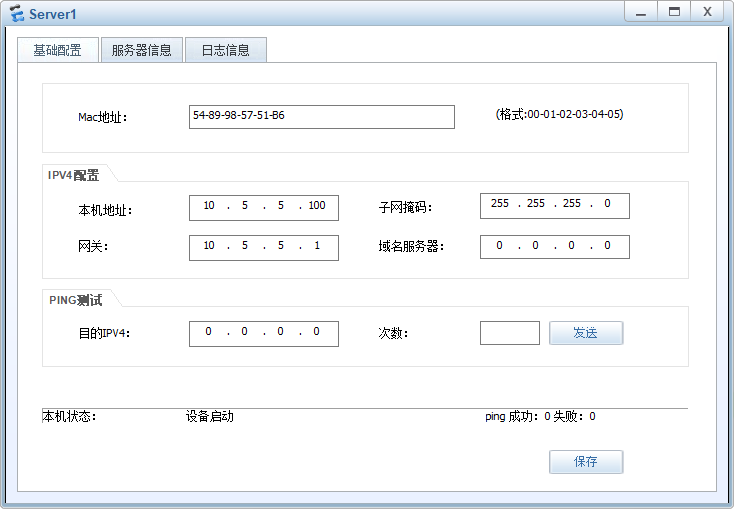
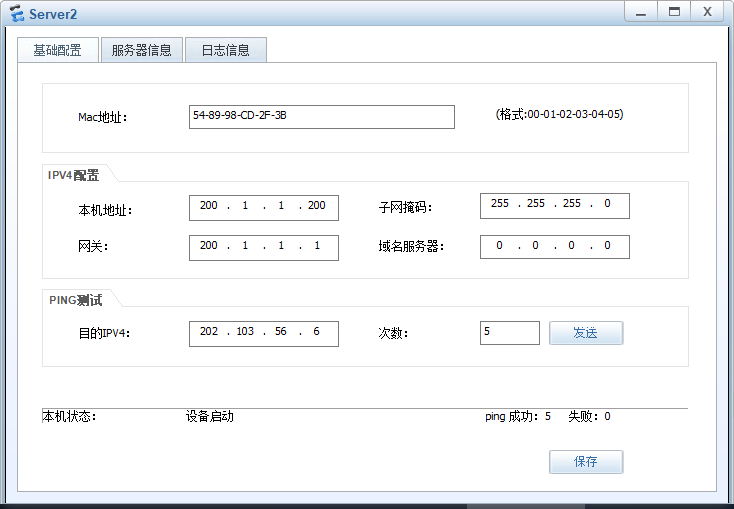
3. 配置服务器:
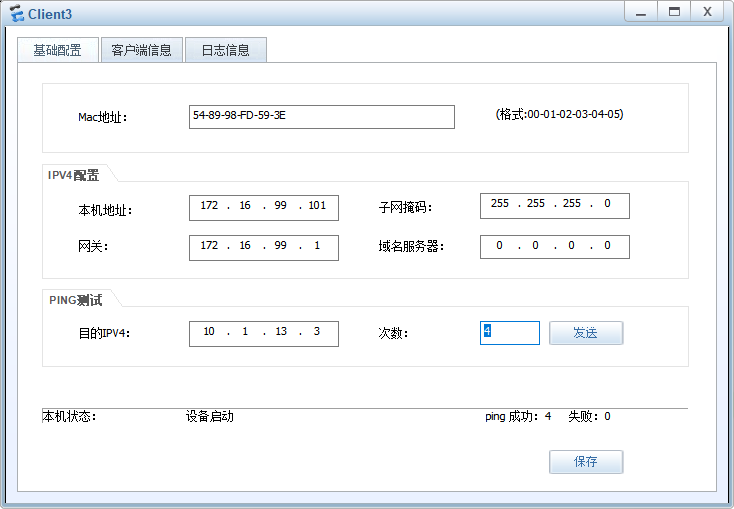
4. 配置终端设备:

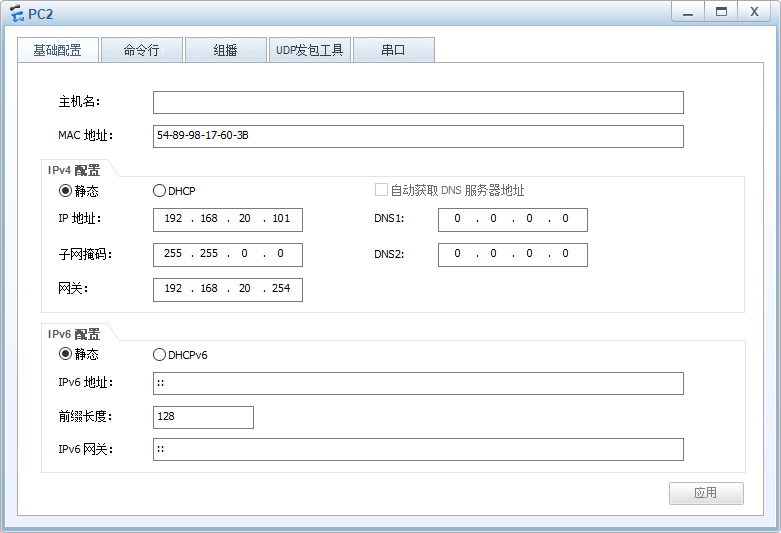
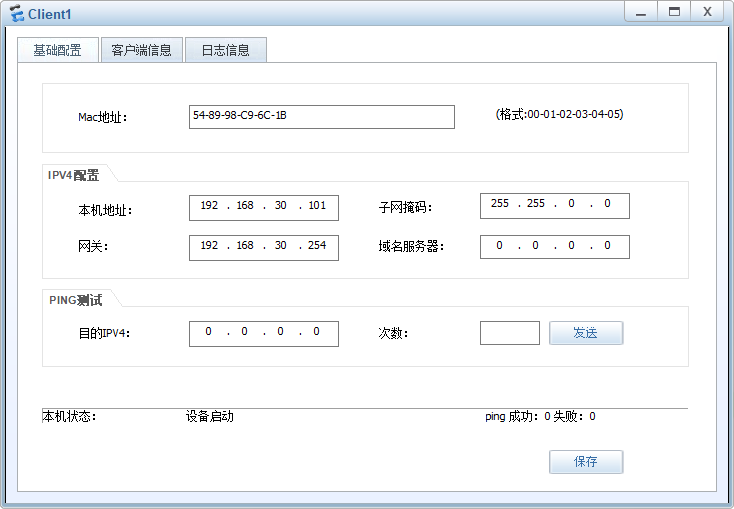

边栏推荐
- 2022 cisp-pte (III) command execution
- opencv
- JMeter performance automation test
- [open source project recommendation colugomum] this group of undergraduates open source retail industry solutions based on the domestic deep learning framework paddlepadddle
- Personally design a highly concurrent seckill system
- Journal quotidien des questions (11)
- Difference between shortest path and minimum spanning tree
- 第8章、MapReduce 生产经验
- 表达式的动态解析和计算,Flee用起来真香
- 爬虫代码基础教学
猜你喜欢

Redis cluster creation, capacity expansion and capacity reduction
Yolov1 learning notes

23 design models

2022 CISP-PTE(三)命令执行
The dynamic analysis and calculation of expressions are really delicious for flee
Creating postgre enterprise database by ArcGIS
DBNet:具有可微分二值化的实时场景文本检测
Push box games C #

These two mosquito repellent ingredients are harmful to babies. Families with babies should pay attention to choosing mosquito repellent products
vmware虚拟机C盘扩容
随机推荐
Reinstalling the system displays "setup is applying system settings" stationary
Pytorch exercise items
第8章、MapReduce 生产经验
【无标题】8 简易版通讯录
These two mosquito repellent ingredients are harmful to babies. Families with babies should pay attention to choosing mosquito repellent products
YOLOV1学习笔记
Use @data in Lombok to simplify entity class code
opencv鼠标键盘事件
POI dealing with Excel learning
Naive Bayes in machine learning
DNS forward query:
Printer related problem record
方差迭代公式推导
Support vector machine for machine learning
HMS core helps baby bus show high-quality children's digital content to global developers
Difference between shortest path and minimum spanning tree
Derivation of variance iteration formula
保险公司怎么查高血压?
Scripy learning
JMeter performance automation test