当前位置:网站首页>STL tutorial 4- input / output stream and object serialization
STL tutorial 4- input / output stream and object serialization
2022-06-25 07:41:00 【Sleepy snail】
standard I/O= The standard input + standard output
file I/O= File input + File output
One 、 Standard I / O stream

cout Global object , Has been associated with the display 
cerr There is no buffer ,clog There are buffers ,cin and cout There are also buffers
cin.peek(); Peeping into the buffer , Does not take from the buffer
cin.putback() Use is to use the front get perhaps getline Function to read characters from the input stream ch Return to the input stream , Insert to current pointer position
cout<<flush()// Refresh buffer
cout.put(‘a’).put(‘a’);// Output a character and support chain programming
cout.write(“aaa”,strlen(“aaa”));
Format output
1、 The way member methods 
Code
void test06() {


	int number = 10;
	// The pattern of member methods
	cout.unsetf(ios::dec);// Uninstall the default 10 Binary output mode
	cout.setf(ios::oct);// Set to octal output
	cout << number<<endl;
	cout.setf(ios::showbase);// Show some hidden contents
	cout << number<<endl;
	cout.unsetf(ios::oct);// Unload octal
	cout.setf(ios::hex);// Set to hexadecimal
	cout << number << endl;
	cout.width(10);// Set bit width
	cout.fill('*');// Set content fill
	cout << number << endl;
	cout.setf(ios::left);// Set left alignment
	cout << number << endl;

}
2、 Through the controller
Need to include header file #include 
	int number2 = 10;
	cout << hex   // Set to 16 Base number
		<< resetiosflags(ios::showbase)// Set the display symbol bit
		<< setw(10)// Set the width to 10
		<< setfill('$')// Set the padding to $
		<<setiosflags(ios::left)
		<< number2
		<< endl;
Two 、 File operations
File read
Need to include header file #include < fstream >// File read and write
There are two ways to define file objects ,
1、ifstream ism(filePath,ios::in);
2、ifstream ism;
ism.open(filePath, ios::in);
	const char* filePath = "C:\\Users\\admin\\Desktop\\source.txt";
	ifstream ism(filePath,ios::in);// Open the file in read-only mode

   // Or define an object , Open the file as a member of the object
	/*ifstream ism; ism.open(filePath, ios::in);*/

	// Here, the object must be overloaded
	if (!ism) {

		cout << " fail to open file " << endl;
	}
	// Reading documents   Thanks to the establishment of the pipeline
	char ch;
	while ( ism.get(ch))
	{

		cout << ch;
	}
	// Finished closing files
	ism.close();
File is written to
Defining the file write object is the same as defining the file read format
ofstream osm(targetPath, ios::out | ios::app); // have only out It's overlay mode , Add the back | ios::app It's the append mode
rearwards osm.put(ch); Add elements to it
void test07() {


	const char* filePath = "C:\\Users\\admin\\Desktop\\source.txt";
	const char* targetPath = "C:\\Users\\admin\\Desktop\\target.txt";
	ifstream ism(filePath,ios::in);// Open the file in read-only mode
	ofstream osm(targetPath, ios::out | ios::app); // have only out It's overlay mode , Plus the following is the append mode

   // Or define an object , Open the file as a member of the object
	/*ifstream ism; ism.open(filePath, ios::in);*/

	// Here, the object must be overloaded
	if (!ism) {

		cout << " fail to open file " << endl;
	}
	// Reading documents   Thanks to the establishment of the pipeline
	char ch;
	while ( ism.get(ch))
	{

		cout << ch;
		osm.put(ch);
	}
	// Finished closing files
	ism.close();
	osm.close();


}
Binary mode read / write
Create a new one Person class take p1 and p2 Write to file p1 and p2 Is stored in binary form , The common text mode reading mentioned above is actually stored in binary form
Even garbled code is stored in binary form window Go to carriage return and line feed /r/n Two symbols are used to mark the end of the line linux Just wrap on as a newline /n sign
Read files in text mode , Will automatically change the /r/n Switch to /n, Writing a file will /n Switch to /r/n
But in linxu It is the same in both text mode and binary mode
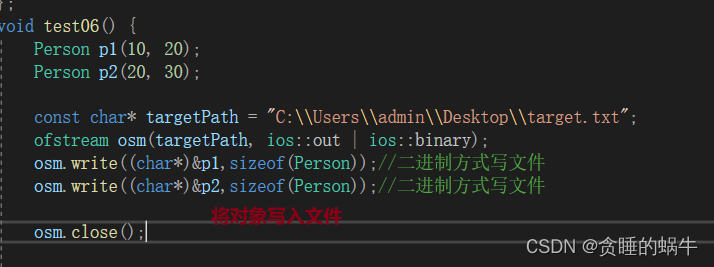


summary
Files are stored in binary mode , Even newly created objects in memory are in binary form , Then you can write the object to the file , The difference between opening files in text mode and binary mode is ,window Go to carriage return and line feed /r/n Two symbols are used to mark the end of the line ,linux Just wrap on as a newline /n sign . Read files in text mode , Will automatically change the /r/n Switch to /n, Writing a file will /n Switch to /r/n, But in linux It is the same in both text mode and binary mode
边栏推荐
- Sichuan Tuwei ca-if1051 can transceiver has passed aec-q100 grade 1 certification
- Runtime——methods成员变量,cache成员变量
- [Batch dos - cmd Command - Summary and Summary] - External Command - cmd Download Command, wget Command
- 图扑软件数字孪生 3D 风电场,智慧风电之海上风电
- 【批处理DOS-CMD命令-汇总和小结】-cmd扩展命令、扩展功能(cmd /e:on、cmd /e:off)
- Why "New Year's Eve", the original memory burst!
- Explain distributed raft with dynamic diagram
- JMeter introduction practice ----- use of global variables and local variables
- MySQL face Scripture eight part essay
- Let's talk about MCU crash caused by hardware problems
猜你喜欢

This year, I graduated

Common functions of OrCAD schematic
FairMOT yolov5s转onnx
点云智绘在智慧工地中的应用

Weimeisi new energy rushes to the scientific innovation board: the annual revenue is 1.7 billion, and the book value of accounts receivable is nearly 400million

smartBugs安装小问题总结
![[Batch dos - cmd Command - Summary and Summary] - cmd extension Command, extension Function (CMD / E: on, CMD / E: off)](/img/2b/4495a6cd41a2dd4e7a20ee60b398c9.png)
[Batch dos - cmd Command - Summary and Summary] - cmd extension Command, extension Function (CMD / E: on, CMD / E: off)
![[Batch dos - cmd Command - Summary and Summary] - External Command - cmd Download Command, wget Command](/img/00/5a5b081b78ad6a6c1c3a3c847dd315.png)
[Batch dos - cmd Command - Summary and Summary] - External Command - cmd Download Command, wget Command

【批处理DOS-CMD命令-汇总和小结】-CMD窗口的设置与操作命令(cd、title、mode、color、pause、chcp、exit)

Chuantu microelectronics ca-if1051 can-fd transceiver
随机推荐
[QT] shortcut key
稳压二极管的原理,它有什么作用?
Several good weather plug-ins
基于地面点稀少的LiDAR点云的茂密森林蓄积量估算
LeetCode 每日一题——515. 在每个树行中找最大值
NSIS 静默安装vs2013运行时
几款不错的天气插件
My debut is finished!
C Getting Started tutorial
[introduction to UVM== > episode_9] ~ register model, integration of register model, general methods of register model, application scenarios of register model
Keepalived monitors the process and automatically restarts the service process
(tool class) quickly add time to code in source insight
Sichuan earth microelectronics high performance, high integration and low cost isolated 485 transceiver
OAuth 2.0一键登录那些事
C#入门教程
Chuantu microelectronics 𞓜 subminiature package isolated half duplex 485 transceiver
[batch dos-cmd command - summary and summary] - file and directory operation commands (MD, RD, xcopy, dir, CD, set, move, copy, del, type, sort)
lebel只想前面有星号,但是不想校验
海思3559 sample解析:vio
栅格地图(occupancy grid map)构建