当前位置:网站首页>Tutorial details | how to edit and set the navigation function in the coolman system?
Tutorial details | how to edit and set the navigation function in the coolman system?
2022-06-24 23:50:00 【Cool Lehman VR panorama】
Let's watch VR Panorama is sometimes used to browse the scene automatically , This is because there is a navigation function , After adding the navigation function, the works can be browsed automatically according to the navigation points we set , Highlight the places or objects that need to be displayed , We can also add text and audio introduction before each navigation point . Generally, it is in the exhibition hall 、 Museums, scenic spots and other places will use more navigation functions , Because they all need to browse through the scenes in order .
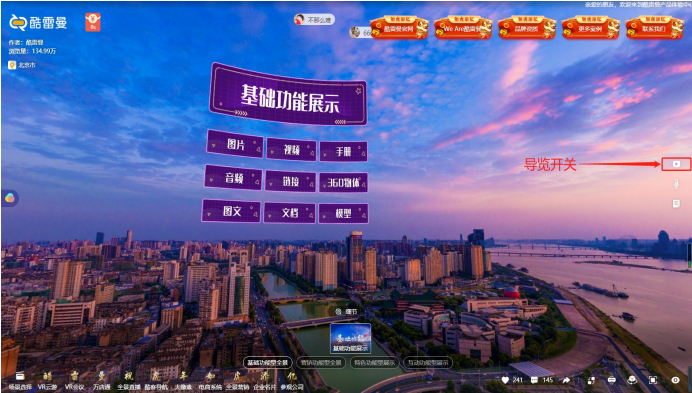
One 、 Add navigation point
You can add a navigation point to the global works according to the position you need to display , The tour is divided into two adding modes , Add navigation points manually and generate navigation with one click . Switching time can be adjusted between each navigation point , You can also add text and audio introductions .
1、 One click navigation : Click one button to generate a guide , The system will combine all the current scenes in the existing order for playback , The rotation time of each navigation point is the same , This function can greatly shorten the production time of the work .

2、 Add navigation points manually : Click Add navigation point , Then turn the computer screen to find the location where you need to add the next navigation point . Each navigation point is added at the same level , The display effect will be better . Pay attention to , If the guide point of the next scene is involved , The sequence number of the navigation point of the next scene is not to start over , It starts with the serial number of the previous navigation point .

3、 Set the navigation point : Setting the navigation point is to set the switching duration between navigation points 、 Text introduction and audio introduction , Remember that the scene point switching time must be greater than the audio playback time . For time setting , You can see from the right side between each navigation point , We can click in to change it by ourselves , Reset the navigation point switching time , The default time in the background is 5 second .
Then there are text introduction and audio introduction , Text introduction can only be uploaded 200 Characters , The text will be displayed in the works when the auto navigation is started ; The audio introduction is to set up voice commentary and background music before the guide point , Audio can directly call audio files in data management . At the same time, note that the audio time should be less than the switching time of the navigation point , And the audio is played automatically during the automatic navigation .

Two 、 Global settings
The navigation point transition time and global audio can be set , That is to set the switching time of the navigation point and add panoramic audio , But if the rotation time between each navigation point is set , There is no need to repeat the settings . And the guide image can choose to use three , We can select a check box to display it in the front of the work .

Tour start / At the end of the navigation, you also need to set the display diagram , It can increase the effect of the guided display , The display chart can also add the merchant's logo. There are other settings , For example, control whether the navigation needs to be played circularly 、 Text size adjustment in text introduction 、 Control whether the hotspot is displayed when the auto navigation is played , We can set it as appropriate .
边栏推荐
- 基于三维GIS开发的水电工程建设方案
- 我的为人处事真的有问题吗?
- JPA学习2 - 核心注解、注解进行增删改查、List查询结果返回类型、一对多、多对一、多对多
- 为什么越来越多的实体商铺用VR全景?优势有哪些?
- Solution of IP network broadcasting system in Middle School Campus - Design Guide for Campus Digital IP broadcasting system
- DO280OpenShift访问控制--加密和ConfigMap
- SAP PA certificate for no birds, which can be tested by new peers
- Current situation analysis and development trend forecast report of global and Chinese acrylonitrile butadiene styrene industry from 2022 to 2028
- 7-8 梯云纵
- Spark's wide dependence and narrow dependence yyds dry goods inventory
猜你喜欢

Is there really something wrong with my behavior?

js监听页面或元素scroll事件,滚动到底部或顶部

Why is it that the "Zhongtai" that was originally eaten by civil engineering is no longer fragrant?
教程详解|在酷雷曼系统中如何编辑设置导览功能?

Volcano becomes spark default batch scheduler

VR全景怎么赚钱?结合市场从两个方面客观分析下
我的为人处事真的有问题吗?

QT display RGB data

Actipro WPF Controls 2022.1.2

基于三维GIS开发的水电工程建设方案
随机推荐
Hibernate学习2 - 懒加载(延迟加载)、动态SQL参数、缓存
Analysis report on the development trend and Prospect of cetamide industry in the world and China from 2022 to 2028
How to use stm32subeide SWV function
First person singular reading notes
企业数据防泄露解决方案分享
Go language pointer, value reference and pointer reference
Global and Chinese 3-Chlorobenzaldehyde industry operation mode and future development trend report 2022 ~ 2028
DO280OpenShift访问控制--加密和ConfigMap
The R language uses the matchit package for propensity matching analysis and match The data function constructs the matched sample set, and performs Welch double sample t-test analysis and double inde
Printf redirection of serial port under sw4stm32 (SW4)
Andersen global strengthens the Middle East platform with Palestinian member companies
Analysis report on production and marketing demand and investment forecast of China's boron nitride industry from 2022 to 2028
Understanding openstack network
Window系统安装Nacos
SAP PA certificate for no birds, which can be tested by new peers
Classic interview questions and answers for embedded engineers
明天就是PMP考试了(6月25日),这些大家都了解了吗?
QT cannot be edited with UTF-8
throttle-debounce.js:一个小型的防抖节流函数库
JS listens for page or element scroll events, scrolling to the bottom or top