当前位置:网站首页>Flink Yarn Per Job - Yarn应用
Flink Yarn Per Job - Yarn应用
2022-08-01 23:43:00 【hyunbar】

程序入口类main方法
1)flink-1.12.0\flink-clients\…\CliFrontend.java
/**
 * Submits the job based on the arguments.
 */
public static void main(final String[] args) {
  EnvironmentInformation.logEnvironmentInfo(LOG, "Command Line Client", args);

  // 1. find the configuration directory
  /*TODO 获取flink的conf目录的路径*/
  final String configurationDirectory = getConfigurationDirectoryFromEnv();

  // 2. load the global configuration
  /*TODO 根据conf路径,加载配置*/
  final Configuration configuration = GlobalConfiguration.loadConfiguration(configurationDirectory);

  // 3. load the custom command lines
  /*TODO 封装命令行接口:按顺序Generic、Yarn、Default*/
  final List<CustomCommandLine> customCommandLines = loadCustomCommandLines(
    configuration,
    configurationDirectory);

  try {
    final CliFrontend cli = new CliFrontend(
      configuration,
      customCommandLines);

    SecurityUtils.install(new SecurityConfiguration(cli.configuration));
    int retCode = SecurityUtils.getInstalledContext()
        .runSecured(() -> cli.parseAndRun(args));
    System.exit(retCode);
  }
  catch (Throwable t) {
    final Throwable strippedThrowable = ExceptionUtils.stripException(t, UndeclaredThrowableException.class);
    LOG.error("Fatal error while running command line interface.", strippedThrowable);
    strippedThrowable.printStackTrace();
    System.exit(31);
  }
}
2)获取flink的conf目录的路径final String configurationDirectory = getConfigurationDirectoryFromEnv();

3)根据conf路径,加载配置
final Configuration configuration =
GlobalConfiguration.loadConfiguration(configurationDirectory);
flink-1.12.0\flink-core\…\configuration\GlobalConfiguration.java

4)封装命令行
public static List<CustomCommandLine> loadCustomCommandLines(Configuration configuration, String configurationDirectory) {
  List<CustomCommandLine> customCommandLines = new ArrayList<>();
  customCommandLines.add(new GenericCLI(configuration, configurationDirectory));

  //  Command line interface of the YARN session, with a special initialization here
  //  to prefix all options with y/yarn.
  final String flinkYarnSessionCLI = "org.apache.flink.yarn.cli.FlinkYarnSessionCli";
  try {
    customCommandLines.add(
      loadCustomCommandLine(flinkYarnSessionCLI,
        configuration,
        configurationDirectory,
        "y",
        "yarn"));
  } catch (NoClassDefFoundError | Exception e) {
    final String errorYarnSessionCLI = "org.apache.flink.yarn.cli.FallbackYarnSessionCli";
    try {
      LOG.info("Loading FallbackYarnSessionCli");
      customCommandLines.add(
          loadCustomCommandLine(errorYarnSessionCLI, configuration));
    } catch (Exception exception) {
      LOG.warn("Could not load CLI class {}.", flinkYarnSessionCLI, e);
    }
  }

  //  Tips: DefaultCLI must be added at last, because getActiveCustomCommandLine(..) will get the
  //        active CustomCommandLine in order and DefaultCLI isActive always return true.
  customCommandLines.add(new DefaultCLI());

  return customCommandLines;
}
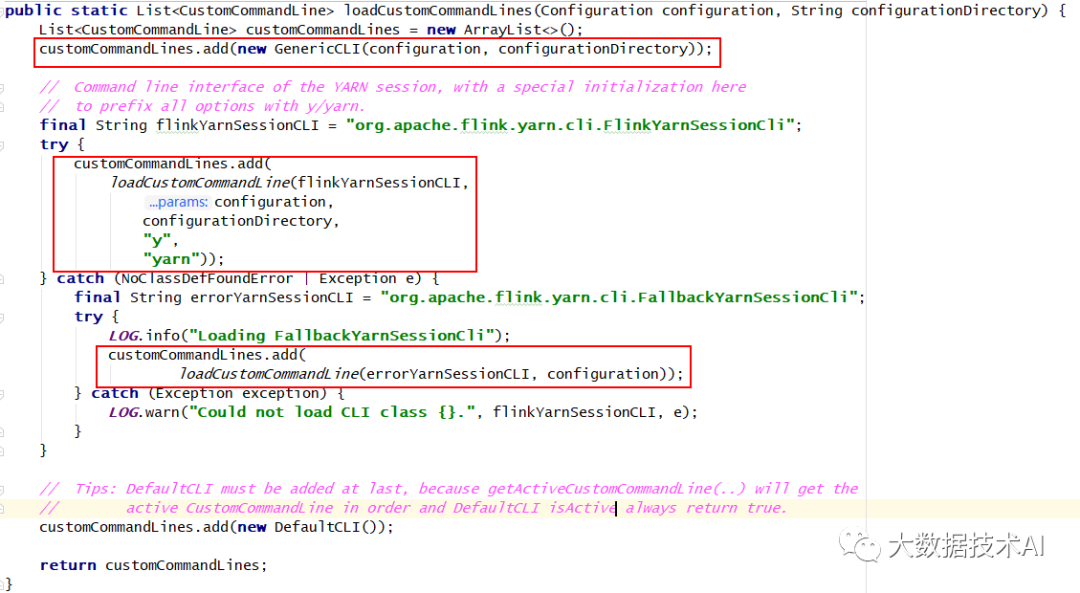
依次是:Generic、Yarn、Default
**5)解析命令行参数
**
解析命令行参数并启动所有请求操作
flink-1.12.0\flink-clients\…\client\cli\CliFrontend.java
/**
 * Parses the command line arguments and starts the requested action.
 *
 * @param args command line arguments of the client.
 * @return The return code of the program
 */
public int parseAndRun(String[] args) {

  // check for action
  if (args.length < 1) {
    CliFrontendParser.printHelp(customCommandLines);
    System.out.println("Please specify an action.");
    return 1;
  }

  // get action
  String action = args[0];

  // remove action from parameters
  final String[] params = Arrays.copyOfRange(args, 1, args.length);

  try {
    // do action
    switch (action) {
      case ACTION_RUN:
        run(params);
        return 0;
      case ACTION_RUN_APPLICATION:
        runApplication(params);
        return 0;
      case ACTION_LIST:
        list(params);
        return 0;
      case ACTION_INFO:
        info(params);
        return 0;
      case ACTION_CANCEL:
        cancel(params);
        return 0;
      case ACTION_STOP:
        stop(params);
        return 0;
      case ACTION_SAVEPOINT:
        savepoint(params);
        return 0;
      case "-h":
      case "--help":
        CliFrontendParser.printHelp(customCommandLines);
        return 0;
      case "-v":
      case "--version":
        String version = EnvironmentInformation.getVersion();
        String commitID = EnvironmentInformation.getRevisionInformation().commitId;
        System.out.print("Version: " + version);
        System.out.println(commitID.equals(EnvironmentInformation.UNKNOWN) ? "" : ", Commit ID: " + commitID);
        return 0;
      default:
        System.out.printf("\"%s\" is not a valid action.\n", action);
        System.out.println();
        System.out.println("Valid actions are \"run\", \"list\", \"info\", \"savepoint\", \"stop\", or \"cancel\".");
        System.out.println();
        System.out.println("Specify the version option (-v or --version) to print Flink version.");
        System.out.println();
        System.out.println("Specify the help option (-h or --help) to get help on the command.");
        return 1;
    }
  }
  } catch (Exception e) {
    return handleError(e);
  }
}

另外:
flink -h|-help:flink帮助命令
flink -v|–version:flink查看版本
执行run操作
flink-1.12.0\flink-clients\…\client\cli\CliFrontend.java
  /**
   * Executions the run action.
   *
   * @param args Command line arguments for the run action.
   */
  protected void run(String[] args) throws Exception {
    LOG.info("Running 'run' command.");

    /*TODO 获取run动作,默认的配置项*/
    final Options commandOptions = CliFrontendParser.getRunCommandOptions();

    /*TODO 根据用户指定的配置项,进行解析*/
    final CommandLine commandLine = getCommandLine(commandOptions, args, true);

    // evaluate help flag
    if (commandLine.hasOption(HELP_OPTION.getOpt())) {
      CliFrontendParser.printHelpForRun(customCommandLines);
      return;
    }

    /*TODO 根据之前添加的顺序,挨个判断是否active:Generic、Yarn、Default*/
    final CustomCommandLine activeCommandLine =
        validateAndGetActiveCommandLine(checkNotNull(commandLine));

    final ProgramOptions programOptions = ProgramOptions.create(commandLine);

    /*TODO 获取 用户的jar包和其他依赖*/
    final List<URL> jobJars = getJobJarAndDependencies(programOptions);

    /*TODO 获取有效配置:HA的id、Target(session、per-job)、JobManager内存、TaskManager内存、每个TM的slot数...*/
    final Configuration effectiveConfiguration = getEffectiveConfiguration(
        activeCommandLine, commandLine, programOptions, jobJars);

    LOG.debug("Effective executor configuration: {}", effectiveConfiguration);

    final PackagedProgram program = getPackagedProgram(programOptions, effectiveConfiguration);

    try {
      /*TODO 执行程序*/
      executeProgram(effectiveConfiguration, program);
    } finally {
      program.deleteExtractedLibraries();
    }
  }
1)获取run动作,默认的配置项
final Options commandOptions = CliFrontendParser.getRunCommandOptions();
flink-1.12.0\flink-clients\…\client\cli\CliFrontendParser.java
public static Options getRunCommandOptions() {
  Options options = buildGeneralOptions(new Options());
  options = getProgramSpecificOptions(options);
  options.addOption(SAVEPOINT_PATH_OPTION);
  return options.addOption(SAVEPOINT_ALLOW_NON_RESTORED_OPTION);
}
flink-1.12.0\flink-clients\…\client\cli\CliFrontendParser.java
private static Options buildGeneralOptions(Options options) {
  options.addOption(HELP_OPTION);
  // backwards compatibility: ignore verbose flag (-v)
  options.addOption(new Option("v", "verbose", false, "This option is deprecated."));
  return options;
}

private static Options getProgramSpecificOptions(Options options) {
  options.addOption(JAR_OPTION);
  options.addOption(CLASS_OPTION);
  options.addOption(CLASSPATH_OPTION);
  options.addOption(PARALLELISM_OPTION);
  options.addOption(ARGS_OPTION);
  options.addOption(DETACHED_OPTION);
  options.addOption(SHUTDOWN_IF_ATTACHED_OPTION);
  options.addOption(YARN_DETACHED_OPTION);
  options.addOption(PY_OPTION);
  options.addOption(PYFILES_OPTION);
  options.addOption(PYMODULE_OPTION);
  options.addOption(PYREQUIREMENTS_OPTION);
  options.addOption(PYARCHIVE_OPTION);
  options.addOption(PYEXEC_OPTION);
  return options;
}
flink-1.12.0\flink-clients\…\client\cli\CliFrontendParser.java
参数简写和长写法
public class CliFrontendParser {

  static final Option HELP_OPTION = new Option("h", "help", false,
      "Show the help message for the CLI Frontend or the action.");

  static final Option JAR_OPTION = new Option("j", "jarfile", true, "Flink program JAR file.");

  static final Option CLASS_OPTION = new Option("c", "class", true,
      "Class with the program entry point (\"main()\" method). Only needed if the " +
      "JAR file does not specify the class in its manifest.");

  static final Option CLASSPATH_OPTION = new Option("C", "classpath", true, "Adds a URL to each user code " +
      "classloader  on all nodes in the cluster. The paths must specify a protocol (e.g. file://) and be " +
          "accessible on all nodes (e.g. by means of a NFS share). You can use this option multiple " +
          "times for specifying more than one URL. The protocol must be supported by the " +
          "{@link java.net.URLClassLoader}.");

  public static final Option PARALLELISM_OPTION = new Option("p", "parallelism", true,
      "The parallelism with which to run the program. Optional flag to override the default value " +
      "specified in the configuration.");
  public static final Option DETACHED_OPTION = new Option("d", "detached", false, "If present, runs " +
      "the job in detached mode");

  public static final Option SHUTDOWN_IF_ATTACHED_OPTION = new Option(
    "sae", "shutdownOnAttachedExit", false,
    "If the job is submitted in attached mode, perform a best-effort cluster shutdown " +
      "when the CLI is terminated abruptly, e.g., in response to a user interrupt, such as typing Ctrl + C.");


  public static final Option ARGS_OPTION = new Option("a", "arguments", true,
      "Program arguments. Arguments can also be added without -a, simply as trailing parameters.");

  public static final Option ADDRESS_OPTION = new Option("m", "jobmanager", true,
      "Address of the JobManager to which to connect. " +
      "Use this flag to connect to a different JobManager than the one specified in the configuration.");

  public static final Option SAVEPOINT_PATH_OPTION = new Option("s", "fromSavepoint", true,
      "Path to a savepoint to restore the job from (for example hdfs:///flink/savepoint-1537).");

  public static final Option SAVEPOINT_ALLOW_NON_RESTORED_OPTION = new Option("n", "allowNonRestoredState", false,
      "Allow to skip savepoint state that cannot be restored. " +
          "You need to allow this if you removed an operator from your " +
          "program that was part of the program when the savepoint was triggered.");

  static final Option SAVEPOINT_DISPOSE_OPTION = new Option("d", "dispose", true,
      "Path of savepoint to dispose.");

  // list specific options
  static final Option RUNNING_OPTION = new Option("r", "running", false,
      "Show only running programs and their JobIDs");

  static final Option SCHEDULED_OPTION = new Option("s", "scheduled", false,
      "Show only scheduled programs and their JobIDs");

  static final Option ALL_OPTION = new Option("a", "all", false,
    "Show all programs and their JobIDs");

  static final Option ZOOKEEPER_NAMESPACE_OPTION = new Option("z", "zookeeperNamespace", true,
      "Namespace to create the Zookeeper sub-paths for high availability mode");

  static final Option CANCEL_WITH_SAVEPOINT_OPTION = new Option(
      "s", "withSavepoint", true, "**DEPRECATION WARNING**: " +
      "Cancelling a job with savepoint is deprecated. Use \"stop\" instead. \n Trigger" +
      " savepoint and cancel job. The target directory is optional. If no directory is " +
      "specified, the configured default directory (" +
      CheckpointingOptions.SAVEPOINT_DIRECTORY.key() + ") is used.");

  ...

  }
2)根据用户指定的配置项,进行解析
final CommandLine commandLine = getCommandLine(commandOptions, args, true);
.m2\repository\commons-cli\commons-cli\1.3.1\commons-cli-1.3.1.jar!\org\apache\commons\cli\DefaultParser.class
public CommandLine parse(Options options, String[] arguments, Properties properties, boolean stopAtNonOption) throws ParseException {
    this.options = options;
    this.stopAtNonOption = stopAtNonOption;
    this.skipParsing = false;
    this.currentOption = null;
    this.expectedOpts = new ArrayList(options.getRequiredOptions());
    Iterator var5 = options.getOptionGroups().iterator();

    while(var5.hasNext()) {
        OptionGroup group = (OptionGroup)var5.next();
        group.setSelected((Option)null);
    }

    this.cmd = new CommandLine();
    if (arguments != null) {
        String[] var9 = arguments;
        int var10 = arguments.length;

        for(int var7 = 0; var7 < var10; ++var7) {
            String argument = var9[var7];
            // TODO:
            this.handleToken(argument);
        }
    }

    this.checkRequiredArgs();
    this.handleProperties(properties);
    this.checkRequiredOptions();
    return this.cmd;
}
.m2\repository\commons-cli\commons-cli\1.3.1\commons-cli-1.3.1.jar!\org\apache\commons\cli\DefaultParser.class
private void handleToken(String token) throws ParseException {
    this.currentToken = token;
    if (this.skipParsing) {
        this.cmd.addArg(token);
    } else if ("--".equals(token)) {
        this.skipParsing = true;
    } else if (this.currentOption != null && this.currentOption.acceptsArg() && this.isArgument(token)) {
        this.currentOption.addValueForProcessing(Util.stripLeadingAndTrailingQuotes(token));
    } else if (token.startsWith("--")) {
        this.handleLongOption(token);
    } else if (token.startsWith("-") && !"-".equals(token)) {
        this.handleShortAndLongOption(token);
    } else {
        this.handleUnknownToken(token);
    }

    if (this.currentOption != null && !this.currentOption.acceptsArg()) {
        this.currentOption = null;
    }
}
匹配 一个“-” 的参数或者 两个“–”的参数
选择哪种客户端
1) 【程序入口类main方法】第四步 依次添加了: Generic、Yarn、Default 三种命令行客户端
2)根据之前添加的顺序,挨个判断是否active:Generic、Yarn、Default
flink-1.12.0\flink-clients\…\client\cli\CliFrontendParser.java
/**
 * Gets the custom command-line for the arguments.
 * @param commandLine The input to the command-line.
 * @return custom command-line which is active (may only be one at a time)
 */
public CustomCommandLine validateAndGetActiveCommandLine(CommandLine commandLine) {
  LOG.debug("Custom commandlines: {}", customCommandLines);
  for (CustomCommandLine cli : customCommandLines) {
    LOG.debug("Checking custom commandline {}, isActive: {}", cli, cli.isActive(commandLine));
    // 找到激活的
    if (cli.isActive(commandLine)) {
      return cli;
    }
  }
  throw new IllegalStateException("No valid command-line found.");
}
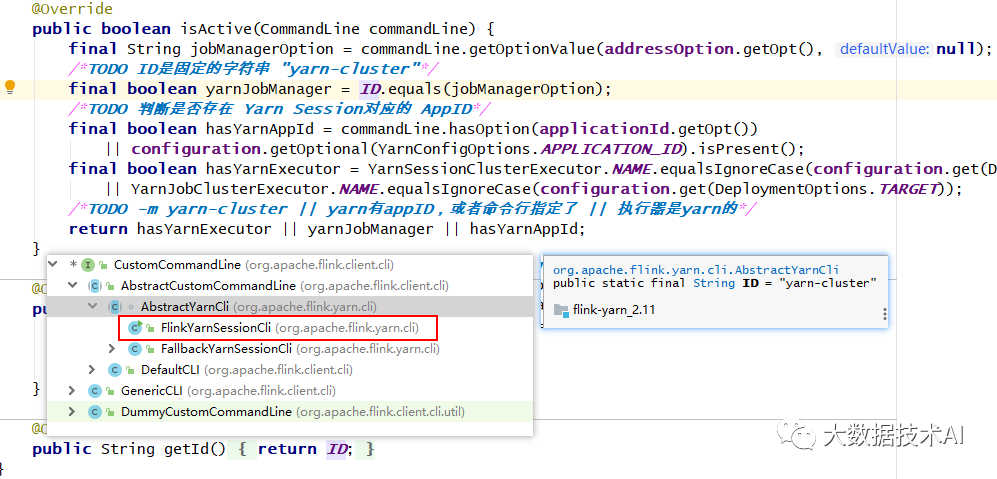
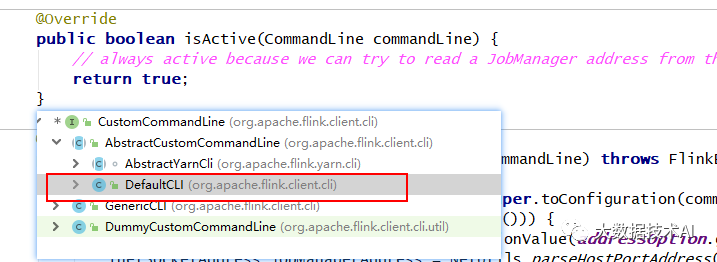
在 FlinkYarnSessionCli 为 active 时优先返回 FlinkYarnSessionCli。
对于 DefaultCli,它的 isActive 方法总是返回 true。
flink-1.12.0\flink-yarn\…\yarn\cli\AbstractYarnCli.java
@Override
public boolean isActive(CommandLine commandLine) {
  final String jobManagerOption = commandLine.getOptionValue(addressOption.getOpt(), null);
  // TODO ID是固定的字符串 "yarn-cluster"
  final boolean yarnJobManager = ID.equals(jobManagerOption);
  // TODO 判断是否存在 Yarn Session对应的 AppID
  final boolean hasYarnAppId = commandLine.hasOption(applicationId.getOpt())
    || configuration.getOptional(YarnConfigOptions.APPLICATION_ID).isPresent();
  final boolean hasYarnExecutor = YarnSessionClusterExecutor.NAME.equalsIgnoreCase(configuration.get(DeploymentOptions.TARGET))
    || YarnJobClusterExecutor.NAME.equalsIgnoreCase(configuration.get(DeploymentOptions.TARGET));
  // TODO -m yarn-cluster || yarn有appID,或者命令行指定了 || 执行器是yarn的*/
  return hasYarnExecutor || yarnJobManager || hasYarnAppId;
}
是否指定为 per-job 模式,即指定”-m yarn-cluster”; ID = “yarn-cluster”
是否存在 flink 在 yarn 的 appID,即 yarn-session 模式是否启动
executor 的名字为 “yarn-session” 或 “yarn-per-job”
获取有效配置
1)获取有效配置:HA的id、Target(session、per-job)、JobManager内存、TaskManager内存、每个TM的slot数
final Configuration effectiveConfiguration = getEffectiveConfiguration(
    activeCommandLine, commandLine, programOptions, jobJars);
flink-1.12.0\flink-clients\…\client\cli\CliFrontend.java
private <T> Configuration getEffectiveConfiguration(
    final CustomCommandLine activeCustomCommandLine,
    final CommandLine commandLine) throws FlinkException {

  final Configuration effectiveConfiguration = new Configuration(configuration);

  final Configuration commandLineConfiguration =
      checkNotNull(activeCustomCommandLine).toConfiguration(commandLine);

  effectiveConfiguration.addAll(commandLineConfiguration);

  return effectiveConfiguration;
}
flink-1.12.0\flink-yarn\…\yarn\cli\FlinkYarnSessionCli.java
@Override
public Configuration toConfiguration(CommandLine commandLine) throws FlinkException {
  // we ignore the addressOption because it can only contain "yarn-cluster"
  final Configuration effectiveConfiguration = new Configuration();

  applyDescriptorOptionToConfig(commandLine, effectiveConfiguration);

  final ApplicationId applicationId = getApplicationId(commandLine);
  // 1.0 检查zkns
  if (applicationId != null) {
    final String zooKeeperNamespace;
    if (commandLine.hasOption(zookeeperNamespace.getOpt())){
      zooKeeperNamespace = commandLine.getOptionValue(zookeeperNamespace.getOpt());
    } else {
      zooKeeperNamespace = effectiveConfiguration.getString(HA_CLUSTER_ID, applicationId.toString());
    }
    // 1.1 设置 HA_CLUSTER_ID
    effectiveConfiguration.setString(HA_CLUSTER_ID, zooKeeperNamespace);
    // 1.2 设置 APPLICATION_ID
    effectiveConfiguration.setString(YarnConfigOptions.APPLICATION_ID, ConverterUtils.toString(applicationId));
    // 1.3 设置 TARGET
    //TARGET 就是 execution.target,目标执行器
    //决定后面什么类型的执行器提交任务:yarn-session、yarn-per-job
    effectiveConfiguration.setString(DeploymentOptions.TARGET, YarnSessionClusterExecutor.NAME);
  } else {
    effectiveConfiguration.setString(DeploymentOptions.TARGET, YarnJobClusterExecutor.NAME);
  }

  if (commandLine.hasOption(jmMemory.getOpt())) {
    String jmMemoryVal = commandLine.getOptionValue(jmMemory.getOpt());
    if (!MemorySize.MemoryUnit.hasUnit(jmMemoryVal)) {
      jmMemoryVal += "m";
    }
    // 2.0 设置JM内存
    effectiveConfiguration.set(JobManagerOptions.TOTAL_PROCESS_MEMORY, MemorySize.parse(jmMemoryVal));
  }

  if (commandLine.hasOption(tmMemory.getOpt())) {
    String tmMemoryVal = commandLine.getOptionValue(tmMemory.getOpt());
    if (!MemorySize.MemoryUnit.hasUnit(tmMemoryVal)) {
      tmMemoryVal += "m";
    }
    // 3.0 设置TM内存
    effectiveConfiguration.set(TaskManagerOptions.TOTAL_PROCESS_MEMORY, MemorySize.parse(tmMemoryVal));
  }

  if (commandLine.hasOption(slots.getOpt())) {
   // 4.0 设置slot
    effectiveConfiguration.setInteger(TaskManagerOptions.NUM_TASK_SLOTS, Integer.parseInt(commandLine.getOptionValue(slots.getOpt())));
  }

  dynamicPropertiesEncoded = encodeDynamicProperties(commandLine);
  if (!dynamicPropertiesEncoded.isEmpty()) {
    Map<String, String> dynProperties = getDynamicProperties(dynamicPropertiesEncoded);
    for (Map.Entry<String, String> dynProperty : dynProperties.entrySet()) {
      effectiveConfiguration.setString(dynProperty.getKey(), dynProperty.getValue());
    }
  }

  if (isYarnPropertiesFileMode(commandLine)) {
    return applyYarnProperties(effectiveConfiguration);
  } else {
    return effectiveConfiguration;
  }
}
1.0、 检查zkns
1.1 设置 HA_CLUSTER_ID
1.2 设置 APPLICATION_ID
1.3 设置 TARGET:TARGET 就是 execution.target,目标执行器。决定后面什么类型的执行器提交任务:yarn-session、yarn-per-job
2.0、 设置JM内存
3.0、 设置TM内存
4.0、 设置slot
调用用户的main方法
executeProgram(effectiveConfiguration, program)
flink-1.12.0\flink-clients\…\client\ClientUtils.java
public static void executeProgram(
    PipelineExecutorServiceLoader executorServiceLoader,
    Configuration configuration,
    PackagedProgram program,
    boolean enforceSingleJobExecution,
    boolean suppressSysout) throws ProgramInvocationException {
  checkNotNull(executorServiceLoader);
  final ClassLoader userCodeClassLoader = program.getUserCodeClassLoader();
  final ClassLoader contextClassLoader = Thread.currentThread().getContextClassLoader();
  try {
    // 设置当前的 classloader 为用户代码的 classloader
    Thread.currentThread().setContextClassLoader(userCodeClassLoader);

    LOG.info("Starting program (detached: {})", !configuration.getBoolean(DeploymentOptions.ATTACHED));

    /*TODO 配置环境的上下文,用户代码里的 getExecutionEnvironment就会拿到这些环境信息*/
    ContextEnvironment.setAsContext(
      executorServiceLoader,
      configuration,
      userCodeClassLoader,
      enforceSingleJobExecution,
      suppressSysout);

    StreamContextEnvironment.setAsContext(
      executorServiceLoader,
      configuration,
      userCodeClassLoader,
      enforceSingleJobExecution,
      suppressSysout);

    try {
     // 主要 执行用户main方法
      program.invokeInteractiveModeForExecution();
    } finally {
      ContextEnvironment.unsetAsContext();
      StreamContextEnvironment.unsetAsContext();
    }
  } finally {
    Thread.currentThread().setContextClassLoader(contextClassLoader);
  }
}
flink-1.12.0\flink-clients\…\client\program\PackagedProgram.java
public void invokeInteractiveModeForExecution() throws ProgramInvocationException {
  callMainMethod(mainClass, args);
}
flink-1.12.0\flink-clients\…\client\program\PackagedProgram.java
private static void callMainMethod(Class<?> entryClass, String[] args) throws ProgramInvocationException {
  Method mainMethod;
  if (!Modifier.isPublic(entryClass.getModifiers())) {
    throw new ProgramInvocationException("The class " + entryClass.getName() + " must be public.");
  }

  try {
    // 获取main
    mainMethod = entryClass.getMethod("main", String[].class);
  } catch (NoSuchMethodException e) {
    throw new ProgramInvocationException("The class " + entryClass.getName() + " has no main(String[]) method.");
  } catch (Throwable t) {
    throw new ProgramInvocationException("Could not look up the main(String[]) method from the class " +
      entryClass.getName() + ": " + t.getMessage(), t);
  }

  if (!Modifier.isStatic(mainMethod.getModifiers())) {
    throw new ProgramInvocationException("The class " + entryClass.getName() + " declares a non-static main method.");
  }
  if (!Modifier.isPublic(mainMethod.getModifiers())) {
    throw new ProgramInvocationException("The class " + entryClass.getName() + " declares a non-public main method.");
  }

  try {
    /*TODO 调用用户代码的main方法(通过反射)*/
    mainMethod.invoke(null, (Object) args);
  } catch (IllegalArgumentException e) {
    throw new ProgramInvocationException("Could not invoke the main method, arguments are not matching.", e);
  } catch (IllegalAccessException e) {
    throw new ProgramInvocationException("Access to the main method was denied: " + e.getMessage(), e);
  } catch (InvocationTargetException e) {
    Throwable exceptionInMethod = e.getTargetException();
    if (exceptionInMethod instanceof Error) {
      throw (Error) exceptionInMethod;
    } else if (exceptionInMethod instanceof ProgramParametrizationException) {
      throw (ProgramParametrizationException) exceptionInMethod;
    } else if (exceptionInMethod instanceof ProgramInvocationException) {
      throw (ProgramInvocationException) exceptionInMethod;
    } else {
      throw new ProgramInvocationException("The main method caused an error: " + exceptionInMethod.getMessage(), exceptionInMethod);
    }
  } catch (Throwable t) {
    throw new ProgramInvocationException("An error occurred while invoking the program's main method: " + t.getMessage(), t);
  }
}
调用执行环境main方法
flink-1.12.0\flink-streaming-java\…\streaming\api\environment\StreamExecutionEnvironment.java
public JobExecutionResult execute(String jobName) throws Exception {
  Preconditions.checkNotNull(jobName, "Streaming Job name should not be null.");

  /*TODO 获取StreamGraph,并接着执行*/
  return execute(getStreamGraph(jobName));
}
@Internal
public JobClient executeAsync(StreamGraph streamGraph) throws Exception {
  checkNotNull(streamGraph, "StreamGraph cannot be null.");
  checkNotNull(configuration.get(DeploymentOptions.TARGET), "No execution.target specified in your configuration file.");
  // 根据提交模式选择匹配的 factory
  final PipelineExecutorFactory executorFactory =
    executorServiceLoader.getExecutorFactory(configuration);

  checkNotNull(
    executorFactory,
    "Cannot find compatible factory for specified execution.target (=%s)",
    configuration.get(DeploymentOptions.TARGET));

  // 选择合适的 executor 提交任务
  CompletableFuture<JobClient> jobClientFuture = executorFactory
    .getExecutor(configuration)
    .execute(streamGraph, configuration, userClassloader);

  try {
    JobClient jobClient = jobClientFuture.get();
    jobListeners.forEach(jobListener -> jobListener.onJobSubmitted(jobClient, null));
    return jobClient;
  } catch (ExecutionException executionException) {

  }
}
flink-1.12.0\flink-clients\…\client\deployment\executors\AbstractSessionClusterExecutor.java
public CompletableFuture<JobClient> execute(@Nonnull final Pipeline pipeline, @Nonnull final Configuration configuration, @Nonnull final ClassLoader userCodeClassloader) throws Exception {
  // 获取JobGraph
  final JobGraph jobGraph = PipelineExecutorUtils.getJobGraph(pipeline, configuration);

  try (final ClusterDescriptor<ClusterID> clusterDescriptor = clusterClientFactory.createClusterDescriptor(configuration)) {
    final ClusterID clusterID = clusterClientFactory.getClusterId(configuration);
    checkState(clusterID != null);

    final ClusterClientProvider<ClusterID> clusterClientProvider = clusterDescriptor.retrieve(clusterID);
    ClusterClient<ClusterID> clusterClient = clusterClientProvider.getClusterClient();
    return clusterClient
        .submitJob(jobGraph)
        .thenApplyAsync(FunctionUtils.uncheckedFunction(jobId -> {
          ClientUtils.waitUntilJobInitializationFinished(
            () -> clusterClient.getJobStatus(jobId).get(),
            () -> clusterClient.requestJobResult(jobId).get(),
            userCodeClassloader);
          return jobId;
        }))
        .thenApplyAsync(jobID -> (JobClient) new ClusterClientJobClientAdapter<>(
            clusterClientProvider,
            jobID,
            userCodeClassloader))
        .whenComplete((ignored1, ignored2) -> clusterClient.close());
  }
}
Job提交流程接下篇

边栏推荐
- Appears in oozie on CDH's hue, error submitting Coordinator My Schedule
- 20220725资料更新
- @Resource和@Autowired的区别
- @Transactional注解在类上还是接口上使用,哪种方式更好?
- ICLR 2022 Best Paper: Partial Label Learning Based on Contrastive Disambiguation
- [LeetCode304周赛] 两道关于基环树的题 6134. 找到离给定两个节点最近的节点,6135. 图中的最长环
- Several interview questions about golang concurrency
- The Spark of Sql join on the and and where
- 问题解决方式了
- IDEA常用插件
猜你喜欢
Spark Sql之join on and和where
cdh的hue上oozie启动报错,Cannot allocate containers as requested resource is greater than maximum allowed
UML diagram of soft skills
软技能之UML图
The third chapter of the imitation cattle network project: develop the core functions of the community (detailed steps and ideas)

Use Jenkins for continuous integration, this knowledge point must be mastered

UI自动化测试框架搭建-标记性能较差用例

cdh6打开oozieWeb页面,Oozie web console is disabled.

Secondary Vocational Network Security Competition B7 Competition Deployment Process

获取小猪民宿(短租)数据
随机推荐
Secondary Vocational Network Security Competition B7 Competition Deployment Process
加载字体时避免隐藏文本
color transparency parameter
程序员如何优雅地解决线上问题?
问题解决方式了
LocalDateTime转为Date类型
IDEA常用插件
qt-faststart installation and use
npm npm
Check if point is inside rectangle
【C语言进阶】文件操作(二)
基于JAX的激活函数、softmax函数和交叉熵函数
对于在新标签页中打开的链接,始终使用“noopener”或“noreferrer”
6133. 分组的最大数量
Getting started with IDEA is enough to read this article
[LeetCode304周赛] 两道关于基环树的题 6134. 找到离给定两个节点最近的节点,6135. 图中的最长环
@WebServlet注解(Servlet注解)
Chapter 19 Tips and Traps: Common Goofs for Novices
Calculate the midpoint between two points
Building a cloud-native DevOps environment