当前位置:网站首页>Tools and methods - use code formatting tools in source insight
Tools and methods - use code formatting tools in source insight
2022-06-24 11:19:00 【Night drift ice】
stay Source Insight 4.0 in , With code formatting tool :

When you open a source file , You can modify the format of the current file :

Yes ANSI、GNU、K&R Three coding styles can be selected .

You can also set it yourself :
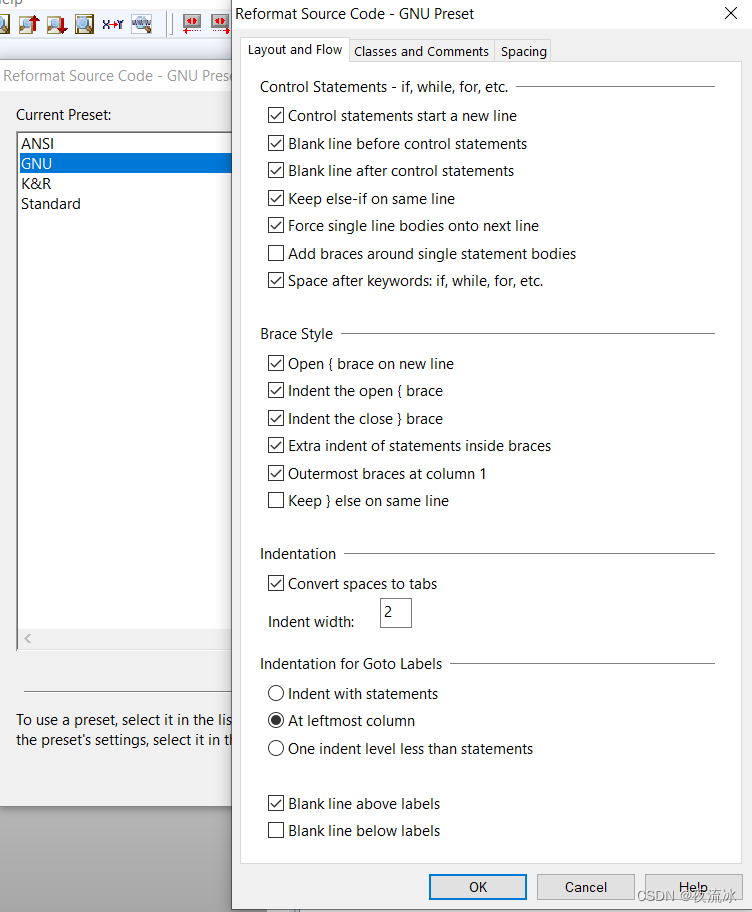
meanwhile , This code format also supports import and Export , Use XML file .
In addition, in the help document , Relevant instructions can be found .

Related instructions
1, The supported file types here are C/C++, C#, Java, These use curly bracket like syntax .
2, You can save the modified settings in your own encoding format .
3, If you choose a piece of code , Format only the selected code . If you do not select the code, only one caret will be retained , Format the current file .
Related settings
Layout and Flow
Control Statements - if, while, for, etc. | Control statements sart a new line | yes |
Blank line before control statement | yes | |
Blank line after control statements | yes | |
Keep else-if on same line | yes | |
Force single line bodies onto next line | yes | |
Add braces around single statement bodies | no | |
Space after keywords: if, while, for, etc. | yes | |
Brace style | Open { brace on new line | no |
Indent the open { brace | no | |
Indent the close { brace | no | |
Extra indent of statements inside braces | no | |
Outermost braces at column 1 | yes | |
Keep } else on same line | no | |
Indentation | Convert spaces to tabs | no |
Indent width | 4 | |
Indentation for Goto labels | At leftmost column | yes |
Blank line above labels | yes |
Classes and Comments
Classes and Structs | Indent members | yes |
Blank line above public/private labels | yes | |
Blank line below public/private labels | yes | |
Align field members at column | 16 | |
Align bit-field sizes at column | 32 | |
Indentation for Member Access Specifiers( private/public/etc) | One indent level less than other declarations | yes |
Comments | Preserve blank lines in comments | yes |
Blank line above comment blocks | yes | |
Preserve text formatting in lines that contain only comments | yes | |
Align right-hand comments at column | 60 | |
Other | Indent namespace contents | no |
Spacing
Line Width | Wrap lines at column | 120 |
Preprocessor Macros(#defines) | Align macro names at column | 8 |
Align macro values at column | 40 | |
Align macro continuation(\) at column | 80 | |
Line Spacing | Preserve blank lines in source | no |
Blank lines between functions. | 2 | |
White space | Space between function name and parenthese | no |
Space between function parameters | yes | |
Spaces around operators | yes | |
Spaces inside prentheses like ‘( this )’ | no | |
Remove extra white space at end of lines | yes | |
Align variables at column: | 16 | |
Align assignments at column: | 20 |
Layout and control flow
Control statement | Control statement starts a new line | yes |
Blank line before control statement | yes | |
A blank line after the control statement | yes | |
else if Statements on the same line | yes | |
When there is only one execution statement, start a single line | yes | |
Whether to enlarge the parentheses when there is only one execution statement | no | |
if, while, for Whether to add a space between and the following brackets | yes | |
Space style | Open parentheses and start a new line | no |
Open bracket indent | no | |
Close bracket indent | no | |
The statements in brackets are indented | no | |
The outermost parentheses are in the first column | yes | |
} else On the same line | no | |
Indent | Convert spaces to Tab key | no |
Indent width | 4 | |
Goto The label of the statement | It's on the far left | yes |
A blank line before the tag | yes |
Classes and annotations
Classes and structs | Class member indent | yes |
public Wait for the access control character to be preceded by a blank line | yes | |
public Wait for the access control character to be followed by a blank line | yes | |
Member variable name aligned Columns | 16 | |
Bit field member variable aligned Columns | 32 | |
Indent of access control characters | Indent one level more than other statements | yes |
notes | Leave blank lines in comments | yes |
Add a blank line before the comment block | yes | |
Keep the original format in the comment | yes | |
Right end of line comment aligned column | 60 | |
other | The contents of the namespace are indented | no |
blank
Width of each line | Which column to wrap in | 120 |
Preprocessing | Preprocess name aligned Columns | 8 |
Preprocessed value aligned Columns | 40 | |
Preprocess row connector aligned Columns | 80 | |
Blank line | Whether to keep extra blank lines in the source code | no |
The number of empty lines between two functions | 2 | |
Space | Whether to add a space between the function name and the following parentheses | no |
Spaces between function arguments | yes | |
Whether there are spaces on both sides of the binary operator | yes | |
Whether to add a space inside the brackets , such as ( this ) | no | |
Remove extra space at the end of the line | yes | |
When variables are declared , Variable name aligned Columns | 16 | |
Variable assignment symbol aligned Columns | 20 |
There is a drawback , You cannot batch modify files , Make it work .
边栏推荐
- 《opencv学习笔记》-- CV::Mat类
- First acquaintance with string+ simple usage (I)
- How to develop hospital information system (his) with SMS notification and voice function
- 《opencv学习笔记》-- 离散傅里叶变换
- Tke deployment kubord
- [Qianfan 618 countdown!] IAAs operation and maintenance special preferential activities
- Jetpack Compose 教程之 从一开始就投资于良好的导航框架将帮助您在之后节省大量的迁移工作
- I pushed my younger brother into Tencent. Look at his benchmark resume!
- Lightweight deployment of firefoxsend temporary file sharing service using Tencent cloud
- Suddenly I thought of the wooden house in my hometown
猜你喜欢






随机推荐
Reliable remote code execution (1)
Which map navigation is easy to use and accurate?
“一次编写,运行各端”,高通重磅发布 AI 软件栈!
Déplacer Tencent sur le cloud a guéri leur anxiété technologique
How to use arbitrarygen code generator what are the characteristics of this generator
Internship experience sharing in ByteDance 𞓜 ten thousand word job guide
Coinbase将推出首个针对零售交易员的加密衍生产品
@Requestbody annotation
Does the depth system work?
What code did the full stack programmer write this month?
[深度学习][pytorch][原创]crnn在高版本pytorch上训练loss为nan解决办法
How to use data analysis tools to deal with emergencies in retail industry
About the unsupported instruction set SSE 4.2 of CPU in virtualization
Network monitoring: active troubleshooting becomes simple
8 types of API automated testing that technicians must know
Preparation for a series of courses on WordPress applet generation
PHP SMS notification + voice broadcast automatic double call
"Write once, run at all ends", Qualcomm released AI software stack!
Qt: 判断字符串是否为数字格式
[deep learning][pytorch][original]crnn trains loss on the higher version of pytorch as a solution for Nan