当前位置:网站首页>[Anaconda environmental management and package management]
[Anaconda environmental management and package management]
2022-07-23 11:04:00 【mandala -chen】
Anaconda Environmental management and package management
1、 Relative path and absolute path
1、 Why can't the file be found when writing a program (The file is not found)
Read the program file ——————> Compared to the material transmission between two people
Put one folder after another ——————> Compared to small rooms
Material transmission should be face-to-face Only two people in the same room can carry out material transmission
When it comes to cross room material transfer You need to know the room number when you get there ( Address )
Relative address ————————>( Which room in front of us , There is a house next to us )
Absolute address ————————>( On which floor, in the small room )
environment variable ————————>( amount to The exact location of this room was posted downstairs , All the material transfer based on this room You don't have to go to this room to do it again. You can do it in a way similar to takeout )
1、 stay Anaconda Install the package in Anaconda prompt
2、conda Environmental management package and environment
conda And pip brief introduction
conda It's a python package , Dependency and environmental management tools , For multiple languages , Such as : Python, R, Scala, Java, Javascript, C/ C++, FORTRAN
pip yes Python Package management tools , The tool provides the right Python Bag search 、 download 、 install 、 Uninstalled features . At present, if you are in python.org Download the latest version of the installation package
Command format
Instruction names Parameters Parameter values
conda View virtual environment
conda env list
conda Creating a virtual environment :
conda create -n your_env_name python=X.X
conda Enter the virtual environment :
conda activate ss
conda Exit virtual environment :
conda deactivate
conda Delete environment :
conda remove -n name --all
View installed packages
conda list
conda Installation package
conda install package
Install the specified version of the package :
conda install package=xx
Upgrade package :
conda update spyder
conda Uninstall package
conda uninstall xxx
Found that the package installation speed is too slow ?——> Configure image source
3、conda/pip Configure mirror source :
conda Change Tsinghua source tutorial
1、 open Anaconda prompt Enter the following command in it
conda config --set show_channel_urls yes
After executing the command, it will generate .condarc file 
Open in Notepad .condarc Delete the original contents, copy and paste the following contents and save
channels:
  - defaults
show_channel_urls: true
default_channels:
  - https://mirrors.tuna.tsinghua.edu.cn/anaconda/pkgs/main
  - https://mirrors.tuna.tsinghua.edu.cn/anaconda/pkgs/r
  - https://mirrors.tuna.tsinghua.edu.cn/anaconda/pkgs/msys2
custom_channels:
  conda-forge: https://mirrors.tuna.tsinghua.edu.cn/anaconda/cloud
  msys2: https://mirrors.tuna.tsinghua.edu.cn/anaconda/cloud
  bioconda: https://mirrors.tuna.tsinghua.edu.cn/anaconda/cloud
  menpo: https://mirrors.tuna.tsinghua.edu.cn/anaconda/cloud
  pytorch: https://mirrors.tuna.tsinghua.edu.cn/anaconda/cloud
  simpleitk: https://mirrors.tuna.tsinghua.edu.cn/anaconda/cloud
Run the following command to clear the cache
conda clean -i
conda View software source :
conda config --show-sources
pip Change Tsinghua source tutorial
open Anaconda prompt Enter the following command in it
pip install pip -U
pip config set global.index-url https://pypi.tuna.tsinghua.edu.cn/simple
4、anaconda jupyter Multi core switch management
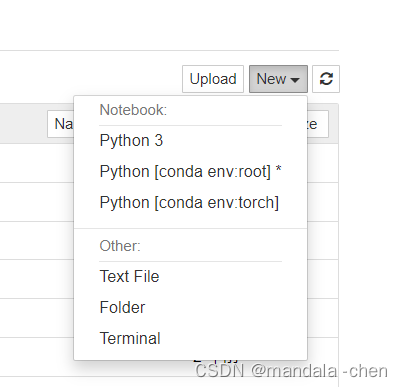
anconda jupyter Multi kernel management refers to Only default base Installation in environment jupyter Install... In a virtual environment jupyter kernel , Can be directly in jupyter Switch kernel to use virtual environment There is no need to manually activate the environment to switch
step
Start by opening anconda promt terminal In the default environment (base) Next Use the following command to install the plug-in
conda install nb_conda_kernelos
Create a virtual environment
conda create -n your_env_name
Enter your newly created virtual environment
conda activate your_env_name
Install the required packages in the virtual environment ( If you want to install other languages, you can install other languages kernel ) And install ipykernel Two bags
conda install ipykernel
remind
If an error is reported, please check that the user directory is in Chinese And make sure you are in your default environment And virtual environment ipykernel The versions of are consistent
If the following appears, it means success 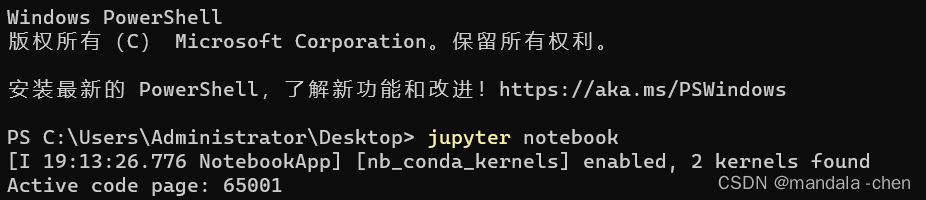
边栏推荐
猜你喜欢

项目部署(简版)

Pytorch (V) -- pytorch advanced training skills
![[ROS advanced chapter] Lesson 8 syntax explanation of URDF file](/img/ad/038d088d5cd17784d3e2d7291bb750.jpg)
[ROS advanced chapter] Lesson 8 syntax explanation of URDF file

NOTIFIER诺帝菲尔消防主机电源维修及日常维护

pyqt5使用QPainter绘制坐标轴并显示散点图

村田muRata电源维修交换机服务器电源维修及主要功能特点

H1 -- HDMI interface test application 2022-07-15

C ivalueconverter interface usage example

Matlab中的滤波器
Notifier Nordic fire engine power supply maintenance and daily maintenance
随机推荐
Compare the advantages and disadvantages of RDB and AOF modes of redis
Redis source code and design analysis -- 8. Object system
H1 -- HDMI interface test application 2022-07-15
Li Nan, CTO of Yunqian Technology: technology and technical people, coevolution with digitalization
3DMAX first skin brush weights, then attach merge
主从同步步骤读写分离+自遇错误分享
8、曲面几何
Detailed explanation of structure
Cadence learning path (VIII) PCB placement components
Redis源码与设计剖析 -- 8.对象系统
MySql语句查询某一级节点的所有子节点
Optimization Net application CPU and memory 11 practices
An accident caused by MySQL misoperation, and "high availability" is not working well
Database process stuck solution
村田muRata电源维修交换机服务器电源维修及主要功能特点
“我最想要的六种编程语言!”
C1--Vivado配置VS Code文本编辑器环境2022-07-21
"The six programming languages I want most!"
[visual slam] orb slam: tracking and mapping recognizable features
7、纹理映射