当前位置:网站首页>Matlab file path
Matlab file path
2022-07-28 08:30:00 【Kaizhi~】
generally speaking , The function file that can be called by the script file must be under the same file path , So in general MATLAB Projects are a folder , It stores all the .m file . But in fact , The function files that script files can call also include private Private functions in folders . As shown in the figure below ,Base.m and nua.m The file is a script file ,x.m、y.m、z.m For function file .Base.m File is callable by default y.m and x.m file , Cannot call new In folder z.m file .
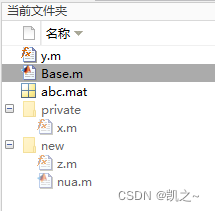
If in Base.m An attempt was made to call z.m file , The following prompt appears in the command line window :

The former means to switch to z.m The folder where the file is located to continue running , Of course, even if you choose this option, it will not work normally in Base.m Call in file z.m file , Because at this time Base.m The file is not in the current folder , So it can't run . Only the latter , take z.m Add the file to the path ( similar keil Add the file path ), In order to operate normally . The current folder window is shown in the following figure , You can see ,z.m The folder is “ Lighten up ”. here ,Base.m、y.m、z.m、nua.m Can call each other , Of course ,z.m、nua.m Cannot call through this method private In folder x.m file .

The method of adding a path is to add it after running and reporting an error , You can also right-click in the current folder window and select “ Add to path ”, The effect is the same .
View the method of added path , You can click Set path in the Home tab .

The following window pops up , On the right is the added path ,MATLAB If the corresponding function cannot be found at runtime , Will search in turn .
边栏推荐
- 【MindSpore易点通机器人-01】你也许见过很多知识问答机器人,但这个有点不一样
- Chairman tree review
- DCL singleton mode
- CarSim simulation quick start (XI) - Driver Model (1)
- Characteristics of EMC EMI beads
- Talk about synchronous, asynchronous, blocking and non blocking
- SQL function
- js信息提示框定时关闭
- [environment configuration] ppyoole trains its own data set (for its own use)
- Solve the inherent defects of CNN! Common CNN architecture ccnn is coming | icml2022
猜你喜欢
![MySQL query error [err] 1046 - no database selected](/img/32/7d877571397c1e2024ec488b783e87.png)
MySQL query error [err] 1046 - no database selected
Meituan Er Mian: why does redis have sentinels?

UE4 engine customizes screenpass and MRT output
![In the task manager, the CPU speed displayed is greater than its maximum speed [main frequency]](/img/90/a3f56ef8f08a8735febba16af227f9.png)
In the task manager, the CPU speed displayed is greater than its maximum speed [main frequency]

Tell you step by step what you need to do to apply for PMP? What should I do?

Kubernetes技术与架构(七)
![[Qt5] QT small software release](/img/83/9867bd4513caadac6a056c801abe48.png)
[Qt5] QT small software release

Can‘t connect to server on ‘IP‘ (60)

JS thoroughly understand this point

Spiral matrix
随机推荐
解决CNN固有缺陷!通用 CNN 架构CCNN来了| ICML2022
Unity中队列(Queue)的简单使用
Redis of non relational database [jedis client +jedis connection cluster]
五张图看懂EMI电磁干扰的传播过程-方波陡峭程度对高频成分的影响,时序到频域频谱图形,波形形状对EMI辐射的影响。
These mobile security browsers are more than a little easy to use
In the task manager, the CPU speed displayed is greater than its maximum speed [main frequency]
【300+精选大厂面试题持续分享】大数据运维尖刀面试题专栏(八)
Mysql-怎么添加用户和设置权限?
Usage of constructors
File editing component
03 | project deployment: how to quickly deploy a website developed based on the laravel framework
Find out whether the number exists from the matrix
Prescan quick start to master the road elements of lecture 15
(Reprinted) plantuml Quick Guide
A group of South University students rely on science and technology to go to sea, with an annual income of 1billion
Redis of non relational database [detailed setup of redis cluster]
Regular expression for mobile number verification
Opentsdb time series database
No super high-rise buildings | new regulations: what information does it reveal that no new buildings above 500 meters should be built?
Unity切换到另一个场景的时候,发现该场景变暗了