当前位置:网站首页>Cesium实现卫星在轨绕行
Cesium实现卫星在轨绕行
2022-06-27 12:51:00 【.ed】
Cesium实现卫星在轨绕行
这个效果其实网上很多案例了,本来不打算写了,但是做都做了,稍微来说一下吧,代码实测可用!
最后的效果就是这个样子的啦!
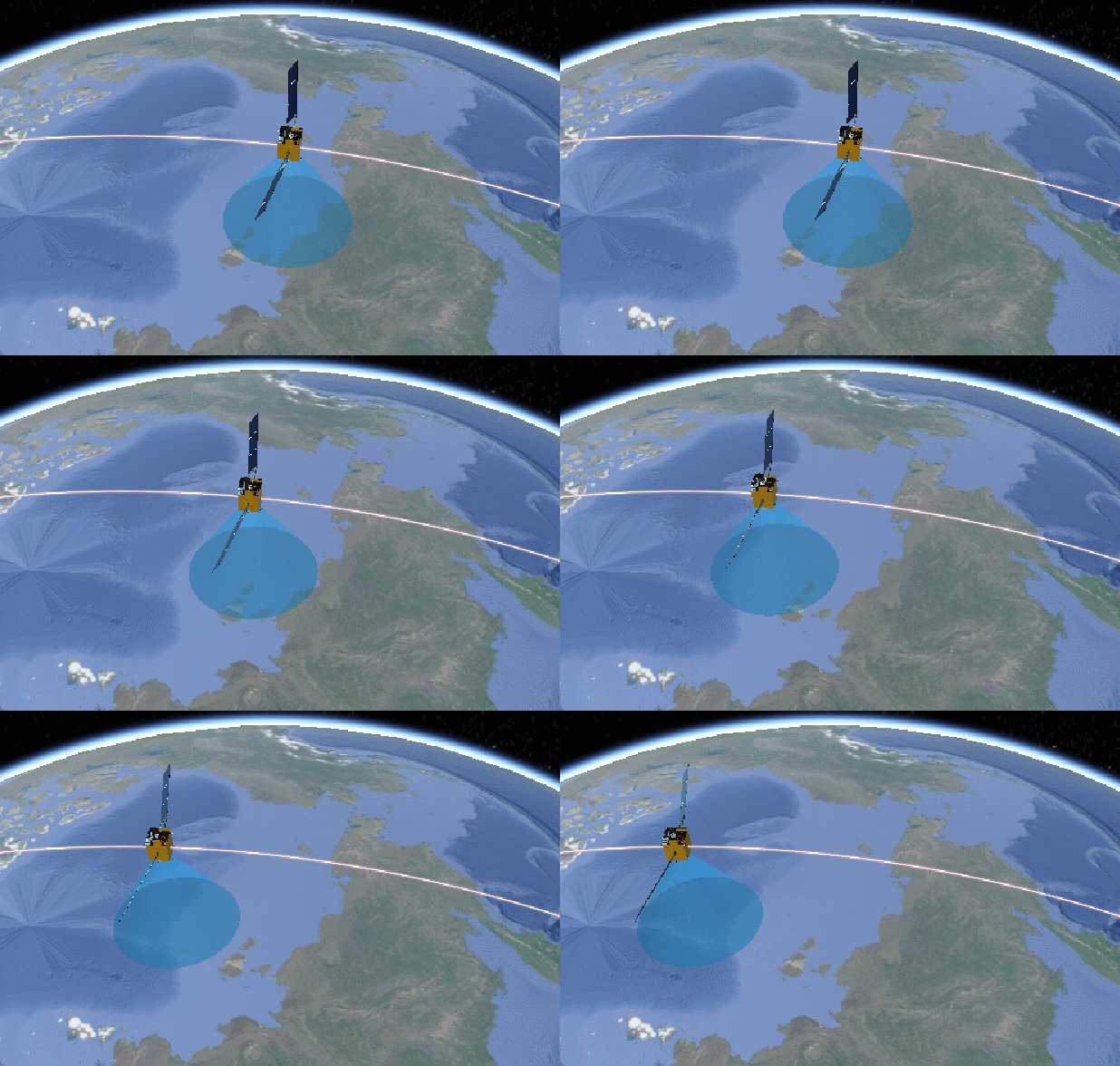
就是很简单的一个卫星,放射信号,然后围着轨道转圈圈。
资源网站
首先呢,分享几个网站,尽管大家应该都有,但是还是分享一下子吧。
其中这个下载3D模型的网站有很多3D模型,可以根据自己的需要搜索下载使用,尽管大部分是收费的,但是又免费的呀,自己测试或者是玩的话,我觉得够用了,我觉得还不错的呢!
绘制卫星绕轨动效
首先这个稍微说一下哈,其实就是用了 cesium 的时间轴,然后添加卫星模型,在距离地面的固定高度按照设置好的轨迹进行绕地旋转,关于下面的锥形信号覆盖区域,就是在卫星正下方,添加绘制了一个圆柱形的模型,使得上面的圆截面半径为0,下面的圆截面半径大一些,然后就是一个锥形了,具体锥形绘制案例看我 这篇博客【穿梭门】 哈,有好多绘制形状的案例。
接下来直接上代码!!!! 其实我也是看的别的博主发的文章,然后稍作修改出来的效果,但是大体实现方式就是我上面说的。
初始化蓝星
首先要实现这个功能,一定要开启时间轴的呀,不然不好使哈!
timeline: true, //是否显示时间线控件
上面这个得开起来!
    viewer = new Cesium.Viewer('map', {

      baseLayerPicker: false,  // 影像切换
      animation: true,  //是否显示动画控件
      infoBox: false, //是否显示点击要素之后显示的信息
      geocoder: false, //是否显示地名查找控件
      timeline: true, //是否显示时间线控件
      fullscreenButton: false,
      shouldAnimate: false,
      navigationHelpButton: false, //是否显示帮助信息控件
      terrainProvider: new Cesium.createWorldTerrain({

        requestWaterMask: true,
        requestVertexNormals: true
      }),
      imageryProvider: new Cesium.UrlTemplateImageryProvider({

        url: "http://mt1.google.cn/vt/lyrs=s&hl=zh-CN&x={x}&y={y}&z={z}&s=Gali"
      })
    })
添加卫星模型方法
主要是配置这个时间轴,然后就调用方法把卫星放进蓝星里面。
  // 卫星
  function satellite() {

    start = new Cesium.JulianDate.fromDate(new Date());  // 获取当前时间 这不是国内的时间
    start = Cesium.JulianDate.addHours(start, 8, new Cesium.JulianDate());  // 添加八小时,得到我们东八区的北京时间
    stop = Cesium.JulianDate.addSeconds(start, 360, new Cesium.JulianDate());  // 设置一个结束时间,意思是360秒之后时间结束


    viewer.clock.startTime = start.clone();   // 给cesium时间轴设置开始的时间,也就是上边的东八区时间
    viewer.clock.stopTime = stop.clone();     // 设置cesium时间轴设置结束的时间
    viewer.clock.currentTime = start.clone(); // 设置cesium时间轴设置当前的时间
    viewer.clock.clockRange = Cesium.ClockRange.LOOP_STOP;  // 时间结束了,再继续重复来一遍
    //时间变化来控制速度 // 时间速率,数字越大时间过的越快
    viewer.clock.multiplier = 2;
    //给时间线设置边界
    viewer.timeline.zoomTo(start, stop);

    rrStates = [];
    getRandState(arrStates, 1);
    startFunc();
  }
相关方法
一股脑直接把代码发过来了,然后网上其实都有,我不发你也找得到,然后这些也是网上拼凑起来的,然后嘞,应该能看懂,看不懂的直接找那个 Cesium API 中文版网站去查,应该没什么难的。加油!
function mySatePosition() {

    this.lon = 0;
    this.lat = 0;
    this.hei = 700000;          //卫星高度
    this.phei = 700000 / 2;     //轨道高度
    this.time = 0;
  }

  function computeCirclularFlight(source, panduan) {

    var property = new Cesium.SampledPositionProperty();
    if (panduan == 1) {
             //卫星位置
      for (var i = 0; i < source.length; i++) {

        var time = Cesium.JulianDate.addSeconds(start, source[i].time, new Cesium.JulianDate);
        var position = Cesium.Cartesian3.fromDegrees(source[i].lon, source[i].lat, source[i].hei);
        // 添加位置,和时间对应
        property.addSample(time, position);
      }
    } else if (panduan == 2) {
    //轨道位置
      for (var i = 0; i < source.length; i++) {

        var time = Cesium.JulianDate.addSeconds(start, source[i].time, new Cesium.JulianDate);
        var position = Cesium.Cartesian3.fromDegrees(source[i].lon, source[i].lat, source[i].phei);
        // 添加位置,和时间对应
        property.addSample(time, position);
      }
    }
    return property;
  }

  function getRandState(brr, count) {

    for (var m = 0; m < count; m++) {

      var arr = [];
      var t1 = Math.floor(Math.random() * 360);
      var t2 = Math.floor(Math.random() * 360);
      for (var i = t1; i <= 360 + t1; i += 30) {

        var aaa = new mySatePosition();
        aaa.lon = t2;
        aaa.lat = i;
        aaa.time = i - t1;
        arr.push(aaa);
      }
      brr.push(arr);
    }
  }

  function getStatePath(aaa) {

    var entity_ty1p = computeCirclularFlight(aaa, 2);
    var entity_ty1 = viewer.entities.add({

      availability: new Cesium.TimeIntervalCollection([new Cesium.TimeInterval({

        start: start,
        stop: stop
      })]),
      position: entity_ty1p,   //轨道高度
      orientation: new Cesium.VelocityOrientationProperty(entity_ty1p),
      cylinder: {

        HeightReference: Cesium.HeightReference.CLAMP_TO_GROUND,
        length: 700000,
        topRadius: 0,
        bottomRadius: 900000 / 2,
        // material: Cesium.Color.RED.withAlpha(.4),
        // outline: !0,
        numberOfVerticalLines: 0,
        // outlineColor: Cesium.Color.RED.withAlpha(.8),
        material: Cesium.Color.fromBytes(35, 170, 242, 80)
      },
    });

    entity_ty1.position.setInterpolationOptions({

      interpolationDegree: 5,
      interpolationAlgorithm: Cesium.LagrangePolynomialApproximation
    });

    var entity1p = computeCirclularFlight(aaa, 1);
    //创建实体
    var entity1 = viewer.entities.add({

      // 将实体availability设置为与模拟时间相同的时间间隔。
      availability: new Cesium.TimeIntervalCollection([new Cesium.TimeInterval({

        start: start,
        stop: stop
      })]),
      position: entity1p,//计算实体位置属性
      //基于位置移动自动计算方向.
      orientation: new Cesium.VelocityOrientationProperty(entity1p),
      //加载飞机模型
      model: {

        uri: './models/weixing/scene.gltf',
        scale: 1000
      },
      //路径
      path: {

        resolution: 1,
        material: new Cesium.PolylineGlowMaterialProperty({

          glowPower: 0.1,
          color: Cesium.Color.PINK
        }),
        width: 5
      }
    });

    //差值器
    entity1.position.setInterpolationOptions({

      interpolationDegree: 5,
      interpolationAlgorithm: Cesium.LagrangePolynomialApproximation
    });
  }

  function startFunc() {

    for (var i = 0; i < arrStates.length; i++) {

      getStatePath(arrStates[i]);
    }
  }

边栏推荐
- [medical segmentation] unet3+
- PyCharm汉化
- Daily question brushing record (6)
- What is the next step in the recommendation system? Alispacetime aggregates GNN, and the effect is to sling lightgcn!
- TCP 流控问题两则
- Openfeign service interface call
- 7 killer JS lines of code
- 《预训练周刊》第51期:重构预训练、零样本自动微调、一键调用OPT
- Quanzhi A13 tossing memo
- Two TCP flow control problems
猜你喜欢

Hue new account error reporting solution
![[fans' welfare] today, I'd like to introduce a method to collect money for nothing - convertible bonds. I personally verified that each person can earn 1500 yuan a year](/img/b8/8de207734e4aa85778ca1f0609ddf2.png)
[fans' welfare] today, I'd like to introduce a method to collect money for nothing - convertible bonds. I personally verified that each person can earn 1500 yuan a year

外包2年的我终于上岸了!记录我的字节跳动3轮面试,希望帮助到大家!

Details of istio micro service governance grid traffic management core resource controller

OpenHGNN发布0.3版本

Explore tidb lightning source code to solve the found bugs

Postman如何设置成中文?(汉化)

深信服X计划-系统基础总结

局域网即时通讯软件应该怎么选择

SSH workflow and principle
随机推荐
【第27天】给定一个整数 n ,打印出1到n的全排列 | 全排列模板
Industry insight - how should brand e-commerce reshape growth under the new retail format?
Hue new account error reporting solution
Esp32s3 iperf routine test esp32s3 throughput test
AI for Science: scientific research paradigm, open source platform and industrial form
深信服X计划-系统基础总结
Deploy redis sentinel mode using bitnamiredis Sentinel
How to choose LAN instant messaging software
Ssh server configuration file sshd_ Config and operation
LeetCode_ Fast power_ Recursion_ Medium_ 50.Pow(x, n)
Principle of printf indefinite length parameter
Threejs' ambient light + point light + parallel light + spherical light and Hepler understanding + shadow ()
Failed to execute NPM instruction, prompting ssh: Permission denied
Vs debugging skills
Pycharm in Chinese
新华三的千亿企业梦,还得靠吃ICT老本来实现?
内网学习笔记(8)
执行 npm 指令失败,提示ssh: ... Permission denied
PyCharm汉化
scrapy