当前位置:网站首页>1312_适用7z命令进行压缩与解压
1312_适用7z命令进行压缩与解压
2022-07-26 12:45:00 【grey_csdn】
我常用的工具的使用小结全都放在了这里: GreyZhang/toolbox: 常用的工具使用查询,非教程,仅作为自我参考! (github.com)
也不知道从什么时候开始,我开始使用各种NAS或者类似树莓派这样的开发板搭建家用的server以及我个人的数据中心。有时候,切换硬盘的时候需要进行数据搬运,而搬运的时候少不了压缩解压的操作。如果是一个整卷的压缩或者解压,之前我用的最多的还是zip和unzip,掌握的细致的用法没有几条,但是几本是可以满足我自己的需要的。但是,在这两个命令中我始终没找到比较好的分卷压缩以及解压的好的方式。
在使用PC以及GUI的时候,我这几年用的最多的压缩工具其实是7z,它基本上是拥有了我需要的压缩以及解压的全部功能。类似这样的开源软件,通常在命令行的支持上是不错的。我于是尝试了这方面的探索,结果是令我满意的。
在此,总结一下这个工具使用的时候的一些小经验。
1. 安装
安装其实是很容易的,一条命令即可,需要注意在linux的环境下可能有不同的分发版本,尽量安装全功能版本的。
sudo apt-get install p7zip-full
2. 压缩指定的文件
2.1 7z a xxx.7z xxx

这是参数比较少的一种使用方式,默认的情况下其实就可以生成7z的格式。

这是通过GUI的软件来查看看到的效果。一是看得出来格式能够识别,另外是看得出来压缩的内容没问题。
2.2 解压缩

我创建新的目录,把压缩的压缩包转移到了这个目录。之后执行解压的效果如上。
2.3 压缩目录

这是很让人开心的操作特性,默认的输入下,压缩一个目录以及目录下的全部文件就跟直接压缩一个文件一样简单。
2.4 7za命令

这个命令其实是专门用于压缩的7z命令,而7z还可以用于解压缩。
2.5 分卷压缩
7z的分卷压缩也非常简单,就是普通的压缩增加一个参数而已。-vxxxb,其中xxx是数值,单位是字节。如果想用其他的单位,格式类似,k、m、g等可以用。但是需要注意,这里的参数都是小写的。
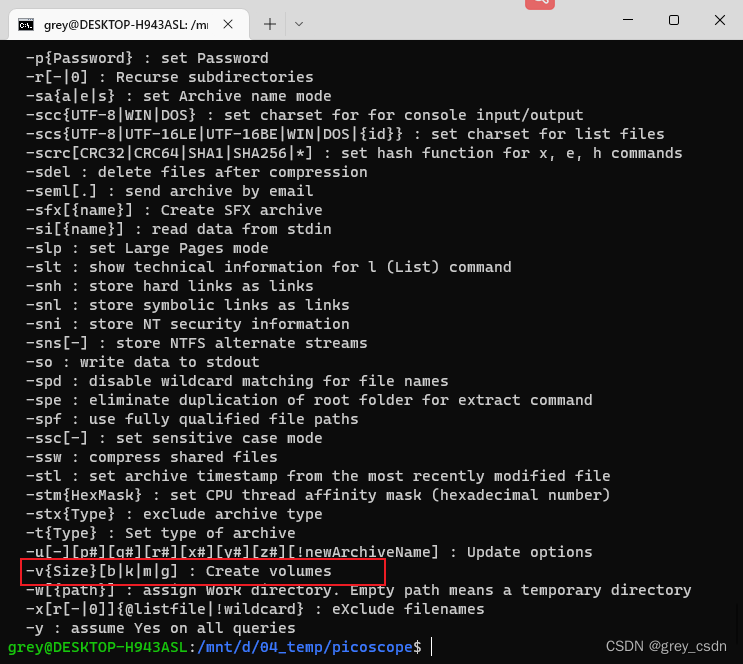
我从帮助信息中找到了相应的信息。接下来,尝试把上面的文件夹压缩成分卷500KB的分卷。

2.6 分卷的解压缩
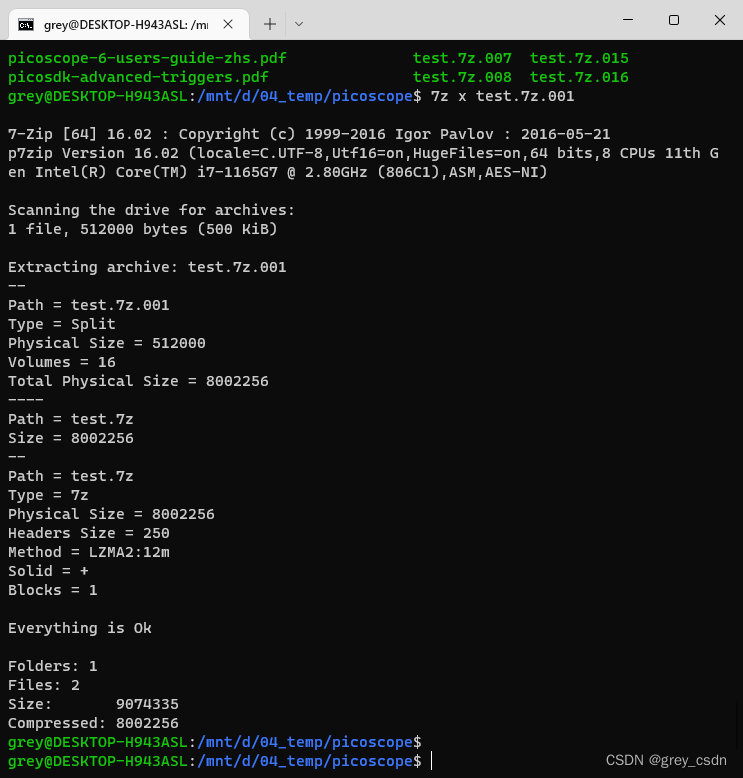
又是一个很简单的操作,跟处理一个文件一样。这里只需要把第一个分卷的名称传递进来,其他的操作都是自动完成的,十分方便。
2.7 压缩成指定的格式,比如zip

没有什么特殊的,只需要增加一个参数的控制。上面,我实现了一个zip的分卷压缩。而解压缩也是跟前面分卷的解压完全一样的处理方式。

单卷压缩,其实是一个更简单的操作。
这样,7z工具的基本使用情况于我来说比较实用的部分就已经梳理完了。或许,从此以后我的server上的最常用压缩以及解压软件就是这个了。
边栏推荐
- 今日睡眠质量记录75分
- Today in history: IBM obtained the first patent; Verizon acquires Yahoo; Amazon releases fire phone
- 一款超好用的神器Apifox,甩 Swagger 几条街...(荣耀典藏版)
- Kubernetes -- Introduction to common plug-ins of kubernetes
- 数据库组成表
- Food safety | is self-made food purchased online healthy food? Don't fall into these misunderstandings
- Emerging security providers to learn about in 2022
- LCD笔记(4)分析内核自带的LCD驱动程序
- Understand test.py in gaitset
- LCD notes (4) analyze the LCD driver of the kernel
猜你喜欢

What is the Internet of things? The most comprehensive explanation of common IOT protocols

Kubernetes----高级存储之PV和PVC简介

What is a callback function? Understanding of the word "back"

New function | intelligent open search online customized word weight model
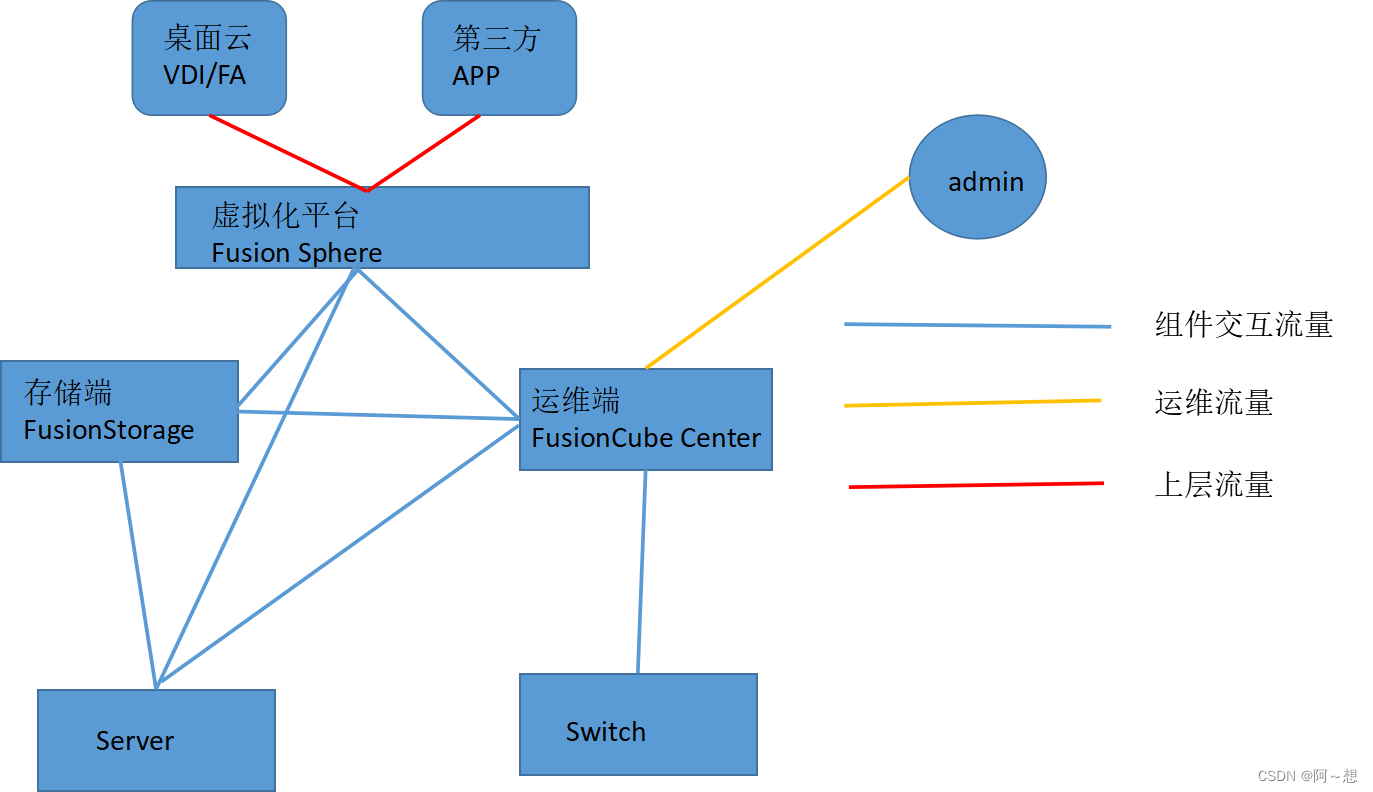
华为超融合FusionCube解决方案笔记

After being fined "paid leave" for one month, Google fired him who "loves" AI
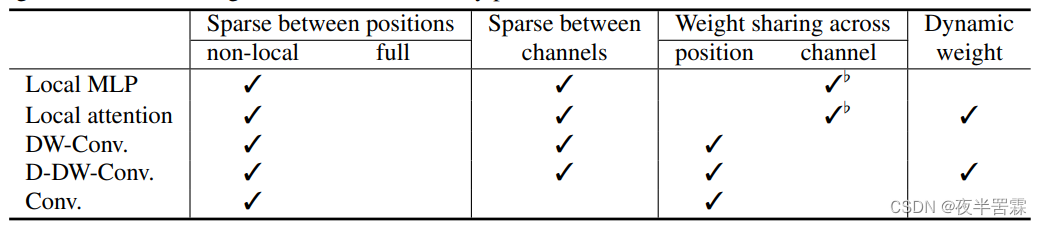
Transformer dominates the world? Depth wise conv has something to say

PXE principle and configuration

Food safety | can you eat any fruit?

A super easy-to-use artifact apifox, throw swagger a few streets... (glory Collection Edition)
随机推荐
回溯——46. 全排列
Interviewer: how to understand QPS, TPS, RT?
一款超好用的神器Apifox,甩 Swagger 几条街...(荣耀典藏版)
UE5 官方案例Lyra 全特性详解 7.资源管理
Use flex to realize left middle right layout and middle adaptation
高通再次「押宝」中科创达,挑战智能驾驶软硬件全栈方案
(int argc, char** argv) command line parameters in visual stdio (VS)
Backtracking - 131. Split palindrome string
Use grid to realize left, middle and right layout, and the middle content is adaptive
V01 - XX, record a good life from the log
Kubernetes -- Introduction to common plug-ins of kubernetes
一文看懂GaitSet中的test.py
数据库组成存储过程和函数
Code examples explain the difference between [reentrant lock] and [non reentrant lock]?
Guys, how can CDC Oracle set the reading from the specified SCN number, or how to set the read-only full archive, not to read fast
Flutter dart generates a list of random numbers that are not repeated in n intervals
Visual stdio(VS)中的(int argc、char** argv)命令行参数
C regards type as generic type T and uses it as generic type of method
火山引擎云上增长方案全景:30+方案齐出,兵发优势领域
食品安全 | 这些常见食物小心有毒!速查自家餐桌