当前位置:网站首页>技能梳理[email protected]+阿里云+nbiot+dht11+bh1750+土壤湿度传感器+oled
技能梳理[email protected]+阿里云+nbiot+dht11+bh1750+土壤湿度传感器+oled
2022-06-30 09:37:00 【Sky_Lannister】
使用DHT11温湿度传感器测量温湿度,使用BH1750测量光照强度,使用土壤湿度传感器测量土壤湿度。需要做PCB板子,32+pcb+传感器+oled显示这几个数据
1、项目简介

2、实现逻辑
#通过dht11检测温湿度
#通过bh1750检测光照强度
#通过adc检测土壤湿度
#将数据显示到oled及通过串口发送给nbiot模块,然后到阿里云
3、应用场景
#远程检测环境参数
4、核心代码梳理
//代码是用的之前复用好几次的了不重要,重要的是nbiot模块的配置
//temp hump
void DHT11_IO_IN(void) {

    GPIO_InitTypeDef GPIO_InitStructure;
    GPIO_InitStructure.Pin = DHT11_Pin;
    GPIO_InitStructure.Mode = GPIO_MODE_INPUT;
    HAL_GPIO_Init(GPIOA,&GPIO_InitStructure);
}

void DHT11_IO_OUT(void) {

    GPIO_InitTypeDef GPIO_InitStructure;
    GPIO_InitStructure.Pin = DHT11_Pin;
    GPIO_InitStructure.Mode = GPIO_MODE_OUTPUT_PP;
    GPIO_InitStructure.Speed = GPIO_SPEED_FREQ_HIGH;
    HAL_GPIO_Init(GPIOA,&GPIO_InitStructure);
}

void DHT11_Rst(void) {

    DHT11_IO_OUT(); 	//
    DHT11_DQ_OUT_LOW; 	//
    HAL_Delay(20);    	//
    DHT11_DQ_OUT_HIGH; 	//
    delay_us(30);     	//
}

uint8_t DHT11_Check(void) {

    uint8_t retry=0;
    DHT11_IO_IN();
    while (DHT11_DQ_IN && retry<100) {

        retry++;
        delay_us(1);
    };
    if(retry>=100)return 1;
    else retry=0;
    while (!DHT11_DQ_IN&&retry<100) {

        retry++;
        delay_us(1);
    };
    if(retry>=100)return 1;
    return 0;	//DHT11
}

uint8_t DHT11_Read_Bit(void) {

    uint8_t retry=0;
    while(DHT11_DQ_IN&&retry<100) {

        retry++;
        delay_us(1);
    }
    retry=0;
    while(!DHT11_DQ_IN&&retry<100) {

        retry++;
        delay_us(1);
    }
    delay_us(40);
    if(DHT11_DQ_IN)return 1;
    else return 0;
}

uint8_t DHT11_Read_Byte(void) {

    uint8_t i,dat;
    dat=0;
    for (i=0; i<8; i++) {

        dat<<=1;
        dat|=DHT11_Read_Bit();
    }
    return dat;
}

uint8_t DHT11_Read_Data(uint16_t *temp,uint16_t *humi) {

    uint8_t buf[5];
    uint8_t i;
    DHT11_Rst();
    if(DHT11_Check()==0) {

        for(i=0; i<5; i++) {

            buf[i]=DHT11_Read_Byte();
        }
        if((buf[0]+buf[1]+buf[2]+buf[3])==buf[4]) {

            *humi=(buf[0]<<8) + buf[1];
            *temp=(buf[2]<<8) + buf[3];
        }
    } else return 1;
    return 0;
}

uint8_t DHT11_Init(void) {

    DHT11_Rst();
    return DHT11_Check();
}


bh1750****************//
/***开始信号***/
void BH1750_Start()
{

    HAL_GPIO_WritePin(GPIOB, BH1750_SDA_Pin,GPIO_PIN_SET);                    //拉高数据线
    HAL_GPIO_WritePin(GPIOB, BH1750_SCL_Pin,GPIO_PIN_SET);                   //拉高时钟线
    delay_us(5);                 //延时
    HAL_GPIO_WritePin(GPIOB, BH1750_SDA_Pin,GPIO_PIN_RESET);                    //产生下降沿
    delay_us(5);                 //延时
    HAL_GPIO_WritePin(GPIOB, BH1750_SCL_Pin,GPIO_PIN_RESET);                    //拉低时钟线
}

/*****停止信号******/
void BH1750_Stop()
{

    HAL_GPIO_WritePin(GPIOB, BH1750_SDA_Pin,GPIO_PIN_RESET);                   //拉低数据线
    HAL_GPIO_WritePin(GPIOB, BH1750_SCL_Pin,GPIO_PIN_SET);                      //拉高时钟线
    delay_us(5);                 //延时
    HAL_GPIO_WritePin(GPIOB, BH1750_SDA_Pin,GPIO_PIN_SET);                    //产生上升沿
    delay_us(5);                 //延时
}
/************************************** 发送应答信号 入口参数:ack (0:ACK 1:NAK) **************************************/
void BH1750_SendACK(int ack)
{

    GPIO_InitTypeDef GPIO_InitStruct;

    GPIO_InitStruct.Pin = GPIO_PIN_10|GPIO_PIN_11;
    GPIO_InitStruct.Mode = GPIO_MODE_OUTPUT_PP;
    GPIO_InitStruct.Speed = GPIO_SPEED_FREQ_LOW;
    HAL_GPIO_Init(GPIOB, &GPIO_InitStruct);


    if(ack == 1)   //写应答信号
        HAL_GPIO_WritePin(GPIOB, BH1750_SDA_Pin,GPIO_PIN_SET);
    else if(ack == 0)
        HAL_GPIO_WritePin(GPIOB, BH1750_SDA_Pin,GPIO_PIN_RESET);
    else
        return;

    HAL_GPIO_WritePin(GPIOB, BH1750_SCL_Pin,GPIO_PIN_SET);      //拉高时钟线
    delay_us(5);                //延时
    HAL_GPIO_WritePin(GPIOB, BH1750_SCL_Pin,GPIO_PIN_RESET);      //拉低时钟线
    delay_us(5);                 //延时
}
/************************************** 接收应答信号 **************************************/
int BH1750_RecvACK()
{

    int mcy;
    GPIO_InitTypeDef GPIO_InitStruct;

    GPIO_InitStruct.Mode = GPIO_MODE_INPUT;  /*这里一定要设成输入上拉,否则不能读出数据*/
    GPIO_InitStruct.Speed = GPIO_SPEED_FREQ_LOW;
    GPIO_InitStruct.Pin = BH1750_SDA_Pin;
    HAL_GPIO_Init(GPIOB, &GPIO_InitStruct);

    HAL_GPIO_WritePin(GPIOB, BH1750_SCL_Pin,GPIO_PIN_SET);            //拉高时钟线
    delay_us(5);                 //延时

    if(HAL_GPIO_ReadPin( GPIOB, BH1750_SDA_Pin ) == 1 )//读应答信号
        mcy = 1 ;
    else
        mcy = 0 ;

    HAL_GPIO_WritePin(GPIOB, BH1750_SCL_Pin,GPIO_PIN_RESET);                    //拉低时钟线
    delay_us(5);                 //延时

    GPIO_InitStruct.Mode = GPIO_MODE_OUTPUT_PP;
    HAL_GPIO_Init( GPIOB, &GPIO_InitStruct );

    return mcy;
}

/************************************** 向IIC总线发送一个字节数据 **************************************/
void BH1750_SendByte(uint8_t dat)
{

    uint8_t i;

    HAL_GPIO_WritePin(GPIOB, BH1750_SCL_Pin,GPIO_PIN_RESET);                //拉低时钟线
    delay_us(2);             //延时
    for (i=0; i<8; i++)         //8位计数器
    {

        if( 0X80 & dat )
            HAL_GPIO_WritePin(GPIOB, BH1750_SDA_Pin,GPIO_PIN_SET);
        else
            HAL_GPIO_WritePin(GPIOB, BH1750_SDA_Pin,GPIO_PIN_RESET);

        dat <<= 1;
        HAL_GPIO_WritePin(GPIOB, BH1750_SCL_Pin,GPIO_PIN_SET);               //拉高时钟线
        delay_us(2);             //延时
        HAL_GPIO_WritePin(GPIOB, BH1750_SCL_Pin,GPIO_PIN_RESET);                //拉低时钟线
        delay_us(2);             //延时
    }
    //BH1750_RecvACK();
}

/************************************** 从IIC总线读取一个字节数据 **************************************/
uint8_t BH1750_RecvByte()
{

    uint8_t i;
    uint8_t dat = 0;
    uint8_t bit;

    GPIO_InitTypeDef GPIO_InitStruct;

    GPIO_InitStruct.Mode = GPIO_MODE_INPUT;   /*这里一定要设成输入上拉,否则不能读出数据*/
    GPIO_InitStruct.Pin = BH1750_SDA_Pin;
    GPIO_InitStruct.Speed = GPIO_SPEED_FREQ_LOW;
    HAL_GPIO_Init( GPIOB, &GPIO_InitStruct );

    //HAL_GPIO_WritePin(GPIOB, BH1750_SDA_Pin,GPIO_PIN_SET); //使能内部上拉,准备读取数据,

    for (i=0; i<8; i++)         //8位计数器
    {

        //dat <<= 1;
        HAL_GPIO_WritePin(GPIOB, BH1750_SCL_Pin,GPIO_PIN_RESET);               //拉高时钟线
        delay_us(2);             //延时
        HAL_GPIO_WritePin(GPIOB, BH1750_SCL_Pin,GPIO_PIN_SET);
        dat <<= 1;
        HAL_GPIO_WritePin(GPIOB, BH1750_SCL_Pin,GPIO_PIN_SET);
        if( SET == HAL_GPIO_ReadPin( GPIOB, BH1750_SDA_Pin ) )
            dat |= 0X01;

        //拉低时钟线
        delay_us(1);             //延时
    }
    HAL_GPIO_WritePin(GPIOB, BH1750_SCL_Pin,GPIO_PIN_RESET);
    GPIO_InitStruct.Mode = GPIO_MODE_OUTPUT_PP;
    HAL_GPIO_Init( GPIOB, &GPIO_InitStruct );
    return dat;
}

void Init_BH1750()
{

    BH1750_Start();
    BH1750_SendByte(0x46);
    BH1750_SendByte(0x01);
    BH1750_Stop();
}


void Single_Write_BH1750(u8 REG_Address)
{

    BH1750_Start();//起始信号
    BH1750_SendByte(0x46);//发送设备地址+写信号
    BH1750_RecvACK();
    BH1750_SendByte(REG_Address);//内部寄存器地址,请参考中文pdf22页
    BH1750_RecvACK();
    BH1750_Stop();//发送停止信号
}


/********************************************************* 连续读出BH1750内部数据 *********************************************************/
void Multiple_Read_BH1750()
{

    BH1750_Start();//起始信号
    BH1750_SendByte(0x47);//发送设备地址+读信号
    BH1750_RecvACK();
    BUF[0] = BH1750_RecvByte();//BUF[0]存储0x32地址中的数据
    BH1750_SendACK(0);
    BUF[1] = BH1750_RecvByte();//BUF[0]存储0x32地址中的数据
    BH1750_SendACK(1);
    BH1750_Stop();//停止信号
    HAL_Delay(5);
}

//连续读出BH1750内部数据
void mread(void)
{

    u8 i=0;
    Single_Write_BH1750(0x01);// power on
    Single_Write_BH1750(0x10);// H- resolution mode
    HAL_Delay(18);//延时18ms

    Multiple_Read_BH1750();//连续读出数据,存储在BUF中
}

/* 向onenet平台发数据函数 * return 1 ok; 0 fail */
uint8_t send_onenet(void)
{

    char text[200];
    uint8_t len;

    memset(text, 0, sizeof(text));

    //组包
    memset(text, 0, sizeof(text));
    sprintf(text, "bbbWenDu:%.2f C; ShiDu: %.2f %; TuRang:%.2f %; GuangZhao:%d Lux;",temp, hump, check_hump, light);

    //封包
    len = strlen(text);

    HAL_UART_Transmit(&huart1, (uint8_t *)text, len, 0xFFFF); //发送

    HAL_Delay(1000);
    return 1;
}
/* USER CODE END 0 */

/** * @brief The application entry point. * @retval int */
int main(void)
{

    /* USER CODE BEGIN 1 */
    uint32_t clk;
    tx_nbiot[0] = 0xff;
    tx_nbiot[1] = 0x74;
    tx_nbiot[13] = 0xff;
    /* USER CODE END 1 */

    /* MCU Configuration--------------------------------------------------------*/

    /* Reset of all peripherals, Initializes the Flash interface and the Systick. */
    HAL_Init();

    /* USER CODE BEGIN Init */

    /* USER CODE END Init */

    /* Configure the system clock */
    SystemClock_Config();

    /* USER CODE BEGIN SysInit */

    /* USER CODE END SysInit */

    /* Initialize all configured peripherals */
    MX_GPIO_Init();
    MX_USART1_UART_Init();
    MX_ADC1_Init();
    MX_TIM1_Init();
    /* USER CODE BEGIN 2 */

    OLED_Init();
    OLED_ColorTurn(0);//
    OLED_DisplayTurn(0);//
    OLED_Refresh();
    OLED_Clear();
    OLED_ShowString(0,0,"TEMP: . C",16);
    OLED_ShowString(0,14,"HUMP: . %",16);
    OLED_ShowString(0,28,"GROUND: . %",16);
    OLED_ShowString(0,42,"LIGHT: LUX",16);
    OLED_Refresh();


    /****dht11*****/
    uint8_t int_num = 3;
    while(int_num--) {

        HAL_Delay(500);
        DHT11_Init();
    }

    __HAL_UART_ENABLE_IT(&huart1,UART_IT_RXNE);//open uart1 RXNE
    //Init_BH1750();

    /* USER CODE END 2 */

    /* Infinite loop */
    /* USER CODE BEGIN WHILE */
    while (1)
    {

        /* USER CODE END WHILE */

        /* USER CODE BEGIN 3 */


        check_hump = 4092-ADC_num;
        check_hump = (float)(check_hump/3292*100);//ad->hump%
        if((check_hump >= 0) && (check_hump <= 100))
        {

            intH = (int)check_hump;
            float hum_tmp = check_hump - intH;
            hum_tmp *= 100;
            decH = hum_tmp;
            tx_nbiot[6] = intH;
            tx_nbiot[7] = decH;
        }
        HAL_ADC_Start_IT(&hadc1);

        DHT11_Read_Data(&temperature,&humidity);
// OLED_ShowNum(39,0,temperature>>8,4,12);
// OLED_ShowNum(80,0,temperature&0xff,2,12);
// OLED_ShowNum(39,2,humidity>>8,4,12);
// OLED_ShowNum(80,2,humidity&0xff,2,12);
        tx_nbiot[2] = temperature>>8;
        tx_nbiot[3] = temperature&0xff;
        tx_nbiot[4] = humidity>>8;
        tx_nbiot[5] = humidity&0xff;

        temp = tx_nbiot[2]*100 + tx_nbiot[3];
				temp = temp/100;
        hump = tx_nbiot[4]*100 + tx_nbiot[5];
				hump = hump/100;
// light_temp = GetLight();
// light = light_temp;
        mread();
        light_temp = BUF[0];
        light_temp=(light_temp<<8)+BUF[1];//合成数据
        light=light_temp/1.2;

        OLED_ShowNum(53,0,tx_nbiot[2],2,16); //temp
        OLED_ShowNum(77,0,tx_nbiot[3],2,16);
        OLED_ShowNum(53,14,tx_nbiot[4],2,16);//hump
        OLED_ShowNum(77,14,tx_nbiot[5],2,16);
        OLED_ShowNum(53,28,tx_nbiot[6],2,16);//ground
        OLED_ShowNum(77,28,tx_nbiot[7],2,16);
        OLED_ShowNum(53,42,light,5,16);//LIGHT
        OLED_Refresh();

        tx_nbiot[8] = (light>>8)&0xff;
        tx_nbiot[9] = light&0xff;

        if(clk % 10 == 0) //
            send_onenet();


// if(rx_ok)
// {

// //rx_order++;
// rx_ok = 0;
// }
        HAL_Delay(500);
        HAL_GPIO_TogglePin(LED_GPIO_Port, LED_Pin);
        clk++;

    }
    /* USER CODE END 3 */
}
5、部分参考资料
合宙系统官网 http://erp.openluat.com/
DTU管理系统:https://dtu.yinerda.com/#/user/login
物理网卡管理:http://sim.openluat.com/

#电路板原理图 pcb见资料包
6、注意事项
#nbiot模块不用插卡,需要好好的配置一下
完整可运行项目地址
边栏推荐
- 2022第六季完美童模 合肥赛区 初赛圆满落幕
- OSError: [Errno 28] No space left on device
- MIT-6874-Deep Learning in the Life Sciences Week6
- Leetcode question brushing (II) -- sorting (go Implementation)
- Dyson design award, changing the world with sustainable design
- 华南产业集团发力数字经济,城链科技发布会成功召开
- Tooltips in the era of touch
- South China Industrial Group launched digital economy and successfully held the city chain technology conference
- Ant s19xp appeared in 140t, why is it called the computing power ceiling by the world
- Description of event flow
猜你喜欢

Launch of Rural Revitalization public welfare fund and release of public welfare bank for intangible cultural heritage protection of ancient tea tree

UAV project tracking record 83 -- PCB diagram completion
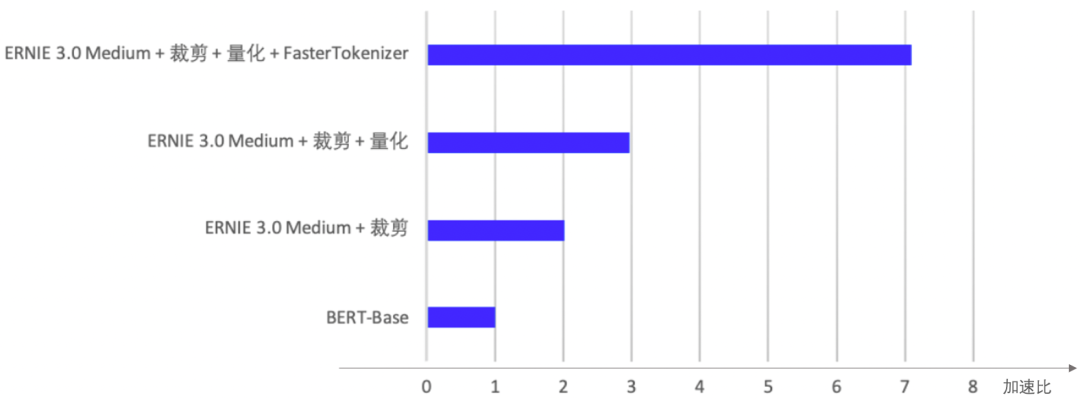
Open source! Wenxin large model Ernie tiny lightweight technology, accurate and fast, full effect

How does the diode work?

‘Failed to fetch current robot state‘ when using the ‘plan_ kinematic_ path‘ service #868

unable to convert expression into double array

6.Redis新数据类型

MySQL log management, backup and recovery of databases (2)

“昆明城市咖啡地图”再度开启,咖啡拉近城市距离

郭琳加冕 2022第三季完美大师 全球人气季军
随机推荐
调试方法和技巧详解
郭琳加冕 2022第三季完美大师 全球人气季军
Didn't receive robot state (joint angles) with recent timestamp within 1 seconds
Koreano essential creates a professional style
G-Code 详解
MIT-6874-Deep Learning in the Life Sciences Week5
The preliminary round of the sixth season of 2022 perfect children's model Hefei competition area was successfully concluded
Detailed explanation of commissioning methods and techniques
The rising star of Goldshell STC box
2022第六季完美童模 托克逊赛区 决赛圆满落幕
李沐《动手学习深度学习》d2lbook环境搭建
Force buckle 428 Serialize and deserialize n-tree DFS
浏览器复制的网址粘贴到文档是超链接
6.Redis新数据类型
About the split and join operations of strings
Js獲取指定字符串指定字符比特置&指定字符比特置區間的子串【簡單詳細】
Oracle creates a stored procedure successfully, but the compilation fails
1033 To Fill or Not to Fill
train_ de.py: error: argument --save_ steps: invalid int value: ‘$[$[889580/128/4]*10/2]‘
G code explanation | list of the most important G code commands