当前位置:网站首页>Jincang KFS data centralized scenario (many to one) deployment
Jincang KFS data centralized scenario (many to one) deployment
2022-06-25 11:07:00 【Thousands of sails pass by the side of the sunken boat_】
KFS Dataset scenario ( For one more ) Deploy
One 、 environmental information
1、 Software version
KFS edition :Kingbase FlySync V001R006C003B20220107
Source end 1:oracle 11.2.0.4.0
Source end 2:Mysql 8.0.26
Source end 3:sqlserver 2017
Target end :KingbaseES V008R006C003B0071
2、 Deployment Topology

KFS Centralized deployment with the database , Deploy on the same server .
3、IP Address
Source end 1(oracle):192.168.100.111
Source end 2(mysql):192.168.100.112
Source end 3(sqlserver):192.168.100.113
Target end (kes):192.168.100.114
Two 、 Source end 1(oracle) KFS Deploy
Source end oracle use redo Mode analysis .
( One )、 Environment configuration
1、 Create installation users
groupadd flysync
useradd flysync -g flysync -G mysql
passwd flysync
2、 Upload installation packages and license File to server /home/flysync Under the table of contents , And extract the
tar -xzvf KingbaseFlySync-V001R006C003B20220107-replicator.tar.gz
3、 Configuration will hosts file , Add both source and target servers
vi /etc/hosts
192.168.100.111 oracle
192.168.100.114 kes
192.168.100.112 mysql
192.168.100.113 sqlserver
4、 To configure /etc/security/limits.conf file 【 Optional 】
vi /etc/security/limits.conf
flysync - nofile 65535
flysync - nproc 8096
mssql - nofile 65535
mssql - nproc 8096
5、 Turn on the time synchronization service 【 Optional 】
yum install ntp
systemctl start ntpd
systemctl enable ntpd
6、 stay /etc/sysctl.conf To configure swappiness Parameters 【 Optional 】
vi /etc/sysctl.conf
vm.swappiness = 10
sysctl -p
7、 Check the dependent software jdk and ruby【 must 】
--jdk
java -version
Version less than 1.8 Of , have access to yum install 1.8 edition
yum install java-1.8.0-openjdk.x86_64
You can also download oracle Of 1.8 Version of JDK Manually upload and install packages
--ruby
have access to yum Way to install
yum install ruby
You can also use KFS The console server comes with ruby Package replacement , Position in :/opt/KFS/console/media/rbenv,
Extract the package to /usr/local, Then configure /etc/profile In the document $PATH environment variable , take ruby Of bin Add directory to
vi /etc/profile
export PATH=$PATH:/usr/local/ruby/bin
When the configuration is complete , Use source Command application
source /etc/profile
( Two )、 Database configuration
1、 Configure database time format :
ALTER SYSTEM SET NLS_DATE_FORMAT='YYYY-MM-DD' SCOPE=SPFILE;
2、 Create connected users and grant relevant permissions :
create user flysync identified by 123456;
alter user flysync default tablespace users;
alter user flysync quota unlimited on users;
GRANT CONNECT, RESOURCE TO FLYSYNC;
GRANT EXECUTE_CATALOG_ROLE TO FLYSYNC;
GRANT CREATE SESSION TO FLYSYNC;
GRANT SELECT ANY TRANSACTION TO FLYSYNC;
GRANT SELECT ANY TABLE TO FLYSYNC;
GRANT UNLIMITED TABLESPACE TO FLYSYNC;
GRANT DBA TO FLYSYNC;
3、 Turn on Oracle Archive log of database ( Must be turned on ) 了 , The specific steps are as follows :
(1). View the current archive mode
SQL>select log_mode from v$database;
(2). Create archive Directory
[[email protected] oracle]$ mkdir -p $ORACLE_BASE/archivelog
[[email protected] oracle]$ sqlplus / as sysdba
SQL> alter system set log_archive_dest_1="location=/data/oracle/archivelog" scope=both;
(3). Restart the database to mount state
SQL>shutdown immediate
SQL>startup mount
(4). Change the database to archive mode
SQL>alter database archivelog;
(5). Open database
SQL>alter database open;
(6). Check whether the archive mode is on
SQL>select log_mode from v$database;
4、 Open completion log :
(1). Check the status of the completion log
SQL> SELECT supplemental_log_data_min, supplemental_log_data_pk,supplemental_log_data_all FROM v$database;
SUPPLEME SUP SUP
-------- --- ---
NO NO NO
(2). Open completion log ( It is suggested that MOUNT Execution in mode )
SQL> ALTER DATABASE ADD SUPPLEMENTAL LOG DATA;
SQL> ALTER DATABASE ADD SUPPLEMENTAL LOG DATA (PRIMARY KEY) COLUMNS;
SQL> ALTER DATABASE ADD SUPPLEMENTAL LOG DATA (ALL) COLUMNS;
(3). Check the status of the completion log again
SQL> SELECT supplemental_log_data_min, supplemental_log_data_pk, supplemental_log_data_all FROM v$database;
SUPPLEME SUP SUP
-------- --- ---
YES YES YES
must 3 Items are YES
5、 Switch log files
SQL> ALTER SYSTEM SWITCH LOGFILE;
( 3、 ... and )、KFS install
1、 To configure flysync.ini file
Configure... In the home directory of the installation user flysync.ini file
vi /home/flysync/flysync.ini
Enter the following :
[defaults]
user=flysync
install-directory=/home/flysync/kfsrep
profile-script=~/.bash_profile
rmi-port=11000
[oracle11g]
role=master
master=oracle
members=oracle
kufl-port=3112
replication-host=192.168.100.111
replication-port=1521
# The user name to connect to the database must be in upper case
replication-user=FLYSYNC
replication-password=123456
datasource-type=oracle
oracle-extractor-method=redo
datasource-oracle-service=orcl
svc-extractor-filters=dropstatementdata,ignoreddl
property=replicator.extractor.dbms.tablePatterns=FLYSYNC.*,TEST.*
property=replicator.extractor.dbms.keepMixDML=false
property=replicator.filter.ignoreddl.ignore=CREATE;ALTER;DROP;TURNCATE
2、 install
Switch to... Under the installation package directory tools subdirectories
cd /home/flysync/KingbaseFlySync-V001R006C003B20220107-replicator/tools
./fspm install
3、 take license Copy the file to the installation directory
cp license_8703_0.dat /home/flysync/kfsrep/license.dat
4、 start-up KFS
replicator start
see KFS state
replicator status
View service status
fsrepctl status
see KUFL list
kufl list
3、 ... and 、 Source end 2(mysql8)KFS Deploy
( One )、 Environment configuration
1、 Create installation users
groupadd flysync
useradd flysync -g flysync -G mysql
passwd flysync
2、 Upload installation packages and license File to server /home/flysync Under the table of contents , And extract the
tar -xzvf KingbaseFlySync-V001R006C003B20220107-replicator.tar.gz
3、 Configuration will hosts file , Add both source and target servers
vi /etc/hosts
192.168.100.111 oracle
192.168.100.114 kes
192.168.100.112 mysql
192.168.100.113 sqlserver
4、 To configure /etc/security/limits.conf file 【 Optional 】
vi /etc/security/limits.conf
flysync - nofile 65535
flysync - nproc 8096
mssql - nofile 65535
mssql - nproc 8096
5、 Turn on the time synchronization service 【 Optional 】
yum install ntp
systemctl start ntpd
systemctl enable ntpd
6、 stay /etc/sysctl.conf To configure swappiness Parameters 【 Optional 】
vi /etc/sysctl.conf
vm.swappiness = 10
sysctl -p
7、 Check the dependent software jdk and ruby【 must 】
--jdk
java -version
Version less than 1.8 Of , have access to yum install 1.8 edition
yum install java-1.8.0-openjdk.x86_64
You can also download oracle Of 1.8 Version of JDK Manually upload and install packages
--ruby
have access to yum Way to install
yum install ruby
You can also use KFS The console server comes with ruby Package replacement , Position in :/opt/KFS/console/media/rbenv,
Extract the package to /usr/local, Then configure /etc/profile In the document $PATH environment variable , take ruby Of bin Add directory to
vi /etc/profile
export PATH=$PATH:/usr/local/ruby/bin
When the configuration is complete , Use source Command application
source /etc/profile
( Two )、 Database configuration
1、mysql System parameter configuration
vi /etc/my.cnf
[mysqld]
character-set-server= utf8
binlog_format= ROW
default-time-zone= '+08:00'
server-id= 1
log-bin= mysql-bin
If the source is mysql Slave Library , The following parameters need to be added , Ensure that the binlog Logs can be transferred to the slave library :
[mysqld]
log_slave_updates=1
If there is a big data scale , The temporary table space size limit needs to be modified , Add the following parameters
[mysqld]
tmp_table_size=256M # The size of the temporary watch
max_heap_table_size=256M # Memory table size
Restart the database after saving
systemctl restart mysqld
2、 Connection account configuration
Set up an account and give corresponding permissions
mysql>CREATE USER [email protected]'%' IDENTIFIED BY '123456';
mysql>GRANT ALL ON *.* TO [email protected]'%' WITH GRANT OPTION;
( 3、 ... and )、KFS install
1、 To configure flysync.ini
[defaults]
install-directory=/home/flysync/kfsrep
profile-script=~/.bash_profile
rmi-port=11000
[mysql80]
skip_validation_check=MySQLDumpCheck,MySQLPermissionsCheck
role=master
master=mysql
members=mysql
kufl-port=3112
replication-host=192.168.100.112
replication-port=3306
replication-user=flysync
replication-password=123456
datasource-type=mysql
datasource-mysql-conf=/etc/my.cnf
enable-heterogeneous-master=true
svc-extractor-filters=dropstatementdata,replicate
property=replicator.filter.dbselector.db=test
property=replicator.filter.replicate.do=test.*,flysync_mysql80*
2、 install
cd /home/flysync/KingbaseFlySync-V001R005C002B20210524-replicator/tools
./fspm install
3、 Reply to license File to installation directory
cp license.dat /home/flysync/kesrep/license.dat
4、 Start and initialize
/home/flysync/kesrep/flysync/cluster-home/bin/startall
source ~/.bash_profile
see KFS state
replicator status
View service status
fsrepctl status
see KUFL list
kufl list
Four 、 Source end 3(sqlserver2017)KFS Deploy
( One )、 Environment configuration
1、 Create installation users
groupadd flysync
useradd flysync -g flysync -G mysql
passwd flysync
2、 Upload installation packages and license File to server /home/flysync Under the table of contents , And extract the
tar -xzvf KingbaseFlySync-V001R006C003B20220107-replicator.tar.gz
3、 Configuration will hosts file , Add both source and target servers
vi /etc/hosts
192.168.100.111 oracle
192.168.100.114 kes
192.168.100.112 mysql
192.168.100.113 sqlserver
4、 To configure /etc/security/limits.conf file 【 Optional 】
vi /etc/security/limits.conf
flysync - nofile 65535
flysync - nproc 8096
mssql - nofile 65535
mssql - nproc 8096
5、 Turn on the time synchronization service 【 Optional 】
yum install ntp
systemctl start ntpd
systemctl enable ntpd
6、 stay /etc/sysctl.conf To configure swappiness Parameters 【 Optional 】
vi /etc/sysctl.conf
vm.swappiness = 10
sysctl -p
7、 Check the dependent software jdk and ruby【 must 】
--jdk
java -version
Version less than 1.8 Of , have access to yum install 1.8 edition
yum install java-1.8.0-openjdk.x86_64
You can also download oracle Of 1.8 Version of JDK Manually upload and install packages
--ruby
have access to yum Way to install
yum install ruby
You can also use KFS The console server comes with ruby Package replacement , Position in :/opt/KFS/console/media/rbenv,
Extract the package to /usr/local, Then configure /etc/profile In the document $PATH environment variable , take ruby Of bin Add directory to
vi /etc/profile
export PATH=$PATH:/usr/local/ruby/bin
When the configuration is complete , Use source Command application
source /etc/profile
( Two )、 Database configuration
1、 Turn on sqlserver agent(mssql user )
/opt/mssql/bin/mssql-conf set sqlagent.enabled true
systemctl restart mssql-server.service
- To configure SQL Server Of CDC
(1)、 Setup profile :
cd /home/flysync/KingbaseFlySync-V001R006C003B20220107-replicator/flysync-replicator/extractors/mssql-cdc
vi setupCDC.conf
Add the following
service=sqlserver2017
db_host=localhost,1433
db_name=test
sa_user=sa
sa_pass=123456
source_user=flysync_sqlserver2017 # Synchronize user names , Naming rules :flysync_+service name
source_password=Flysync1234 # Synchronize user passwords , password 8 Above position , Must have letter case , Numbers or special characters .
delete_user=0
specific_path=
file_group_size=16GB
(2)、 Fill in flysync.tables file .Flysync.tables The content is the table to be synchronized .
vi flysync.tables
test # The format is < Pattern >< Space >< surface >< Space >< Column >
(3)、 Execute configuration script :
./setupCDC.sh setupCDC.conf
( 3、 ... and )、KFS install
1、 To configure flysync.ini
[defaults]
install-directory=/home/flysync/kfsrep
profile-script=~/.bash_profile
rmi-port=11000
[sqlserver2017]
role=master
master=sqlserver
Members=sqlserver
kufl-port=3112
replication-host=192.168.100.113
replication-port=1433
replication-user=flysync_sqlserver2017 # and cdc In the configuration file source_user equally
replication-password=123456
datasource-type=mssql
mssql-extractor-method=cdc
mssql-dbname=test
property=replicator.extractor.dbms.maxRowsByBlock=500
property=replicator.extractor.dbms.minSleepTime=5
property=replicator.extractor.dbms.sleepAddition=1
property=replicator.extractor.dbms.maxSleepTime=15
2、 install
cd /home/flysync/KingbaseFlySync-V001R005C002B20210524-replicator/tools
./fspm install
3、 Reply to license File to installation directory
cp license.dat /home/flysync/kesrep/license.dat
4、 Start and initialize
/home/flysync/kesrep/flysync/cluster-home/bin/startall
source ~/.bash_profile
see KFS state
replicator status
View service status
fsrepctl status
see KUFL list
kufl list
5、 ... and 、 Target end (KES v8r6)KFS Deploy
( One )、 Environment configuration
1、 Create installation users
groupadd flysync
useradd flysync -g flysync -G mysql
passwd flysync
2、 Upload installation packages and license File to server /home/flysync Under the table of contents , And extract the
tar -xzvf KingbaseFlySync-V001R006C003B20220107-replicator.tar.gz
3、 Configuration will hosts file , Add both source and target servers
vi /etc/hosts
192.168.100.111 oracle
192.168.100.114 kes
192.168.100.112 mysql
192.168.100.113 sqlserver
4、 To configure /etc/security/limits.conf file 【 Optional 】
vi /etc/security/limits.conf
flysync - nofile 65535
flysync - nproc 8096
mssql - nofile 65535
mssql - nproc 8096
5、 Turn on the time synchronization service 【 Optional 】
yum install ntp
systemctl start ntpd
systemctl enable ntpd
6、 stay /etc/sysctl.conf To configure swappiness Parameters 【 Optional 】
vi /etc/sysctl.conf
vm.swappiness = 10
sysctl -p
7、 Check the dependent software jdk and ruby【 must 】
--jdk
java -version
Version less than 1.8 Of , have access to yum install 1.8 edition
yum install java-1.8.0-openjdk.x86_64
You can also download oracle Of 1.8 Version of JDK Manually upload and install packages
--ruby
have access to yum Way to install
yum install ruby
You can also use KFS The console server comes with ruby Package replacement , Position in :/opt/KFS/console/media/rbenv,
Extract the package to /usr/local, Then configure /etc/profile In the document $PATH environment variable , take ruby Of bin Add directory to
vi /etc/profile
export PATH=$PATH:/usr/local/ruby/bin
When the configuration is complete , Use source Command application
source /etc/profile
( Two )、 Database configuration
Create a connection database account and authorize :
ksql>CREATE USER FLYSYNC SUPERUSER PASSWORD '123456';
( 3、 ... and )、KFS install
1、 To configure flysync.ini
[defaults]
install-directory=/home/flysync/kfsrep
profile-script=~/.bash_profile
rmi-port=11000
[oracle11g_kingbase8]
role=slave
master=oracle
master-kufl-port=3112
members=kes8
kufl-port=3112
replication-host=192.168.100.114
replication-port=54321
replication-user=flysync
replication-password=123456
datasource-type=kingbase
datasource-version=8
kingbase-dbname=TEST
svc-parallelization-type=none
svc-remote-filters=casetransform,rename
property=replicator.filter.casetransform.to_upper_case=false
property = replicator.filter.rename.definitionsFile=/home/flysync/kfsrep/filters-config/oracle11g_kingbase8_rename.csv
property=replicator.applier.dbms.optimizeRowEvents=true
property=replicator.applier.dbms.maxRowBatchSize=5000
[mysql80_kingbase8]
role=slave
master=mysql
master-kufl-port=3112
members=kes8
kufl-port=3113
replication-host=192.168.100.114
replication-port=54321
replication-user=flysync
replication-password=123456
datasource-type=kingbase
datasource-version=8
kingbase-dbname=TEST
svc-parallelization-type=none
svc-remote-filters=casetransform,rename
property=replicator.filter.casetransform.to_upper_case=false
property = replicator.filter.rename.definitionsFile=/home/flysync/kfsrep/filters-config/mysql80_kingbase8_rename.csv
property=replicator.applier.dbms.optimizeRowEvents=true
property=replicator.applier.dbms.maxRowBatchSize=5000
[sqlserver2017_kingbase8]
role=slave
master=sqlserver
master-kufl-port=3112
members=kes8
kufl-port=3114
replication-host=192.168.100.114
replication-port=54321
replication-user=flysync
replication-password=123456
datasource-type=kingbase
datasource-version=8
kingbase-dbname=TEST
svc-parallelization-type=none
svc-remote-filters=casetransform,rename
property=replicator.filter.casetransform.to_upper_case=false
property = replicator.filter.rename.definitionsFile=/home/flysync/kfsrep/filters-config/sqlserver2017_kingbase8_rename.csv
property=replicator.applier.dbms.optimizeRowEvents=true
property=replicator.applier.dbms.maxRowBatchSize=5000
2、 install
cd /home/flysync/KingbaseFlySync-V001R005C002B20210524-replicator/tools
./fspm install
3、 Reply to license File to installation directory
cp license.dat /home/flysync/kesrep/license.dat
4、 modify rename file
(1)、oracle11g_kingbase8 Service rename file
vi /home/flysync/kfsrep/filters-config/oracle11g_kingbase8_rename.csv
FLYSYNC,trep_commit_seqno,*,flysync_oracle11g_kingbase8,-,-
FLYSYNC,consistency,*,flysync_oracle11g_kingbase8,-,-
FLYSYNC,heartbeat,*,flysync_oracle11g_kingbase8,-,-
FLYSYNC,trep_shard,*,flysync_oracle11g_kingbase8,-,-
FLYSYNC,trep_shard_channel,*,flysync_oracle11g_kingbase8,-,-
test,*,*,test1,-,-
(2)、mysql80_kingbase8 Service rename file
vi /home/flysync/kfsrep/filters-config/mysql80_kingbase8_rename.csv
flysync_mysql80,*,*,flysync_mysql80_kingbase8,-,-
test,*,*,test2,-,-
(3)、sqlserver2017_kingbase8 Service rename file
vi /home/flysync/kfsrep/filters-config/sqlserver2017_kingbase8_rename.csv
flysync_sqlserver2017,*,*,flysync_sqlserver2017_kingbase8,-,-
test,*,*,test3,-,-
6、 Start and initialize
/home/flysync/kesrep/flysync/cluster-home/bin/startall
source ~/.bash_profile
see KFS state
replicator status
View service status
fsrepctl status
see KUFL list
kufl list
6、 ... and 、 Data relocation
( One )、 Table structure migration
Table structure migration uses the extremely fast migration mode , Execute... On the target side , Each target side service executes once .
- Target end 1(oracle11g_kingbase8)
ddlscan -target.service oracle11g_kingbase8 -source.user FLYSYNC -source.pass 123456 -source.db orcl -source.dbtype oracle -source.host 192.168.100.111 -source.port 1521 -source.schema TEST -target.db test -mgType 0
- Target end 2(mysql80_kingbase8)
ddlscan -target.service mysql80_kingbase8 -source.user flysync -source.pass 123456 -source.db test -source.dbtype mysql -source.host 192.168.100.112 -source.port 3306 -source.schema test -target.db test -mgType 0
- Target end 3(sqlserver2017_kingbase8)
ddlscan -target.service sqlserver2017_kingbase8 -source.user flysync_sqlserver2017 -source.pass 123456 -source.db test -source.dbtype mssql -source.host 192.168.100.113 -source.port 1433 -source.schema test -target.db test -mgType 0
( Two )、 Stock data migration
Dataset scenario , Data migration can use extreme speed mode ( Fast relocation of target pipeline ), Execute... On the target side , Faster migration ,KFS replicator You don't have to start .
- Target end 1(oracle11g_kingbase8)
loader -source.user FLYSYNC -source.pass 123456 -source.db orcl -source.dbtype oracle -source.host 192.168.100.111 -source.port 1521 -source.schema TEST -target.service oracle11g_kingbase8
- Target end 2(mysql80_kingbase8)
loader -source.user flysync -source.pass 123456 -source.db test -source.dbtype mysql -source.host 192.168.100.112 -source.port 3306 -source.schema test -target.service mysql80_kingbase8
3、 Target end 3(sqlserver2017_kingbase8)
loader -source.user flysync -source.pass 123456 -source.db test -source.dbtype mssql -source.host 192.168.100.113 -source.port 1433 -source.schema test -target.service sqlserver2017_kingbase8
边栏推荐
猜你喜欢

Shen Lu, China Communications Institute: police open source Protocol - ofl v1.1 Introduction and Compliance Analysis

【图像融合】基于形态学分析结合稀疏表征实现图像融合附matlab代码

Previous string inversion topic

Task03 probability theory

c盘使用100%清理方法

Nuxtjs actual combat case

1-7snapshots and clones in VMWare
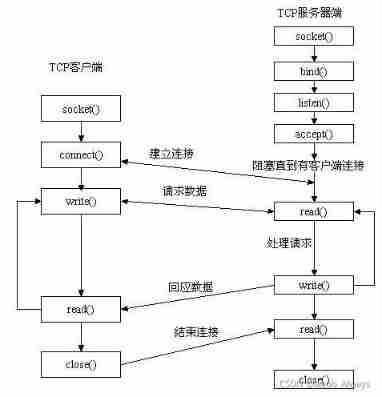
Socket communication principle
Apache ShenYu 入门

Use of three-level linkage plug-ins selected by provinces and cities
随机推荐
Network remote access using raspberry pie
GaussDB 如何统计用户sql的响应时间
A five-year technical Er, based on the real experience of these years, gives some suggestions to the fresh students
1-7snapshots and clones in VMWare
输出式阅读法:把学到的知识用起来
XSS attack
【上云精品】节能提效!加速纺织业“智造”转型
数组结构整理
CSRF attack
Ouverture de l'inscription | le troisième marathon des hackers de pagaie est arrivé comme prévu.
CSRF攻击
16 enterprise architecture strategies
Growth: how to think deeply and learn
Daily Mathematics Series 52: February 20
金仓数据库 KingbaseES 插件dbms_session
Shen Ying, China Academy of communications and communications: font open source protocol -- Introduction to ofl v1.1 and analysis of key points of compliance
MySQL synchronous data configuration and shell script implementation
June 24, 2022: golang multiple choice question, what does the following golang code output? A:1; B:3; C:4; D: Compilation failed. package main import ( “fmt“ ) func mai
2022年PMP项目管理考试敏捷知识点(2)
Get to know Prometheus