当前位置:网站首页>Go language source level debugger delve
Go language source level debugger delve
2022-07-01 16:21:00 【frank.】
Hello everyone , I am a frank.
01
Introduce
Delve It's a simple 、 Powerful and easy to use Go Language source level debugger , It's also Go Officially recommended debugger .
02
install
Delve Very simple installation , If readers use Go 1.16 Or later , You can use it directly go install install :
go install github.com/go-delve/delve/cmd/[email protected]
If readers use less than Go 1.16 Version of , But download it first Delve Source code , And then use go install install :
git clone https://github.com/go-delve/delve
cd delve
go install github.com/go-delve/delve/cmd/dlv
After installation , have access to go help install see dlv Detailed location of executable . I suggest readers to dlv Executable file , Configuration to PATH environment variable .
It should be noted that , If readers use macOS, You also need to install command line development tools :
xcode-select --install
To avoid every use of dlv All need authorization to use debugger, Readers are advised to open the developer mode :
sudo /usr/sbin/DevToolsSecurity -enable
03
practice
At the completion of Part 02 After all operations in , We use dlv version Check dlv Whether the executable program can be used .
We can use dlv Start a modal session with any available command of , The commonly used command is dlv debug, dlv exec and dlv test. Limited to space , In this paper we introduce dlv debug How to use .
Sample code :
package main

import (
    "fmt"
)

func main() {
    a := 1
    b := 2
    c := sum(a, b)
    fmt.Println(c)
}

func sum(a, b int) int {
    res :=  a + b
    return res
}
Read the above code example we will use to debug the session , It contains a main Function and a sum function ,main Function to define variables a And variables b, call sub function , And assign the returned result to the variable c, Finally, print the variable c Value .
Start a debugging session :
[[email protected] work]# dlv debug
Type 'help' for list of commands.
(dlv)
Read the code above , We use dlv debug Start a debugging session , Without any parameters ,Delve Compile and start debugging main package .
We can also specify a file name ,Delve Will compile the specified file main package , And start a debugging session .
[[email protected] work]# dlv debug main.go
Type 'help' for list of commands.
(dlv)
After the debugging session starts , We can use the debug command to debug the program .
list command :
dlv debug
Type 'help' for list of commands.
(dlv) list main.main
Showing /work/main.go:7 (PC: 0x49670a)
     2:
     3: import (
     4:  "fmt"
     5: )
     6:
     7: func main() {
     8:  a := 1
     9:  b := 2
    10:  c := sum(a, b)
    11:  fmt.Println(c)
    12: }
(dlv) list ./main.go:7
Showing /work/main.go:7 (PC: 0x49670a)
     2:
     3: import (
     4:  "fmt"
     5: )
     6:
     7: func main() {
     8:  a := 1
     9:  b := 2
    10:  c := sum(a, b)
    11:  fmt.Println(c)
    12: }
(dlv)
After the debugging session starts , We can use list The command lists the source code of the specified location , There are two ways , The first way is <package name>.<func name>, The second way is <file name>:<line number>.
break command :
dlv debug
Type 'help' for list of commands.
(dlv) break main.main
Breakpoint 1 set at 0x49670a for main.main() ./main.go:7
(dlv)
We can use break Command add breakpoint , and list command , Add the location of the breakpoint , You can also use the above two methods .
We can use breakpoints command , List all breakpoints , have access to clear Command deletes the specified breakpoint , have access to clearall Delete all assertions .
continue、next、step、stepout and print command :
 dlv debug
Type 'help' for list of commands.
(dlv) break main.main
Breakpoint 1 set at 0x49670a for main.main() ./main.go:7
(dlv) continue
> main.main() ./main.go:7 (hits goroutine(1):1 total:1) (PC: 0x49670a)
     2:
     3: import (
     4:  "fmt"
     5: )
     6:
=>   7: func main() {
     8:  a := 1
     9:  b := 2
    10:  c := sum(a, b)
    11:  fmt.Println(c)
    12: }
(dlv) next
> main.main() ./main.go:8 (PC: 0x496718)
     3: import (
     4:  "fmt"
     5: )
     6:
     7: func main() {
=>   8:  a := 1
     9:  b := 2
    10:  c := sum(a, b)
    11:  fmt.Println(c)
    12: }
    13:
(dlv) next
> main.main() ./main.go:9 (PC: 0x496721)
     4:  "fmt"
     5: )
     6:
     7: func main() {
     8:  a := 1
=>   9:  b := 2
    10:  c := sum(a, b)
    11:  fmt.Println(c)
    12: }
    13:
    14: func sum(a, b int) int {
(dlv) next
> main.main() ./main.go:10 (PC: 0x49672a)
     5: )
     6:
     7: func main() {
     8:  a := 1
     9:  b := 2
=>  10:  c := sum(a, b)
    11:  fmt.Println(c)
    12: }
    13:
    14: func sum(a, b int) int {
    15:  res :=  a + b
(dlv) print a
1
(dlv) print b
2
(dlv) step
> main.sum() ./main.go:14 (PC: 0x4967e0)
     9:  b := 2
    10:  c := sum(a, b)
    11:  fmt.Println(c)
    12: }
    13:
=>  14: func sum(a, b int) int {
    15:  res :=  a + b
    16:  return res
    17: }
(dlv) next
> main.sum() ./main.go:15 (PC: 0x496800)
    10:  c := sum(a, b)
    11:  fmt.Println(c)
    12: }
    13:
    14: func sum(a, b int) int {
=>  15:  res :=  a + b
    16:  return res
    17: }
(dlv) next
> main.sum() ./main.go:16 (PC: 0x49680f)
    11:  fmt.Println(c)
    12: }
    13:
    14: func sum(a, b int) int {
    15:  res :=  a + b
=>  16:  return res
    17: }
(dlv) next
> main.main() ./main.go:10 (PC: 0x496739)
Values returned:
 ~r0: 3

     5: )
     6:
     7: func main() {
     8:  a := 1
     9:  b := 2
=>  10:  c := sum(a, b)
    11:  fmt.Println(c)
    12: }
    13:
    14: func sum(a, b int) int {
    15:  res :=  a + b
(dlv) next
> main.main() ./main.go:11 (PC: 0x49673e)
     6:
     7: func main() {
     8:  a := 1
     9:  b := 2
    10:  c := sum(a, b)
=>  11:  fmt.Println(c)
    12: }
    13:
    14: func sum(a, b int) int {
    15:  res :=  a + b
    16:  return res
(dlv) print c
3
(dlv)
Read the code above , We use Delve After adding breakpoints , perform continue command , The program will execute to the breakpoint ; perform next command , The program continues to execute the next line of code ; perform step command , The program steps into the calling function ; perform stepout command , The program steps out to the calling position of the calling function ; perform print command , Print the value of the specified parameter .
Readers use the above commands , It can meet most debugging scenarios . For ease of understanding , The commands used in the above examples do not use the abbreviated form , In actual use , It will be more convenient to use abbreviated forms .
Abbreviation form :
- break(b)
- continue(c)
- next(n)
- step(s)
- stepout(so)
- print(p)
04
summary
In this article, we briefly introduce Go Language debugger Delve The basic way of use , Readers can put Delve Use up , Replace with print Debug the code in the form of printing .
About Delve Advanced features of , For example, debugging goroutines、 Attach the debugger to an existing process 、 Remote debugging and from VSCode Editor or Goland IDE Use Delve. Interested readers can refer to Delve Help document for .
Reference material :
- https://go.dev/doc/gdb
- https://github.com/go-delve/delve/tree/master/Documentation
边栏推荐
- 电脑屏幕变色了怎么调回来,电脑屏幕颜色怎么改
- Where should older test / development programmers go? Will it be abandoned by the times?
- Huawei issued hcsp-solution-5g security talent certification to help build 5g security talent ecosystem
- Golang爬虫框架初探
- 数据库系统原理与应用教程(004)—— MySQL 安装与配置:重置 MySQL 登录密码(windows 环境)
- Pico,是要拯救还是带偏消费级VR?
- 瑞典公布决定排除华为5G设备,但是华为已成功找到新出路
- Origin2018安装与使用(整理中)
- Analysis of PostgreSQL storage structure
- Authentication processing in interface testing framework
猜你喜欢
周少剑,很少见

2023 spring recruitment Internship - personal interview process and face-to-face experience sharing

China's intelligent transportation construction from the perspective of "one hour life circle" in Dawan District
Talking from mlperf: how to lead the next wave of AI accelerator

嵌入式开发:5个修订控制最佳实践
Stonedb is building blocks for domestic databases, and the integrated real-time HTAP database based on MySQL is officially open source!
Vscode find and replace the data of all files in a folder

搜索框和按钮缩放时会有缝隙的bug
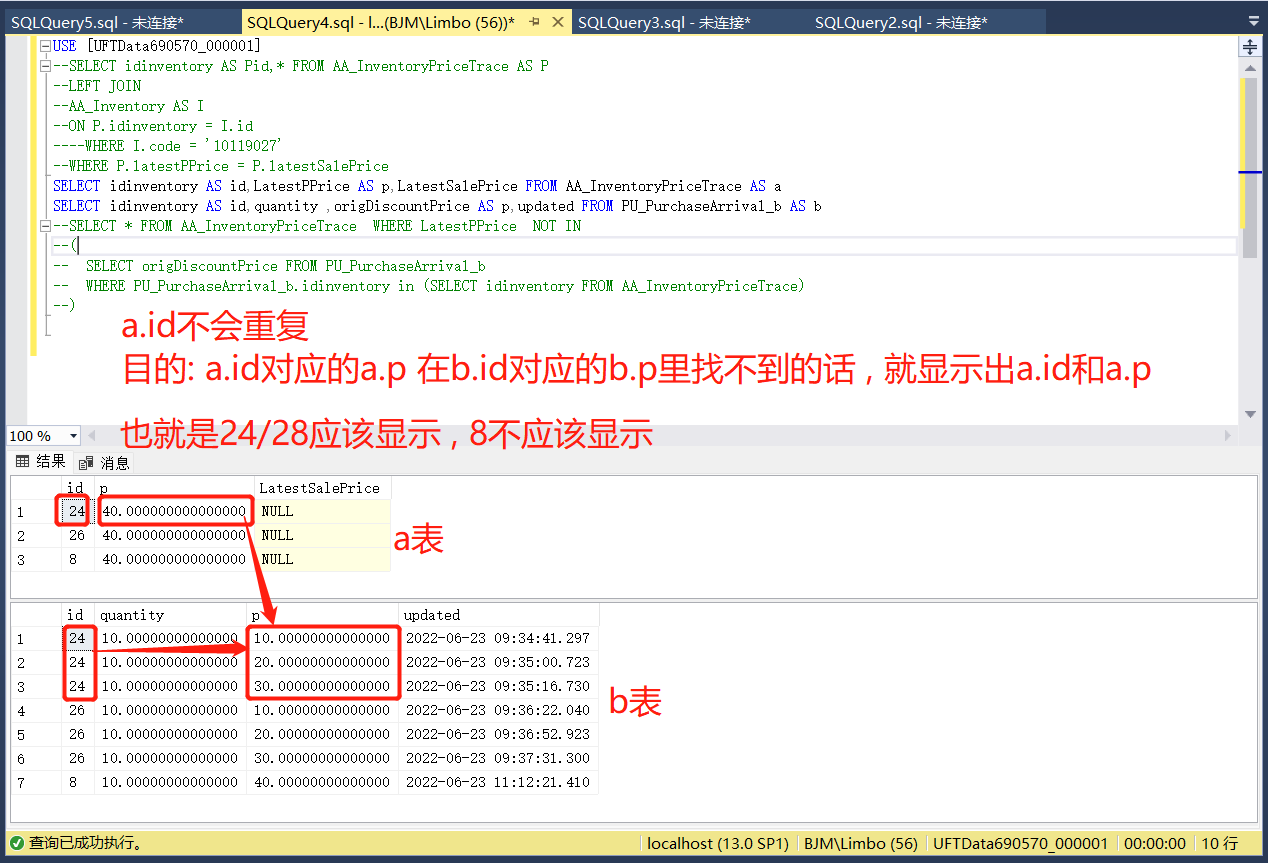
Sqlserver query: when a.id is the same as b.id, and the A.P corresponding to a.id cannot be found in the B.P corresponding to b.id, the a.id and A.P will be displayed

Principle of motion capture system
随机推荐
In the past six months, it has been invested by five "giants", and this intelligent driving "dark horse" is sought after by capital
How does win11 set user permissions? Win11 method of setting user permissions
Problèmes rencontrés dans le développement de la GI pour maintenir le rythme cardiaque en vie
数据库系统原理与应用教程(006)—— 编译安装 MySQL5.7(Linux 环境)
超视频时代,什么样的技术会成为底座?
【Hot100】20. 有效的括号
Malaysia's Star: Sun Yuchen is still adhering to the dream of digital economy in WTO MC12
Problems encountered in IM instant messaging development to maintain heartbeat
Principle of motion capture system
What is the digital transformation of manufacturing industry
ABAP call restful API
Can't global transactions be used when shardingjdbc is used in seate?
Do280 management application deployment - pod scheduling control
怎麼用MySQL語言進行行列裝置?
【SQL语句】请问这边为什么select出了两个上海,查询出了不同的count我想让他变成一个上海,count只显示一个总和
Sales management system of lightweight enterprises based on PHP
德国iF多项大奖加冕,这副耳机有多强?音珀GTW 270 Hybrid深度评测
[observation] where is the consulting going in the digital age? Thoughts and actions of softcom consulting
Golang爬虫框架初探
Win11如何设置用户权限?Win11设置用户权限的方法