当前位置:网站首页>【第019问 Unity中对SpherecastCommand的理解?】
【第019问 Unity中对SpherecastCommand的理解?】
2022-07-26 03:59:00 【valaki】
一、背景
游戏优化中会对物理中的射线检测进行优化,比如你会对多个玩家进行执行相同的Physics.SphereCast() 射线检测,大多数情况下,在研发的过程中可能会直接采取循环的方式,进行多次的Physics.SphereCast() 逻辑处理;这里我们可以用SpherecastCommand 替代,结合Job进行操作;
二、动画演示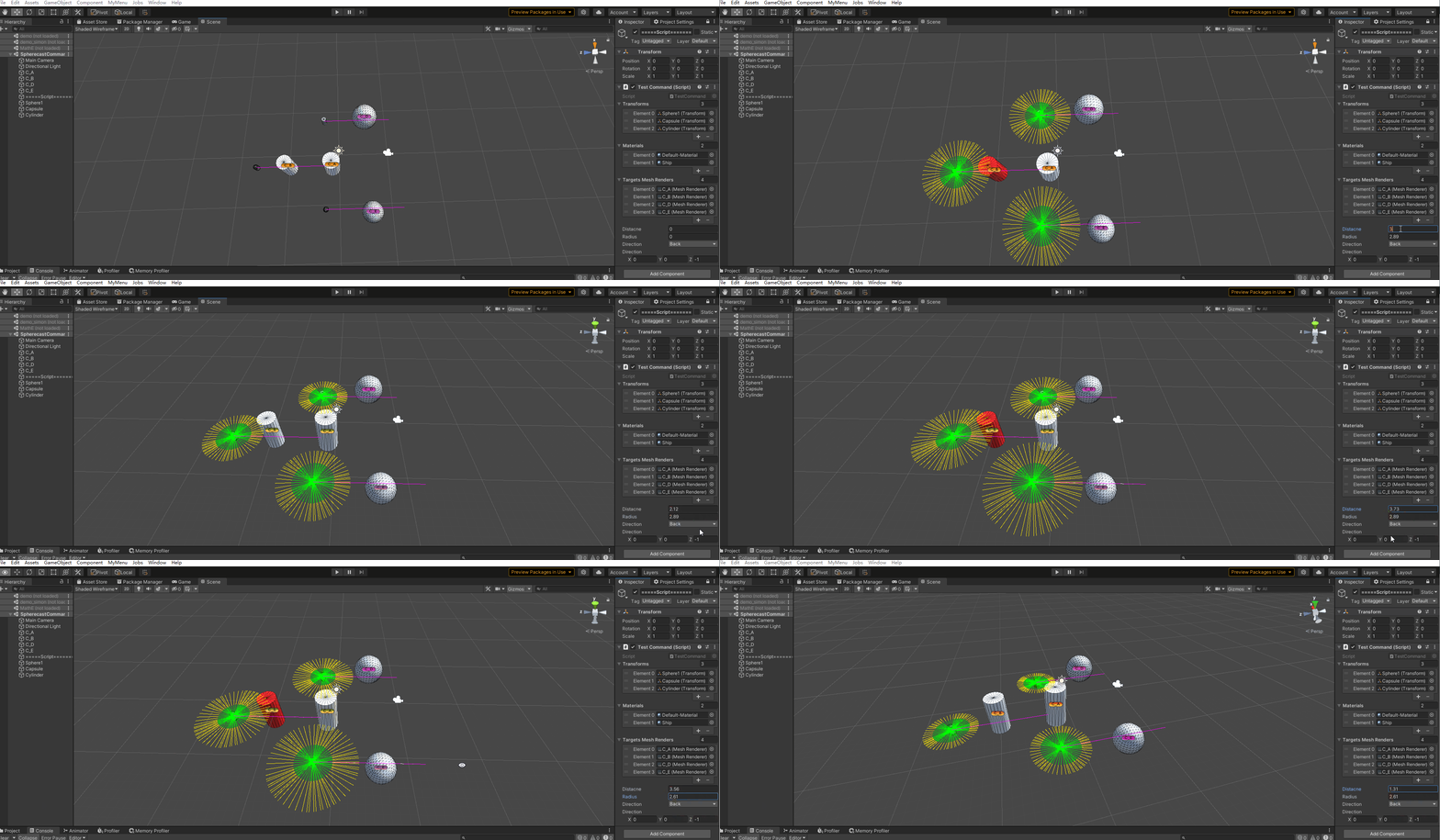
上文动画中有3个需要检测的对象,这里的对象根据实际情况可以增删;这里会根据实际调节的半径、检测距离、检测方向进行检测;不同的参数会检测出其对应的结果;其中红色表示该对象是被射线检测到的点;
从上面的动画中可以动态调节半径可以但绿色部分的动态变化,同理检测距离的调节也会可视化;
具体的逻辑可参考一下源码部分;代码里面有详细的逻辑注释。
三、源码
using System;
using System.Collections;
using System.Collections.Generic;
using System.Text.RegularExpressions;
using Unity.Collections;
using Unity.Mathematics;
using UnityEditor.Timeline;
using UnityEngine;


[ExecuteAlways]
public class TestCommand : MonoBehaviour
{

    public List<Transform> transforms;
    public List<Material> materials;
    public List<MeshRenderer> targetsMeshRenders;


    public enum Direction
    {

        Right,
        Left,
        Forward,
        Back,
    }


    public float distacne = 1;
    public float radius = 1;
    int count = 1;

    public Direction direction = Direction.Right;

    public Vector3 _direction = Vector3.right;

    // Update is called once per frame
    void Update()
    {

        //https://docs.unity3d.com/cn/2019.1/ScriptReference/SpherecastCommand.html 具体可以参考这里官方的说明

        count = transforms.Count;
        InitDirection();
        RestMaterials();
        //定义一个RaycastHit数组 用于存储RaycastHit的信息 这里count表示要检测的个数
        NativeArray<RaycastHit> raycastHits = new NativeArray<RaycastHit>(count, Allocator.TempJob);
        //定义SpherecastCommand数组 表示球体命令数组 也就是有多少个需要执行球体射线检测的命令
        NativeArray<SpherecastCommand>
            spherecastCommands = new NativeArray<SpherecastCommand>(count, Allocator.TempJob);

        //这里的循环表示有多少个对象需要执行球体射线检测 那么创建多少个球体射线检测的命令 这里只是把创建的命令存储起来,具体的执行在后面;
        for (int i = 0; i < count; i++)
        {

            CheckRadius(i);
            CheckDistance(i);
            CheckDirection(i);
            //创建球体射线投射指令
            /* * 投射的起始位置 * 投射的球体的半径【scene中的绿色可以看出】 * direction:检测的方向【scene中可以看出】 * distance:检测的距离 【scene中可以看出】 */
            spherecastCommands[i] =
                new SpherecastCommand(transforms[i].position, radius, transforms[i].rotation * _direction, distacne);
        }

        //https://docs.unity3d.com/cn/2019.1/ScriptReference/SpherecastCommand.ScheduleBatch.html

        //这里表示需要执行的球体批次投射命令 这里会返回一个job对象 并安排此处作业进入等待执行状态,
        var jobhandel = SpherecastCommand.ScheduleBatch(spherecastCommands, raycastHits, 1, default);
        //等待该批次执行完成
        jobhandel.Complete();


        for (int i = 0; i < raycastHits.Length; i++)
        {

            RaycastHit raycastHit = raycastHits[i];
            if (raycastHit.transform != null)
            {

                raycastHit.transform.GetComponent<MeshRenderer>().sharedMaterial = materials[1];
            }
        }

        //释放
        raycastHits.Dispose();
        //释放
        spherecastCommands.Dispose();
    }


    void InitDirection()
    {

        switch (direction)
        {

            case Direction.Back:
                _direction = Vector3.back;
                break;
            case Direction.Forward:
                _direction = Vector3.forward;
                break;

            case Direction.Left:
                _direction = Vector3.left;
                break;
            case Direction.Right:
                _direction = Vector3.right;
                break;
        }
    }


    /// <summary>
    /// 检测的方向
    /// </summary>
    /// <param name="index"></param>
    void CheckDirection(int index)
    {

        Debug.DrawLine(transforms[index].position,
            transforms[index].position + transforms[index].rotation * _direction * 15, Color.magenta);
    }

    /// <summary>
    /// 半径的检测范围
    /// </summary>
    /// <param name="index"></param>
    void CheckRadius(int index)
    {

        Vector3 pos = transforms[index].position;
        for (int i = 0; i < 360; i += 5)
        {

            float x = pos.x + math.cos(i) * radius;
            float z = pos.z + math.sin(i) * radius;

            Debug.DrawLine(pos, new Vector3(x, pos.y, z), Color.green);
        }
    }


    /// <summary>
    /// 距离检测 距离检测的起点是半径为起点,实际检测的距离=半径+距离
    /// </summary>
    /// <param name="index"></param>
    void CheckDistance(int index)
    {

        Vector3 pos = transforms[index].position;
        for (int i = 0; i < 360; i += 5)
        {

            float rx = math.cos(i) * radius;
            float ry = math.sin(i) * radius;

            float sx = pos.x + rx;
            float sz = pos.z + ry;

            float ex = sx + math.cos(i) * distacne;
            float ey = sz + math.sin(i) * distacne;

            Debug.DrawLine(new Vector3(sx, pos.y, sz), new Vector3(ex, pos.y, ey), Color.yellow);
        }
    }


    /// <summary>
    /// 重置Materail
    /// </summary>
    void RestMaterials()
    {

        foreach (var tmr in targetsMeshRenders)
        {

            tmr.sharedMaterial = materials[0];
        }
    }
}
四、结语
辣椒好像吃多了有点上火-【valaki】
边栏推荐
- How to use graffiti magic color product development kit
- Dracoo master
- JS upload avatar (you can understand it after reading it, trust me)
- [Reading Notes - > data analysis] Introduction to BDA textbook data analysis
- 【单片机仿真项目】外部中断0和1控制两位数码管进行计数
- Navicat connects to MySQL database on Cloud Server
- php 实现从1累加到100的算法
- Asemi rectifier bridge gbu1510 parameters, gbu1510 specifications, gbu1510 package
- Dat of deep learning
- Save the image with gaussdb (for redis), and the recommended business can easily reduce the cost by 60%
猜你喜欢

redux
Realization of online shopping mall system based on JSP

Matlab paper illustration drawing template issue 39 - stairs

UFS Clk Gate介绍

【Unity3d Shader】角色投影与倒影

Dracoo Master天龙卡牌大师

What is the problem of the time series database that has been developed for 5 years?

安装VMware报错failed to install the hcmon driver

Opencv learning notes -- Hough transform

Wechat applet to realize music player (4) (use pubsubjs to realize inter page communication)
随机推荐
[digital ic/fpga] Hot unique code detection
5年1.4W倍,NFT OG 的封神之路|Web3专栏
[in depth study of 4g/5g/6g topic-42]: urllc-13 - in depth interpretation of 3GPP urllc related protocols, specifications and technical principles -7-low delay technology-1-subcarrier spacing expansio
Tactile intelligent sharing-rk3568 application in scenic spot navigation robot
Three ways of redis cluster
1311_硬件设计_ICT概念、应用以及优缺点学习小结
waf详解
Realization of online shopping mall system based on JSP
CPU and GPU are out of date, and the era of NPU and APU begins
如何构建面向海量数据、高实时要求的企业级OLAP数据引擎?
Basic line chart: the most intuitive presentation of data trends and changes
[深入研究4G/5G/6G专题-42]: URLLC-13-《3GPP URLLC相关协议、规范、技术原理深度解读》-7-低延时技术-1-子载波间隔扩展
UFS Clk Gate介绍
Analysis on the infectious problem of open source license
Save the image with gaussdb (for redis), and the recommended business can easily reduce the cost by 60%
Connect external MySQL databases in istio Service Grid
Can't the container run? The Internet doesn't have to carry the blame
oracle 11g “密码延迟验证”特性
Moco V2: further upgrade of Moco series
基于JSP实现网上商城系统