当前位置:网站首页>Switching routing (VLAN) experiment
Switching routing (VLAN) experiment
2022-06-30 18:07:00 【Kenneth~ Xiao Xiao】

step 1: analysis
1、 It can be seen from the picture that pc1 and pc3 The interface is access Interface , And divided into VLAN2 in , Given a network segment 192.168.1.0/24, Router r1 Set sub interface management pc1 and pc3, And set... For the sub interface dhcp send ip Automatic access to
2、pc2、4、5、6 In the same network segment , among pc2 Divide VLAN3,pc4、5 Divide VLAN4,pc6 Divide vlan5, Use hybrid mode to configure pc With the switch VLAN
3、pc2 The interface connecting the switch allows VLAN3 Up ,VLAN3、4、5 Peel off the label and come down
4、pc4 The interface connecting the switch allows VLAN4 Up ,VLAN3、4 Peel the label off
5、pc5 The interface connecting the switch allows VLAN4 Up ,VLAN3、4 Peel the label off
6、pc6 The interface connecting the switch allows VLAN5 Up ,VLAN3、5 Peel the label off
7、sw1 and sw2 Configuration between trunk main rd ,sw2 and sw3 Mixed trunk roads are arranged between
8、r1 and sw1 You can put pc2、4、5、6 as VLAN1, Therefore, mixed trunk roads are provided
step 2: Build simulation diagram

step 3: Create... On the switch VLAN, And switch the interface to VLAN
lsw1:
system-view
[Huawei]sys lsw1
[lsw1]vlan batch 2 to 5
[lsw1]int g0/0/1
[lsw1-GigabitEthernet0/0/1]port hybrid tagged vlan 2
[lsw1-GigabitEthernet0/0/1]port hybrid untagged vlan 3 to 5
[lsw1-GigabitEthernet0/0/1]int g0/0/2
[lsw1-GigabitEthernet0/0/2]port link-type access
[lsw1-GigabitEthernet0/0/2]port default vlan 2
[lsw1]int g0/0/3
[lsw1-GigabitEthernet0/0/3]port hybrid pvid vlan 3
[lsw1-GigabitEthernet0/0/3]port hybrid untagged vlan 3 to 5
[lsw1]int g0/0/4
[lsw1-GigabitEthernet0/0/4]port link-type trunk
[lsw1-GigabitEthernet0/0/4]port trunk allow-pass vlan 2 to 5

lsw2:
system-view
[Huawei]sysname lsw2
[lsw2]vlan batch 2 to 5
[lsw2]int g0/0/1
[lsw2-GigabitEthernet0/0/1]port hybrid tagged vlan 2 to 5
[lsw2-GigabitEthernet0/0/1]int g0/0/2
[lsw2-GigabitEthernet0/0/2]port link-type access
[lsw2-GigabitEthernet0/0/2]port default vlan 2
[lsw2-GigabitEthernet0/0/2]int g0/0/3
[lsw2-GigabitEthernet0/0/3]port hybrid pvid vlan 4
[lsw2-GigabitEthernet0/0/3]port hybrid untagged vlan 3 4
[lsw2-GigabitEthernet0/0/3]int g0/0/4
[lsw2-GigabitEthernet0/0/4]port hybrid tagged vlan 2 to 5

lsw3:
[Huawei]sysname lsw3
[lsw3]vlan batch 2 to 5
[lsw3]int g0/0/1
[lsw3-GigabitEthernet0/0/1]port hybrid tagged vlan 2 to 5
[lsw3-GigabitEthernet0/0/1]int g0/0/2
[lsw3-GigabitEthernet0/0/2]port hybrid pvid vlan 4
[lsw3-GigabitEthernet0/0/2]port hybrid untagged vlan 3 4
[lsw3-GigabitEthernet0/0/2]int g0/0/3
[lsw3-GigabitEthernet0/0/3]port hybrid pvid vlan 5
[lsw3-GigabitEthernet0/0/3]port hybrid untagged vlan 3 5

step 4: Configure router r1, And configuration dhcp service
[Huawei]sys
[Huawei]sys r1
[r1]int g0/0/0
[r1-GigabitEthernet0/0/0]ip address 192.168.1.1 24
[r1-GigabitEthernet0/0/0]int g0/0/0.1
[r1-GigabitEthernet0/0/0.1]dot1q termination vid 2
[r1-GigabitEthernet0/0/0.1]ip address 192.168.2.1 24
[r1-GigabitEthernet0/0/0.1]arp broadcast enable
[r1]dhcp enable
[r1]ip pool a
[r1-ip-pool-a]network 192.168.1.0 mask 24
[r1-ip-pool-a]gateway-list 192.168.1.1
[r1-ip-pool-a]dns-list 114.114.114.114
[r1]ip pool b
[r1-ip-pool-b]network 192.168.2.0 mask 24
[r1-ip-pool-b]gateway-list 192.168.2.1
[r1-ip-pool-b]dns-list 114.114.114.114
[r1-ip-pool-b]q
[r1]int g0/0/0
[r1-GigabitEthernet0/0/0]dhcp select global
[r1-GigabitEthernet0/0/0]int g0/0/0.1
[r1-GigabitEthernet0/0/0.1]dhcp select global
step 5:pc End automatic access ip Address


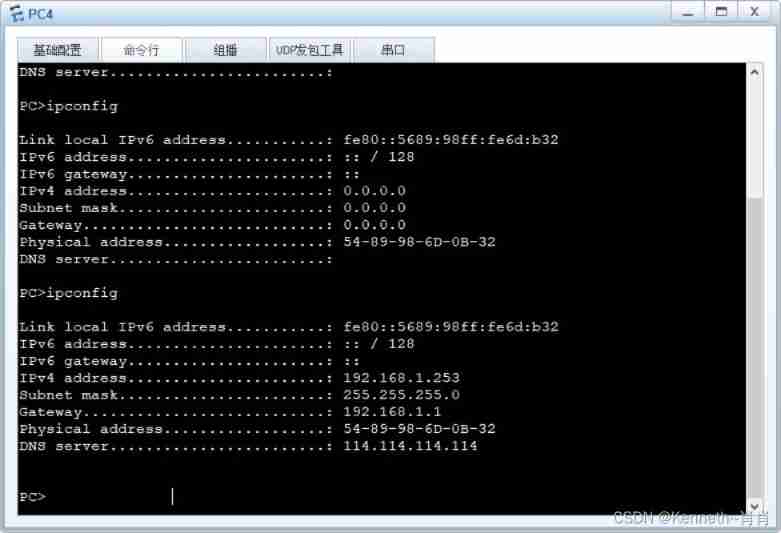


step 6: test
1、pc1 You can visit pc2、3、4、5、6


2、pc2 You can visit pc4、5、6

3、pc4 You can visit pc5, Cannot access pc6

4、pc5 Cannot access pc6

边栏推荐
- 现在玩期货需要注意什么,在哪里开户比较安全,我第一次接触
- 联想“双平台”运维解决方案 助力智慧医疗行业智慧管理能力全面提升
- Do fresh students get a job or choose a job after graduation?
- Importing alicloud ECS locally to solve deployment problems
- Deep understanding of JVM (I) - memory structure (I)
- Redis (VII) - sentry
- Login box tricks
- Share 5 commonly used feature selection methods, and you must see them when you get started with machine learning!!!
- MySQL reports that the column timestamp field cannot be null
- Six pictures show you why TCP has three handshakes?
猜你喜欢

Six pictures show you why TCP has three handshakes?

Exploration and practice of "flow batch integration" in JD

Tubes响应性数据系统的设计与原理

Daily interview 1 question - how to prevent CDN protection from being bypassed
![[零基础学IoT Pwn] 环境搭建](/img/3b/a0689a1570fcc40bb9a5a4e9cdc63c.png)
[零基础学IoT Pwn] 环境搭建
![leetcode:787. The cheapest transfer flight in station K [k-step shortest path + DFS memory + defaultdict (dict)]](/img/28/78e2961877776ca3dfcba5ee7e35d2.png)
leetcode:787. The cheapest transfer flight in station K [k-step shortest path + DFS memory + defaultdict (dict)]

TFTP download kernel, NFS mount file system

基于eNSP的校园网设计的仿真模拟

元宇宙带来的游戏变革会是怎样的?

Share 5 commonly used feature selection methods, and you must see them when you get started with machine learning!!!
随机推荐
Synchronized summary
News management system based on SSM
New research of HKUST & MsrA: about image to image conversion, finishing is all you need
Hyper-V: enable SR-IOV in virtual network
Zero foundation can also be an apple blockbuster! This free tool can help you render, make special effects and show silky slides
Vue3 reactive database
Redis (I) - data type
4 years of working experience, and you can't tell the five communication modes between multithreads. Can you believe it?
[binary tree] preorder traversal to construct binary search tree
Booking UI effect implemented by svg
Splitting. JS text title slow loading JS effect
4年工作经验,多线程间的5种通信方式都说不出来,你敢信?
[PROJECT] Xiaomao school (IX)
【网易云信】播放demo构建:无法将参数 1 从“AsyncModalRunner *”转换为“std::nullptr_t”**
Redis (IX) - enterprise level solution (II)
Fragmentary knowledge points of MySQL
Deep understanding of JVM (II) - memory structure (II)
TFTP下载kernel,nfs挂载文件系统
Send the injured baby for emergency medical treatment. Didi's driver ran five red lights in a row
【剑指Offer】53 - I. 在排序数组中查找数字 I