当前位置:网站首页>Camera-CreateCaptureSession
Camera-CreateCaptureSession
2022-06-26 03:46:00 【Cmatrix204】
Camera CaptureSession is a operation to configure the camera device's internal pipelines and allocating memory buffers to sending images to the desired targets.
A configured capture session for a cameraDevice is used for capturing images from the camera or reprocessing images captured from the camera in the same session previously and providing a set of target output surfaces for reprocessable capture session, and once created, the session is active until a new session is created by the camera device, or the camera device is closed.
Part One: createCaptureSession by List<Surface>
camera createCaptureSession by List<Surface> will produce potentially risk to delaying camera startup. For example, if the preview Surface is obtained from SurfaceView, the SurfaceView will only be ready after the UI layout is done, so this opreation will take some time for waiting preview surface to be ready.
Below is the struct of the createCaptureSession by List<Surface> and releated API.


framework/base/core/java/android/hardware/camera2/impl/CameraDeviceImpl.java

Part Two: createCaptureSession by List<OutputConfiguration>
To speed up camera startup time, the users can configure the CameraCaptureSession with the eventual preview size via OutputConfiguration and defer the preview output comfiguration until the Surface is ready. After the CameraCaptureSession is created successfully with this deferred output and other normal outputs, the application can start submitting requests as long as the do not include deferred out Surfaces. Once a deferred Surface is ready, the application can add the Surface to the Surface to the deferred output configuration with the addSurface method, and then update the deferred output configuration via this method, before it can submit caoture requests with this output target.
finalizeOutputConfigurations- This function can also be called in case where multiple surfaces share the same OutputConfiguration, and one of the surfaces becomes available after the CameraCaptureSession is created. In that case, the user must first create the outputConfiguration with the available Surface before creating the CameraCaptureSession. After the CameraCaptureSession is created, and once the extra Surface becomes available, the users must then call add Surface before finalizing the configuration with this method, and attention again, if the provided OutputConfigurations are unchanged from session creation, this function call has no effect. This function must only be called once fir a particular output configuration.
Below is the structure of the createCaptureSession by List<OutputConfiguration> and releated API.
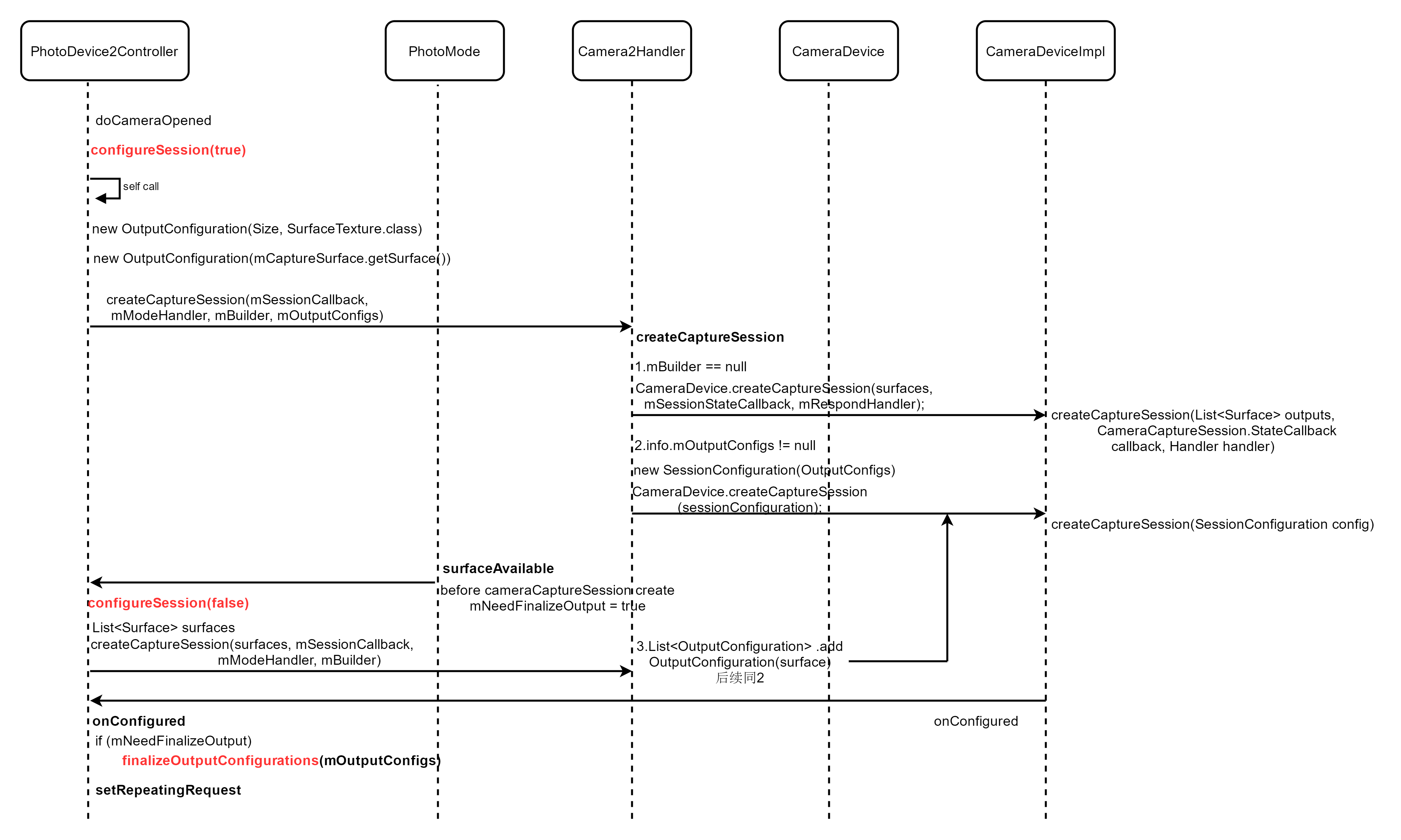


Attention: Use this method to quickly create cameraCaptureSession may be produce some errors when outputconfiguration that is different from the surface has been changed as different size and formats.
Below has some error information to check and stay cautiously.


Part Three: createCaptureSession by createCaptureSessionByOutputConfigurations
This method create a new camera capture session by providing the target output set of Surfaces and its correspending surface configuration to the camera device.
Below is the releated API and function invoke.


边栏推荐
- You cannot call Glide. get() in registerComponents(), use the provided Glide instance instead
- 2020 summary: industrial software development under Internet thinking
- Classic model alexnet
- JS array array JSON de duplication
- Popupwindow utility class
- 智能制造学习记录片和书籍
- Classic model - Nin & googlenet
- Request object, send request
- (15)Blender源码分析之闪屏窗口显示菜单功能
- 【Appium踩坑】io.appium.uiautomator2.common.exceptions.InvalidArgumentException: ‘capabilities‘ are mand
猜你喜欢

Upload file / text / picture, box shadow

String到底能不能改变?

Solve the problem that the uniapp plug-in Robin editor reports an error when setting the font color and background color

Run multiple main functions in the clion project
Xgboost, lightgbm, catboost -- try to stand on the shoulders of giants

Cloud Computing Foundation -0

Multimedia elements, audio, video

【好书集锦】从技术到产品

Kotlin quick start

【LOJ#6718】九个太阳「弱」化版(循环卷积,任意模数NTT)
随机推荐
ABP framework Practice Series (II) - Introduction to domain layer
Uni app Baidu cloud realizes OCR ID card recognition
Contains an object field at offset position
指南针app是正规的吗?到底安不安全
Kotlin quick start
Classic model alexnet
Some mobile phones open USB debugging, and the solution to installation failure
String到底能不能改变?
Prism framework project application - Navigation
用eclipse连mysql数据库出错然后出现图中的话是咋回事呀
Open Camera异常分析(一)
Kotlin uses viewpager2+fragment+bottomnavigationview to implement the style of the switching module of the bottom menu bar.
优化——多目标规划
力扣79单词搜索
智能制造学习记录片和书籍
go time包:秒、毫秒、纳秒时间戳输出
How to prepare for a moving wedding
Tupu software is the digital twin of offshore wind power, striving to be the first
MySQL advanced part (IV: locking mechanism and SQL optimization)
Is it safe for individuals to buy stocks with flush software? How to buy stocks