当前位置:网站首页>QT learning 21 standard dialog box in QT (Part 2)
QT learning 21 standard dialog box in QT (Part 2)
2022-07-03 13:58:00 【A little black sauce】
Qt Study 21 Qt Standard dialog boxes in ( Next )
Font dialog
- Qt Provided in predefined Font dialog box QFontDialog class
- QFontDialog Class is used to provide Dialog box part for selecting font
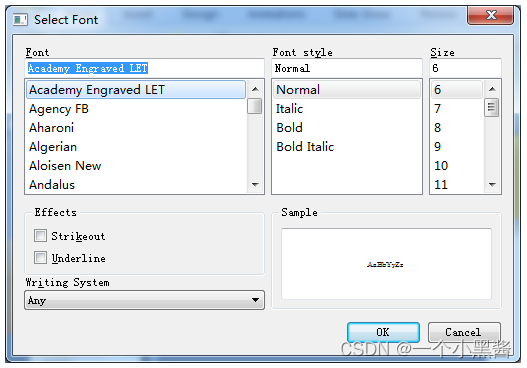
- How to use the font dialog
//  Construct font dialog object
QFontDialog dlg(this);
//  Set the relevant properties of the font dialog
dlg.setWindowTitle("Font Editor");
dlg.setCurrentFont(QFont("Courier New", 10, QFont::Bold));	//  Initial font
if (dlg.exec() == QFontDialog::Accepted) {

    qDebug() << dlg.selectedFont();
}
- QFontDialog Utility functions in
- QFontDialog::getFont
Progress dialog
- Qt Provided in predefined Progress dialog box QProgressDialog class
- QProgressDialog Class used Show progress information
- QProgressDialog Class used Occasions that require users to wait
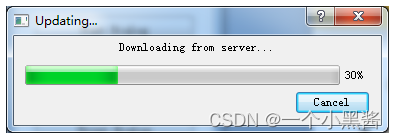
- How to use the progress dialog
//  Construction progress dialog object
QProgressDialog dlg(this);
//  Set the relevant properties of the progress dialog
dlg.setWindowTitle("Updating...");
dlg.setLabelText("Downloading from server...");
dlg.setMinimum(0);		//  Set the minimum progress value
dlg.setMaximum(1000);	//  Set the maximum progress value
dlg.exec();
Code experiments
#ifndef WIDGET_H
#define WIDGET_H

#include <QWidget>
#include <QPushButton>

class Widget : public QWidget
{

    Q_OBJECT
private:
    QPushButton FontDialogBtn;
    QPushButton ProgressDialogBtn;
private slots:
    void FontDialogBtn_Clicked();
    void ProgressDialogBtn_Clicked();
public:
    Widget(QWidget *parent = 0);
    ~Widget();
};

#endif // WIDGET_H
#include "Widget.h"
#include <QFontDialog>
#include <QProgressDialog>
#include <QDebug>

Widget::Widget(QWidget *parent)
    : QWidget(parent), FontDialogBtn(this), ProgressDialogBtn(this)
{

    FontDialogBtn.setText("Font Dialog");
    FontDialogBtn.move(20, 20);
    FontDialogBtn.resize(160, 30);

    ProgressDialogBtn.setText("Progress Dialog");
    ProgressDialogBtn.move(20, 70);
    ProgressDialogBtn.resize(160, 30);

    resize(200, 120);
    setFixedSize(200, 120);

    connect(&FontDialogBtn, SIGNAL(clicked()), this, SLOT(FontDialogBtn_Clicked()));
    connect(&ProgressDialogBtn, SIGNAL(clicked()), this, SLOT(ProgressDialogBtn_Clicked()));
}

Widget::~Widget()
{


}

void Widget::FontDialogBtn_Clicked()
{

    QFontDialog dlg(this);

    dlg.setWindowTitle("Font Dialog Test");
    dlg.setCurrentFont(QFont("Courier New", 10, QFont::Normal));
    if (dlg.exec() == QFontDialog::Accepted) {

        qDebug() << dlg.selectedFont();
    }
    //  Simple usage
    bool ok;
    QFont font= QFont("Courier New", 10, QFont::Normal);
    font = QFontDialog::getFont(&ok, font, this);
    qDebug() << font;
}

void Widget::ProgressDialogBtn_Clicked()
{

    QProgressDialog dlg(this);

    dlg.setWindowTitle("Updating...");
    dlg.setLabelText("Downloading update from server...");
    dlg.setMinimum(0);
    dlg.setMaximum(100);
    dlg.setValue(35);
    // create a new thread
    dlg.exec();
}
#include "Widget.h"
#include <QApplication>

int main(int argc, char *argv[])
{

    QApplication a(argc, argv);
    Widget w;
    w.show();

    return a.exec();
}
Summary
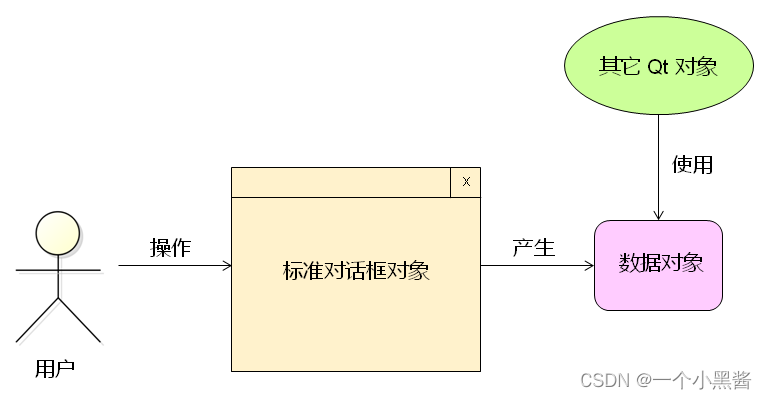
- Qt In the standard dialog box Design patterns
- GUI Interface Component generation Data objects
- Business logic Other objects in use Data objects
- GUI Interface And Business logic adopt Data objects Connect
边栏推荐
- Use docker to build sqli lab environment and upload labs environment, and the operation steps are provided with screenshots.
- GoLand 2021.2 configure go (go1.17.6)
- Shell timing script, starting from 0, CSV format data is regularly imported into PostgreSQL database shell script example
- Go language web development series 26: Gin framework: demonstrates the execution sequence of code when there are multiple middleware
- Qt学习22 布局管理器(一)
- 3D vision - 2 Introduction to pose estimation - openpose includes installation, compilation and use (single frame, real-time video)
- Go 1.16.4: purpose of go mod tidy
- [combinatorics] permutation and combination (two counting principles, examples of set permutation | examples of set permutation and circle permutation)
- Go: send the get request and parse the return JSON (go1.16.4)
- 可编程逻辑器件软件测试
猜你喜欢

Go language web development series 28: solve cross domain access of CORS with gin contrib / CORS
 [email protected]纳米粒子"/>
金属有机骨架MIL-88负载阿霉素DOX|叶酸修饰UiO-66-NH2负载阿霉素[email protected]纳米粒子
Go language web development series 25: Gin framework: using MD5 to verify the signature for the interface station
Cross linked cyclodextrin metal organic framework loaded methotrexate slow-release particles | metal organic porous material uio-66 loaded with flavonoid glycosides | Qiyue

Multi person collaborative data annotation based on Baidu brain easydata from scratch
Using registered classes to realize specific type matching function template
NFT新的契机,多媒体NFT聚合平台OKALEIDO即将上线

GoLand 2021.1.1: configure the multi line display of the tab of the open file

Spring cup eight school league
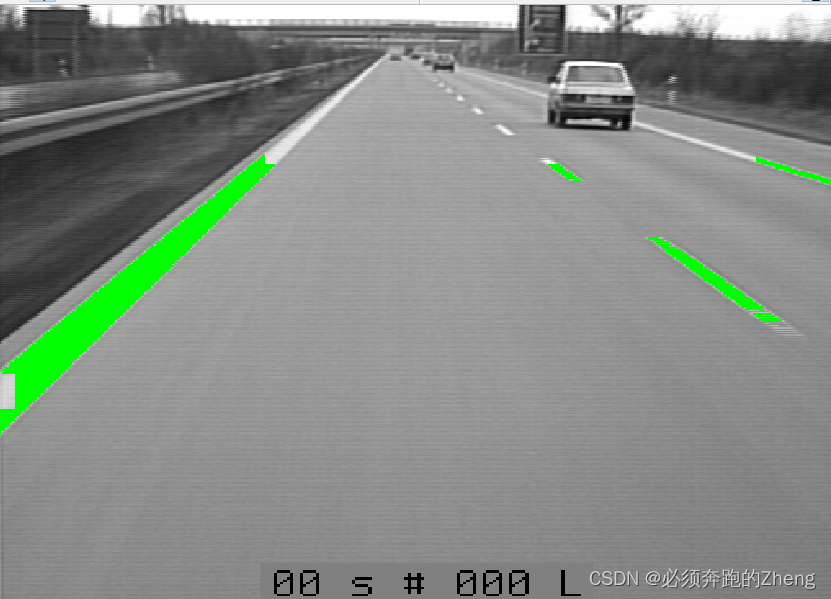
HALCON联合C#检测表面缺陷——HALCON例程autobahn
随机推荐
[technology development-24]: characteristics of existing IOT communication technology
Uniapp skills - dom display and hiding
Qt学习25 布局管理器(四)
从零开始的基于百度大脑EasyData的多人协同数据标注
IBEM 数学公式检测数据集
GoLand 2021.2 configure go (go1.17.6)
Golang — 命令行工具cobra
如何使用lxml判断网站公告是否更新
Implementation of Muduo asynchronous logging
There is nothing new under the sun. Can the meta universe go higher?
静态链表(数组的下标代替指针)
Richview trvstyle liststyle list style (bullet number)
Uniapp skills - scrolling components -1
The latest BSC can pay dividends. Any B usdt Shib eth dividend destruction marketing can
[acnoi2022] guess numbers
Golang — template
金属有机骨架(MOFs)抗肿瘤药载体|PCN-223装载甲硝唑|UiO-66包载盐酸环丙沙星([email protected])
Go language web development series 29: Gin framework uses gin contrib / sessions library to manage sessions (based on cookies)
Qt学习18 登录对话框实例分析
Field problems in MySQL