当前位置:网站首页>Mastering the cypress command line options is the basis for truly mastering cypress
Mastering the cypress command line options is the basis for truly mastering cypress
2022-07-03 13:44:00 【Open source optimization test】

The essence is recommended :20 Selected cutting-edge theories 、 Technology and experience summary album
master Cypress Command line options , Is really master Cypress The basis of , If you are right about Cypress Command and command options are not well understood , Then you are not enough to use Cypress In enterprise practice, it is very good to produce .
Talk nonsense , Go straight up Cypress Command options table :
Command format cypress run [Option]
| Option( Options ) | Description( describe ) |
|---|---|
--browser, -b | Run with the specified browser name or browser path Cypress |
--ci-build-id | Assign a unique identifier to the current run , To enable grouping or parallelization |
--config, -c | Specify the configuration |
--config-file, -C | Specify profile |
--env, -e | Specify environment variables |
--group | Group the currently running test records |
--headed | Specify browser GUI mode |
--headless | Specify browser headless mode |
--help, -h | Display command help |
--key, -k | Specify secret key |
--no-exit | After performing the test , Do not exit Cypress |
--parallel | Run in parallel through multiple machines |
--port,-p | Appoint Cypress Start port |
--project, -P | Appoint Cypress Project at startup |
--record | Whether the test is recorded |
--reporter, -r | Specify whether to generate Mocha The report |
--reporter-options, -o | Specify generation Mocha Report options |
--spec, -s | Specify the file to run |
--tag, -t | Use tag Identification test |
Cypress example !!!
start-up chrome Browser running Cypress, The order is as follows :
cypress run --browser chrome
or
cypress run -b chrome
or
cypress run --browser /usr/bin/chrome
or
cypress run -b /usr/bin/chrome
notes : The browser can be chrome, chromium, edge, electron, firefox
Specify some configuration of the runtime , For example, specify page loading timeout, File monitoring switch configuration :
cypress run --config pageLoadTimeout=100000,watchForFileChanges=false
notes : Multiple variables are separated by Western commas
Load the specified configuration file to start cypress, Configuration files are generally stored json String text file :
cypress run --config-file tests/cypress-config.json
The others don't give examples one by one , Here are a few key things
1. Cypress configuration option , This is a little bit more , Look directly at the official website documents :
https://docs.cypress.io/guides/references/configuration.html#Intelligent-Code-Completion
2. environment variable , Quite a lot, too , Look directly at the official documents :
https://docs.cypress.io/guides/guides/environment-variables.html#Option-3-CYPRESS
Add me to wechat group to communicate together , Indicate the : The group of , Join wechat group

Last article :Cypress Must understand the asynchronous and synchronous command mechanism
Selected articles
Blockbuster released - Automation framework foundation guide pdf
Bitter leaf observation : Eleven trends in software testing industry
Before automated testing , You should know 10 Piece of advice
Welcome to leave a message at the bottom of the article 、 Discuss 、 communication
边栏推荐
- Logseq 评测:优点、缺点、评价、学习教程
- Red hat satellite 6: better management of servers and clouds
- Kivy tutorial how to automatically load kV files
- IBEM mathematical formula detection data set
- 道路建设问题
- Servlet
- Students who do not understand the code can also send their own token, which is easy to learn BSC
- Logseq evaluation: advantages, disadvantages, evaluation, learning tutorial
- mysql更新时条件为一查询
- Swiftui development experience: the five most powerful principles that a programmer needs to master
猜你喜欢

JSP and filter
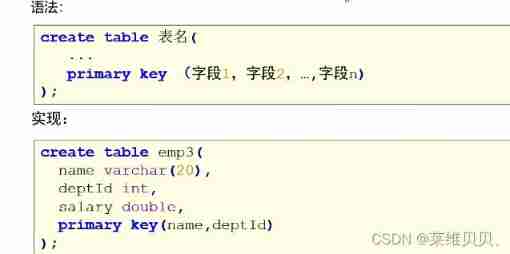
MySQL constraints

Bidirectional linked list (we only need to pay attention to insert and delete functions)

Multi table query of MySQL - multi table relationship and related exercises

Kivy tutorial how to automatically load kV files

Libuv库 - 设计概述(中文版)
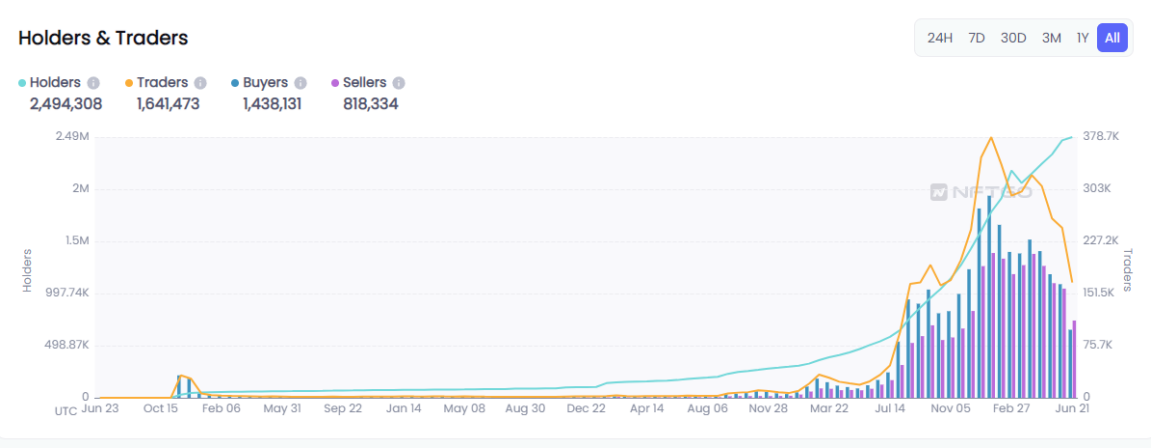
NFT new opportunity, multimedia NFT aggregation platform okaleido will be launched soon

User and group command exercises

AI 考高数得分 81,网友:AI 模型也免不了“内卷”!
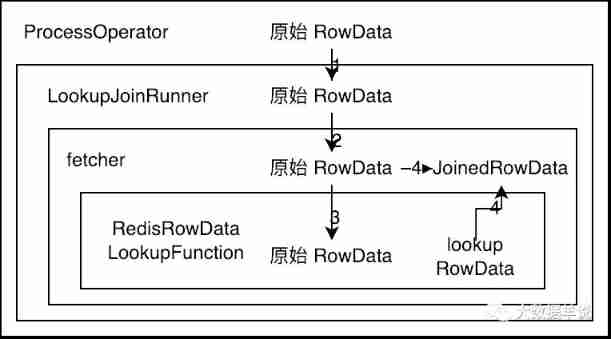
Flink SQL knows why (XV): changed the source code and realized a batch lookup join (with source code attached)
随机推荐
Flutter动态化 | Fair 2.5.0 新版本特性
[how to earn a million passive income]
Kivy教程之 盒子布局 BoxLayout将子项排列在垂直或水平框中(教程含源码)
MyCms 自媒体商城 v3.4.1 发布,使用手册更新
Flink SQL knows why (XV): changed the source code and realized a batch lookup join (with source code attached)
Typeerror resolved: argument 'parser' has incorrect type (expected lxml.etree.\u baseparser, got type)
Disruptor -- a high concurrency and high performance queue framework for processing tens of millions of levels
JS 将伪数组转换成数组
Task6: using transformer for emotion analysis
Comprehensive evaluation of double chain notes remnote: fast input, PDF reading, interval repetition / memory
Red Hat Satellite 6:更好地管理服务器和云
使用tensorflow进行完整的DNN深度神经网络CNN训练完成图片识别案例
json序列化时案例总结
挡不住了,国产芯片再度突进,部分环节已进到4nm
Sequence table (implemented in C language)
Kivy tutorial how to automatically load kV files
Replace the GPU card number when pytorch loads the historical model, map_ Location settings
R语言使用data函数获取当前R环境可用的示例数据集:获取datasets包中的所有示例数据集、获取所有包的数据集、获取特定包的数据集
Spark practice 1: build spark operation environment in single node local mode
Introduction to the implementation principle of rxjs observable filter operator