当前位置:网站首页>pyQt 中 QMenu 响应
pyQt 中 QMenu 响应
2022-06-24 06:57:00 【Qredsun】
需求场景:
在qt界面中,需要给菜单添加响应动作。
实现:
查看了QMenu 对象源码,没有找到类似QPushButton.clicked()的信号函数。只发现了QMenu.triggered() 函数,已经常用的QMenu.addAction()。就是说,只能通过triggered触发出菜单列表,在菜单列表中添加QAction(),使用QAction()关联对应的槽函数,实现操作响应。
具体实现:
- qt界面中的控件关联关系:
# UI 关联
menuBar = QtWidgets.QMenuBar() # 菜单栏
menuBar.setGeometry(QtCore.QRect(0, 0, 1245, 23))
menuBar.setObjectName("menuBar")

menu = QtWidgets.QMenu() # 菜单按钮
menu.setObjectName("menu")
menu_check = QtWidgets.QMenu(menuBar)
menu_check.setObjectName("menu_check")

actionSavePicture = QtWidgets.QAction() # 动作响应,修改存放路径
actionSavePicture.setObjectName("actionSavePicture")

menu.addAction(actionSavePicture) # 菜单按钮添加动作
- 后端响应代码中的信号槽关联
actionSavePicture.triggered.connect(changeImgSavePath)

def changeImgSavePath():
    # 获取目录路径
    save_path = QFileDialog.getExistingDirectory(None, caption='选择截图存放目录')
    if save_path:
        img_save_path = save_path
        cam_conf = CameraConfig()
        cam_conf.img_save_path = save_path
        cam_conf._update_cfg_file()
        QMessageBox.about(None, '提示', f'截图存放目录变更为:{
      save_path}')
    else:
        QMessageBox.about(None, '提示', '截图存放目录未变更')
边栏推荐
- Teach you how to use the reflect package to parse the structure of go - step 1: parameter type check
- Graphmae ---- quick reading of papers
- 搜索与推荐那些事儿
- Leetcode 515 find the leetcode path of the maximum [bfs binary tree] heroding in each row
- js滚动div滚动条到底部
- Optimization and practice of Tencent cloud EMR for cloud native containerization based on yarn
- Utilisation de la fermeture / bloc de base SWIFT (source)
- Phonics
- 2021-03-09 COMP9021第七节课笔记
- 疫情下更合适的开发模式
猜你喜欢

解决笔记本键盘禁用失败问题
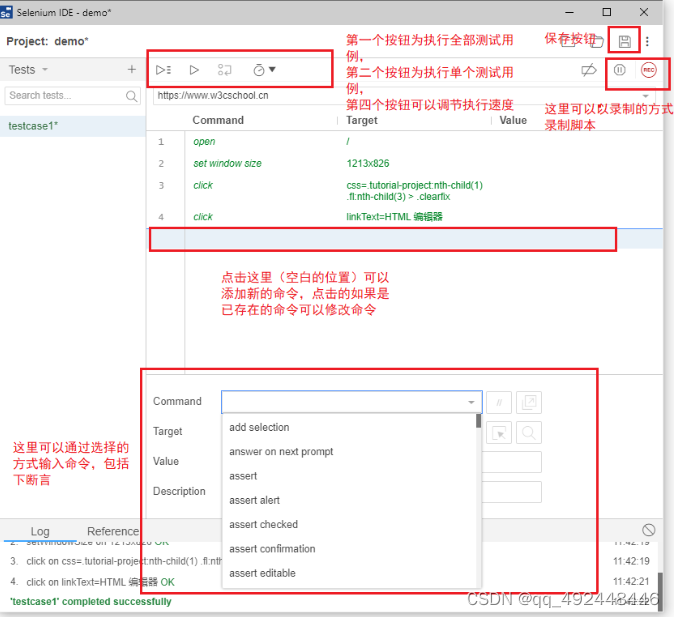
Installation and use of selenium IDE

Introduction to software engineering - Chapter 2 - feasibility study
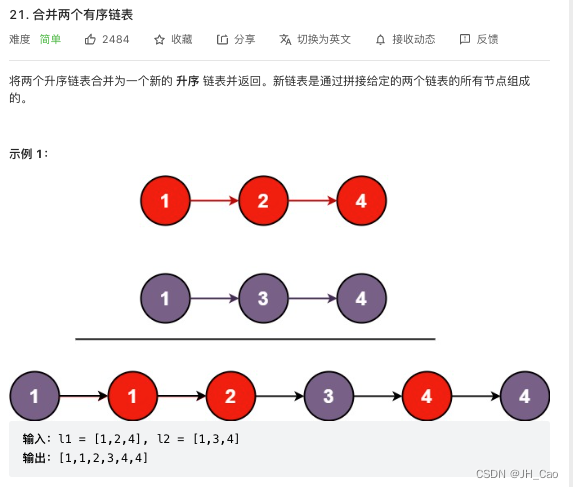
12--合并两个有序链表

2022茶艺师(中级)上岗证题库及在线模拟考试
![3D数学基础[十七] 平方反比定理](/img/59/bef931d96883288766fc94e38e0ace.png)
3D数学基础[十七] 平方反比定理

Screenshot recommendation - snipaste

The monthly salary of two years after graduation is 36K. It's not difficult to say

2021-03-09 COMP9021第七节课笔记

JDBC 在性能测试中的应用
随机推荐
2022茶艺师(中级)上岗证题库及在线模拟考试
小样本故障诊断 - 注意力机制代码 - BiGRU代码解析实现
"Adobe international certification" about Adobe Photoshop, creating and modifying brush tutorials?
Learning event binding of 3D visualization from scratch
Saccadenet: use corner features to fine tune the two stage prediction frame | CVPR 2020
Installation and use of selenium IDE
Solution of electric education system for intelligent supervision station
Dart development server, do I have a fever?
1279_VMWare Player安装VMWare Tools时VSock安装失败解决
longhorn安装与使用
问题3 — messageBox弹框,修改默认背景色
All you know is the test pyramid?
Écouter le réseau d'extension SWIFT (source)
一文理解同步FIFO
Vulnhub target: boredhackerblog_ CLOUD AV
Part 1: building OpenGL environment
os.path.join()使用过程中遇到的坑
Phonics
直播回顾 | 云原生混部系统 Koordinator 架构详解(附完整PPT)
Swift Extension NetworkUtil(网络监听)(源码)