当前位置:网站首页>4 自定义模型训练
4 自定义模型训练
2022-06-26 15:30:00 【X1996_】
构建模型(神经网络的前向传播) --> 定义损失函数 --> 定义优化函数 --> 定义tape --> 模型得到预测值 --> 前向传播得到loss --> 反向传播 --> 用优化函数将计算出来的梯度更新到变量上面去
自定义模型训练 无评估函数
import numpy as np
import tensorflow as tf

data = np.random.random((1000, 32))
labels = np.random.random((1000, 10))

class MyModel(tf.keras.Model):

    def __init__(self, num_classes=10):
        super(MyModel, self).__init__(name='my_model')
        self.num_classes = num_classes
        # 定义自己需要的层
        self.dense_1 = tf.keras.layers.Dense(32, activation='relu')
        self.dense_2 = tf.keras.layers.Dense(num_classes)

    def call(self, inputs):
        #定义前向传播
        # 使用在 (in `__init__`)定义的层
        x = self.dense_1(inputs)
        return self.dense_2(x)

model = MyModel(num_classes=10)

# Instantiate an optimizer.
optimizer = tf.keras.optimizers.SGD(learning_rate=1e-3)
# Instantiate a loss function.
loss_fn = tf.keras.losses.CategoricalCrossentropy()

# Prepare the training dataset.
batch_size = 64
train_dataset = tf.data.Dataset.from_tensor_slices((data, labels))
train_dataset = train_dataset.shuffle(buffer_size=1024).batch(batch_size)

# epoch
#batch_size
#tape 求梯度 梯度更新
# 训练
epochs = 10
for epoch in range(epochs):
    #print('Start of epoch %d' % (epoch,))


    # 遍历数据集的batch_size
    for step, (x_batch_train, y_batch_train) in enumerate(train_dataset):


        # 打开GradientTape以记录正向传递期间运行的操作,这将启用自动区分。
        with tf.GradientTape() as tape:

            # 运行该模型的前向传播。 模型应用于其输入的操作将记录在GradientTape上。
            logits = model(x_batch_train, training=True)  # 这个minibatch的预测值

            # 计算这个minibatch的损失值
            loss_value = loss_fn(y_batch_train, logits)

        # 使用GradientTape自动获取可训练变量相对于损失的梯度。
        grads = tape.gradient(loss_value, model.trainable_weights)

        # 通过更新变量的值来最大程度地减少损失,从而执行梯度下降的一步。
        optimizer.apply_gradients(zip(grads, model.trainable_weights))

        # 每200 batches打印一次.
    print('Training loss %s epoch: %s' % (epoch, float(loss_value)))
加入评估函数
import numpy as np
import tensorflow as tf

x_train = np.random.random((1000, 32))
y_train = np.random.random((1000, 10))
x_val = np.random.random((200, 32))
y_val = np.random.random((200, 10))
x_test = np.random.random((200, 32))
y_test = np.random.random((200, 10))

class MyModel(tf.keras.Model):

    def __init__(self, num_classes=10):
        super(MyModel, self).__init__(name='my_model')
        self.num_classes = num_classes
        # 定义自己需要的层
        self.dense_1 = tf.keras.layers.Dense(32, activation='relu')
        self.dense_2 = tf.keras.layers.Dense(num_classes)

    def call(self, inputs):
        #定义前向传播
        # 使用在 (in `__init__`)定义的层
        x = self.dense_1(inputs)
        return self.dense_2(x)

# 优化器
optimizer = tf.keras.optimizers.SGD(learning_rate=1e-3)
# 损失函数
loss_fn = tf.keras.losses.CategoricalCrossentropy(from_logits=True)

# 准备metrics函数
train_acc_metric = tf.keras.metrics.CategoricalAccuracy()
val_acc_metric = tf.keras.metrics.CategoricalAccuracy()

# 准备训练数据集
batch_size = 64
train_dataset = tf.data.Dataset.from_tensor_slices((x_train, y_train))
train_dataset = train_dataset.shuffle(buffer_size=1024).batch(batch_size)

# 准备测试数据集
val_dataset = tf.data.Dataset.from_tensor_slices((x_val, y_val))
val_dataset = val_dataset.batch(64)

model = MyModel(num_classes=10)
epochs = 10
for epoch in range(epochs):
    print('Start of epoch %d' % (epoch,))

    # 遍历数据集的batch_size
    for step, (x_batch_train, y_batch_train) in enumerate(train_dataset):


        #一个batch
        with tf.GradientTape() as tape:
            logits = model(x_batch_train)
            loss_value = loss_fn(y_batch_train, logits)
        grads = tape.gradient(loss_value, model.trainable_weights)
        optimizer.apply_gradients(zip(grads, model.trainable_weights))####

        # 更新训练集的metrics
        train_acc_metric(y_batch_train, logits)


    # 在每个epoch结束时显示metrics。
    train_acc = train_acc_metric.result()
  # print('Training acc over epoch: %s' % (float(train_acc),))
    # 在每个epoch结束时重置训练指标
    train_acc_metric.reset_states()#!!!!!!!!!!!!!!!

    # 在每个epoch结束时运行一个验证集。
    for x_batch_val, y_batch_val in val_dataset:
        val_logits = model(x_batch_val)
        # 更新验证集merics
        val_acc_metric(y_batch_val, val_logits)
    val_acc = val_acc_metric.result()
 # print('Validation acc: %s' % (float(val_acc),))
    val_acc_metric.reset_states()

    print('Training_losses: %s Training_acc: %s Validation_acc: %s' % (float(loss_value), float(train_acc), float(val_acc)))
边栏推荐
- [C language practice - printing hollow upper triangle and its deformation]
- CNN optimized trick
- JVM笔记
- Vsomeip3 dual computer communication file configuration
- Use of abortcontroller
- Summer camp is coming!!! Chongchongchong
- 还存在过有键盘的kindle?
- 为什么图像分割任务中经常用到编码器和解码器结构?
- IDEA本地代理后,无法下载插件
- NFT Platform Security Guide (1)
猜你喜欢
![[tcapulusdb knowledge base] tcapulusdb doc acceptance - transaction execution introduction](/img/7c/25a88f46e02cebd2e003b9590b9c13.png)
[tcapulusdb knowledge base] tcapulusdb doc acceptance - transaction execution introduction

NFT 项目的开发、部署、上线的流程(2)

5000 word analysis: the way of container security attack and defense in actual combat scenarios
![[C language practice - printing hollow upper triangle and its deformation]](/img/56/6a88b3d8de32a3215399f915bba33e.png)
[C language practice - printing hollow upper triangle and its deformation]

nanoPi Duo2连接wifi

el-dialog拖拽,边界问题完全修正,网上版本的bug修复

「干货」NFT 上中下游产业链全景分析
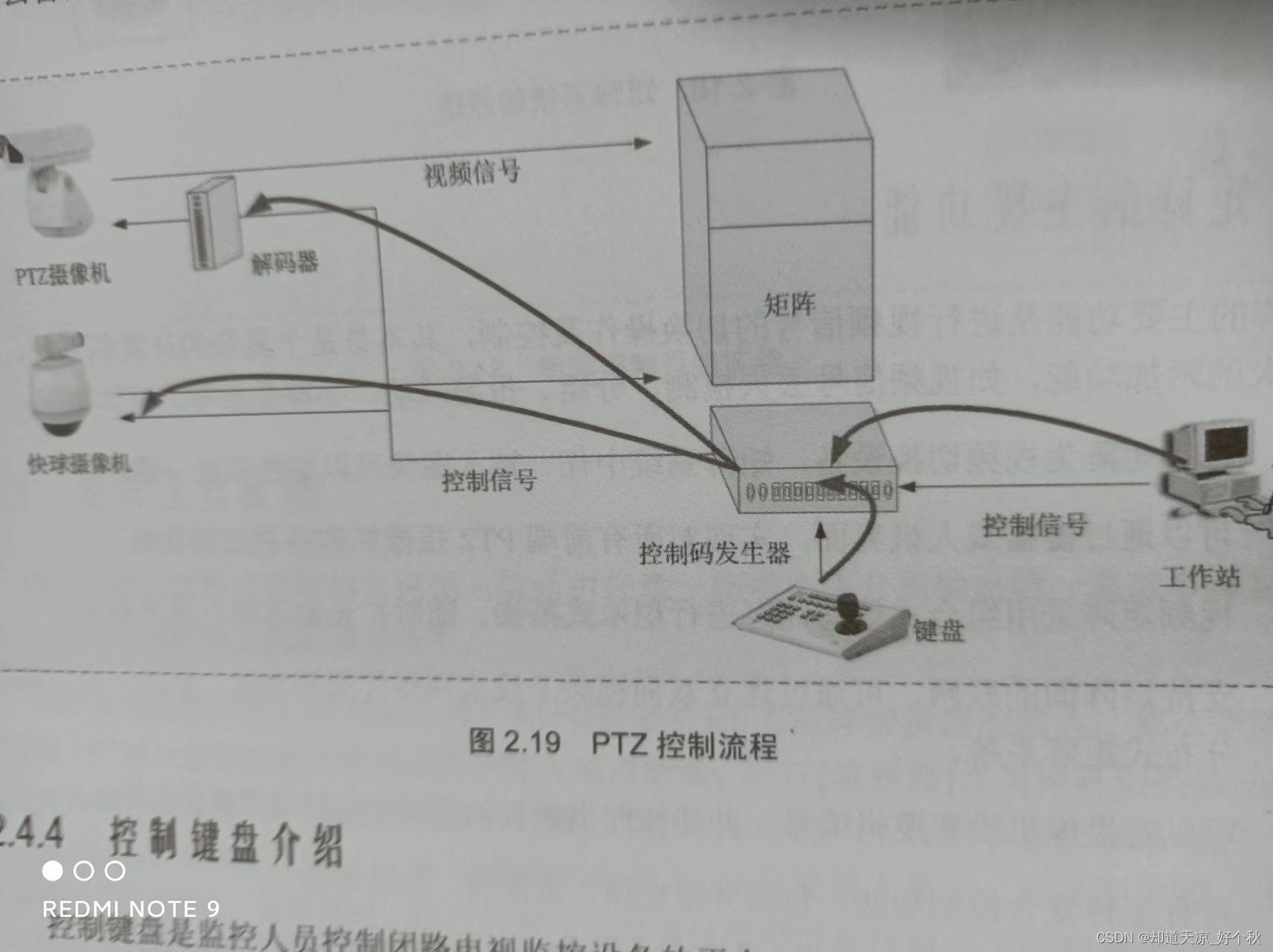
音视频学习(一)——PTZ控制原理
![[tcapulusdb knowledge base] tcapulusdb doc acceptance - Introduction to creating game area](/img/7b/8c4f1549054ee8c0184495d9e8e378.png)
[tcapulusdb knowledge base] tcapulusdb doc acceptance - Introduction to creating game area

Solana扩容机制分析(2):牺牲可用性换取高效率的极端尝试 | CatcherVC Research
随机推荐
Unable to download Plug-in after idea local agent
JS creative icon navigation menu switch background color
JS events
golang 1.18 go work 使用
selenium将元素保存为图片
反射修改final
Svg animation around the earth JS special effects
[tcapulusdb knowledge base] tcapulusdb doc acceptance - transaction execution introduction
IntelliJ idea -- Method for formatting SQL files
PCIe Capabilities List
Is it safe to open a new bond registration account? Is there any risk?
评价——TOPSIS
Tweenmax+svg switch color animation scene
[tcapulusdb knowledge base] Introduction to tcapulusdb system management
AbortController的使用
SVG大写字母A动画js特效
[applet practice series] Introduction to the registration life cycle of the applet framework page
Canvas three dot flashing animation
简单科普Ethereum的Transaction Input Data
JS之手写 bind、apply、call