当前位置:网站首页>Fabric.js 上划线、中划线(删除线)、下划线
Fabric.js 上划线、中划线(删除线)、下划线
2022-06-26 09:49:00 【InfoQ】
本文简介
HTMLWordFabric.jscanvas
fabric.jsIText初始化时设置
- 上划线 overline
- 中划线 linethrough
- 下划线 underline
<canvas id="c" width="300" height="300" style="border: 1px solid #ccc"></canvas>
<script src="../../script/fabric.5.2.1.js"></script>
<script>
const canvas = new fabric.Canvas('c')
const iText = new fabric.IText('aaa',{
styles: {
0: {
0: { overline: true }, // 上划线
1: { linethrough: true }, // 中划线
2: { underline: true } // 下划线
}
}
})
canvas.add(iText)
</script>
astyleskey0styles: {
0: { // 第1行
0:, // 第1行 第1个字
1:, // 第1行 第2个字
2: // 第1行 第3个字
}
}
\n动态设置
Fabric.js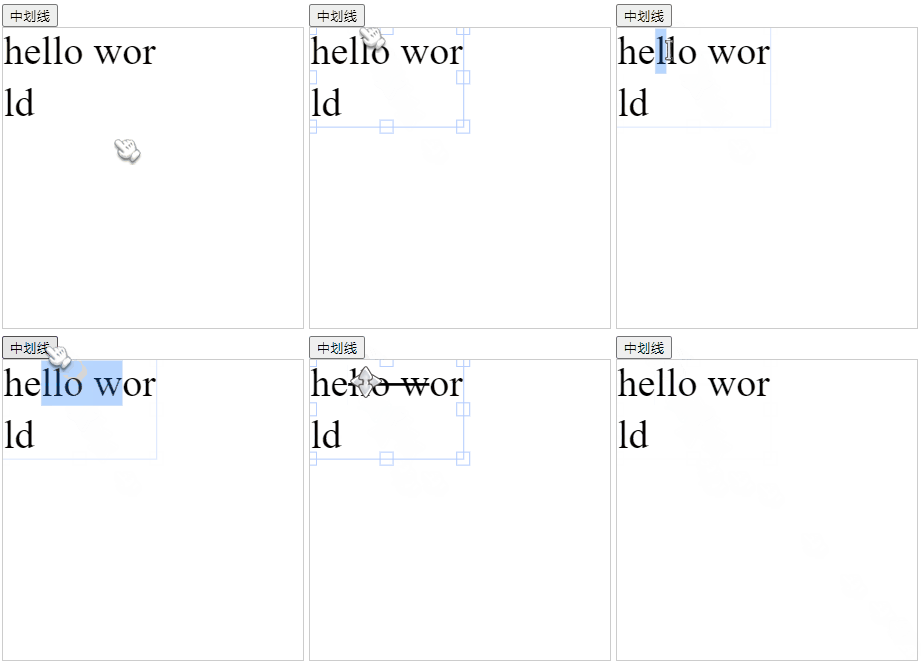
<button onclick="linethrough()">中划线</button>
<canvas id="c" width="300" height="300" style="border: 1px solid #ccc"></canvas>
<canvas id="c" width="300" height="300" style="border: 1px solid #ccc"></canvas>
<!-- 引入fabric -->
<script src="../../script/fabric.5.2.1.js"></script>
<script>
const canvas = new fabric.Canvas('c') // 初始化画布
const iText = new fabric.IText('hello wor\nld') // 创建文字
canvas.add(iText)
function linethrough() {
let activeTxt = canvas.getActiveObject() // 获取当前选中的文字
// 如果当前没选中文字,那什么都不操作
if (!activeTxt) return
// 判断当前是否进入编辑状态
if (activeTxt.isEditing) {
// 编辑状态
const state = activeTxt.getSelectionStyles().find(item => item.linethrough !== true)
// 如果当前
if (!state || (JSON.stringify(state) === '{}' && activeTxt['linethrough'] === true)) {
// 如果当前已经设置了中划线,那就把全局中划线取消
activeTxt.setSelectionStyles({ 'linethrough': false })
} else {
// 如果当前没设置中划线,那就添加上中划线
activeTxt.setSelectionStyles({ 'linethrough': true })
}
} else {
// 选择状态
if (activeTxt['linethrough'] === true) {
activeTxt.linethrough = false
activeTxt.dirty = true;
let s = activeTxt.styles
for(let i in s) {
for (let j in s[i]) {
s[i][j].linethrough = false
}
}
} else {
activeTxt.linethrough = true
activeTxt.dirty = true;
let s = activeTxt.styles
for(let i in s) {
for (let j in s[i]) {
s[i][j].linethrough = true
}
}
}
}
canvas.renderAll()
}
</script>
- 初始化画布
- 创建文字
- 将文字添加到画布中
linethrough方法添加或取消中划线
linethroughlinethrough- 获取当前选中的文字
- 如果没选中就不做任何操作
- 如果选中了,判断是否进入编辑状态
- 编辑状态
- 获取当前被选中文字的中划线状态
- 如果被选中文字设置了中划线,就把中划线取消掉
- 如果被选中文字没设置中划线,就添加中划线
- 如果不是编辑状态,只是单击了
iText进入框选状态
- 如果需要全局取消中划线
- 全局取消
- 循环每个字符,并取消每个字符的中划线
- 需要全局设置中划线
- 全局设置
- 再逐个字符单独设置
- 重新渲染画布
代码仓库
边栏推荐
- See how I store integer data in the map < string, string > set
- MySQL第十二次作业-存储过程的应用
- Which PHP open source works deserve attention
- Flutter与原生通信(上)
- Linux下安裝Mysql【詳細】
- Common interview questions of binary tree
- RDB持久化验证测试
- Swiftui development experience: data layer of application design for offline priority
- What is in the method area - class file, class file constant pool, runtime constant pool
- CentOS installs redis multi master multi slave cluster
猜你喜欢

MySQL seventh job - update data

AdaptiveAvgPool2D 不支持 onnx 导出,自定义一个类代替 AdaptiveAvgPool2D

MySQL第六次作业-查询数据-多条件

Omni channel, multi scenario and cross platform, how does app analyze channel traffic with data

Linux下安装Mysql【详细】
DBSCAN

利用foreach循环二维数组
MySQL第十二次作业-存储过程的应用

量化投资学习——经典书籍介绍

Selection of webrtc video codec type VP8 H264 or other? (openh264 encoding, ffmpeg decoding)
随机推荐
String constant pool, class constant pool, and runtime constant pool
CentOS installs redis multi master multi slave cluster
Oracle sqlplus 查询结果显示优化
Pit record_ TreeSet custom sorting results in less data loss
Index summary of blog articles -- Industrial Internet
MySQL project 8 summary
Problems encountered in the application and development of Hongmeng and some roast
Linux下安裝Mysql【詳細】
Bit operation n & (n-1), leetcode231, interview question 05.06
Opencv image processing - grayscale processing
Reasons for "unresolved external symbols" during vs or QT compilation link:
MySQL Chapter 4 Summary
基础-MySQL
CentOS安装Redis多主多从集群
Notes - simple but adequate series_ KVM quick start
Redis中执行Lua脚本
磁带库简单记录1
Reshape a two-dimensional array with 3 rows and 3 columns to find the sum of the diagonals
MySQL job 11 - application de la vue
MySQL第四章总结