当前位置:网站首页>Browser development and use skills
Browser development and use skills
2022-07-26 01:11:00 【Love code meow】
Browser development skills
debugging hover Elements appearing after
Method 1
- Open the debug window
F12, Move the mouse over the element to be debugged - Right click to do nothing
- Move the mouse to the debugging window and press
N, The elements that appear will not disappear
Method 2
- Select the... That triggers the mouse event in the debug window
divOn , take:hovThe property of is set to:hover
JS Breakpoint debugging
debugger The way
- stay
jsWrite indebuggerThe browser debugging window can be useddebuggerPattern
Directly break the point in the debugging window
- Make a breakpoint in the source code of the browser debugging window to debug
F10next step 、F8Do it all
Browser shortcuts
- Zoom in
CTRL + + - Narrow down the content
CTRL + - - Back to normal size
CTRL + 0 - Tab switching
CTRL + 1~9(1~9 Each represents the first label , Second label …) - Open new label
CTRL + T - Search content
CTRL + F - Go back to the previous page
CTRL +left arrow - Go back to the next page
CTRL +Right arrow - Refresh the page
CTRL + R
Console Use
console.table: Show concretelyJSONAnd array data
Overrids Use local Js Replace the Js
- browser
f12SourcesOverridesClick the plus sign below to add a zero hour local directory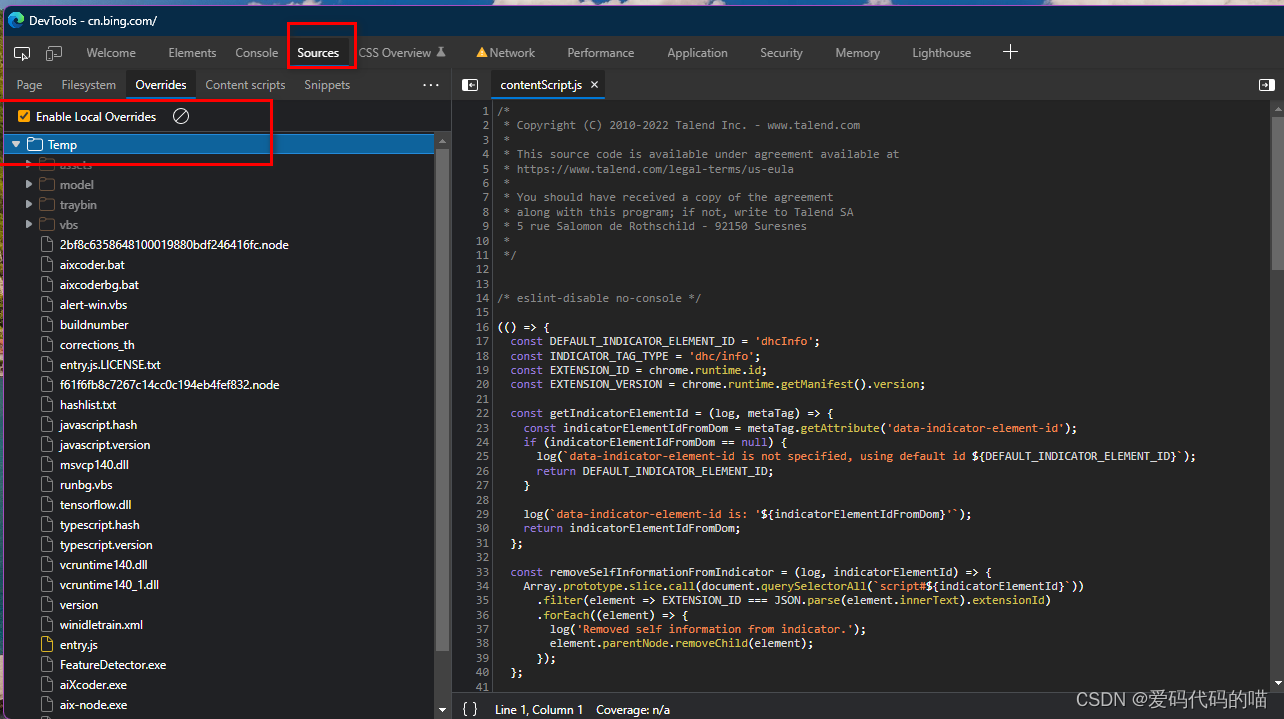
- On the way to
pagePage find the file to replace, right-click save as overwrite , At this time, the file on the right will have*To his ownjsAfter the content is copied into this filectrl+spreservation , And then refresh the browser , This is the one you replacedjs, It can debug online content very well
F12
ctrl+shift+p Call up the command line
screenshotscreenshotsshow animationsOpen the animation panel
Elements (Elements)
- View element code , arrow ( Or the user can use the shortcut key
Ctrl+Shift+C) Enter select element mode , Then select the element you want to view from the page , Then you can use the developer tool element (Elements) Locate the specific location of the element source code in the column .

- Modify the code and attributes of the element : Double click the part you want to modify , Then make the changes , Or select the part to be modified and right-click to modify
- stay
stylesClick the color in the to pop up the color finder

- Use
$0Get current element
The Internet (Network)
see
Networkessential information , Which addresses are requested and eachURLNetwork related request information can be seenURL, Response status code , Response data type , Response data size , response time .request
URLIt can be screened and classified , Choose different categories , View request URL, Easy to findSimulate and adjust the network speed

Right click request
Replay XHR( scene : Want to resend a request , But I don't want to refresh the page or trigger events manually )
Console
Input log execution
js, staydebuggerYou can enter the value of the variableconsole.clear()Clear the console$_: The result of the previous expression
Ctrl+P
- Quick search for files , Open the file of your project .
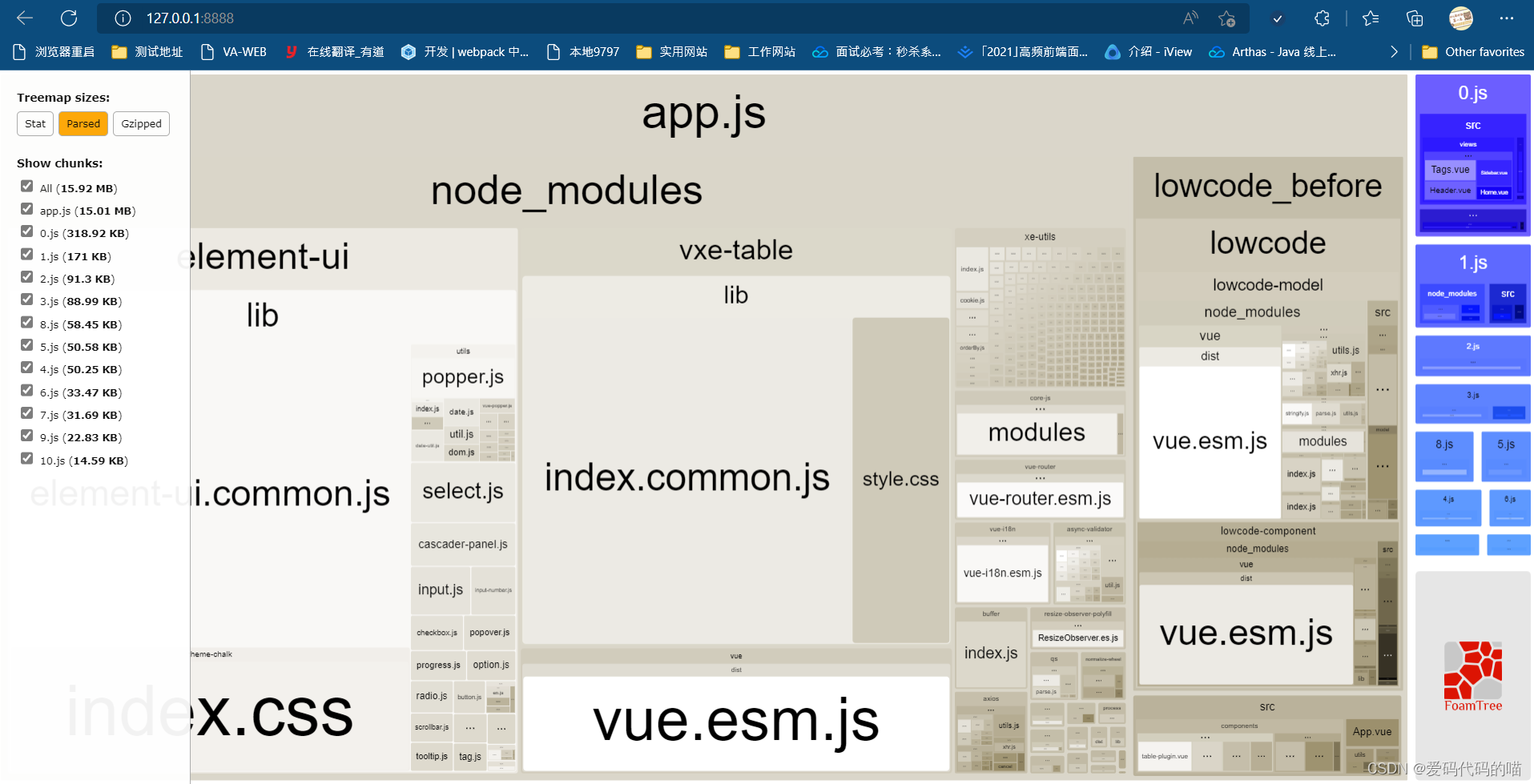
Vue Check the size of the packaged file
Use webpack-bundle-analyzer
- install
webpack-bundle-analyzer:
npm install webpack-bundle-analyzer --save-dev
- To configure
webpack.config.jsfile :
// webpack.config.js  file
const BundleAnalyzerPlugin = require('webpack-bundle-analyzer').BundleAnalyzerPlugin
module.exports={

  plugins: [
    new BundleAnalyzerPlugin()  //  Use default configuration
    //  Specific configuration items of the default configuration
    // new BundleAnalyzerPlugin({

    // analyzerMode: 'server',
    // analyzerHost: '127.0.0.1',
    // analyzerPort: '8888',
    // reportFilename: 'report.html',
    // defaultSizes: 'parsed',
    // openAnalyzer: true,
    // generateStatsFile: false,
    // statsFilename: 'stats.json',
    // statsOptions: null,
    // excludeAssets: null,
    // logLevel: info
    // })
  ]
}
- To configure
package.jsonfile
{

 "scripts": {

    "dev": "webpack --config webpack.dev.js --progress"
  }
}
- Start script access address
边栏推荐
- Gcdqueue encapsulation
- [software development specification III] [software version naming Specification]
- Inverse matrix block matrix
- 《nlp入门+实战:第四章:使用pytorch手动实现线性回归 》
- JDBC connection database (idea version)
- Docker高级篇-Mysql主从复制
- 如何才能修炼成一名不可替代的程序员?
- [laser principle and application -3]: foreign brands of lasers
- What is informatization? What is digitalization? What are the connections and differences between the two?
- 985 associate professors in Colleges and universities sun their annual salary, and the provident fund tops the monthly salary of ordinary people. Netizen: it is worthy of being in Shanghai
猜你喜欢

Lua基础语法

Small sample learning - getting started

Redis数据结构详解,结合书本

RHCE之at和crontab命令详解及chrony部署
RHCE之at和crontab命令详解及chrony部署
![[RTOS training camp] course learning methods and structural knowledge review + linked list knowledge](/img/d1/96bdcdb1ad9987aa551438def5f194.jpg)
[RTOS training camp] course learning methods and structural knowledge review + linked list knowledge

代理IP服务器如何保证自身在网络中的信息安全呢

985高校副教授晒年薪,公积金顶普通人月薪,网友:不愧是在上海

We have no way out
![[RTOS training camp] GPIO knowledge and preview arrangement + evening class questions](/img/44/f3323a16e505a7fe923b25630f62f7.jpg)
[RTOS training camp] GPIO knowledge and preview arrangement + evening class questions
随机推荐
Embedded development: tips and tricks -- seven tips for designing powerful boot loader
Optimization of tableview
NIO简易示例
NLP introduction + practice: Chapter 4: using pytorch to manually realize linear regression
【RTOS训练营】课程学习方法和结构体知识复习 + 链表知识
Four common simple and effective methods for changing IP addresses
《nlp入门+实战:第三章:梯度下降和反向传播 》
Tutorial on principles and applications of database system (055) -- MySQL query (XVII): usage of mathematical functions
RHCE之at和crontab命令详解及chrony部署
typing‘ has no attribute ‘_ SpecialForm‘
[secsha concept] large and small end
"Introduction to natural language processing practice" deep learning foundation - attention mechanism, transformer deep analysis and learning material summary
web中间件日志分析脚本3.0(shell脚本)
How to switch IP and move bricks with mobile game simulator
Nanjie's embarrassment
网络文件传输之零拷贝
[software development specification II] prohibited item development specification
【RTOS训练营】关于上课和答疑
数据库系统原理与应用教程(056)—— MySQL 查询(十八):其他类型函数的用法
Cf1494f delete the edges (Euler circuit)