当前位置:网站首页>Shell中的文本处理工具、cut [选项参数] filename 说明:默认分隔符是制表符、awk [选项参数] ‘/pattern1/{action1}filename 、awk 的内置变量
Shell中的文本处理工具、cut [选项参数] filename 说明:默认分隔符是制表符、awk [选项参数] ‘/pattern1/{action1}filename 、awk 的内置变量
2022-07-27 03:44:00 【Redamancy06】
1.文本处理工具
1.1cut
cut 的工作就是“剪”,具体的说就是在文件中负责剪切数据用的。cut 命令从文件的每一行剪切字节、字符和字段并将这些字节、字符和字段输出。
1.1.1基本用法
cut [选项参数] filename
说明:默认分隔符是制表符
1.1.2选项参数说明
| 选项参数 | 功能 |
|---|---|
| -f | 列号,提取第几列 |
| -d | 分隔符,按照指定分隔符分割列,默认是制表符“\t” |
| -c | 按字符进行切割 后加加 n 表示取第几列 比如 -c 1 |
1.1.3案例
1.1.3.1数据准备
[[email protected] scripts]# vim cut_test.txt
1.1.3.2切割 cut_test.txt 第一列
[[email protected] scripts]# cut -d " " -f 1 cut_test.txt
1.1.3.3切割 cut_test.txt 第二、三列
[[email protected] scripts]# cut -d " " -f 2,3 cut_test.txt
1.1.3.4在 cut_test.txt 文件中切割出 nan
[[email protected] scripts]# cat cut_test.txt | grep nan | cut -d " " -f 1

1.1.3.5要passwd中以bash结尾的第一,六,七列
[[email protected] scripts]# cat /etc/passwd | grep bash$ | cut -d “:” -f 1,6,7

如果列多的话总不能1,2,3,4,5,6,7,8,9,10…等吧,可以用“-”来,下面介绍
1.1.3.6要passwd中以bash结尾的第1-4列
[[email protected] scripts]# cat /etc/passwd | grep bash$ | cut -d “:” -f 1-4

1.1.3.7要passwd中以bash结尾的第4列往后的全部列
[[email protected] scripts]# cat /etc/passwd | grep bash$ | cut -d “:” -f 4-

1.1.3.8要passwd中以bash结尾的第4列之前的全部列
[[email protected] scripts]# cat /etc/passwd | grep bash$ | cut -d “:” -f -4

1.1.3.9选取系统 PATH 变量值,第 2 个“:”开始后的所有路径:
[[email protected] scripts]# echo $PATH | cut -d “:” -f 3-

1.1.3.10切割 ifconfig 后打印的 IP 地址
[[email protected] scripts]# ifconfig ens33 | grep netmask | cut -d " " -f 10
为什么是10呢,因为inet前面有8个空格
1.2awk
awk和gawk是一样的,awk是gawk的一个软连接
一个强大的文本分析工具,把文件逐行的读入,以空格为默认分隔符将每行切片,切开的部分再进行分析处理。
1.2.1基本用法
awk [选项参数] ‘/pattern1/{action1} /pattern2/{action2}…’ filename
pattern:表示 awk 在数据中查找的内容,就是匹配模式
action:在找到匹配内容时所执行的一系列命令
1.2.2选项参数说明
| 选项参数 | 功能 |
|---|---|
| -F | 指定输入文件分隔符 |
| -v | 赋值一个用户定义变量 |
1.2.3案例
1.2.3.1搜索 passwd 文件以 root 关键字开头的所有行,并输出该行的第 7 列

1.2.3.2搜索 passwd 文件以 root 关键字开头的所有行,并输出该行的第 1 列和第 7 列, 中间以“,”号分割
用cut是不能改变输出中间用什么隔开的,而awk可以,记住,需要用“”包裹
1.2.3.3只显示/etc/passwd 的第一列和第七列,以逗号分割,且在所有行前面添加列名 user,shell 在最后一行添加"end of file"
[[email protected] scripts]# cat /etc/passwd | awk -F “:” ‘BEGIN{print “user,shell”}{print $1","$7} END{print “end of file”}’


1.2.3.4将 passwd 文件中的用户 id 增加数值 1 并输出


因为{}里面是代码块,可以直接在里面更改

如果{}代码块里的代码多了,需要更改会很麻烦,因此使用-v,这样的话在外面一改数字代码块里面的代码就都改了
1.2.4awk 的内置变量
| 变量 | 说明 |
|---|---|
| FILENAME | 文件名 |
| NR | 已读的记录数(行号) |
| NF | 浏览记录的域的个数(切割后,列的个数) |
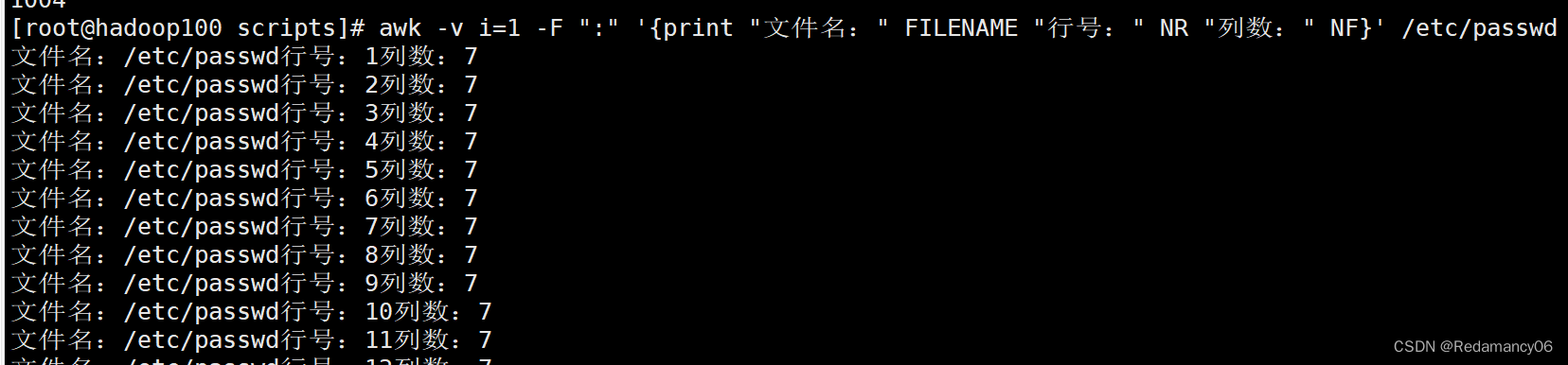
1.2.4.1统计 passwd 文件名,每行的行号,每行的列数
[[email protected] scripts]# awk -v i=1 -F “:” ‘{print “文件名:” FILENAME “行号:” NR “列数:” NF}’ /etc/passwd
1.2.4.2查询 ifconfig 命令输出结果中的空行所在的行号
[[email protected] scripts]# ifconfig | grep -n ^$

用之前的方法输出会有":",但是结果不想要,用awk解决
[[email protected] scripts]# ifconfig | awk ‘/^$/ {print NR}’

也可以随意加东西
[[email protected] scripts]# ifconfig | awk ‘/^$/ {print "空行:"NR}’

1.2.4.3切割 IP
使用cut时-f后需要数前面那一堆空格

使用awk后,前面那一堆空格是不需要数的
边栏推荐
- 深度剖析 —— 动态内存管理
- Learning route from junior programmer to architect + complete version of supporting learning resources
- Framework learning journey: init process startup process
- [Code] sword finger offer 04 search in two-dimensional array
- [machine learning network] BP neural network and deep learning-6 deep neural networks (DNN)
- els_ 画矩形、代码规划和备份
- 通信协议综述
- F - Pre-order and In-order(Atcoder 255)
- Cool Lehman VR panorama paves the way for you to start a business
- Deep analysis - dynamic memory management
猜你喜欢

Influxdb basic understanding

JS modify the key value of the object array

Navicat exports Mysql to table structure and field description

Ribbon负载均衡策略与配置、Ribbon的懒加载和饥饿加载

Delete the whole line of Excel, and delete the pictures together

Practice of microservice in solving Library Download business problems

数据库泰斗王珊:努力创新,精心打磨优质的数据库产品

Nacos启动与登录

卷积神经网络——24位彩色图像的卷积的详细介绍
微服务化解决文库下载业务问题实践
随机推荐
Remember the major performance problems caused by a TCP packet loss
[competition reference] pytorch common code snippet and operation collection
数据库泰斗王珊:努力创新,精心打磨优质的数据库产品
PX4模块设计之十二:High Resolution Timer设计
Is VR panoramic production a single weapon in the home decoration industry? Why is this?
Is VR panorama just needed now? After reading it, you will understand
微信小程序轮播图
STM32基于HAL库的串口接受中断和空闲中断
VR panorama gold rush "careful machine" (Part 1)
Eureka service registry
Cool Lehman VR panorama paves the way for you to start a business
Manually build ABP framework from 0 -abp official complete solution and manually build simplified solution practice
Brightcove任命Dan Freund为首席营收官
Ribbon-负载均衡原理及部分源码
法解析的外部符号 “public: virtual __cdecl nvinfer1::YoloLayerPlugin::~YoloLayerPlugin(void)“ “public: virtua
HEAD detached from origin/...导致push失败
P1438 无聊的数列 线段树+差分
Elastic开源社区:开发者招募
The difference between ArrayList and LinkedList
ros 相机标定 sensor_msgs/CameraInfo Message 数据类型及含义