当前位置:网站首页>嵌入式系统移植【8】——设备树和根文件系统移植
嵌入式系统移植【8】——设备树和根文件系统移植
2022-07-26 22:36:00 【imysy_22_】
Linux设备驱动移植
设备树是一种描述硬件信息的数据结构,Linux内核运行时可以通过设备树将硬件信息直接传递给Linux内核,而不再需要在Linux内核中包含大量的冗余编码
设备树语法概述
dts 设备树源文件
dtsi 类似于头文件,包含一些公共的信息,可被其它设备树文件引用
dtb 编译后的设备树文件
设备树的语法为树状结构,由一系列的节点和属性组成,根节点下包含子节点
子节点下还可以包含子节点,节点内部包含了对应设备的属性
Linux内核驱动移植
1.在make menuconfig界面中选中要安装的驱动
2.在设备树中添加/修改相应的设备信息
3.重新编译内核/设备树
实验八 网卡驱动移植
【实验目的】
掌握 Linux 内核配置的基本方法,完成对网卡驱动、NFS 等相关功能的配置
【实验环境】
1、 ubuntu 14.04 发行版
2、 FS4412 实验平台
3、 交叉编译工具:arm-none-linux-gnueabi-
【注意事项】
1、实验步骤中以“$”开头的命令表示在 ubuntu 环境下执行,以“#”开头的命令表示在开发板下执行
【实验步骤】
1、 在内核源码的顶层目录下执行如下命令,修改内核配置
$ make menuconfig
给内核选配 DM9000 网卡驱动,然后选择“Save”保存
Device Drivers ---> [*] Network device support ---> [*] Ethernet driver support ---> <*> DM9000 support |
因为内核要使用 NFS 去挂载根文件系统,而 NFS 是基于 TCP 协议实现的,所以这里需要选配 TCP 相关的网络协议(部分功能默认已经选配),然后选择“Save”保存
[*] Networking support ---> Networking options ---> <*> Packet socket <*> Unix domain sockets [*] TCP/IP networking [*] IP: kernel level autoconfiguration |
因为内核要使用 NFS 去挂载根文件系统,所以需要给内核选配 NFS 客户端及相关功能
[*] Root file system on NFS |
NFS client support for the NFSv3 ACL protocol extension |
[*] |
NFS client support for NFS version 3 (NEW) |
<*> |
File systems ---> [*] Network File Systems ---> <*> NFS client support |
设置完成后通过方向键选择‘Save’保存即可,然后选择‘Exit’退出该配置界面
2、 在设备树中添加网卡的硬件信息
$ vi arch/arm/boot/dts/exynos4412-fs4412.dts
在文件的末尾,最后一个花括号前添加如下内容(即要写在根节点之内)
[email protected] { compatible = "simple-bus"; #address-cells = <1>; #size-cells = <1>; reg = <0x5000000 0x1000000>; ranges; compatible = "davicom,dm9000"; reg = <0x5000000 0x2 0x5000004 0x2>; interrupt-parent = <&gpx0>; interrupts = <6 4>; davicom,no-eeprom; mac-address = [00 0a 2d a6 55 a2]; }; }; |
3、 修改时钟相关配置(忽略无用的时钟)
$ vi drivers/clk/clk.c
将
static bool clk_ignore_unused;
修改为以下内容,然后保存退出
static bool clk_ignore_unused=true; 4、 修改 EMMC 相关配置
$ vi drivers/mmc/core/mmc.c
将
if (card->ext_csd.rev > 7) { pr_err("%s: unrecognised EXT_CSD revision %d\n", mmc_hostname(card->host), card->ext_csd.rev); err = -EINVAL; goto out; } |
修改为以下内容,然后保存退出
#if 0 if (card->ext_csd.rev > 7) { #else if (card->ext_csd.rev > 8) { #endif pr_err("%s: unrecognised EXT_CSD revision %d\n", mmc_hostname(card->host), card->ext_csd.rev); err = -EINVAL; goto out; } |
5、 编译内核和设备树
$ make uImage $ make dtbs |
6、 测试内核和设备树
将编译生成的内核和设备树拷贝到 tftp 的工作目录
$ sudo | cp arch/arm/boot/uImage /tftpboot | |
$ sudo | cp arch/arm/boot/dts/exynos4412-fs4412.dtb | /tftpboot/ |
$ sudo | chmod 777 /tftpboot/* |
重启 tftp 和 nfs 服务器
$ sudo service tftpd-hpa restart $ sudo service nfs-kernel-server restart |
重启开发板查看现象,如图所示,此时 Linux 内核已经能通过 NFS 去挂载根文件系统在终端下执行‘ls’命令我们就能看到根文件系统中的内容

根文件系统
根文件系统是内核启动后挂载的第一个文件系统系统引导程序会在根文件系统挂载后从中把一些基本的初始化脚本和服务等加载到内存中去运行。
根文件系统内容
根文件系统移植
BusyBox
BusyBox将很多常用的工具集成到一个很小的可执行文件中,为普通用户提供大多数常用的命令,BusyBox实现的命令都是精简版的,很多扩展都不支持( 命令后面加杠的拓展有部分不支持)。BusyBox被称为Linux工具里的瑞士军刀。
https://busybox.net/downloads/
实验九 根文件系统移植
【实验目的】
熟悉根文件系统的目录结构,构建自己的根文件系统
【实验环境】
1、 ubuntu 14.04 发行版
2、 FS4412 实验平台
3、 交叉编译工具:arm-none-linux-gnueabi-
【注意事项】
1、实验步骤中以“$”开头的命令表示在 ubuntu 环境下执行
【实验步骤】
一、构建自己的根文件系统
1、 在 busybox 官网下载 busybox 源码(这里我们下载 busybox-1.22.1.tar.bz2)
2、 拷贝 busybox 源码包到 ubuntu 的家目录下,解压并进入其顶层目录
$ tar xvf busybox-1.22.1.tar.bz2 $ cd busybox-1.22.1/ |
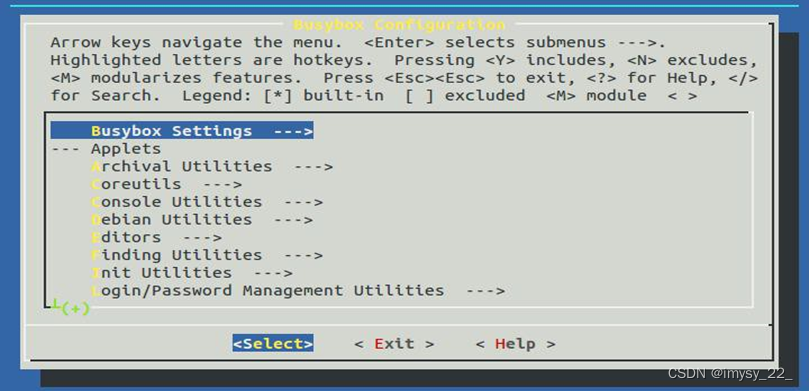
3、 进入 busybox 配置界面(与 Linux 内核配置方法一样)
$ make menuconfig
4、 参考如下信息配置 busybox
Busybox Settings ---> Build Options ---> [*] Build BusyBox as a static binary (no shared libs) [ ] Build with Large File Support (for accessing files > 2 GB) (arm-none-linux-gnueabi-) Cross Compiler prefix |
配置完成后通过方向键选择‘Exit’退出,并保存配置信息
5、 编译 busybox
$ make
编译完成后在源码的顶层目录下会生成 busybox 文件

6、 安装 busybox
$ make install
安装完成后在源码的顶层目录下会生成_install 目录
7、 进入到安装目录下查看生成的文件
$ cd _install/ $ ls |
如下图所示,在安装目录下生成了根文件系统中所需的 shell 命令文件

8、 将交叉编译工具链中的库文件拷贝到_install 目录下
$ cp /home/linux/Linux_4412/toolchain/gcc-4.6.4/arm-arm1176jzfssf-linux-gnueabi/lib/ . -a
如下图所示,在安装目录下就有了根文件系统中所需的库文件

9、 删除库文件中的静态库
|
$ sudo rm lib/*.a
10、删除共享库中的符号表(需要在 root 用户下操作)
11、将资料中“移植相关文件”下的 etc 目录(配置文件)拷贝到当前目录下

12、给 etc/init.d/下的 rcS 脚本添加可执行权限
$ chmod +x etc/init.d/rcS
13、创建其他目录
$ mkdir dev mnt proc root sys tmp var
如下图所示,至此我们就构建好了自己的根文件系统

14、删除原来的根文件系统
$ sudo rm -rf /opt/4412/rootfs/*
15、将自己制作的根文件系统拷贝到 NFS 的工作目录下测试
$ sudo cp -rf ./* /opt/4412/rootfs
边栏推荐
- [Luogu] p2709 little B's inquiry
- HCIA-R&S自用笔记(20)VLAN综合实验、GVRP
- 科研太忙无法顾家?陈婷:人生不能只有一个支点
- Sign up now | frontier technology exploration: how to make spark stronger and more flexible
- 第二部分—C语言提高篇_7. 结构体
- Cheaper than seals, with a large space for shape explosion. Is there really no match for 200000 or so? Chang'an's new "King fried" is cost-effective
- 【面试:并发篇26:多线程:两阶段终止模式】volatile版本
- What are the use cases in the Internet of things industry in 2022?
- Positioning of soaring problems caused by online MySQL CPU
- 力扣155题,最小栈
猜你喜欢

华测RTK采集的GPX数据如何带属性转出kml、shp进行后续的管理和分析

Basic select statement

Basic use of gateway
实战项目:Boost搜索引擎
![[H5 bottom scrolling paging loading]](/img/2c/fb8dd8a7d985392450ad7d3b70016c.png)
[H5 bottom scrolling paging loading]

Product principles of non-financial decentralized application

公有云安全性和合规性方面的考虑事项

第二部分—C语言提高篇_6. 多维数组

The most classic Nature paper on Alzheimer's disease is suspected of fraud
How to transfer the GPX data collected by CTI RTK out of KML and SHP with attributes for subsequent management and analysis
随机推荐
My SQL is OK. Why is it still so slow? MySQL locking rules
【面试:并发篇26:多线程:两阶段终止模式】volatile版本
Part II - C language improvement_ 7. Structure
第二部分—C语言提高篇_6. 多维数组
Sign up now | frontier technology exploration: how to make spark stronger and more flexible
The interviewer asked: this point of JS
第二部分—C语言提高篇_9. 链表
Part II - C language improvement_ 13. Recursive function
Basic select statement
P5469 [NOI2019] 机器人(拉格朗日插值、区间dp)
Vector execution engine framework gluten announced the official open source and appeared at spark technology summit
18. Opening and saving file dialog box usage notes
2. Realize the map of navigation bar and battle page
How can enterprises mitigate the security risks of Internet of things and industrial Internet of things
Silicon Valley class lesson 7 - Tencent cloud on demand management module (2)
Disk expansion process and problems encountered in the virtual machine created by VMWare
Silicon Valley class lesson 6 - Tencent cloud on demand management module (I)
30、 Modern storage system (management database and distributed storage system)
【flask高级】结合源码分析flask中的线程隔离机制
Re understand the life world and ourselves