当前位置:网站首页>2. Realize the map of navigation bar and battle page
2. Realize the map of navigation bar and battle page
2022-07-26 23:24:00 【Wuhu boy】
1. The overall framework

2. Implement navigation bar
2.1 Basic navigation bar
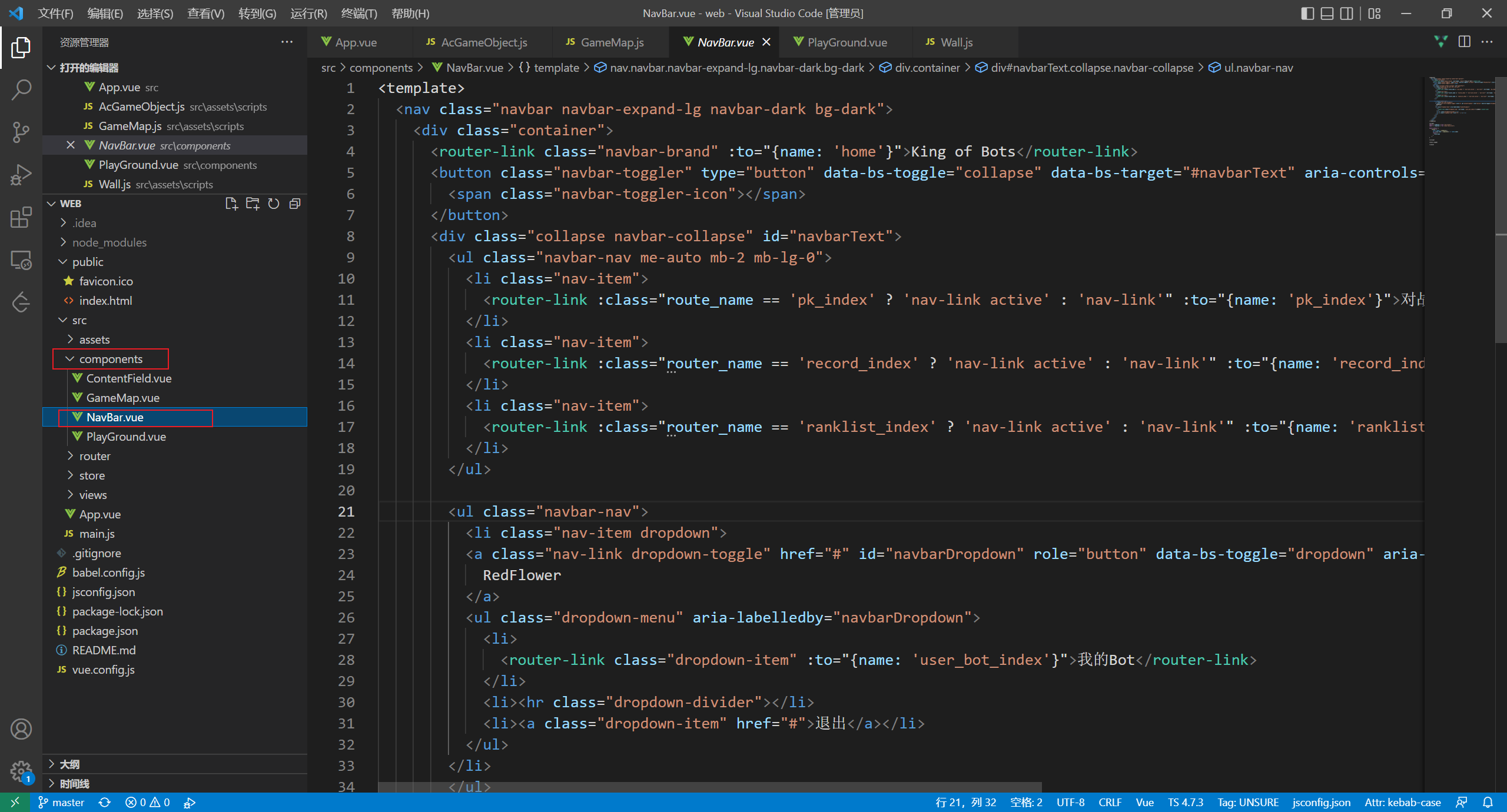
stay components Folder creation component : NavBar.vue
stay template Next Import bootstrap Template
Take a chestnut :
<nav class="navbar navbar-expand-lg navbar-light bg-light">
  <div class="container-fluid">
    <a class="navbar-brand" href="#">Navbar w/ text</a>
    <button class="navbar-toggler" type="button" data-bs-toggle="collapse" data-bs-target="#navbarText" aria-controls="navbarText" aria-expanded="false" aria-label="Toggle navigation">
      <span class="navbar-toggler-icon"></span>
    </button>
    <div class="collapse navbar-collapse" id="navbarText">
      <ul class="navbar-nav me-auto mb-2 mb-lg-0">
        <li class="nav-item">
          <a class="nav-link active" aria-current="page" href="#">Home</a>
        </li>
        <li class="nav-item">
          <a class="nav-link" href="#">Features</a>
        </li>
        <li class="nav-item">
          <a class="nav-link" href="#">Pricing</a>
        </li>
      </ul>
      <span class="navbar-text">
        Navbar text with an inline element
      </span>
    </div>
  </div>
</nav>
Create a successful NavBar.vue
stay App.vue Add NavBar Components :
<template>
  <NavBar></NavBar>
  <router-view></router-view>
</template>

<script>

import NavBar from "@/components/NavBar.vue";
import "bootstrap/dist/css/bootstrap.min.css";
import "bootstrap/dist/js/bootstrap"

export default {
  components:{
    NavBar
  }
}
</script>

<style>
body {
  background-image: url("./assets/images/background.png");
  background-size: cover;
}
</style>
If an error is reported, you may need to add @popperjs/core rely on refresh
At the same time to modify bootstrap Words in the template , Change to the style you need
2.2 URL jump
aims: Enter a different address in the address bar , You need to jump to different interfaces
for example :
http://localhost:8080/pk/go topkInterfacehttp://localhost:8080/record/go toBattle recordInterface
2.2.1 Design page :
Need to use 5 Interfaces
pk + record + ranklist + userbots + 404
2.2.2 Create folder and Corresponding page
stay views Create under folder :

The template of each page is as follows , Different page modifications div The font inside can .
Modification of the war... War 、 The match list is modified to match list, etc 、
<template>
    <div> Against the </div>
</template>

<script>

</script>

<style scoped>
</style>
2.2.3 The address is associated with the page
stay router/index.js The following defines the URL
import PkIndexView from '../views/pk/PkIndexView'
import RanklistIndexView from '../views/ranklist/RanklistIndexView'
import RecordIndexView from '../views/record/RecordIndexView'
import UserBotIndexView from '../views/user/bot/UserBotIndexView'
import NotFound from '../views/error/NotFound'

const routes = [
  {

    path: "/",
    name: "home",
    redirect: "/pk/"
  },
  {

    path: "/pk/",
    name: "pk_index",
    component: PkIndexView,
  },
  {

    path: "/record/",
    name: "record_index",
    component: RecordIndexView,
  },
  {

    path: "/ranklist/",
    name: "ranklist_index",
    component: RanklistIndexView,
  },
  {

    path: "/user/bot",
    name: "user_bot_index",
    component: UserBotIndexView,
  },
  {

    path: "/404/",
    name: "404",
    component: NotFound,
  },
  {

    path: "/:catchAll(.*)",
    redirect: "/404/",
  }
]
At the same time NavBar Internal modification herf

2.2.4 Achieve click 、 Icon does not refresh
stay NavBar Modify the : hold <a> Switch to <router-link> At the same time, modify according to the following :
<router-link class="nav-link" :to="{name: 'pk_index'}"> Against the </router-link>
The following is the complete process :

2.3 Implement the box of each page
Because these pages need borders , So we can treat this common part as a component
Create a new one ContentField.vue Components
Shortcut key : div.container>div.card>div.card-body>
Component code :
<template>
    <div class="container content-field">
        <div class="card">
            <div class="card-body">
                <slot></slot>
            </div>
        </div>
    </div>
</template>

<script>

</script>

<style scoped>
    div.content-field{
        margin-top: 20px;
    }
</style>
Component content :

After the component is created 、 We can introduce components in different interfaces , For example, in pk Interface :
<template>
    <ContentField>
         Against the
    </ContentField>
</template>


<script>
import ContentField from '../../components/ContentField'

export default {
    components: {
        ContentField
    }
}
</script>

<style scoped>
</style>
In this way, components can be introduced into different interfaces .
2.4 Page focus
thought :
Get the current interface of the mouse , modify NavBar.vue
<script> Is to get the current page , above <template> Use Ternary operator to judge , If so active.
as follows :
<template>
  <nav class="navbar navbar-expand-lg navbar-dark bg-dark">
    <div class="container">
      <router-link class="navbar-brand" :to="{name: 'home'}">King of Bots</router-link>
      <button class="navbar-toggler" type="button" data-bs-toggle="collapse" data-bs-target="#navbarText" aria-controls="navbarText" aria-expanded="false" aria-label="Toggle navigation">
        <span class="navbar-toggler-icon"></span>
      </button>
      <div class="collapse navbar-collapse" id="navbarText">
        <ul class="navbar-nav me-auto mb-2 mb-lg-0">
          <li class="nav-item">
            <router-link :class="route_name == 'pk_index' ? 'nav-link active' : 'nav-link'" :to="{name: 'pk_index'}"> Against the </router-link>
          </li>
          <li class="nav-item">
            <router-link :class="router_name == 'record_index' ? 'nav-link active' : 'nav-link'" :to="{name: 'record_index'}"> Match list </router-link>
          </li>
          <li class="nav-item">
            <router-link :class="router_name == 'ranklist_index' ? 'nav-link active' : 'nav-link'" :to="{name: 'ranklist_index'}"> Ranking List </router-link>
          </li>
        </ul>

        <ul class="navbar-nav">
          <li class="nav-item dropdown">
          <a class="nav-link dropdown-toggle" href="#" id="navbarDropdown" role="button" data-bs-toggle="dropdown" aria-expanded="false">
            RedFlower
          </a>
          <ul class="dropdown-menu" aria-labelledby="navbarDropdown">
            <li>
              <router-link class="dropdown-item" :to="{name: 'user_bot_index'}"> my Bot</router-link>
            </li>
            <li><hr class="dropdown-divider"></li>
            <li><a class="dropdown-item" href="#"> sign out </a></li>
          </ul>
        </li>
        </ul>
      </div>
    </div>
  </nav>
</template>

<script>
import { useRoute } from "vue-router";
import { computed } from "@vue/reactivity";

export default {
    setup() {
      const route = useRoute();
      let route_name = computed(() => route.name)
      return {
        route_name
      }
    }
}

</script>

<style scoped>

</style>
2.5 Code address :
https://git.acwing.com/syy/kob/-/commit/0e77363c84de61461eef77d514aa7565ad675ab8
3. Implement maps
3.1 Map features :
size :
13 * 13The center of the map is symmetrical , The edge is a wall , The lower left corner and the lower right corner generate two snakes , And the lower left corner and the lower right corner are connected
Different obstacles will be randomly generated on the map .

3.2 Draw the game area
It's equivalent to making your own wheels
stay assets Create a new folder in the directory Name it scripts
Create a new game class The name is : AcGameObject.js
const AC_GAME_OBJECTS = [];

export class AcGameObject {

    contructor() {

        AcGame_Object.push(this);
        this.timedelta = 0; //  Time interval every frame
        this.has_called_start = false;
    }

    start() {
     //  Only once

    }

    update() {
     // Execute once per frame

    }

    on_destroy() {
     // Execute before deleting

    }

    distory() {

        this.on_destroy();

        for (let i in AC_GAME_OBJECTS) {

            const obj = AC_GAME_OBJECTS[i];
            if (obj === this) {

                AC_GAME_OBJECTS.splice(i);
                break;
            }
        }
    }
}

let last_timestamp;
const step = timestamp => {

    for (let obj of AC_GAME_OBJECTS) {

        if (!obj.has_called_start) {

            obj.has_called_start = true;
            obj.start();
        } else {

            obj,timedelta = timestamp - last_timestamp;
            obj.update();
        }
    }

	last_timestamp = timestamp;
    requestAnimationFrame(step)
}

requestAnimationFrame(step)
Implement map class :GameMap.js
import {
     AcGameObject } from "./AcGameObject";

export class GameMap extends AcGameObject {

    constructor(ctx, parent) {

        super();

        this.ctx = ctx;
        this.parent = parent;
        this.L = 0;

    }

    start() {


    }

    update() {

        this.rander();
    }

    // Rendering function
    render() {


    }
}
3.2.1 Draw the game area
stay pk The interface creates a game area , Used to show the battle .
stay commponts Write a component : PlayGround.vue
<template>
    <div class="playground">

    </div>
</template>

<script>


</script>

<style scoped>
div.playground {
    width: 60vw;
    height: 70vh;
    background: lightblue;
}
</style>
And then in pk_index Introduce this component into :
<template>
  <PlayGround/>
</template>


<script>
import PlayGround from '../../components/PlayGround.vue'

export default {
    components: {
        PlayGround
    }
}
</script>

<style scoped>
</style>
Because in pk The interface may also contain different things such as scoreboards .
So open a new component to store other types of components GameMap.vue
<template>
    <div class="gamemap"></div>
</template>

<script>

</script>

<style scoped>

div.gamemap {
    width: 100%;
    height: 100%;
}
</style>
stay PlayGround.vue Introduction in GameMap.vue
<template>
    <div class="playground">
        <GameMap/>
    </div>
</template>

<script>
import GameMap from "./GameMap.vue";

export default {
    components: {
        GameMap,
    }
}
</script>
stay GameMap.vue Add canvas
<template>
    <div ref="parent" class="gamemap">
        <canvas ref="canvas">
        </canvas>
    </div>
</template>

<script>
import { GameMap } from "@/assets/scripts/GameMap"
import { ref, onMounted } from 'vue'

export default {
    setup() {
        let parent = ref(null);
        let canvas = ref(null);

        onMounted(() => {
            new GameMap(canvas.value.getContext('2d'), parent.value);
        })
        return {
            parent,
            canvas
        }
    }
}

</script>

<style scoped>

div.gamemap {
    width: 100%;
    height: 100%;
}
</style>
The preliminary map is as follows :

3.3 Dynamically calculate the internal area :

stay GameMap.js Revision in China :
import {
     AcGameObject } from "./AcGameObject";

export class GameMap extends AcGameObject {

    constructor(ctx, parent) {

        super();

        this.ctx = ctx;
        this.parent = parent;
        this.L = 0;

        this.rows = 13;
        this.cols = 13;
    }

    start() {


    }

    update_size() {

        //  Calculate the side length of the small square
        this.L = Math.min(this.parent.clientWidth / this.cols, this.parent.clientHeight / this.rows);
        this.ctx.canvas.width = this.L * this.cols;
        this.ctx.canvas.height = this.L * this.rows;
    }

    update() {

        this.update_size();
        this.render();
    }

    render() {

        // drawing
        this.ctx.fillStyle = 'green';
        this.ctx.fillRect(0, 0, this.ctx.canvas.width, this.ctx.canvas.height);
    }
}
How to center the area — > stay GameMap.vue Add
<style scoped>

div.gamemap {
    width: 100%;
    height: 100%;
    display: flex;
    justify-content: center;
    align-items: center;
}
</style>
Draw a square :

3.4 Parity shows the small grid in the square area :
stay GameMap.js Revision in China , The complete code is as follows :
import {
     AcGameObject } from "./AcGameObject";

export class GameMap extends AcGameObject {

    constructor(ctx, parent) {

        super();

        this.ctx = ctx;
        this.parent = parent;
        this.L = 0;

        this.rows = 13;
        this.cols = 13;
    }

    start() {


    }

    update_size() {

        //  Calculate the side length of the small square
        this.L = Math.min(this.parent.clientWidth / this.cols, this.parent.clientHeight / this.rows);
        this.ctx.canvas.width = this.L * this.cols;
        this.ctx.canvas.height = this.L * this.rows;
    }

    update() {

        this.update_size();
        this.render();
    }

    render() {

        //  Take the color
        const color_eve = "#AAD751", color_odd = "#A2D149";
        //  dyeing
        for (let r = 0; r < this.rows; r ++ )
            for (let c = 0; c < this.cols; c ++ ) {

            if ((r + c) % 2 == 0) {

                this.ctx.fillStyle = color_eve;
            } else {

                this.ctx.fillStyle = color_odd;
            }
            // Top left corner left , clear canvas Coordinate system
            this.ctx.fillRect(c * this.L, r * this.L, this.L, this.L);
        }
    }
}
The effect of parity display small grid is as follows :

3.5 Design wall
stay scripts Create a new one wall.js
import {
     AcGameObject } from "./AcGameObject";

export class Wall extends AcGameObject {

    constructor(r, c, gamemap) {

        super();

        this.r = r;
        this.c = c;
        this.gamemap = gamemap;
        this.color = "#B37226";
    }

    update() {

        this.render();
    }

    render() {

        const L = this.gamemap.L;
        const ctx = this.gamemap.ctx;

        ctx.fillStyle = this.color;
        ctx.fillRect(this.c * L, this.r * L, L, L);
    }
}
modify GameMap.js , introduce Wall
import {
     AcGameObject } from "./AcGameObject";
import {
     Wall } from "./Wall";

export class GameMap extends AcGameObject {

    constructor(ctx, parent) {

        super();

        this.ctx = ctx;
        this.parent = parent;
        this.L = 0;

        this.rows = 13;
        this.cols = 13;

        this.wall = [];
    }

    creat_walls() {

        //  wall  true  nothing  false
        const g = [];
        for (let r = 0; r < this.cols; r ++ ) {

            g[r] = [];
            for (let c = 0; c < this.cols; c ++ ) {

                g[r][c] = false;
            }
        }

        // Add walls around
        for (let r = 0; r < this.rows; r ++ ) {

            g[r][0] = g[r][this.cols - 1] = true;
        }

        for (let c = 0; c < this.cols; c ++ ) {

            g[0][c] = g[this.rows - 1][c] = true;
        }
        for (let r = 0; r < this.rows; r ++ ) {

            for (let c = 0; c < this.cols; c ++ ) {

                if (g[r][c]) {

                    this.wall.push(new Wall(r, c, this));
                }
            }
        }
    }

    start() {

        this.creat_walls();
    }

    update_size() {

        //  Calculate the side length of the small square
        this.L = parseInt(Math.min(this.parent.clientWidth / this.cols, this.parent.clientHeight / this.rows));
        this.ctx.canvas.width = this.L * this.cols;
        this.ctx.canvas.height = this.L * this.rows;
    }

    update() {

        this.update_size();
        this.render();
    }

    render() {

        //  Take the color
        const color_eve = "#AAD751", color_odd = "#A2D149";
        //  dyeing
        for (let r = 0; r < this.rows; r ++ )
            for (let c = 0; c < this.cols; c ++ ) {

            if ((r + c) % 2 == 0) {

                this.ctx.fillStyle = color_eve;
            } else {

                this.ctx.fillStyle = color_odd;
            }
            // Top left corner left , clear canvas Coordinate system
            this.ctx.fillRect(c * this.L, r * this.L, this.L, this.L);
        }
    }
}

3.6 Generate maps
modify GameMap.js , Randomly generated obstacles , At the same time, it is forbidden to The lower left corner and Upper right corner Creating obstacles .
import {
     AcGameObject } from "./AcGameObject";
import {
     Wall } from "./Wall";

export class GameMap extends AcGameObject {

    constructor(ctx, parent) {

        super();

        this.ctx = ctx;
        this.parent = parent;
        this.L = 0;

        this.rows = 13;
        this.cols = 13;

        this.inner_walls_count = 20;
        this.wall = [];
    }

    creat_walls() {

        //  wall  true  nothing  false
        const g = [];
        for (let r = 0; r < this.cols; r ++ ) {

            g[r] = [];
            for (let c = 0; c < this.cols; c ++ ) {

                g[r][c] = false;
            }
        }

        // Add walls around
        for (let r = 0; r < this.rows; r ++ ) {

            g[r][0] = g[r][this.cols - 1] = true;
        }

        for (let c = 0; c < this.cols; c ++ ) {

            g[0][c] = g[this.rows - 1][c] = true;
        }

        //  Create random obstacles
        for (let i = 0; i < this.inner_walls_count / 2; i ++ ) {

            for (let j = 0; j < 1000; j ++ ) {

                //  A random number
                let r = parseInt(Math.random() * this.rows);
                let c = parseInt(Math.random() * this.cols);
                if (g[r][c] || g[c][r]) continue;

                //  Exclude the lower left corner and upper right corner
                if (r == this.rows - 2  && c == 1|| r == 1 && c == this.cols - 2)
                    continue;
                //  symmetry
                g[r][c] = g[c][r] = true;
                break;
            }
        }

        for (let r = 0; r < this.rows; r ++ ) {

            for (let c = 0; c < this.cols; c ++ ) {

                if (g[r][c]) {

                    this.wall.push(new Wall(r, c, this));
                }
            }
        }
    }

    start() {

        this.creat_walls();
    }

    update_size() {

        //  Calculate the side length of the small square
        this.L = parseInt(Math.min(this.parent.clientWidth / this.cols, this.parent.clientHeight / this.rows));
        this.ctx.canvas.width = this.L * this.cols;
        this.ctx.canvas.height = this.L * this.rows;
    }

    update() {

        this.update_size();
        this.render();
    }

    render() {

        //  Take the color
        const color_eve = "#AAD751", color_odd = "#A2D149";
        //  dyeing
        for (let r = 0; r < this.rows; r ++ )
            for (let c = 0; c < this.cols; c ++ ) {

            if ((r + c) % 2 == 0) {

                this.ctx.fillStyle = color_eve;
            } else {

                this.ctx.fillStyle = color_odd;
            }
            // Top left corner left , clear canvas Coordinate system
            this.ctx.fillRect(c * this.L, r * this.L, this.L, this.L);
        }
    }
}
3.6.1 Connect the two blocks
Use flood fill Algorithm
import {
     AcGameObject } from "./AcGameObject";
import {
     Wall } from "./Wall";

export class GameMap extends AcGameObject {

    constructor(ctx, parent) {

        super();

        this.ctx = ctx;
        this.parent = parent;
        this.L = 0;

        this.rows = 13;
        this.cols = 13;

        this.inner_walls_count = 50;
        this.wall = [];
    }

    // flood fill Algorithm
    //  Parameters  , chart  , Starting point x,y  Key x, y
    check_connectivity(g, sx, sy, tx, ty) {

        if (sx == tx && sy == ty) return true;
        g[sx][sy] = true;

        let dx = [-1, 0, 1, 0], dy = [0, 1, 0, -1];
        for (let i = 0; i < 4; i ++ ) {

            let x = sx + dx[i], y = sy + dy[i];
            if (!g[x][y] && this.check_connectivity(g, x, y, tx, ty))
                return true;
        }

        return false;
     }

    creat_walls() {

        //  wall  true  nothing  false
        const g = [];
        for (let r = 0; r < this.cols; r ++ ) {

            g[r] = [];
            for (let c = 0; c < this.cols; c ++ ) {

                g[r][c] = false;
            }
        }

        // Add walls around
        for (let r = 0; r < this.rows; r ++ ) {

            g[r][0] = g[r][this.cols - 1] = true;
        }

        for (let c = 0; c < this.cols; c ++ ) {

            g[0][c] = g[this.rows - 1][c] = true;
        }

        //  Create random obstacles
        for (let i = 0; i < this.inner_walls_count / 2; i ++ ) {

            for (let j = 0; j < 1000; j ++ ) {

                //  A random number
                let r = parseInt(Math.random() * this.rows);
                let c = parseInt(Math.random() * this.cols);
                if (g[r][c] || g[c][r]) continue;

                //  Exclude the lower left corner and upper right corner
                if (r == this.rows - 2  && c == 1|| r == 1 && c == this.cols - 2)
                    continue;
                //  symmetry
                g[r][c] = g[c][r] = true;
                break;
            }
        }

        //  Judge whether it is connected
        //  Copy the current state
        const copy_g = JSON.parse(JSON.stringify(g)); //  Copied to the JSON And then switch back
        if (!this.check_connectivity(copy_g, this.rows - 2, 1, 1, this.cols - 2)) return false;

        for (let r = 0; r < this.rows; r ++ ) {

            for (let c = 0; c < this.cols; c ++ ) {

                if (g[r][c]) {

                    this.wall.push(new Wall(r, c, this));
                }
            }
        }

        return true;
    }

    start() {


        for (let i = 0; i < 1000; i ++ )
            if (this.creat_walls())
                break;
    }

    update_size() {

        //  Calculate the side length of the small square
        this.L = parseInt(Math.min(this.parent.clientWidth / this.cols, this.parent.clientHeight / this.rows));
        this.ctx.canvas.width = this.L * this.cols;
        this.ctx.canvas.height = this.L * this.rows;
    }

    update() {

        this.update_size();
        this.render();
    }

    render() {

        //  Take the color
        const color_eve = "#AAD751", color_odd = "#A2D149";
        //  dyeing
        for (let r = 0; r < this.rows; r ++ )
            for (let c = 0; c < this.cols; c ++ ) {

            if ((r + c) % 2 == 0) {

                this.ctx.fillStyle = color_eve;
            } else {

                this.ctx.fillStyle = color_odd;
            }
            // Top left corner left , clear canvas Coordinate system
            this.ctx.fillRect(c * this.L, r * this.L, this.L, this.L);
        }
    }
}
Final effect :
3.7 Code address
https://git.acwing.com/syy/kob/-/commit/093d1651c831680d7f363a0f2653eb26c5958e6c
Small tips: How to change the icon : stay public Replace favicon.icon
边栏推荐
- pgsql -&gt; flink cdc -&gt; flink -&gt; Mysql, if a PgSQL CDC
- How to recover the original data when the U disk is damaged, and how to recover the damaged data when the U disk is damaged
- [Luogu] p2709 little B's inquiry
- PostgreSQL and Navicat: the backbone of the database industry
- C.Net timestamp and time conversion support time zone
- gateway基本使用
- 数据库全栈工程师(DevDBOps)低首付、高回报,先就业后付款
- Hcia-r & s self use notes (20) VLAN comprehensive experiment, GVRP
- [shaders realize distorted outline effect _shader effect Chapter 2]
- 基于gRPC编写golang简单C2远控
猜你喜欢

Hcia-r & s self use notes (19) VLAN configuration and experiment, routing between VLANs

MySQL random paging to get non duplicate data

SQL multi table query exercise
![[flask advanced] analyze the thread isolation mechanism in flask in combination with the source code](/img/11/27d354a411358bfb39ae7126f33a37.png)
[flask advanced] analyze the thread isolation mechanism in flask in combination with the source code

Product principles of non-financial decentralized application

Vector execution engine framework gluten announced the official open source and appeared at spark technology summit

Incremental secure file system SFS based on C language design

杰理下载器强制下载工具的使用介绍_AC695N696NAD14AD15全系列支持

HCIA-R&S自用笔记(18)园区网架构基础、交换机工作原理、VLAN原理
Three person management of system design
随机推荐
Counter attack dark horse: devdbops training, give you the best courses!
gateway基本使用
The most classic Nature paper on Alzheimer's disease is suspected of fraud
Differences between PHP round and sprintf functions
KT6368A蓝牙芯片开发注意事项以及问题集锦--长期更新
工作一年后,我有些感悟(写于2017年)
基于gRPC编写golang简单C2远控
HCIA-R&S自用笔记(21)STP技术背景、STP基础和数据包结构、STP选举规则及案例
An online accident, I suddenly realized the essence of asynchrony
SQL 基础知识
org.yaml.snakeyaml.scanner. ScannerException: mapping values are not allowed here in ‘reader‘, line
Signal debugging document developed by car
HCIA-R&S自用笔记(23)DHCP
Kingbasees SQL language reference manual of Jincang database (3.1.1.14. scope type)
New thrust of Moore's law, detailed explanation of Intel Advanced Packaging Technology!
The secret weapon of apple iphone11 series: U1 chip may usher in the era of ultra wideband
json格式化小工具--pyqt5实例
C.Net timestamp and time conversion support time zone
Public cloud security and compliance considerations
杰理下载器强制下载工具的使用介绍_AC695N696NAD14AD15全系列支持