当前位置:网站首页>Matlab digital image processing experiment 2: single pixel spatial image enhancement
Matlab digital image processing experiment 2: single pixel spatial image enhancement
2022-07-27 13:48:00 【Zombotany Zhiyong】
Catalog
One 、 The experiment purpose
1、 Familiar with single pixel spatial image enhancement methods , Understand and master histogram equalization and normalization to realize image enhancement
Two 、 Experimental environment
Matlab 2020B
3、 ... and 、 Experimental content
subject
1) For an image with low contrast resolution, the gray level transformation method other than histogram processing method is used to realize image enhancement .( Figure optional )
2) Histogram equalization and normalization methods are used for an image with low contrast resolution ( Single mapping or group mapping ) Realize image enhancement , The system function and the function written by ourselves are used to realize the application function .( Figure optional )
3) Write the experiment report . Reporting requirements : The experiment purpose 、 Experimental content 、 Experimental process 、 Experimental summary and more detailed graphic description .
Related knowledge
For low resolution images , We can use the method based on spatial image enhancement . In addition to histogram processing , You can also use gray inversion 、 Logarithmic transformation 、 Exponential transformation 、 Contrast stretch 、 Gray slice, etc .
Use exponential transformation , Use the formula for each pixel s = c r γ s=cr^{\gamma} s=crγ, among c c c Is constant and c = 1 c=1 c=1, γ \gamma γ Is the parameter , γ > 1 \gamma>1 γ>1 The image darkens when , γ < 1 \gamma<1 γ<1 Image lightens when , r r r Is the gray value in the original image , The value range is r ∈ [ 0 , 1 ] r\in[0,1] r∈[0,1], s s s Is the gray value in the new image , if s > 1 s>1 s>1 Then take s = 1 s=1 s=1.
The implementation of gray inversion is relatively simple . Use the formula for each pixel s = L − 1 − r s=L-1-r s=L−1−r. L L L Is the gray level , stay uint8 In the image of , L = 256 L=256 L=256. r r r Is the gray value in the original image , s s s Is the gray value in the new image .
When using logarithmic transformation , Use the formula s = c log ( r + 1 ) s=c\log(r+1) s=clog(r+1), among c c c Is a parameter and c c c It's OK not to 1, r r r Is the gray value in the original image and r ≥ 0 r\ge 0 r≥0.
Contrast stretching can be used matlab Self contained function imadjust Realization ,imadjust Can take three parameters , They are the original drawings 、 The range of gray values entered 、 Range of output gray value . You can also write functions to realize . In this experiment , Use linear transformation to achieve the effect of contrast stretching . Take the gray value of the lowest gray value in the original image as a 0 a_0 a0, take b 0 = 0.5 b_0=0.5 b0=0.5. Take the minimum new gray value as a n e w a_{new} anew, The maximum new gray value is b n e w b_{new} bnew. Then for each pixel , s = a n e w + b n e w − a n e w b 0 − a 0 ∗ ( r − a 0 ) s=a_{new}+\frac{b_{new}-a_{new}}{b_0-a_0}*(r-a_0) s=anew+b0−a0bnew−anew∗(r−a0). among , r r r Is the gray value in the original image and 0 ≤ r ≤ 1 0\le r\le 1 0≤r≤1, s s s Is the gray value in the new image and 0 ≤ s ≤ 1 0\le s\le 1 0≤s≤1. For the calculation results ≤ 0 \le 0 ≤0 The point of needs to be set to 0, For the calculation results ≥ 1 \ge 1 ≥1 The point of needs to be set to 1.
Histogram equalization can be used matlab Self contained function histeq Realization ,histeq With two parameters , They are the original drawings 、 Gray level series of image . call imhist function , You can also get and output the histogram of the image . You can also write functions to realize .
When writing a function to realize histogram equalization , First, process the histogram of the original image . remember h ( r k ) = n k h(r_k)=n_k h(rk)=nk, r k r_k rk Is a certain gray level in the original image , n k n_k nk The gray level in the image is the same as r k r_k rk The number of pixels . take p ( r k ) = h ( r k ) n = n k n p(r_k)=\frac{h(r_k)}{n}=\frac{n_k}{n} p(rk)=nh(rk)=nnk, among n n n Is the total number of pixels in the figure , be p ( r k ) p(r_k) p(rk) It's grayscale r k r_k rk The probability density of the probability of occurrence . For the first k k k Gray scale , s k = T ( r k ) = ∑ j = 0 k p r ( r j ) = ∑ j = 0 k n j n s_k=T(r_k)=\sum_{j=0}^kp_r(r_j)=\sum_{j=0}^k\frac{n_j}n sk=T(rk)=∑j=0kpr(rj)=∑j=0knnj Is its cumulative distribution function . Next , Deal with the second k k k The gray level mapped in the new image S ( k ) = i n t [ ( max ( r k ) − min ( r k ) ) ∗ s k + 0.5 ] S(k)=\rm int \it[(\max (r_k)-\min(r_k))*s_k+\rm 0.5] S(k)=int[(max(rk)−min(rk))∗sk+0.5]. Last , Map the gray level of each pixel in the original image to the gray level of the corresponding pixel in the new image .
Histogram matching ( Prescriptive ) Also used histeq Realization .histeq The two parameters of are the original graph 、 Histogram of the matched image .
Realizing histogram specification in writing functions ( Histogram matching ) when , alike , First, the histogram of the original image and the histogram of the matched image are processed . Histogram matching can be achieved by single mapping , You can also use group mapping to implement . When implementing single mapping , The corresponding gray value in the original image is mapped into the gray value corresponding to the cumulative probability density of the matched image according to the cumulative probability density . When implementing group mapping , The corresponding gray value of the matched image is mapped into the corresponding gray value of the original image according to the cumulative probability density , And need to fill the gap .
Part of the core code
I_0=imread("Couple.bmp");
I_0=im2double(I_0);
c=1;
gamma=0.40;
[w,h]=size(I_0);
I_1=zeros(w,h);
for i=1:w
    for j=1:h
        I_1(i,j)=I_0(i,j).^gamma;
    end
end
title(" experiment 1-1")
subplot(1,2,1);imshow(I_0);title(' Original picture ')
subplot(1,2,2);imshow(I_1);title(' New graph ')
Completed the exponential transformation , Using the formula s = c r γ s=cr^\gamma s=crγ, γ = 0.4 \gamma=0.4 γ=0.4, Success makes the image brighter .
I_0=imread("Couple.bmp");
I_0=im2double(I_0);
c=1;
gamma=0.40;
[w,h]=size(I_0);
I_1=imadjust(I_0,[0.1 0.5],[0 1]);
title(" experiment 2-3")
subplot(1,2,1);imshow(I_0);title(' Original picture ')
subplot(1,2,2);imshow(I_1);title('imadjust')
Finished the contrast stretching of the image , Use matlab Self contained imadjust Function implementation , Make the image bright .
I=im2double(I);
anew=0;
bnew=1;
a0=min(min(min(I)));
b0=0.5;
A1=anew+(bnew-anew)/(b0-a0)*(I-a0);
[row,col]=size(I);
for i=1:row
    for j=1:col
        if(A1(i,j)<0)
            A1(i,j)=0;
        end
        if A1(i,j)>1
            A1(i,j)=1;
        end
    end
end
imshow(A1)
Finished the contrast stretching of the image , Use self written program to realize . The minimum new gray value is a n e w a_{new} anew, The maximum new gray value is b n e w b_{new} bnew. Then for each pixel , s = a n e w + b n e w − a n e w b 0 − a 0 ∗ ( r − a 0 ) s=a_{new}+\frac{b_{new}-a_{new}}{b_0-a_0}*(r-a_0) s=anew+b0−a0bnew−anew∗(r−a0). Last , Handle s > 1 s>1 s>1 or s < 0 s<0 s<0 The situation of .
I_0=imread("Couple.bmp");
I_0=im2double(I_0);
c=2;
[w,h]=size(I_0);
I_1=zeros(w,h);
for i=1:w
    for j=1:h
        I_1(i,j)=c*log(I_0(i,j)+1);
    end
end
title(" experiment 1-1")
subplot(1,2,1);imshow(I_0);title(' Original picture ')
subplot(1,2,2);imshow(I_1);title(' New graph ')
Completed the logarithmic transformation of the image , take c = 2 c=2 c=2, Successfully brighten the image .
I=imread("Couple.bmp");
I=im2double(I);
subplot(1,2,1);imshow(I);title(' Original picture ')
[w,h]=size(I);
I1=ones(w,h);
for i=1:w
    for j=1:h
        I1(i,j)=1-I(i,j);
    end
end
subplot(1,2,2);imshow(I1);title(' New graph ')
Completed the gray inversion of the image , Make the dark place bright , The light turns dark .
I=imread("Couple.bmp");
subplot(2,2,1)
imshow(I);title(" Original picture ")
subplot(2,2,2)
imhist(I);title(" Original histogram ")
ylim('auto')
g=histeq(I,256);
subplot(2,2,3)
imshow(g);title(" New graph ")
subplot(2,2,4)
imhist(g);title(" New histogram ")
ylim('auto')
Call system functions to realize histogram equalization
I=imread("Couple.bmp");
histogram=zeros(1,255);
[w,h]=size(I);
for i=1:w
    for j=1:h
        histogram(I(i,j)+1)=histogram(I(i,j)+1)+1;% Process the number of pixels of each gray level
    end
end
%bar(zhifangtu)
n=w*h;% The total number of pixels on the graph
p=histogram/n;% Probability density function
s=zeros(1,255);% Cumulative probability density
s(1)=p(1);
for i=2:255
    s(i)=s(i-1)+p(i);
end
newimg=zeros(w,h);% New graph
for i=1:w
    for j=1:h
        newimg(i,j)=s(I(i,j)+1);% The corresponding pixel value of the new image is the corresponding pixel value of the original image * Gray scale . But in this code , Use double Save map
    end
end
imshow(newimg)
newimg=im2uint8(newimg);
newhistogram=zeros(1,255);
for i=1:w
    for j=1:h
        newhistogram(newimg(i,j)+1)=newhistogram(newimg(i,j)+1)+1;% The number of pixels of each gray level in the new image
    end
end
title(" experiment 2-8")
subplot(2,2,1);imshow(I);title(' Original picture ')
subplot(2,2,2);bar(histogram);title(' Original histogram ')
subplot(2,2,3);imshow(newimg);title(' Image after histogram equalization ')
subplot(2,2,4);bar(newhistogram);title(' Histogram after histogram equalization ')
Write a function to realize the histogram equalization of the image . First process the probability density of each gray level of the original image , Then solve each gray level
I=imread("Couple.bmp");
Imatch=imread("match.png");
Imatch=rgb2gray(Imatch);
[histogram,x]=imhist(Imatch);
Inew=histeq(I,histogram);
subplot(3,2,1),imshow(I);title(" Original picture ")
subplot(3,2,2);imhist(I);title(" Original histogram ")
subplot(3,2,3);imshow(Imatch);title(" Matched graph ")
subplot(3,2,4);imhist(Imatch);title(" Matched histogram ")
subplot(3,2,5);imshow(Inew);title(" New graph ")
subplot(3,2,6);imhist(Inew);title(" New histogram ")
Use matlab The built-in function realizes histogram matching ( Histogram specification ).
I=imread("Couple.bmp");
histogram=zeros(1,255);
[w,h]=size(I);
for i=1:w
    for j=1:h
        histogram(I(i,j)+1)=histogram(I(i,j)+1)+1;% Process the number of pixels of each gray level
    end
end
%bar(zhifangtu)
n=w*h;
p=histogram/n;
s1=zeros(1,255);
s1(1)=p(1);
for i=2:255
    s1(i)=s1(i-1)+p(i);
end
I2=imread("match.png");% Matched image
histogram2=zeros(1,255);
I2=im2gray(I2);
[w2,h2]=size(I2);
for i=1:w2
    for j=1:h2
        histogram2(I2(i,j)+1)=histogram2(I2(i,j)+1)+1;% Process the number of pixels of each gray level
    end
end
n2=w2*h2;
p2=histogram2/n2;
s2=zeros(1,255);
s2(1)=p2(1);
for i=2:255
    s2(i)=s2(i-1)+p2(i);
end
map=zeros(1,255);% Set gray level i mapping j
for i=1:255
    for j=1:254
        if (s1(i)>=s2(j) && s1(i)<=s2(j+1))% Match the gray level of the original image with that of the new image
            if (abs(s1(i)-s2(j))<abs(s1(i)-s2(j+1)))% Match to the closest point of probability density
                map(i)=j;
            else
                map(i)=j+1;
            end
            break
        end
    end
end
newimg=zeros(w,h);% New graph
for i=1:w
    for j=1:h
        newimg(i,j)=map(I(i,j)+1);% Map the pixels of the original image to the new image according to the matching relationship
    end
end
newimg=newimg/255;
newimg=im2uint8(newimg);
newhistogram=zeros(1,255);
for i=1:w
    for j=1:h
        newhistogram(newimg(i,j)+1)=newhistogram(newimg(i,j)+1)+1;% Histogram of new graph
    end
end
subplot(3,2,1),imshow(I);title(" Original picture ")
subplot(3,2,2);bar(histogram);title(" Original histogram ")
subplot(3,2,3);imshow(Imatch);title(" Matched graph ")
subplot(3,2,4);bar(histogram2);title(" Matched histogram ")
subplot(3,2,5);imshow(newimg);title(" New graph ")
subplot(3,2,6);bar(newhistogram);title(" New histogram ")
Write a function to realize histogram matching , Realize single mapping . First, the probability density and cumulative probability density of each gray level of the original image are processed , Then process the probability density and cumulative probability density of each gray level of the matched image . Last , The gray level of the original image is mapped into the gray level of the matched image according to the cumulative probability density . Get the relationship between the gray level of the original image and the gray level it is mapped into , Create a new image and fill in the mapping value of the gray level of the corresponding pixel of the original image .
I=imread("Couple.bmp");
histogram=zeros(1,255);
[w,h]=size(I);
for i=1:w
    for j=1:h
        histogram(I(i,j)+1)=histogram(I(i,j)+1)+1;% Process the number of pixels of each gray level
    end
end
%bar(zhifangtu)
n=w*h;
p=histogram/n;
s1=zeros(1,255);
s1(1)=p(1);
for i=2:255
    s1(i)=s1(i-1)+p(i);
end

I2=imread("match.png");% Matched image
histogram2=zeros(1,255);
I2=im2gray(I2);
[w2,h2]=size(I2);
for i=1:w2
    for j=1:h2
        histogram2(I2(i,j)+1)=histogram2(I2(i,j)+1)+1;% Process the number of pixels of each gray level
    end
end
n2=w2*h2;
p2=histogram2/n2;
s2=zeros(1,255);
s2(1)=p2(1);
for i=2:255
    s2(i)=s2(i-1)+p2(i);
end
map=zeros(1,255);% Set gray level i mapping j
for j=1:255
    for i=1:254
        if (s2(j)>=s1(i) && s2(j)<=s1(i+1))% Map the gray level of the new image to the gray level of the original image , Group mapping
            if (abs(s2(j)-s1(i))<abs(s2(j)-s1(i+1)))
                map(i)=j;
            else
                map(i)=j+1;
            end
            break
        end
    end
end
for i=2:255
    if (map(i)==0)
        map(i)=map(i-1);
    end
end

newimg=zeros(w,h);
for i=1:w
    for j=1:h
        newimg(i,j)=map(I(i,j)+1);
    end
end
newimg=newimg/255;
newimg=im2uint8(newimg);
newhistogram=zeros(1,255);
for i=1:w
    for j=1:h
        newhistogram(newimg(i,j)+1)=newhistogram(newimg(i,j)+1)+1;
    end
end
subplot(3,2,1),imshow(I);title(" Original picture ")
subplot(3,2,2);bar(histogram);title(" Original histogram ")
subplot(3,2,3);imshow(Imatch);title(" Matched graph ")
subplot(3,2,4);bar(histogram2);title(" Matched histogram ")
subplot(3,2,5);imshow(newimg);title(" New graph ")
subplot(3,2,6);bar(newhistogram);title(" New histogram ")
Write a function to realize histogram matching , Realized group mapping . alike , First, the probability density and cumulative probability density of each gray level of the original image are processed , Then process the probability density and cumulative probability density of each gray level of the matched image . The matched gray level is mapped into the gray level of the original image according to the cumulative probability density . after , If there is a missing value , That is, the gray level of the new image mapped to a certain gray level in the original image is unknown , You need to fill in the missing value . Get the relationship between the gray level of the original image and the gray level it is mapped into , Create a new image and fill in the mapping value of the gray level of the corresponding pixel of the original image .
experimental result

The exponential transformation is successfully realized , You can see that the new image is significantly brighter than the original 、 Higher contrast , because s = c r γ s=cr^\gamma s=crγ Of γ < 1 \gamma<1 γ<1.
Successfully achieved contrast stretching , Use matlab Self contained imadjust function . Due to the selection of parameters , You can see , Some points are obviously brighter , And the color of some pixels remains unchanged .
Realize logarithmic transformation , Take parameters c > 1 c>1 c>1. You can clearly see that some of the points are bright .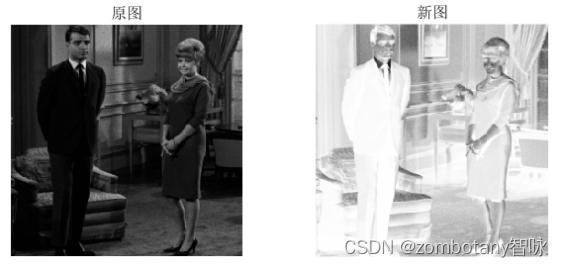
Realize gray inversion .
Writing functions to implement functions similar to imadjust The effect of , take [ 0 , 0.5 ] [0,0.5] [0,0.5] The gray value of is mapped to [ 0 , 1 ] [0,1] [0,1]. It is obvious that the image is brightened .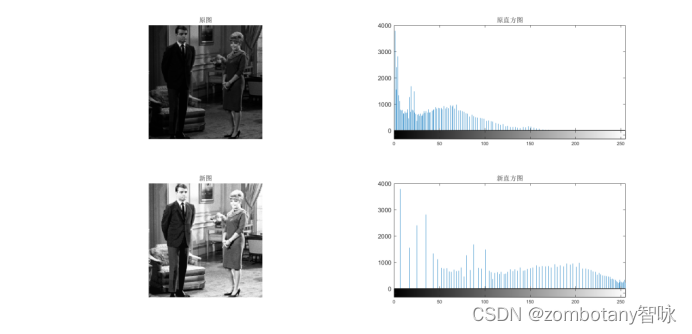
Use the histogram equalization function provided by the system , Histogram equalization is realized . You can see , The image is significantly brighter . The gray value of the original image is distributed around 0150 Within the scope of , After being equalized by histogram , Gray value distribution is more “ equilibrium ” 了 , Distribution in 0255 The scope of the . Compared with the previous transformation that is not based on histogram , This method better saves some details of the image , It looks more natural 、 real .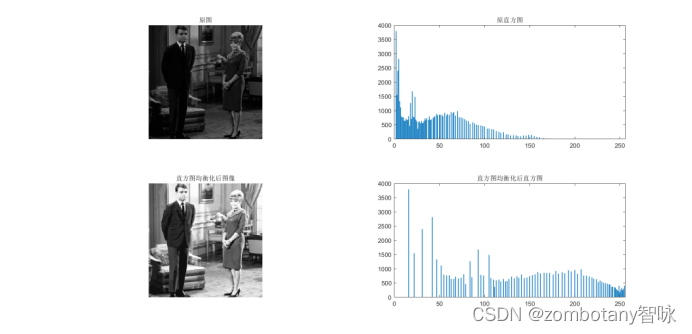
Use self written programs , Histogram equalization is realized . You can see , The program written by myself well restores the implementation effect of the histogram equalization program of the system . It is not only similar to the processing result of the system's own function on the image , And this can be reflected in the histogram image .
Called the system's own function , Achieve histogram matching . You can see , The matched histogram is in 200~230 There is an obvious peak in the distribution of gray level , So this peak is also reflected in the image after histogram matching , Also in the 200~230 There is a peak on the gray level . therefore , The picture is obviously brighter . however , Because it is too bright selected by the matching graph , So the new picture is too bright .
Histogram matching is realized by ourselves , Using the method of single mapping . You can see , In terms of the overall effect of processing, it restores the effect of the function of the system .
Histogram matching is realized by ourselves , Using the method of group mapping . Although the program that implements group mapping is slightly different from the program that implements single mapping , But the effect is similar , All roads lead to Rome , It is similar to the effect of calling the function of the system .
Four 、 Summary of experiments
边栏推荐
- Summary of scaling and coding methods in Feature Engineering
- Seata's landing practice in ant International Banking
- Install the wireless network card driver
- MySQL高可用实战方案——MHA
- C ftp add, delete, modify, query, create multi-level directory, automatic reconnection, switch directory
- Cesium region clipping, local rendering
- 纵横靶场-图片的奥秘
- English grammar_ Definite article the_ Small details
- Double material first!
- [introduction to C language] zzulioj 1021-1025
猜你喜欢

for .. of可用于哪些数据的遍历

Cute image classification -- a general explanation of the article "what are the common flops in CNN model?"

纵横靶场-图片的奥秘
![[internship experience] add your own implementation method to the date tool class](/img/56/54c5f62438a627c96f8b4ad06ba863.jpg)
[internship experience] add your own implementation method to the date tool class
![51: Chapter 5: develop admin management services: 4: develop [add admin account, interface]; (only [user name + password, method]; [@t...] annotation controls transactions; when setting cookies, do yo](/img/6f/4f93eca1d923a58b2ef4b1947538be.png)
51: Chapter 5: develop admin management services: 4: develop [add admin account, interface]; (only [user name + password, method]; [@t...] annotation controls transactions; when setting cookies, do yo

Cesium region clipping, local rendering
滑环的分类以及用途
3D laser slam:aloam---ceres optimization part and code analysis
Double material first!

Summary of scaling and coding methods in Feature Engineering
随机推荐
JS module, closure application
【300+精选大厂面试题持续分享】大数据运维尖刀面试题专栏(九)
Construction and application of industrial knowledge atlas (2): representation and modeling of commodity knowledge
Add index to the field of existing data (Damon database version)
Jianzhi offer 07 rebuild binary tree -- construct binary tree from middle order and post order traversal sequence
ThinkPHP+宝塔运营环境实现定时任务
evutil_make_internal_pipe_: pipe: Too many open files
双料第一!
Oppo self-developed large-scale knowledge map and its application in digital intelligence engineering
16-VMware Horizon 2203 虚拟桌面-Win10 自动桌面池完整克隆专用(十六)
2022年7月24日 暑假第二周训练
Data enhancement in image processing
Evconnlistener of libevent_ new_ bind
小程序毕设作品之微信校园洗衣小程序毕业设计成品(4)开题报告
Interviewers often ask: how to set up a "message queue" and "delayed message queue"?
Intranet penetration based on FRP -- SSH Remote connection to intranet server with the help of public server
纵横靶场-图片的奥秘
期货开户的条件和流程
JS divides the array into two-dimensional arrays according to the specified attribute values
电气成套企业如何借助ERP系统,做好成本利润管理?