当前位置:网站首页>Unity draws the trajectory of pinball and billiards
Unity draws the trajectory of pinball and billiards
2022-07-04 04:18:00 【Cuijiahao】
design sketch
I don't say much nonsense , Go straight to the renderings
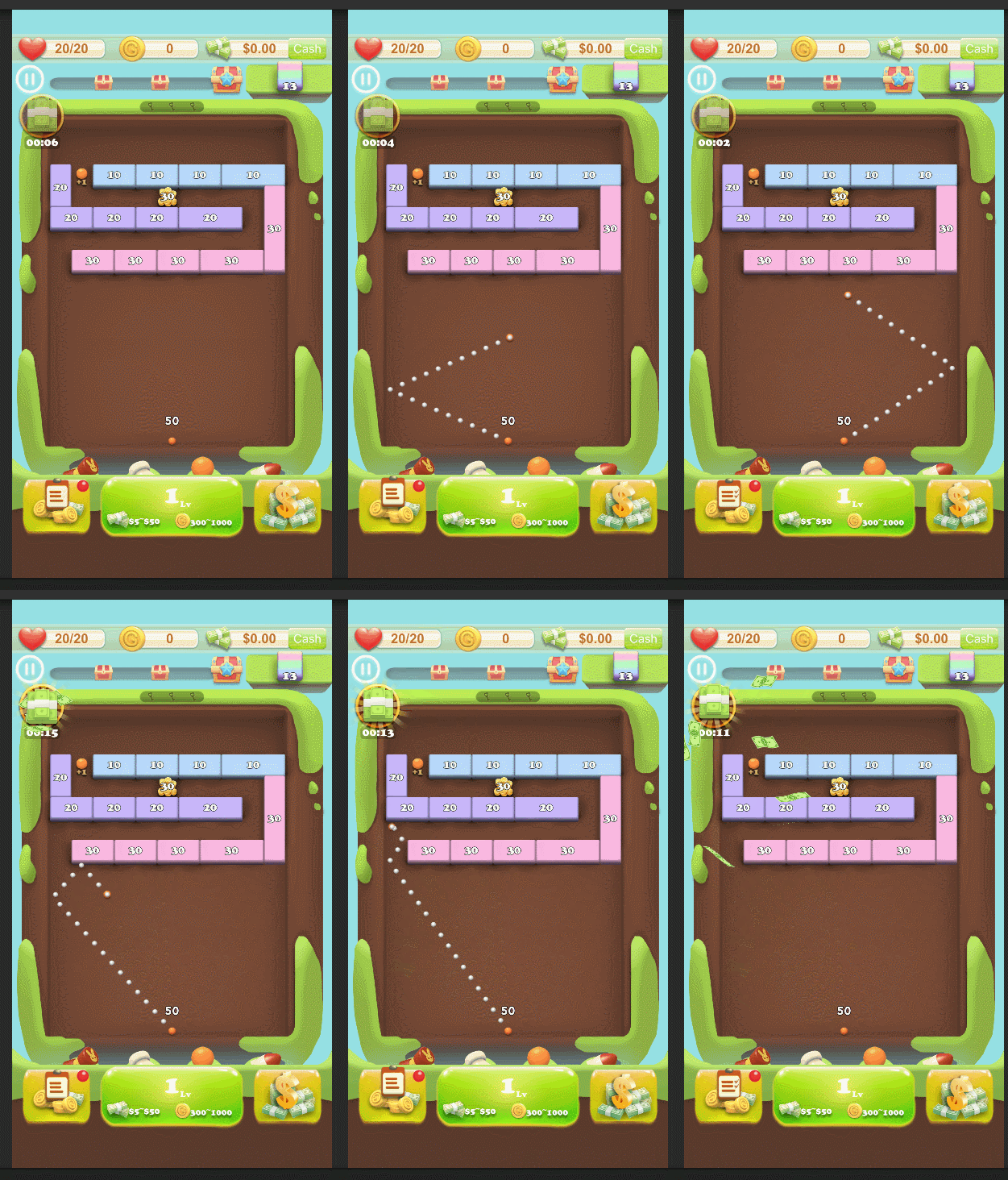
principle
The principle is to create a trackball , In the second scene, simulate the physical trajectory of the white ball , And record the track ! That is to create an invisible scene , Used to simulate the trajectory drawing of the ball .
After the collision , Draw the motion trajectory of the impacted object Transfer momentum to the collision object , Get the object of collision . So as to record the motion trajectory of the collided object
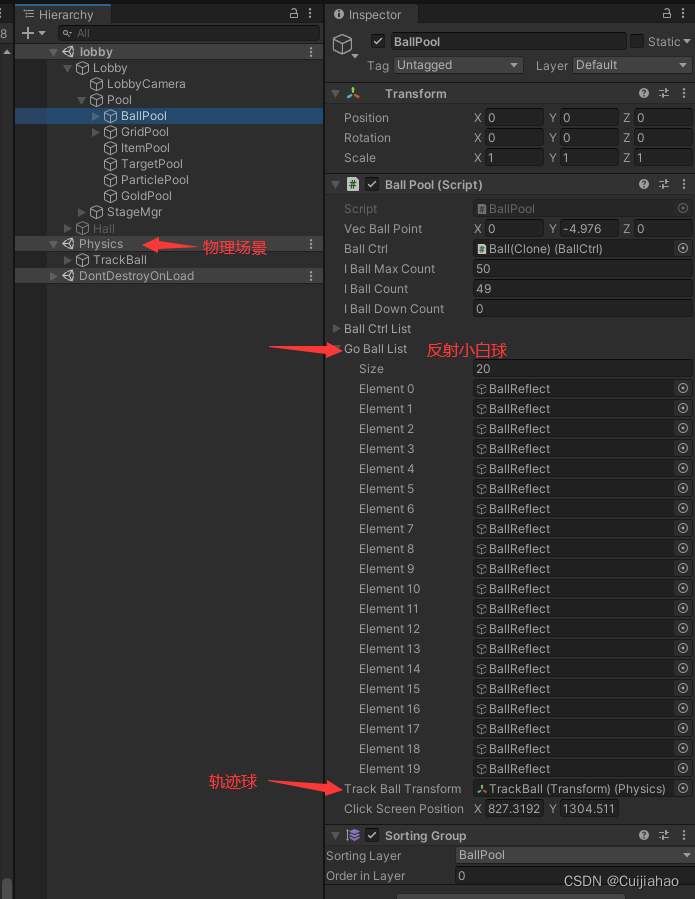
scene
Physics For physical scenes ,GoBallList Used to store the small ball to be reflected ,TrackBallTransform For the trackball to be simulated
Code
There are two key codes :
call physicsScene.Simulate(0.02f); Complete trajectory prediction ;
This API need Physics.autoSimulation = false;// close physical simulation
The specific code is as follows :
using System;
using System.Collections;
using System.Collections.Generic;
using System.Linq;
using TMPro;
using UnityEngine;
using Lean.Touch;
using DG.Tweening;
using UnityEngine.SceneManagement;

public class BallPool : MonoBehaviour
{
    public List<GameObject> GoBallList = new List<GameObject>();// All the reflection balls
    public Transform trackBallTransform;// trackball ( That is, a small ball that needs physical simulation )
    private Rigidbody2D trackBallRigidbody;// The rigid body of the trackball
    private PhysicsScene2D physicsScene;       // Physical scenes
    public Vector3 vecBallPoint;// The position of the trackball

    private void Start()
    {
        CreateBallReflect();// Create a reflection ball
        CreatePhysicsScene();// Create a scene for simulation
    }

    private void OnEnable()
    {
        LeanTouch.OnFingerDown += OnFingerDown;
        LeanTouch.OnFingerSet += OnFingerSet;
        LeanTouch.OnFingerUp += OnFingerUp;
    }

    private void OnDisable()
    {
        LeanTouch.OnFingerDown -= OnFingerDown;
        LeanTouch.OnFingerSet -= OnFingerSet;
        LeanTouch.OnFingerUp -= OnFingerUp;
    }

    // Create a reflection ball
    private void CreateBallReflect()
    {
        // Create trackball
        trackBallTransform = ObjectPool.Instance.Spawn("BallTrack", LobbyCtrl.Instance.transform.parent).transform;
        trackBallTransform.name = "TrackBall";
        trackBallTransform.position = vecBallPoint;
        trackBallRigidbody = trackBallTransform.GetComponent<Rigidbody2D>();
        UIHelper.SetActive(false, trackBallTransform);

        // establish 20 A white reflection ball , And hide
        for (int i = 0; i < 20; i++)
        {
            GameObject ball = ObjectPool.Instance.Spawn(Const.Prefab_Obj_BallReflect, transform);
            ball.name = "BallReflect";
            GoBallList.Add(ball);
        }
        for (int i = 0; i < GoBallList.Count; i++)
        {
            UIHelper.SetActive(false, GoBallList[i]);
        }
    }

    // Create a scene for simulation
    private void CreatePhysicsScene()
    {
        var scene = SceneManager.CreateScene("Physics");
        physicsScene = scene.GetPhysicsScene2D();
        // Move the trackball into the physical scene
        SceneManager.MoveGameObjectToScene(trackBallTransform.gameObject, scene);

    }

    private void MoveFinger(LeanFinger finger)
    {
        // Show trackball
        UIHelper.SetActive(true, trackBallTransform);
        // close   Physics
        Physics2D.autoSimulation = false;
        // Each move requires resetting the position and force of the trackball
        trackBallTransform.position = ballCtrl.transform.position;
        trackBallRigidbody.velocity = Vector3.zero;

        Vector2 screenPoint = Camera.main.ScreenToWorldPoint(finger.ScreenPosition);
        var dir = (screenPoint - (Vector2)ballCtrl.transform.position).normalized;
        // Let the trackball start the physical simulation
        trackBallRigidbody.AddForce(dir * Const.BallSpeed);

        for (int i = 0; i < GoBallList.Count; i++)
        {
            GameObject ball = GoBallList[i];
            UIHelper.SetActive(true, ball);
            physicsScene.Simulate(0.02f);// It must be added that , The smaller the value, the smaller the spacing of white reflection balls
            ball.transform.position = trackBallTransform.position;// All white reflection balls will be placed where the trackball passes
        }
    }

    // Press down
    private void OnFingerDown(LeanFinger finger)
    {
        MoveFinger(finger);
    }

    // Move
    private void OnFingerSet(LeanFinger finger)
    {
        MoveFinger(finger);
    }

    // Release
    private void OnFingerUp(LeanFinger finger)
    {
        // Open Physics
        Physics2D.autoSimulation = true;
    }

    // Recycle Pinball
    void ClearBallList()
    {
        UIHelper.SetActive(false, trackBallTransform);
        for (int i = 0; i < GoBallList.Count; i++)
        {
            ObjectPool.Instance.Unspawn(GoBallList[i]);
        }
    }

}
边栏推荐
- "Implement both software and hardware" to help build a new cloud computing data center
- Tcpclientdemo for TCP protocol interaction
- leetcode刷题:二叉树04(二叉树的层序遍历)
- Rhcsa-- day one
- Katalon框架测试web(二十一)获取元素属性断言
- Epidemic strikes -- Thinking about telecommuting | community essay solicitation
- [csrf-01] basic principle and attack and defense of Cross Site Request Forgery vulnerability
- Redis cluster view the slots of each node
- Interpretation of leveldb source code skiplist
- PostgreSQL users cannot create table configurations by themselves
猜你喜欢

Understand the principle of bytecode enhancement technology through the jvm-sandbox source code

Lnk2038 detected a mismatch of "runtimelibrary": the value "md_dynamicrelease" does not match the value "mdd_dynamicdebug" (in main.obj)
PostgreSQL users cannot create table configurations by themselves
ctf-pikachu-XSS
postgresql 用户不能自己创建表格配置
Infiltration practice guest account mimikatz sunflower SQL rights lifting offline decryption
用于TCP协议交互的TCPClientDemo
深度优先搜索简要讲解(附带基础题)

*. No main manifest attribute in jar
1289_ Implementation analysis of vtask suspend() interface in FreeRTOS
随机推荐
Flink learning 6: programming model
STM32 external DHT11 display temperature and humidity
SQL語句加强練習(MySQL8.0為例)
华为云鲲鹏工程师培训(广西大学)
1289_ Implementation analysis of vtask suspend() interface in FreeRTOS
分布式系统:what、why、how
[Yugong series] go teaching course 002 go language environment installation in July 2022
JDBC advanced
Brief explanation of depth first search (with basic questions)
【读书会第十三期】视频文件的封装格式
指针数组和数组指针
毕业总结
程序员远程办公喜忧参半| 社区征文
【华为云IoT】读书笔记之《万物互联:物联网核心技术与安全》第3章(上)
Perf simple process for multithreaded profile
Two commonly used graphics can easily realize data display
【读书会第十三期】多媒体处理工具 FFmpeg 工具集
Pandora IOT development board learning (HAL Library) - Experiment 6 independent watchdog experiment (learning notes)
Distributed system: what, why, how
A review of reverse reinforcement learning at Virginia Tech (VT)