当前位置:网站首页>Windows and network foundation-15-local security policy
Windows and network foundation-15-local security policy
2022-07-27 17:28:00 【W spicy little prince】
Catalog
One 、 Basic content of local security policy
3.1 Audit strategy ( Log configuration operation )
3.1.5 Audit directory service access
3.1.8 Audit account login events
3.1.9 Audit account management
3.2 User permission assignment
3.2.1 Access this computer from the network
3.2.5 Deny login through Remote Desktop Services
Local security policy
One 、 Basic content of local security policy
1.1 Concept
It is mainly about some security settings for the account logging in to the computer
It mainly affects the security settings of the local computer
1.2 Open mode
1. The start menu ->Windows Management tools -> Local security policy
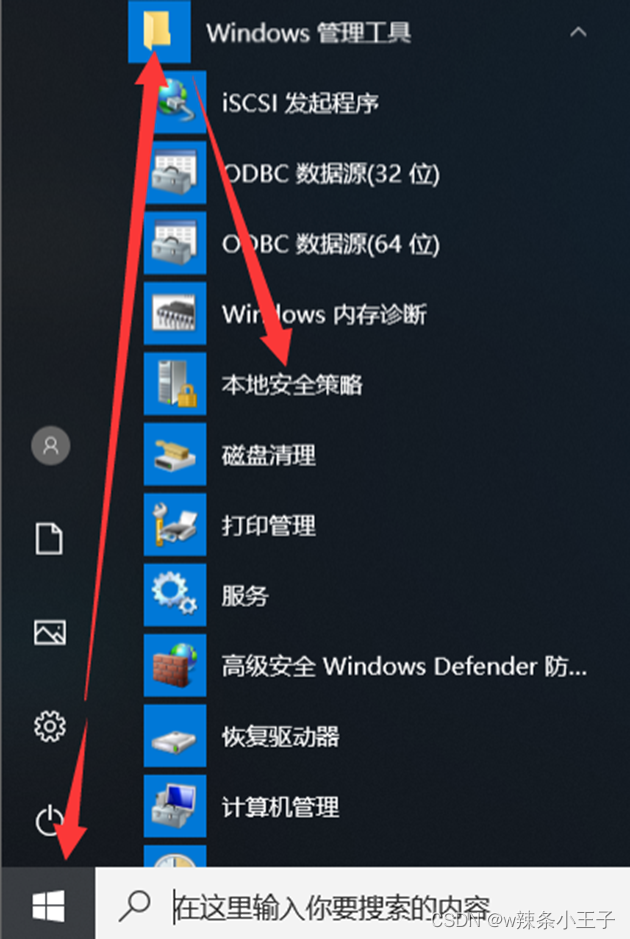
2. Use command “secpol.msc”

3. Use command :gpedit.msc
Enter from the local group policy ( The local group policy contains the local security policy )

Two 、 Account Strategy
2.1 Password policy
Password must meet complexity requirements .
By default Windows Server Is open
This security setting determines whether passwords must meet complexity requirements .
If you enable this policy , The password must meet the following minimum requirements :
Cannot contain the user's account name , Cannot contain more than two consecutive characters in the user name
At least six characters long
Contains three of the following four types of characters :
English capital letters (A To Z)
Small letters in English (a To z)
10 A basic number (0 To 9)
Non alphabetic characters ( for example !、$、#、%)
Perform complexity requirements when changing or creating passwords .
Minimum password length
This security setting determines the minimum number of characters in a user account password . You can set the value between 1 and 20 Between characters , Or set the number of characters to 0 , So as to determine that no password is required . By default 0
Minimum password life
This security setting determines that a password must be used for a period of time before the user can change it ( In days ). You can set a value between 1 and 998 The value between days , Or set the number of days to 0, Allow immediate password changes .
Maximum password life
This security setting determines the period during which a password can be used before the system requires the user to change it ( In days ).
If the maximum password age is set to 0 The default setting is 42
Force password history
Password set in history , It can no longer be set as a new password , The default value is 0, Do not keep historical passwords .
Use reversible encryption to store passwords
Unless application requirements are more important than protecting password information , Otherwise, never enable this policy . Default disabled
2.2 Account locking strategy
Account lockout time
By default , Cannot be defined separately , Need to trigger
Account lockout threshold (yu) value Be sure to turn on this setting to lock the time and lock the counter
This security setting determines the number of failed login attempts that cause the user account to be locked . Before the administrator resets the locked account or the account locking time expires , Cannot use this lock account . Set to 0 Never lock
Reset account lock counter Cannot be defined separately
After entering the wrong password , Wait for some time to recover to the beginning , Recalculate the number of input errors , If the account lockout threshold is defined , This reset time must be less than or equal to the account lockout time . give an example : Wrong bank card password 3 Secondary direct permanent lock , Wrong input 2 The first time I wait xx Hours later, , It will recalculate the number of wrong entries , And then there is 3 Second chance .
give an example : Account lock up time :30 minute
Account lock threshold :3 Time
Reset the account lockout counter :60 minute
If the input is wrong 3 Time , wait for 30 Minutes to unlock , And wrong input 2 Time , etc. 60 Minutes to have 3 Second chance , Why don't you just make a mistake 3 The first time I wait 30 Minutes and 3 Second chance , Therefore, the locking time must be greater than or equal to the time of resetting the account counter .

Account locking strategy : Administrators are not restricted , Never be locked .
problem : Because the administrator is not subject to the account locking policy , The administrator account is fixed , Hackers use password explosion , The server fell , How to hide the administrator , The hacker cannot find the administrator account . Blasting cannot be completed .
3、 ... and 、 The local policy
3.1 Audit strategy ( Log configuration operation )
Yes window Review some events and operations inside . The audit policy can record the events specified to be audited in the system in the form of logs , The system administrator can easily find and track suspicious events in the managed area by checking the log
3.1.1 Audit policy changes
Try to change the user rights assignment policy 、 Audit strategy 、 Audit each instance of account policy or trust policy .
3.1.2 Audit login Events
Audit each instance of a user who attempts to log on to or log off from this computer
3.1.3 Audit object access
determine OS Whether to audit user attempts to access inactive directory objects
Record who has accessed or changed the contents of the shared folder

3.1.4 Audit process tracking
Audit process related events , For example, process creation 、 Process termination 、 Handle replication and indirect object access
3.1.5 Audit directory service access
The types of changes that can be audited include users ( Or any security body ) establish 、 modify 、 Move and restore objects . The directory service audit policy can accurately record the following information in the event : Values before and after modification 、 When was it revised 、 Who modified 、 Which objects have been modified .
3.1.6 Audit privilege use
Audit each instance of the user who performs user rights .
3.1.7 Audit system events
Review any of the following events :
Try changing the system time
Try to start or shut down the system safely
Try loading the extensible authentication component
The audited event is lost due to the failure of the audit system
The security log size exceeds the configurable warning threshold level
3.1.8 Audit account login events
Audit every time the account credentials are verified on this computer
3.1.9 Audit account management
Audit every account management event on the computer . Examples of account management events include :
establish 、 Change or delete user accounts or groups .
rename 、 Disable or enable user accounts .
Set or change password .
3.2 User permission assignment
Assign some permissions to users
3.2.1 Access this computer from the network
This user right determines which users and groups are allowed to connect to the computer over the network . This user right does not affect Remote Desktop Services

3.2.2 Change time zone
Change the computer to display local time ( Computer system time + Time zone offset time ) The time zone
System time itself is absolute , Therefore, it is not affected by the change of time zone .
3.2.3 Change system time
Change the date and time on the computer's internal clock , If the system time is changed , The time recorded in the log will be the new time , Not the actual time of the event .
3.2.4 Shutdown system
Determine which users who log on to the computer locally can use the shutdown command , Shut down the operating system
Remote desktop commands :mstsc
3.2.5 Deny login through Remote Desktop Services
Prohibit users or groups from logging in as remote desktop services clients
3.2.6 Allow local login
Determine which users can log on to the computer
Four 、 Security options
- Interactive login : No need to press ctrl +ALT+DEL
- To turn it off : Allow the system to shut down without logging in
- Account : Guest account status ( Default disabled )
- Account : Local accounts with empty passwords are only allowed to log in to the console
- Network access : Sharing and security model for local accounts
After modifying the policy, you need to update the policy
Gpupdate

边栏推荐
- 二舅的外甥和他的学生们
- Shell编程规范与变量
- 今日睡眠质量记录82分
- 详解二叉树之堆
- Three table joint query 3
- Kubernetes Part 7: using kubernetes to deploy prometheus+grafana monitoring system (kubernetes work practice class)
- 这种精度高,消耗资源少的大模型稀疏训练方法被阿里云科学家找到了!已被收录到IJCAI
- Uncle's nephew and his students
- Xcode 发布测试包TestFlight
- 下棋机器人折断7岁男孩手指,网友:违反了机器人第一定律
猜你喜欢

Kubernetes第七篇:使用kubernetes部署prometheus+grafana监控系统(Kubernetes工作实践类)
Xcode 发布测试包TestFlight

What is JSP?

Technical practice dry goods | from workflow to workflow

Uncle's nephew and his students

High cost, difficult to implement, slow to take effect, what about open source security?

Select structure

SAP UI5 FileUploader 的隐藏 iframe 设计明细

如何通过C#/VB.NET从PDF中提取表格

【obs】NewSocketLoopEnable 网络优化
随机推荐
Global string object (function type) +math object
Complete steps of JDBC program implementation
详解二叉树之堆
Xcode releases test package testflight
Kubernetes第八篇:使用kubernetes部署NFS系统完成数据库持久化(Kubernetes工作实践类)
JDBC connection database
信通院陈屹力:降本增效是云原生应用最大价值
三表联查2
day07 作业
Passive income: return to the original and safe two ways to earn
Can deep learning overturn video codec? The first prize winner of the National Technological Invention Award nags you in the little red book
Start from scratch blazor server (1) -- project construction
Explain the pile of binary trees in detail
[SAML SSO solution] Shanghai daoning brings you SAML for asp NET/SAML for ASP. Net core download, trial, tutorial
每条你收藏的资讯背后,都离不开TA
小于n的最大数
High precision timer
【obs】x264_encoder_encode 编码输出pts dts和 framesize
Chen Yili of ICT Institute: reducing cost and increasing efficiency is the greatest value of cloud native applications
Neural network implementation of handwritten numeral classification matlab