当前位置:网站首页>C common function integration-3
C common function integration-3
2022-07-27 07:30:00 【Xiongsiyu】
Catalog
Compare whether the attribute values of two objects are equal
WebSocket
One 、 demand
Before use , introduce Fleck plug-in unit , The following case will adopt winfrom As a server ,html For the client
It should be noted that , After testing, this case has a problem , That is, if the client connects to the server , If you don't communicate for a long time , Then the connection will be automatically disconnected , In fact, a similar one can be written here TCP The heartbeat mechanism of the protocol solves this problem .
Two 、WebSocket encapsulation
web_socket Code
using Fleck;
using System;
using System.Collections.Generic;
using System.Linq;
using System.Text;
using System.Threading.Tasks;

namespace WebSocket
{
    public class Web_Socket
    {
        // client url And the corresponding Socket Object dictionary
        IDictionary<string, IWebSocketConnection> dic_Sockets = new Dictionary<string, IWebSocketConnection>();
        // Create a  websocket ,0.0.0.0  For listening to all addresses
        WebSocketServer server = new WebSocketServer("ws://0.0.0.0:30000");

        // Open the connection delegate
        public delegate void _OnOpen(string ip);
        public event _OnOpen OnOpen;
        // Close connection delegation
        public delegate void _OnClose(string ip);
        public event _OnClose OnClose;
        // When you get the message
        public delegate void _OnMessage(string ip, string msg);
        public event _OnMessage OnMessage;

        /// <summary>
        ///  initialization
        /// </summary>
        private void Init()
        {
            // Restart after error
            server.RestartAfterListenError = true;

            // Start listening
            server.Start(socket =>
            {
                // Connection establishment Events
                socket.OnOpen = () =>
                {
                    // Get the name of the client web page url
                    string clientUrl = socket.ConnectionInfo.ClientIpAddress + ":" + socket.ConnectionInfo.ClientPort;
                    dic_Sockets.Add(clientUrl, socket);
                    if (OnOpen != null) OnOpen(clientUrl);
                    Console.WriteLine(DateTime.Now.ToString() + " |  The server : And client pages :" + clientUrl + "  establish WebSock Connect !");
                };

                // Connection close event
                socket.OnClose = () =>
                {
                    string clientUrl = socket.ConnectionInfo.ClientIpAddress + ":" + socket.ConnectionInfo.ClientPort;
                    // If this client exists , So for this socket Remove
                    if (dic_Sockets.ContainsKey(clientUrl))
                    {
                        dic_Sockets.Remove(clientUrl);
                        if (OnClose != null) OnClose(clientUrl);
                    }
                    Console.WriteLine(DateTime.Now.ToString() + " |  The server : And client pages :" + clientUrl + "  To break off WebSock Connect !");
                };

                // Accept client web message events
                socket.OnMessage = message =>
                {
                    string clientUrl = socket.ConnectionInfo.ClientIpAddress + ":" + socket.ConnectionInfo.ClientPort;
                    Receive(clientUrl, message);
                    if (OnMessage != null) OnMessage(clientUrl, message);
                };
            });
        }

        /// <summary>
        ///  Send a message to the client
        /// </summary>
        /// <param name="webSocketConnection"> Client instance </param>
        /// <param name="message"> The message content </param>
        public void Send(string clientUrl, string message)
        {
            IWebSocketConnection webSocketConnection = GetUserSocketInstance(clientUrl);
            if (webSocketConnection != null)
            {
                if (webSocketConnection.IsAvailable)
                {
                    webSocketConnection.Send(message);
                }
            }
        }

        /// <summary>
        ///  receive messages
        /// </summary>
        /// <param name="clientUrl"></param>
        /// <param name="message"></param>
        private void Receive(string clientUrl, string message)
        {
            Console.WriteLine(DateTime.Now.ToString() + " |  The server :【 received 】 Come to the client page :" + clientUrl + " Information about :\n" + message);
        }

        /// <summary>
        ///  Get user instance
        /// </summary>
        /// <param name="clientUrl"> Address of the user </param>
        public IWebSocketConnection GetUserSocketInstance(string clientUrl)
        {
            if (dic_Sockets.ContainsKey(clientUrl))
                return dic_Sockets[clientUrl];
            else
                return null;
        }

        /// <summary>
        ///  Close a user's connection
        /// </summary>
        /// <param name="clientUrl"></param>
        public void CloseUserConnect(string clientUrl)
        {
            IWebSocketConnection webSocketConnection = GetUserSocketInstance(clientUrl);
            if (webSocketConnection != null)
                webSocketConnection.Close();
        }

        /// <summary>
        ///  Close all connections to the client
        /// </summary>
        public void CloseAllConnect()
        {
            foreach (var item in dic_Sockets.Values)
            {
                if (item != null)
                {
                    item.Close();
                }
            }
        }

        public Web_Socket()
        {
            Init();
        }
    }
}
3、 ... and 、 The front end
winform Interface

Form1 Code :
using Fleck;
using System;
using System.Collections.Generic;
using System.ComponentModel;
using System.Data;
using System.Drawing;
using System.IO;
using System.Linq;
using System.Text;
using System.Threading.Tasks;
using System.Windows.Forms;

namespace WebSocket
{
    public partial class Form1 : Form
    {
        public Form1()
        {
            InitializeComponent();
        }

        private Web_Socket webSocket = new Web_Socket();

        private void Form1_Load(object sender, EventArgs e)
        {
            webSocket.OnOpen += this.OnOpen;
            webSocket.OnClose += this.OnClose;
            webSocket.OnMessage += this.OnMessage;

            Init();
        }

        private void Form1_FormClosing(object sender, FormClosingEventArgs e)
        {
            webSocket.CloseAllConnect();
        }

        private void Init()
        {

        }

        // When there is a client connection
        private void OnOpen(string clientUrl)
        {
            this.Invoke(new MethodInvoker(delegate
            {
                ComboBox_IPAddres.Items.Add(clientUrl);
                if (ComboBox_IPAddres.Items.Count > 0)
                    ComboBox_IPAddres.SelectedIndex = 0;
                ListBox_IPList.Items.Insert(ListBox_IPList.Items.Count, clientUrl);
            }));
            AddLogToListView(" Users join ", string.Empty, string.Format("IP:{0}  Join the connection ", clientUrl), true);
        }

        // When the client is shut down
        private void OnClose(string clientUrl)
        {
            this.Invoke(new MethodInvoker(delegate
            {
                ComboBox_IPAddres.Items.Remove(clientUrl);
                ListBox_IPList.Items.Remove(clientUrl);
            }));
            AddLogToListView(" User exits ", string.Empty, string.Format("IP:{0}  Close the connection ", clientUrl), true);
        }

        // When a client message is received
        private void OnMessage(string clientUrl, string message)
        {
            AddLogToListView(" Server receive ", clientUrl, message);
        }

        /// <summary>
        ///  Add logs to the log list
        /// </summary>
        /// <param name="clientUrl"></param>
        /// <param name="message"></param>
        private void AddLogToListView(string title, string clientUrl, string message, bool rest = false)
        {
            this.Invoke(new MethodInvoker(delegate
            {
                int len = ListBox_MessageList.Items.Count;
                if (!rest)
                    ListBox_MessageList.Items.Insert(len, string.Format("[{0}] IP:{1}  Content :{2}", title, clientUrl, message));
                else
                    ListBox_MessageList.Items.Insert(len, string.Format("[{0}] {1}", title, message));
            }));
        }

        /// <summary>
        ///  Send button click event
        /// </summary>
        /// <param name="sender"></param>
        /// <param name="e"></param>
        private void Button_Send_Click(object sender, EventArgs e)
        {
            string clientUrl = ComboBox_IPAddres.Text;
            string content = TextBox_Message.Text;
            if (string.IsNullOrEmpty(content))
            {
                MessageBox.Show(" The sending content is empty ");
                return;
            }
            if (string.IsNullOrEmpty(clientUrl))
            {
                MessageBox.Show(" Please select one IP Address ");
                return;
            }
            webSocket.Send(clientUrl, content);
            TextBox_Message.Text = string.Empty;
            AddLogToListView(" Server send ", clientUrl, content);
        }
    }
}
Four 、 Web side
html:
<!DOCTYPE  HTML PUBLIC "-//W3C//DTD HTML 4.0 Transitional//EN">
<html>
<head>
    <title>websocket client</title>
    <script type="text/javascript">
        var start = function () {
            var inc = document.getElementById('incomming');
            var wsImpl = window.WebSocket || window.MozWebSocket;
            var form = document.getElementById('sendForm');
            var input = document.getElementById('sendText');

            inc.innerHTML += " Connect to server ..<br/>";

            //  Create a new websocket And connect
            window.ws = new wsImpl('ws://localhost:30000/');

            //  When the data comes from the server , This method will be called
            ws.onmessage = function (evt) {
                inc.innerHTML += ("[ Messages from the server ] " + evt.data + '<br/>');
                console.log("[ Messages from the server ] " + evt.data);
            };

            //  When establishing a connection , This method will be called
            ws.onopen = function () {
                inc.innerHTML += ' Connection established .. <br/>';
            };

            //  When the connection is closed , This method will be called
            ws.onclose = function () {
                inc.innerHTML += ' Connection closed .. <br/>';
            }

            form.addEventListener('submit', function (e) {
                e.preventDefault();
                var val = input.value;
                ws.send(val);
                input.value = "";
            });
        }
        window.onload = start;
    </script>
</head>
<body>
    <form id="sendForm">
        <span> Enter the content and press enter to send the message </span> <br/>
        <input id="sendText" placeholder="Text to send" />
    </form>
    <pre id="incomming"></pre>
</body>
</html>
After testing , send out , The message received is normal
HTTP Communications
Code :
using Newtonsoft.Json;
using System.IO;
using System.Net;
using System.Text;

namespace HTTP
{
    public class RestClient
    {
        /// <summary>
        /// Get request
        /// </summary>
        /// <param name="url"> request url</param>
        /// <returns></returns>
        public static string Get(string url)
        {
            HttpWebRequest req = (HttpWebRequest)WebRequest.Create(url);
            if (req == null || req.GetResponse() == null)
                return string.Empty;

            HttpWebResponse resp = (HttpWebResponse)req.GetResponse();
            if (resp == null)
                return string.Empty;

            using (Stream stream = resp.GetResponseStream())
            {
                // Get content
                using (StreamReader reader = new StreamReader(stream))
                {
                    return reader.ReadToEnd();
                }
            }
        }


        /// <summary>
        /// Post request
        /// </summary>
        /// <param name="url"></param>
        /// <param name="postData"></param>
        /// <returns></returns>
        public static string Post(string url, object postData)
        {
            HttpWebRequest req = (HttpWebRequest)WebRequest.Create(url);
            if (req == null)
                return string.Empty;

            req.Method = "POST";
            req.ContentType = "application/json";
            req.Timeout = 15000;

            byte[] data = Encoding.UTF8.GetBytes(JsonConvert.SerializeObject(postData));
            // Be careful : There is no need to specify the length manually  ( Otherwise, an exception may be reported that the flow is closed before it is processed , because ContentLength Time will be more real post The data length is large )
            //req.ContentLength = data.Length;
            using (Stream reqStream = req.GetRequestStream())
            {
                reqStream.Write(data, 0, data.Length);
            }

            HttpWebResponse resp = (HttpWebResponse)req.GetResponse();
            if (resp == null)
                return string.Empty;

            using (Stream stream = resp.GetResponseStream())
            {
                using (StreamReader reader = new StreamReader(stream, Encoding.UTF8))
                {
                    return reader.ReadToEnd();
                }
            }
        }

    }
}
above Post Requests may not work on some interfaces , You can use the following method , The first method is parameterless Post request , The second method is as long as the required Key and Value Just add it to the dictionary
/// <summary>
///  Appoint Post Address using Get  Method to get all strings
/// </summary>
/// <param name="url"> Request background address </param>
/// <returns></returns>
public static string Post(string url)
{
    string result = "";
    HttpWebRequest req = (HttpWebRequest)WebRequest.Create(url);
    req.Method = "POST";
    HttpWebResponse resp = (HttpWebResponse)req.GetResponse();
    Stream stream = resp.GetResponseStream();
    // Get content
    using (StreamReader reader = new StreamReader(stream, Encoding.UTF8))
    {
        result = reader.ReadToEnd();
    }
    return result;
}


/// <summary>
///  Appoint Post Address using Get  Method to get all strings
/// </summary>
/// <param name="url"> Request background address </param>
/// <returns></returns>
public static string Post(string url, Dictionary<string, string> dic)
{
    string result = "";
    HttpWebRequest req = (HttpWebRequest)WebRequest.Create(url);
    req.Method = "POST";
    req.ContentType = "application/x-www-form-urlencoded";
    #region  add to Post  Parameters
    StringBuilder builder = new StringBuilder();
    int i = 0;
    foreach (var item in dic)
    {
        if (i > 0)
            builder.Append("&");
        builder.AppendFormat("{0}={1}", item.Key, item.Value);
        i++;
    }
    byte[] data = Encoding.UTF8.GetBytes(builder.ToString());
    req.ContentLength = data.Length;
    using (Stream reqStream = req.GetRequestStream())
    {
        reqStream.Write(data, 0, data.Length);
        reqStream.Close();
    }
    #endregion
    HttpWebResponse resp = (HttpWebResponse)req.GetResponse();
    Stream stream = resp.GetResponseStream();
    // Get response content
    using (StreamReader reader = new StreamReader(stream, Encoding.UTF8))
    {
        result = reader.ReadToEnd();
    }
    return result;
}
Task Two commonly used ways
1. No return value
Code :
using System;
using System.Collections.Generic;
using System.Linq;
using System.Text;
using System.Threading;
using System.Threading.Tasks;

namespace MyTask
{
    class Program
    {
        static void Main(string[] args)
        {
            List<Task> taskList = new List<Task>();
            taskList.Add(Task.Factory.StartNew(() =>
            {
                Thread.Sleep(1000);
                Console.WriteLine("1 Second execution end ");
            }));
            taskList.Add(Task.Factory.StartNew(() =>
            {
                Thread.Sleep(800);
                Console.WriteLine("o.8 Second execution end ");
            }));

            Console.WriteLine(" In execution ");

            TaskFactory taskFactory = new TaskFactory();
            taskList.Add(taskFactory.ContinueWhenAll(taskList.ToArray(), tArray =>
            {
                Thread.Sleep(200);
                Console.WriteLine(" Wait for these to complete ");
            }));

            Console.ReadKey();
        }
    }
}
function :

Here, due to the delay processing , The execution sequence is inconsistent
Suppose an exception occurs in the task :
Code :
taskList.Add(Task.Factory.StartNew(() =>
{
    try
    {
        int a = int.Parse("");
    }
    catch (Exception ex)
    {
        Console.WriteLine("========= abnormal :" + ex.Message);
    }
    Console.WriteLine("========= The second way ");
}));
function :

2. There is a return value method
Code :
using System;
using System.Collections.Generic;
using System.Linq;
using System.Text;
using System.Threading;
using System.Threading.Tasks;

namespace MyTask
{
    class Program
    {
        static void Main(string[] args)
        {
            List<Task<int>> taskList1 = new List<Task<int>>();
            taskList1.Add(Task<int>.Factory.StartNew(() =>
                {
                    int num = 3 * 5;
                    Console.WriteLine(" Task queue with return value  1");
                    return num;
                }
            ));
            taskList1.Add(Task<int>.Factory.StartNew(() =>
                {
                    int num = 3 * 7;
                    Console.WriteLine(" Task queue with return value  2");
                    return num;
                }
            ));
            new TaskFactory().ContinueWhenAll(taskList1.ToArray(), tArray =>
            {
                Console.WriteLine(" The task queue with return value is completed ");
                foreach (Task<int> item in taskList1)
                {
                    Console.WriteLine(" Execution results :" + item.Result);
                }
            });


            Console.ReadKey();
        }
    }
}
function :

Timer
The first one is : Use thread
private void Form1_Load(object sender, EventArgs e){
    timer = new System.Timers.Timer();
    timer.Interval = 3000;
    timer.AutoReset = false;
    timer.Enabled = true;
    timer.Elapsed += new System.Timers.ElapsedEventHandler(GetCurDateTime);
}

private void GetCurDateTime(object sender, System.Timers.ElapsedEventArgs e)
{
    Label_Log.Text = string.Empty;
}
The second kind : use winform Built in components
private System.Windows.Forms.Timer timer = new System.Windows.Forms.Timer();

private void Form1_Load(object sender, EventArgs e){
    timer.Interval = 3000;
    timer.Tick += GetCurDateTime;
    timer.Enabled = true;
}

private void GetCurDateTime(object sender, EventArgs e)
{
    Label_Log.Text = string.Empty;
}
Compare whether the attribute values of two objects are equal
It should be noted that , The fields in both objects must be attributes , with get,set, Otherwise, I can't recognize , Back to you false
Code
/// <summary>
///  Compare -- The value of two entity class objects of the same type
/// </summary>
/// <param name="oneT"></param>
/// <returns> return true The data of the two objects are the same , return false Means different </returns>
private bool CompareType<T>(T oneT, T twoT)
{
    bool result = true;// Use when comparing the two types , If there is anything different, just false
    Type typeOne = oneT.GetType();
    Type typeTwo = twoT.GetType();
    // If two T Different types    No comparison
    if (!typeOne.Equals(typeTwo)) { return false; }
    PropertyInfo[] pisOne = typeOne.GetProperties(); // Get all public properties (Public)
    PropertyInfo[] pisTwo = typeTwo.GetProperties();
    // If the length is 0 return false
    if (pisOne.Length <= 0 || pisTwo.Length <= 0)
    {
        return false;
    }
    // If the length is different , return false
    if (!(pisOne.Length.Equals(pisTwo.Length))) { return false; }
    // Traverse two T type , Traversal properties , And make a comparison
    for (int i = 0; i < pisOne.Length; i++)
    {
        // Get the property name
        string oneName = pisOne[i].Name;
        string twoName = pisTwo[i].Name;
        // Get the value of the property
        object oneValue = pisOne[i].GetValue(oneT, null);
        object twoValue = pisTwo[i].GetValue(twoT, null);
        // Compare , Only compare value types
        if ((pisOne[i].PropertyType.IsValueType || pisOne[i].PropertyType.Name.StartsWith("String")) && (pisTwo[i].PropertyType.IsValueType || pisTwo[i].PropertyType.Name.StartsWith("String")))
        {
            if (oneName.Equals(twoName))
            {
                if (oneValue == null)
                {
                    if (twoValue != null)
                    {
                        result = false;
                        break; // If there is something different, exit the loop
                    }
                }
                else if (oneValue != null)
                {
                    if (twoValue != null)
                    {
                        if (!oneValue.Equals(twoValue))
                        {
                            result = false;
                            break; // If there is something different, exit the loop
                        }
                    }
                    else if (twoValue == null)
                    {
                        result = false;
                        break; // If there is something different, exit the loop
                    }
                }
            }
            else
            {
                result = false;
                break;
            }
        }
        else
        {
            // If the attribute in the object is an entity class object , Recursive traversal comparison
            bool b = CompareType(oneValue, twoValue);
            if (!b) { result = b; break; }
        }
    }
    return result;
}


// call
private void btnOrder_Click(object sender, EventArgs e)
{

    // Entity class comparison
    UserVo userVoOne = new UserVo();
    UserVo userVoTwo = new UserVo();

    userVoOne.UserID = 1;
    //userVoOne.UserAccount = "a";

    userVoTwo.UserID = 1;

    bool flag = CompareType(userVoOne, userVoTwo);
    if (flag)
    {
        MessageBox.Show(" The data of the two classes are the same ");
    }
    else
    {
        MessageBox.Show(" The data of the two classes are different ");
    }
}
Set the software to boot up
Interface :
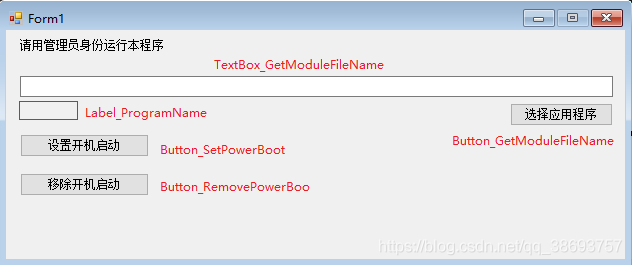
Code :
using Microsoft.Win32;
using System;
using System.Collections.Generic;
using System.ComponentModel;
using System.Data;
using System.Drawing;
using System.IO;
using System.Linq;
using System.Text;
using System.Threading.Tasks;
using System.Windows.Forms;

namespace  Boot up
{
    public partial class Form1 : Form
    {
        public Form1()
        {
            InitializeComponent();
        }

        // Get the application path
        private string StrAssName = string.Empty;
        // Get the application name
        private string ShortFileName = string.Empty;

        private void Form1_Load(object sender, EventArgs e)
        {

        }

        // Add to boot up
        public void AddPowerBoot()
        {
            try
            {
                if(string.IsNullOrEmpty(ShortFileName) || string.IsNullOrEmpty(StrAssName))
                {
                    MessageBox.Show(" Input box cannot be empty ");
                    return;
                }

                // This method loads the startup key into the registry
                // Get the application path
                //string StrAssName = Application.StartupPath + @"\" + Application.ProductName + @".exe";
                // Get the application name
                //string ShortFileName = Application.ProductName;
                // route :HKEY_LOCAL_MACHINE\SOFTWARE\WOW6432Node\Microsoft\Windows\CurrentVersion\Run
                RegistryKey rgkRun = Registry.LocalMachine.OpenSubKey("SOFTWARE\\Microsoft\\Windows\\CurrentVersion\\Run", true);
                if (rgkRun == null)
                {
                    rgkRun = Registry.LocalMachine.CreateSubKey("SOFTWARE\\Microsoft\\Windows\\CurrentVersion\\Run");
                }
                rgkRun.SetValue(ShortFileName, StrAssName);
                MessageBox.Show(" Successfully added to the registry ");
            }
            catch (Exception ex)
            {
                MessageBox.Show(" Perform error :" + ex.Message);
            }
        }

        // Remove boot up
        public void RemovePowerBoot()
        {
            try
            {
                if (string.IsNullOrEmpty(ShortFileName) || string.IsNullOrEmpty(StrAssName))
                {
                    MessageBox.Show(" Input box cannot be empty ");
                    return;
                }

                // This deletes the startup key in the registry
                // Get the application name
                //string ShortFileName = Application.ProductName;
                RegistryKey rgkRun = Registry.LocalMachine.OpenSubKey("SOFTWARE\\Microsoft\\Windows\\CurrentVersion\\Run", true);
                if (rgkRun == null)
                {
                    rgkRun = Registry.LocalMachine.CreateSubKey("SOFTWARE\\Microsoft\\Windows\\CurrentVersion\\Run");
                }
                rgkRun.DeleteValue(ShortFileName, false);
                MessageBox.Show(" Successfully removed the registry ");
            }
            catch (Exception ex)
            {
                MessageBox.Show(" Perform error :" + ex.Message);
            }
        }

        // Set boot up
        private void Button_SetPowerBoot_Click(object sender, EventArgs e)
        {
            AddPowerBoot();
        }

        // Remove boot up
        private void Button_RemovePowerBoot_Click(object sender, EventArgs e)
        {
            RemovePowerBoot();
        }

        // Select the program to operate
        private void Button_GetModuleFileName_Click(object sender, EventArgs e)
        {
            // Create objects
            OpenFileDialog ofg = new OpenFileDialog();
            // Set the default open path ( Absolute path )
            ofg.InitialDirectory = "C:\\Users\\Administrator\\Desktop";
            // Set open title 、 suffix
            ofg.Title = " Please select the exe file ";
            ofg.Filter = "exe file |*.exe";
            string path = string.Empty;
            if (ofg.ShowDialog() == DialogResult.OK)
            {
                // Get the open file path ( Include the file name )
                path = ofg.FileName.ToString();
                Console.WriteLine(" The open file path is :" + path);

                TextBox_GetModuleFileName.Text = path;
                StrAssName = path;

                string[] arr = path.Split('\\');
                ShortFileName = arr[arr.Length - 1];
                Label_ProgramName.Text = " Application name :" + ShortFileName;
            }
            else if (ofg.ShowDialog() == DialogResult.Cancel)
            {
                MessageBox.Show(" No open file selected !");
            }
        }
    }
}
The program must be run as an administrator , Otherwise, an error will be reported
end
边栏推荐
- jjwt 生成token
- ADB instruction sorting
- drawImage方法第一次调用不显示图片的解决方式
- VLAN trunk实验
- QT连接sqlite数据库的错误及其修改办法
- 使用sqlplus显示中文为乱码的解决办法
- Generics -- learn it, and there are many benefits
- The difference between critical section (the code that accesses critical resources in each thread) and mutex (mutex between processes, shared memory, virtual address)
- How to submit C4d animation to cloud rendering farm for fast rendering?
- 优炫数据库主要线程有哪些?
猜你喜欢

Use reflection to dynamically modify annotation attributes of @excel

ClickHouse 笔记1 | 简介、特点 | 基于CentOS7系统的安装与使用 | 常用数据类型 | MergeTree 表引擎 | SQL操作
(2022牛客多校三)J-Journey(dijkstra)

杂谈:跟女儿聊为啥要学好文化课

C# 常用功能整合-2
C# 常用功能整合-3

Essay: college entrance examination

Which C4d cloud rendering platform to cooperate with?

用户解锁SM04 SM12

Federal Reserve SR 11-7: Guidance on model risk management - Wanzi collection
随机推荐
C# 常用功能整合-3
Using loops to process data in tables in kettle
Flutter实战-请求封装(一)
冰冰学习笔记:类与对象(中)
docker安装MySQL8.0.28
在Perl程序中暴露Prometheus指标
Port forwarding summary
在mac中使用docker来搭建oracle数据库服务器
Oracle composite query
(2022 Hangdian multi school III) 1011.taxi (Manhattan maximum + 2 points)
The difference between critical section (the code that accesses critical resources in each thread) and mutex (mutex between processes, shared memory, virtual address)
Cadence(十一)丝印调整和后续事项
Codeforces Round #810 (Div.2) A-C
Perl: split the external command to be executed into multiple lines
C程序代码的内存结构分析
Generics -- learn it, and there are many benefits
C language pthread_ cleanup_ Push() and pthread_ cleanup_ Pop() function (used for the resource cleaning task after the termination action in the critical resource program segment to avoid deadlock. T
Zabbix: 将收集到值映射为易读的语句
Functools module
Gossip: talk with your daughter about why you should learn culture lessons well