当前位置:网站首页>Libgdx learning path 01: libgdx introduction and running tutorial
Libgdx learning path 01: libgdx introduction and running tutorial
2022-07-28 19:18:00 【TDSSS】
One 、 Introduce libGDX
libGDX It's an open source, cross platform 2D/3D Game development framework for , It consists of Java/C/C++ Written in language . compatible (Windows/Linux/Android/IOS/HTML) Wait for multiple platforms .
Code is hosted in GitHub:libGDX_GitHubDesktop/Android/HTML5/iOS Java game development framework - GitHub - libgdx/libgdx: Desktop/Android/HTML5/iOS Java game development framework https://github.com/libgdx/libgdx
framework
The main composition is shown in the figure below ( From Baidu Encyclopedia , Invasion and deletion )

Libgdx from audio、files、graphics、math、physics、scenes、utils These main modules consist of , They correspond to Libgdx Medium Audio operation , File read ,2D/3D Rendering ,Libgdx Drawing related operations ,Box2D encapsulation ,2D/3D Game components , as well as Libgdx Built in tool class .
It provides a clear framework for designing games
The game design architecture is shown in the figure below

Two 、 Generate and import a libGDX project
1、 preparation
- IDE(Android Studio、Eclipse、IDEA All right ) I used Eclipse and Android Studio.
- JDK11+ Although the official say is 8 That's all , But the latest version of project generation requires JDK11 above .
- Maven Prepare the domestic image address
- Android SDK build tools 31.0.0.0+ * Not necessary Only when Android is needed for the project
- RoboVM OSS* Not necessary Project needs IOS You need to prepare when you end
After finishing the preparatory work , We can start the next step , Prepare to build the project
2、 Generating project
The official has prepared a project generation tool gdx-setup
gdx-setup https://libgdx-nightlies.s3.eu-central-1.amazonaws.com/libgdx-runnables/gdx-setup.jar After downloading, you can directly double-click to open , If it can't be opened, you can also input the command to open
java -jar gdx-setup.jar
Open it as shown in the figure

From top to bottom is
- Project name Project name
- Package name Project package name
- Game class Game main class name
- Output folder Generate project storage address
- Android SDK * Not necessary If I check that Android You need to specify SDK
recommend : Click on Advanced stay Maven Mirror URL Enter the Alibaba cloud image address in

Click on save After saving the settings, click Generate Start building project
The first time you build a project, it will be very slow , Wait a few minutes .
After completion, a success prompt as shown in the following figure will appear , Congratulations on your successful project generation !

3、 Import the project
Preparation before import
Use gdx-setup Project generation , Will automatically download gradle To C:\Users\{ Current computer user name }\.gradle\wrapper\dists
Then configure gradle To system variables and so on , You can refer to
stay Eclipse Import
First, let eclipse Support gradle, stay Window -> Preferences -> Gradle -> Choose Gradle wrapper It can be applied

And then in eclipse in , Click on the top left corner File -> import -> Gradle -> Existing Gradle Project -> Select the folder where the project is located -> Gradle wrapper -> finish You can start importing the project

After successful import, the project structure is shown in the figure

stay Android studio Import
open AS after , Click on Open, Open build.gradle file

Then wait for the project to be imported , After successful import, the project structure is shown in the figure

3、 ... and 、 Run the project
1、 Desktop Project (desktop)
Eclipse
Right click the item name -desktop modular -> Run As -> Run Configurations ->Java Application -> Create a new form
-> stay ② Enter the project name in stay ③ Enter the main class of the project desktop module ->Run


After success, as shown in the figure below

2、 Andrews end project (Android)
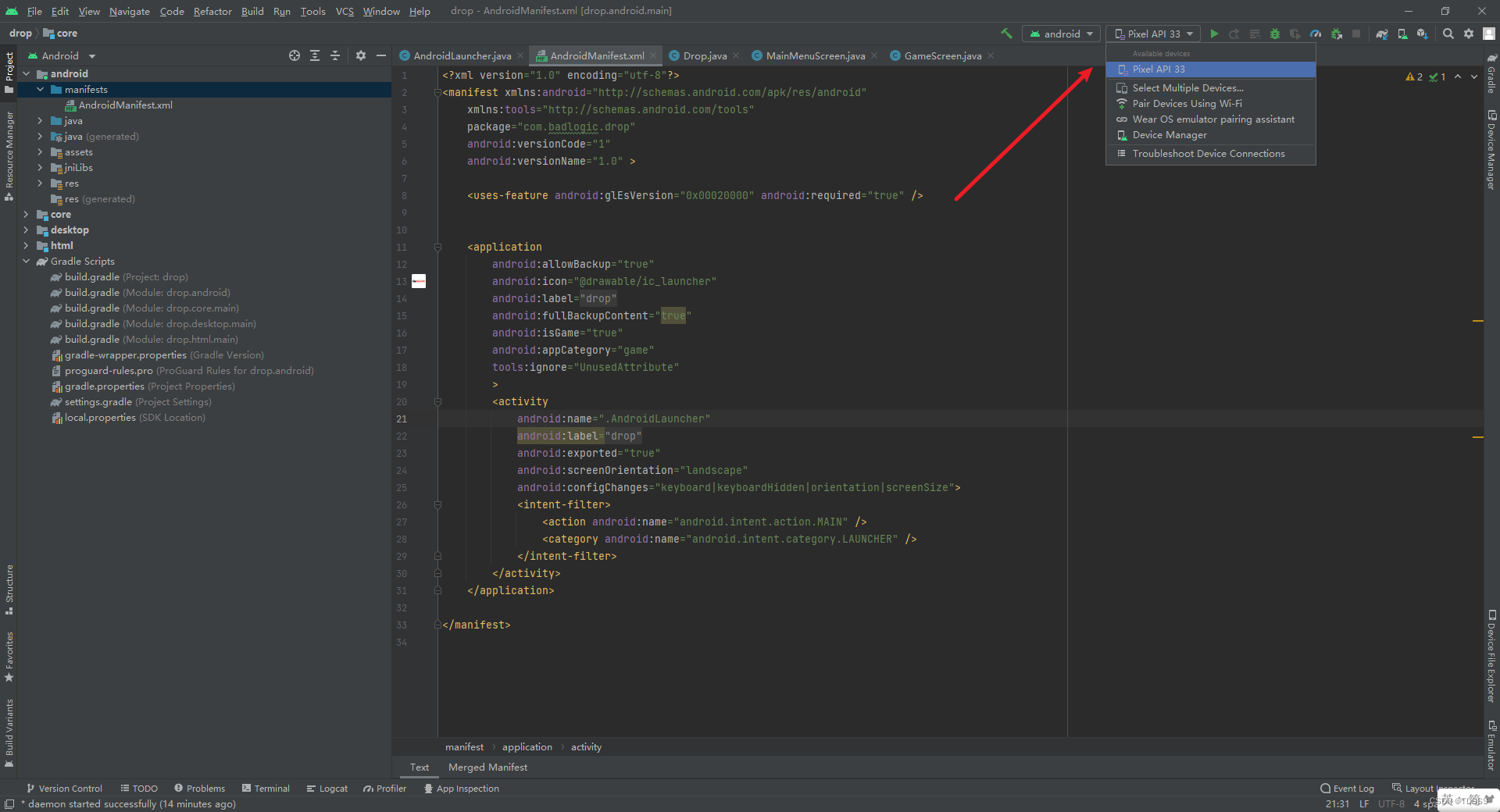
Android Studio
Select virtual machine device or real machine , Click on the run , It will be automatically packaged and generated APK And install and run
3、 Web side project (HTML)
Find the project folder under the build project path

Open in this folder DOS window or stay DOS Window into the folder ( Tips : Press and hold... In the folder shift Right click here to open Powershell window )
File path Reference resources (D:\Project\libgdx\gdx-demo2), Enter the following code on the command line
./gradlew html:superDevBegan to run

After running successfully, it will display

Open the url http://localhost:8080/index.html You can see the game
4、iOS End operation
See this article for specific operations
5、 Command line run ( Expand )
In addition to using tools , In fact, all terminals can be run from the command line
Desktop:
./gradlew desktop:run
Android:
./gradlew android:installDebug android:run
notes : When running with Android command ,ANDROID_HOME Need to point to a valid Android SDK
iOS:
./gradlew ios:launchIPhoneSimulator
HTML:
./gradlew html:superDev
Four 、 A simple little game ( Expand ) * Not necessary
According to the guidance of official documents , The official will teach you how to play a little game of catching raindrops with a bucket , The address is as follows
A simple little game ( The bucket catches raindrops )Before diving into the APIs provided by libGDX, let’s create a very simple “game”, that touches each module provided by the framework, to get a feeling for things. We’ll introduce... https://libgdx.com/wiki/start/a-simple-game besides , Another document has benefited me a lot , A blogger guides how to use libGDX Make a small game prototype of playing bricks , Very interesting , The address is as follows
LibGDX beginner tutorial( Brick making )https://colourtann.github.io/HelloLibgdx/index.html
边栏推荐
- RFs self study notes (II): theoretical measurement model - without clutter but with detection probability
- How long does software testing training take?
- [filter tracking] target tracking based on EKF, TDOA and frequency difference positioning with matlab code
- RFs self study notes (4): actual measurement model - the mixture of OK and CK, and then calculate the likelihood probability
- Win11电脑摄像头打开看不见,显示黑屏如何解决?
- How to choose between software testing and software development?
- How to solve the problem that easycvr device cannot be online again after offline?
- How much is software testing training generally?
- The difference between --save Dev and --save in NPM
- How to obtain data on mobile phones and web pages after the SCM data is uploaded to Alibaba cloud Internet of things platform?
猜你喜欢

SQL custom automatic calculation

AI has changed thousands of industries. How can developers devote themselves to the new "sound" state of AI voice

Today in history: Microsoft acquires qdos; Model testing pioneer birth; The first laser typesetting Chinese newspaper

6-20 vulnerability exploitation proftpd test
How to solve the problem that easycvr device cannot be online again after offline?

QT widget promoted to QWidget

BM16 删除有序链表中重复的元素-II
11 年膨胀 575 倍,微信为何从“小而美”变成了“大而肥”?

GPIO port configuration of K60

Module 8 of the construction camp
随机推荐
Introduction and advanced level of MySQL (I)
When unity customizes the editor, let the subclass inherit the inspector display effect of the parent class
[data analysis] realize SVDD decision boundary visualization based on MATLAB
DevCon.exe 导出output至指定文件
架构实战营第8模块作业
QT & OpenGL lighting
关于ASM冗余问题
Software testing dry goods
Pytorch GPU yolov5 reports an error
N32 replaces STM32. Don't ignore these details!
How new people get started learning software testing
How to solve the problem that the win11 computer camera cannot be seen when it is turned on and the display screen is black?
1、 My first wechat applet
How many of the top ten test tools in 2022 do you master
How to obtain data on mobile phones and web pages after the SCM data is uploaded to Alibaba cloud Internet of things platform?
New progress in the implementation of the industry | the openatom openharmony sub forum of the 2022 open atom global open source summit was successfully held
UWB module realizes personnel precise positioning, ultra wideband pulse technology scheme, and real-time centimeter level positioning application
2、 Uni app login function page Jump
Youqilin system installation beyondcomare
Can I get employed after two months of software testing training?