当前位置:网站首页>Seata installing the window environment
Seata installing the window environment
2022-06-10 18:46:00 【-Bruce Lee】
One 、 Introduce
Seata Is an open source distributed transaction solution , Committed to providing high-performance and easy-to-use distributed transaction services .Seata Will provide users with AT、TCC、SAGA and XA Transaction mode , Create a one-stop distributed solution for users .
Chinese official website Deployment Guide
Two 、 download
Get into Seata On the download page, select the version to download . I downloaded it here 1.3.0 edition , The following configuration is based on this version description .
3、 ... and 、 To configure
1. Server storage mode configuration
Server End storage mode existing file、db、redis Three .
- file The mode does not need to be changed , Just start it directly .file Mode is stand-alone mode , Read and write global transaction session information in memory and persist local files root.data, Higher performance ;
- db The mode is high availability mode , Global transaction session information through db share , The corresponding performance is worse ;
- redis Pattern Seata-Server 1.3 And above support , Higher performance , There is a risk of loss of transaction information , Please configure the appropriate redis Persistent configuration .
Profile location : Under the installation package /conf / file.conf, See the screenshot below for the original document 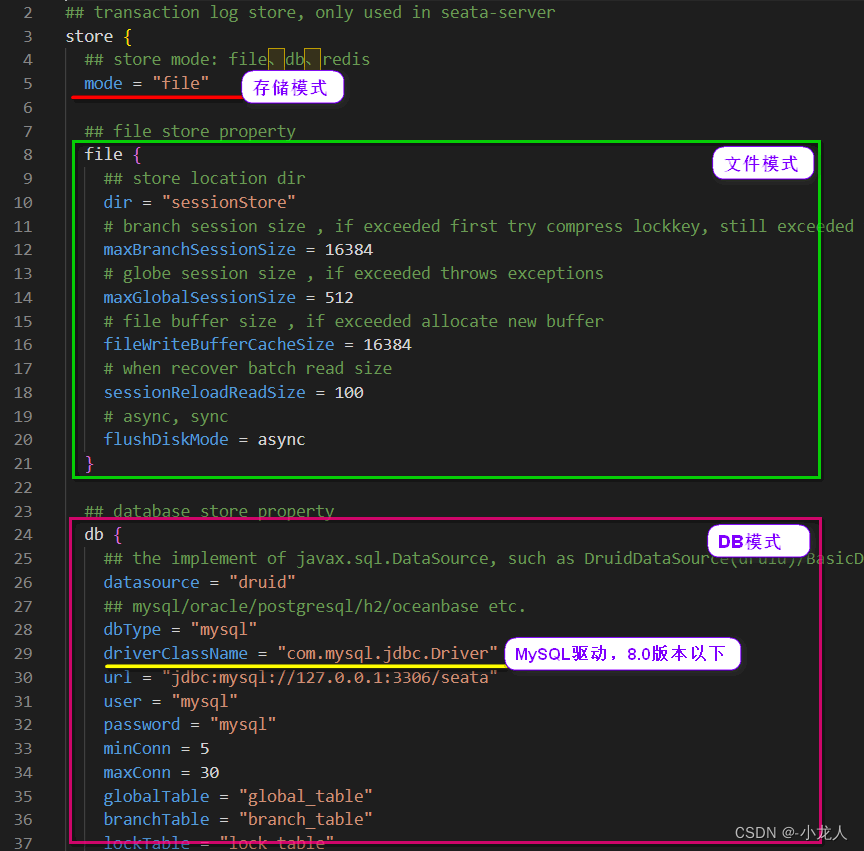
The original configuration file mode is file File mode , Optional configuration DB,Redis Pattern , Here we configure the common mode DB. Switch DB Mode time , Pay attention to the database version used , The default configured database driver here is 8.0 Under version , If it is 8.0 The above version of the database , The driver name needs to be changed .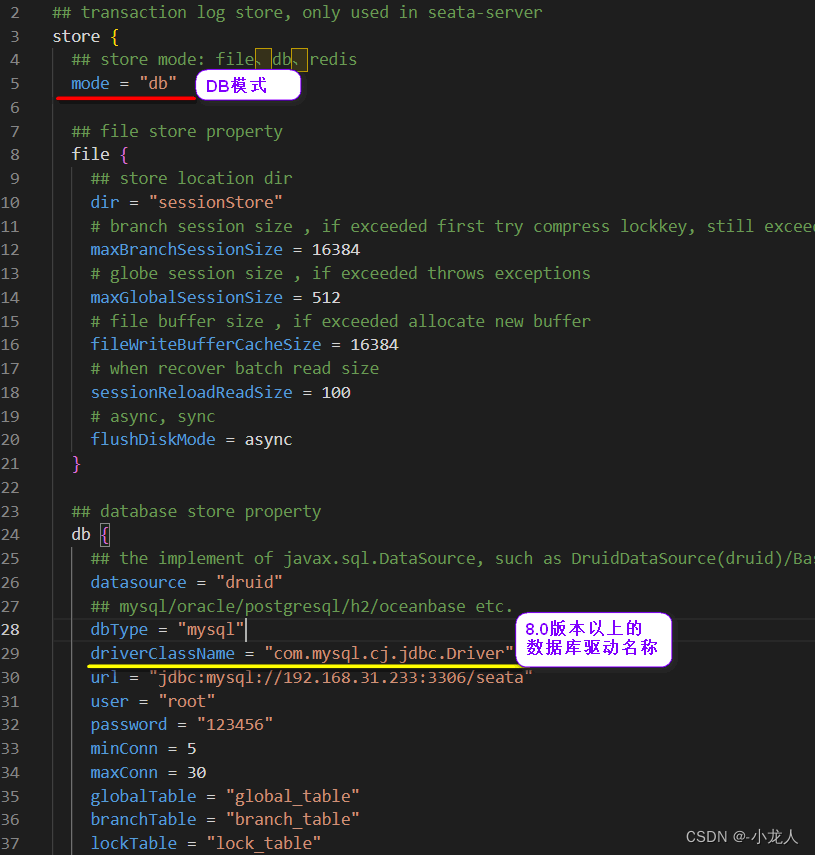
The database is configured here , Then you need to create corresponding libraries and related tables .
2. DB Patterns create databases
Seata The official database script , Just download and import the database , The script is in the source code Script Under the folder , see Seata-Script, stay Deployment Guide There are also hints in the documentation :
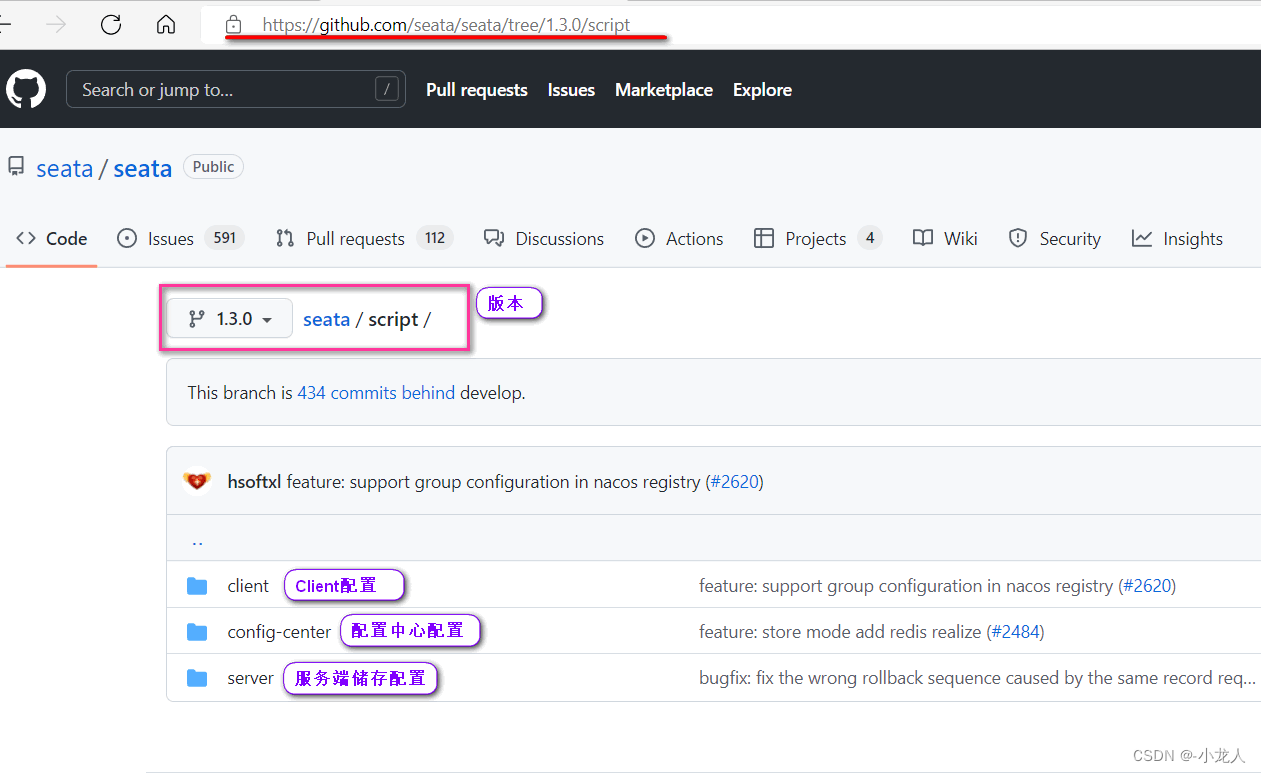
server In file db There are database scripts , Execute the corresponding script .
Here is the stand-alone version seata It's set up , Can be in bin Execute script under file seata-server.bat, You can run seata Service for .
But in practice , We usually build a highly available seata colony , Use with the registry , Such as Nacos, Multiple seata Service cluster , Will consider load balancing , Above we will seata Client configuration, such as storage configuration DB They are all local files , When using a cluster , A configuration change needs to go to each seata The server changes the file , Inefficient and error prone , These configurations can be registered in Nacos in , utilize Nacos To each seata Load balancing , And unified management seata Configuration of .
3. Registry configuration
The client, that is, the transaction participant, needs and seata The transaction coordinator communicates , Recommended here Nacos Registry Center ,seata Service registered to Nacos In the after , The corresponding load balancing operation can be performed .
The location of the configuration file is the same as the server storage configuration : Under the installation package /conf / registry.conf
4. Configuration center configuration
seata The server configuration file information of is as set above DB Configuration and some other configurations , You can also put Nacos in , By default, these configurations are local /conf / file.conf In file , When we build seata When the cluster , Can share Nacos Medium seata To configure .
The configuration file location is the same as the registry configuration : Under the installation package /conf / registry.conf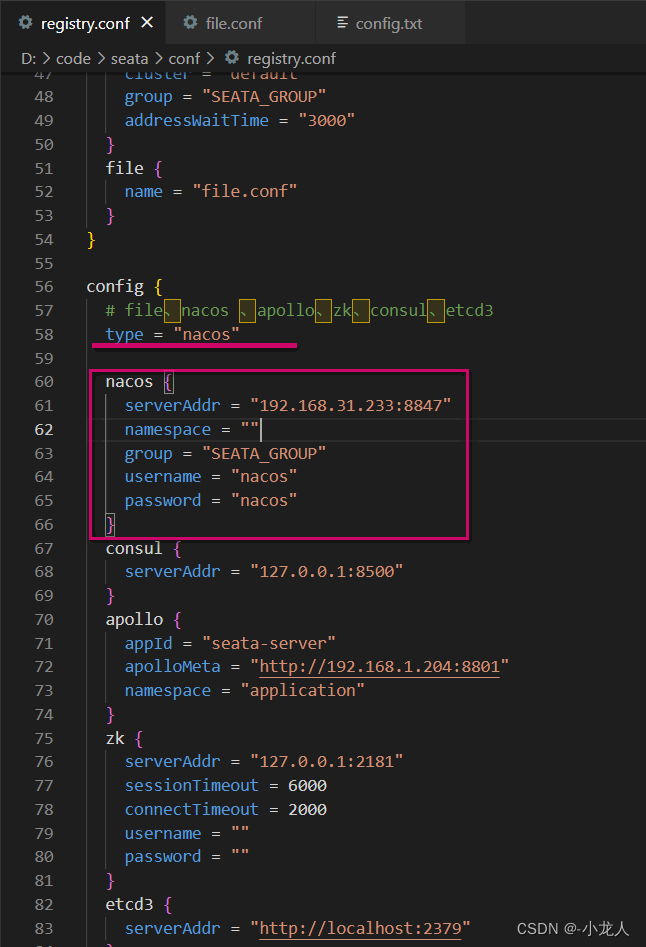
So you're going to have to seata The configuration in is registered to Nacos in ,seata For the configuration of the configuration center, similar MySQL Script for , Also in resources , stay Script Under the document config-center / config.txt In file 
open seata You can see many configuration items in the provided configuration file , Most of these are the default configurations and do not need to be changed ( You can delete ), You only need to change the storage configuration for the server to DB Pattern , Stored in MySQL in , This configuration is described above /conf / file.conf The file has been changed once , Here we just need the same changes .
Configuration change completed , But ultimately, you have to register in Nacos in ,seata Here is also a script for registration , You can register the configuration file to Nacos in , In the configuration file directory , You can see seata Provides a variety of registry tools , There are corresponding scripts in it .
stay Nacos There is shell and python Script , Here we use shell Script , But in front of us seate The server is deployed in window Can't execute on shell file , Local... Can be used here git Environment to operate . Open in the script folder Git Bash, Just execute the script , The following screenshot specifies Nacos Service address port , If you do not specify, the default is to use local Naocs Service default port .
User defined parameter description :
-h:host, The default value is localhost
-p:port, The default value is 8848
-g: Default group , The default value is "SEATA_GROUP"
-t: Tenant information , Corresponding Nacos The namespace of ID Field , The default value is null 
Here we use Nacos take seata Deploy as a highly available mode , You can start seata service , stay bin Execute file under file seata-server.bat, You can also start it in a custom way , The custom parameters are as follows :
| Parameters | jurisdiction | effect | remarks |
|---|---|---|---|
| -h | –host | Specify the registration in the registry IP | Get the current when not specified IP, External access deployed in cloud environments and containers server, It is recommended that |
| -p | –post | Appoint server Start port | The default is 8091 |
| -m | –storeMode | Transaction log storage mode | Support file,db,redis, Default file |
| -n | –serverNode | Is used to specify the seata-server node ID | Such as 1,2,3…, The default is 1 |
| -e | –seataEnv | Appoint seata-server Running environment | Such as dev,prod etc. , The service will start with registry-dev.conf This configuration |
Enable screenshots by default :
seata After the service starts successfully , Will be registered to Nacos in , We need to use seata To handle distributed transactions , Just call Nacos Registered in Seata The service can be , The corresponding configuration information needs to be maintained only in Nacos Modify the corresponding configuration in .
边栏推荐
- Domestic cosmetics, lost 618
- [database] differences among structured data, unstructured data and semi-structured data
- 企业数据质量管理:如何进行数据质量评估?
- Adobe Premiere基础(视频的最后一步字幕添加)(六)
- In the introductory study of data visualization, we should be alert to pitfalls and misunderstandings and grasp key nodes
- AGI基础,不确定性推理,主观逻辑一书ppt1
- Semiconductor silicon continued to fall short of demand, and Shenggao's long-term contract price rose by 30%!
- 关于YUV格式的一些总结
- Custom types: structural bodies
- What is Bi? Talk about the definition and function of Bi
猜你喜欢
Seata安装Window环境

跨域报错:When allowCredentials is true, allowedOrigins cannot contain the special value “*“

企业数据质量管理:如何进行数据质量评估?

Data URL

Huawei cloud Kunpeng devkit code migration practice

数字化转型怎样转?朝哪转?
【数据库】结构化数据、非结构化数据、半结构化数据的区别

Real time business intelligence Bi (II): reasonable ETL architecture design to realize quasi real time Business Intelligence BI

The value of Business Intelligence BI. Is visual report equal to Business Intelligence BI?

如何设置 SaleSmartly 以进行 Google Analytics(分析)跟踪
随机推荐
【QNX Hypervisor 2.2 用户手册】3.2.1 VM配置语法
[database] differences among structured data, unstructured data and semi-structured data
[QNX hypervisor 2.2 user manual] 3.2.2 VM configuration example
afl-fuzz多线程
Array type of DB2 SQL pl
Db2 SQL PL中的控制语句
SaleSmartly | 再添新渠道Slack,助你拉近客户关系
Adobe Premiere基础-素材嵌套(制作抖音结尾头像动画)(九)
AFL fuzzy multithreading
Stream流的常用方法-Lambder
三部曲解下棋先手后手问题
Db2 SQL PL的锚点类型和行数据类型
NaturalSpeech模型合成语音在CMOS测试中首次达到真人语音水平
ETL的使用过程中遇到的坑(ETL中文乱码)
台积电刘德音:不担心半导体库存修正及美日韩合作,今年业绩将增长30%!
实时商业智能BI(二):合理的ETL架构设计实现准实时商业智能BI
ADS,AXD基本使用说明
Semiconductor silicon continued to fall short of demand, and Shenggao's long-term contract price rose by 30%!
智慧城市网络安全建设框架及实践
AGI基础,不确定性推理,主观逻辑一书ppt2