当前位置:网站首页>Custom throttling function six steps to deal with complex requirements
Custom throttling function six steps to deal with complex requirements
2022-07-02 23:57:00 【An ice cream】
Throttling definition
Some frequently operated events will affect performance ," throttle " Used to control the response time interval , When the event triggers , The corresponding function does not trigger immediately , But at specific intervals , Whenever the response interval for execution is reached , Will execute the response function .
Throttling cases
In online games " Aircraft battle ", Keyboard keys can be used to fire bullets , Hit the keyboard quickly and constantly , The plane will not keep launching , But at certain intervals , To control the distance between bullets . For example, the system is set to fire bullets every second , So even if you hit it in a second 20 Secondary keyboard , Still only send 1 Secondary bullet .
Throttling usage scenario
In the process of programming , Many scenes can be used " throttle ".
- Input box frequently 、 Search for
- Click the button frequently 、 Submission of information , Triggering event
- Listen for browser scrolling Events
- Listen for browser zoom events
When throttling is not used
Here simulate a product search box , We need to call the interface to query the content entered by the user , To give users search tips .
When anti shake is not used , We will directly bind the function to the corresponding event .
// html
<input />

// js Code
const inputEl = document.querySelector("input");

let count = 0;
function inputEvent(event) {

    console.log(`${
      ++count} Time input , The content obtained is :${
      event?.target?.value}`);
}
inputEl.oninput = inputEvent;
input Enter... In the box "javascriptcsses6", altogether 16 Characters , So the method calls 16 Time
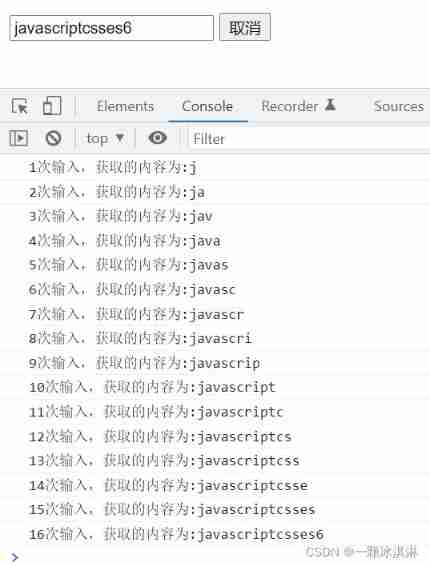
The performance of this method is very low , Because every time you input a character, you call the interface , The pressure on the server is great ," throttle " To execute the function at a specified time , Avoid the waste of resources caused by multiple implementations .
Self defined throttling function
The principle of throttling function implementation is , Execute the function at the specified time interval .
First step : Basic throttling implementation
Determine the time interval between the current and the last execution of the function , If the specified time interval is exceeded , Just execute the function .
function throttle(fn, interval) {

  //  Set the initial time as 0
  let startTime = 0;

  const _throttle = function () {

    //  Get the current time
    let currentTime = new Date().getTime();
    //  Get the time left ( The distance between the current time and the specified interval )
    let restTime = interval - (currentTime - startTime);

    //  The remaining time is less than or equal to 0 when , Execute function
    if (restTime <= 0) {

      //  Execute the passed in function
      fn();
      //  Assign the current time to the initial time
      startTime = currentTime;
    }
  };
  return _throttle;
}

inputEl.oninput = throttle(inputEvent, 2000);
The time interval specified here is 2 Second , namely 2 Execute the function once per second .
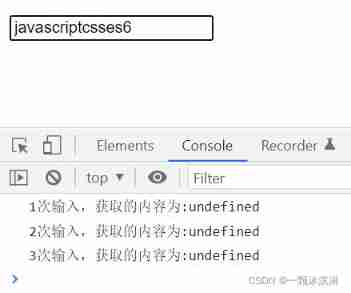
But then we found that , Parameters are not passed , actually this The direction of is also wrong
The second step : expand this And parameters
adopt apply Methods to change this The direction of , And passing parameters
function throttle(fn, interval) {

  //  Set the initial time as 0
  let startTime = 0;

  const _throttle = function (...args) {

    //  Get the current time
    let currentTime = new Date().getTime();
    //  Get the time left ( The distance between the current time and the specified interval )
    let restTime = interval - (currentTime - startTime);

    //  The remaining time is less than or equal to 0 when , Execute function
    if (restTime <= 0) {

      //  adopt apply change this Point and pass parameters
      fn.apply(this, args);
      //  Assign the current time to the initial time
      startTime = currentTime;
    }
  };
  return _throttle;
}
here this And parameters can be obtained ~

So far , Most usage scenarios of throttling have been implemented , The following functions will be more complex .
The third step : The function is executed immediately
In the above function definition , When entering the first character , The function will execute with high probability , Because the time of inputting the first character minus the initialization time 0 Second , Generally, it will be greater than the set time interval .
If you feel that the function execution when entering the first character is unnecessary , Then you can customize the parameters , To control whether the function will execute immediately .
Parameters leading The control function executes immediately , The default is true.
function throttle(fn, interval, options = {
     }) {

  let startTime = 0;
  // leading The default value is true
  const {
     leading = true } = options ;

  const _throttle = function (...args) {

    let currentTime = new Date().getTime();

    //  When immediate execution is not required , Set the initial value to 0 Of startTime Change to current time
    if (!leading && !startTime) {

      startTime = currentTime;
    }
    let restTime = interval - (currentTime - startTime);

    if (restTime <= 0) {

      fn.apply(this, args);
      startTime = currentTime;
    }
  };
  return _throttle;
}

//  Pass in leading Parameters
 inputEl.oninput = throttle(inputEvent, 2000, {

    leading: false,
 });
This will wait 2s Will execute the first function call

Step four : The function is executed for the last time
" throttle " It is only related to the interval of the function , It has nothing to do with the completion of the last character input .
So when the last character is input , If the time interval with the last function call does not reach the specified time interval , At this time, the function will not be executed . If it is necessary to carry out , You need custom parameters to control function execution .
Through parameters trailing The last execution of the control function , The default is false. When the function needs to be executed at the end , Set the timer before the execution of each time interval , Wait until the interval executes the function , Clear timer , If the last character has not reached the specified interval after input , Then execute the contents in the timer .
function throttle(fn, interval, options = {
     }) {

  let startTime = 0;
  //  Set a timer
  let timer = null;
  // leading The default value is true,trailing The default value is false
  const {
     leading = true, trailing = false } = options;

  const _throttle = function (...args) {

    let currentTime = new Date().getTime();

    //  When immediate execution is not required , Set the initial value to 0 Of startTime Change to current time
    if (!leading && !startTime) {

      startTime = currentTime;
    }
    let restTime = interval - (currentTime - startTime);

    if (restTime <= 0) {

      //  When there is a timer , Clear timer
      if (timer) {

        clearTimeout(timer);
        timer = null;
      }
      fn.apply(this, args);
      startTime = currentTime;
      //  When the execution is completed, the following timer code will not be executed , Avoid repetition
      return;
    }

    //  If the last execution is required
    if (trailing && !timer) {

      //  Set timer
      timer = setTimeout(() => {

        timer = null;
        fn.apply(this, args);
        //  When immediate execution is required , The start time is assigned to the current time , conversely , The assignment is 0
        startTime = !leading ? 0 : new Date().getTime();
      }, restTime);
    }
  };
  return _throttle;
}

//  Pass in leading、trailing Parameters
inputEl.oninput = throttle(inputEvent, 2000, {

    leading: false,
    trailing: true,
});
At this point, the last character is entered , Wait for the interval set in the timer (restTime), The function will execute again .

Step five : Cancel the function
There may be such a scenario , When the user searches, he clicks cancel , Or close the page , At this point, there is no need to send requests .
We add a cancel button , Click to terminate the operation .
// html
<input />
<button> Cancel </button>

// javascript
function throttle(fn, interval, options = {
     }) {

  let startTime = 0;
  //  Set a timer
  let timer = null;
  // leading The default value is true,trailing The default value is false
  const {
     leading = true, trailing = false } = options;

  const _throttle = function (...args) {

    let currentTime = new Date().getTime();
    //  When immediate execution is not required , Set the initial value to 0 Of startTime Change to current time
    if (!leading && !startTime) {

      startTime = currentTime;
    }
    let restTime = interval - (currentTime - startTime);

    if (restTime <= 0) {

      //  When there is a timer , Clear timer
      if (timer) {

        clearTimeout(timer);
        timer = null;
      }
      fn.apply(this, args);
      startTime = currentTime;
      //  When the execution is completed, the following timer code will not be executed , Avoid repetition
      return;
    }

    //  If the last execution is required
    if (trailing && !timer) {

      //  Set timer
      timer = setTimeout(() => {

        timer = null;
        fn.apply(this, args);
        //  When immediate execution is required , The start time is assigned to the current time , conversely , The assignment is 0
        startTime = !leading ? 0 : new Date().getTime();
      }, restTime);
    }
  };

  //  Define a cancellation method on the function object
  _throttle.cancel = function () {

    //  When there is a timer , Empty
    if (timer) {

      clearTimeout(timer);
      timer = null;
      //  Reset start time
      startTime = 0;
    }
  };
  return _throttle;
}

//  obtain dom Elements
const inputEl = document.querySelector("input");
const cancelBtn = document.querySelector("button");

const _throttle = throttle(inputEvent, 2000, {

    leading: false,
    trailing: true,
});

//  The binding event
inputEl.oninput = _throttle;
cancelBtn.onclick = _throttle.cancel;
When you click Cancel , The contents of the timer will no longer be executed

Step six : Function return value
above " throttle " After the function is executed, there is no return value , If you need to return a value , There are two forms .
Callback function
Pass the form of callback function in the parameter , To get the return value .
function throttle(fn, interval, options = {
     }) {

  let startTime = 0;
  //  Set a timer
  let timer = null;
  // leading The default value is true,trailing The default value is false, The incoming callback function is used to receive the return value
  const {
     leading = true, trailing = false, callbackFn } = options;
  const _throttle = function (...args) {

    let currentTime = new Date().getTime();
    //  When immediate execution is not required , Set the initial value to 0 Of startTime Change to current time
    if (!leading && !startTime) {

      startTime = currentTime;
    }
    let restTime = interval - (currentTime - startTime);
    if (restTime <= 0) {

      //  When there is a timer , Clear timer
      if (timer) {

        clearTimeout(timer);
        timer = null;
      }
      //  Get the result of executing the function
      const result = fn.apply(this, args);
      //  Execute the incoming callback function
      if (callbackFn) callbackFn(result);
      startTime = currentTime;
      //  When the execution is completed, the following timer code will not be executed , Avoid repetition
      return;
    }
    if (trailing && !timer) {

      timer = setTimeout(() => {

        timer = null;
        //  Get the result of executing the function
        const result = fn.apply(this, args);
        //  Execute the incoming callback function
        if (callbackFn) callbackFn(result);
        //  When immediate execution is required , The start time is assigned to the current time , conversely , The assignment is 0
        startTime = !leading ? 0 : new Date().getTime();
      }, restTime);
    }
  };
  //  Define a cancellation method on the function object
  _throttle.cancel = function () {

    if (timer) {

      //  When there is a timer , Empty
      clearTimeout(timer);
      timer = null;
      //  Reset start time
      startTime = 0;
    }
  };
  return _throttle;
}

const inputEl = document.querySelector("input");
const cancelBtn = document.querySelector("button");

//  The incoming callback function is used to receive the return value
const _throttle = throttle(inputEvent, 2000, {

    leading: false,
    trailing: true,
    callbackFn: (value) => {

     console.log(" Get the return value ", value);
    },
});
inputEl.oninput = _throttle;
cancelBtn.onclick = _throttle.cancel;
Every time the response function is executed , The callback function will be executed once .

promise
By returning promise To get the return value
function throttle(fn, interval, options = {
     }) {

  let startTime = 0;
  //  Set a timer
  let timer = null;
  // leading The default value is true,trailing The default value is false
  const {
     leading = true, trailing = false } = options;
  const _throttle = function (...args) {

    //  adopt promise To return results
    return new Promise((resolve, reject) => {

      let currentTime = new Date().getTime();
      //  When immediate execution is not required , Set the initial value to 0 Of startTime Change to current time
      if (!leading && !startTime) {

        startTime = currentTime;
      }
      let restTime = interval - (currentTime - startTime);
      if (restTime <= 0) {

        //  When there is a timer , Clear timer
        if (timer) {

          clearTimeout(timer);
          timer = null;
        }
        //  Get the result of executing the function
        const result = fn.apply(this, args);
        //  adopt resolve Return a successful response
        resolve(result);
        startTime = currentTime;
        return;
      }
      if (trailing && !timer) {

        timer = setTimeout(() => {

          timer = null;
          //  Get the result of executing the function
          const result = fn.apply(this, args);
          //  adopt resolve Return a successful response
          resolve(result);
          //  When immediate execution is required , The start time is assigned to the current time , conversely , The assignment is 0
          startTime = !leading ? 0 : new Date().getTime();
        }, restTime);
      }
    });
  };
  //  Define a cancellation method on the function object
  _throttle.cancel = function () {

    if (timer) {

      //  When there is a timer , Empty
      clearTimeout(timer);
      timer = null;
      //  Reset start time
      startTime = 0;
    }
  };
  return _throttle;
}

//  obtain dom Elements
const inputEl = document.querySelector("input");
const cancelBtn = document.querySelector("button");

const _throttle = throttle(inputEvent, 2000, {

    leading: false,
    trailing: true,
});

// apply Is used to this Point to input Elements
const promiseCallback = function (...args) {

    _throttle.apply(inputEl, args).then((res) => {

     console.log("promise Callback ", res);
    });
};

//  The binding event
inputEl.oninput = promiseCallback;
cancelBtn.onclick = _throttle.cancel;
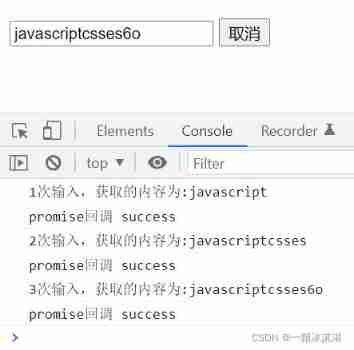
promise call then Method gets the return value
Use throttling function in development to optimize the performance of the project , You can customize as above , You can also use third-party libraries .
About anti shake function , You can refer to this article , Custom anti shake function five steps to deal with complex requirements
The above is related to the anti shake function , About js senior , There are many things that developers need to master , You can look at other blog posts I wrote , Ongoing update ~
边栏推荐
- 95页智慧教育解决方案2022
- 【ML】李宏毅三:梯度下降&分类(高斯分布)
- How much do you know about synchronized?
- RuntimeError: no valid convolution algorithms available in CuDNN
- Returns the size of the largest binary search subtree in a binary tree
- 【STL源码剖析】仿函数(待补充)
- [analysis of STL source code] imitation function (to be supplemented)
- Explain in detail the process of realizing Chinese text classification by CNN
- Convolution和Batch normalization的融合
- Digital collection trading website domestic digital collection trading platform
猜你喜欢

MySQL Foundation

67 page overall planning and construction plan for a new smart city (download attached)

What are the projects of metauniverse and what are the companies of metauniverse

In February 2022, the ranking list of domestic databases: oceanbase regained its popularity with "three consecutive increases", and gaussdb is expected to achieve the largest increase this month
接口差异测试——Diffy工具
来自数砖大佬的 130页 PPT 深入介绍 Apache Spark 3.2 & 3.3 新功能
Container runtime analysis

開源了 | 文心大模型ERNIE-Tiny輕量化技術,又准又快,效果全開
开源了 | 文心大模型ERNIE-Tiny轻量化技术,又准又快,效果全开
What is the official website address of e-mail? Explanation of the login entry of the official website address of enterprise e-mail
随机推荐
Many to one, one to many processing
[live broadcast appointment] database obcp certification comprehensive upgrade open class
Optimization of streaming media technology
[ml] Li Hongyi III: gradient descent & Classification (Gaussian distribution)
Use redis to realize self increment serial number
67 page overall planning and construction plan for a new smart city (download attached)
JDBC practice cases
SharedPreferences save list < bean > to local and solve com google. gson. internal. Linkedtreemap cannot be cast to exception
35页危化品安全管理平台解决方案2022版
[analysis of STL source code] imitation function (to be supplemented)
Maybe you read a fake Tianlong eight
Improvement of RTP receiving and sending PS stream tool (II)
MySQL Foundation
程序分析与优化 - 9 附录 XLA的缓冲区指派
[shutter] shutter open source project reference
Master the development of facial expression recognition based on deep learning (based on paddlepaddle)
【ML】李宏毅三:梯度下降&分类(高斯分布)
JDBC Exercise case
All things work together, and I will review oceanbase's practice in government and enterprise industry
Pytorch里面多任务Loss是加起来还是分别backward?