当前位置:网站首页>Following the last minor upgrade of nodemcu (esp8266)
Following the last minor upgrade of nodemcu (esp8266)
2022-06-25 06:43:00 【Murphy DL】
Next time nodemcu(esp8266) A little upgrade of
Why do you do this , It's inconvenient to turn off the lights every time you go to bed after you go home , So I thought about this , It's all because of laziness hahahaha
Video on 、 See what has been achieved
Realization : Upload of temperature and humidity , Add relay switch, etc 
nodemcu(esp8266)
Hardware

A breadboard ( It doesn't need to be , Just for the sake of beauty )
esp8266 Module one ( It should be called nodemcu) 12.8 element
A relay switch (1 road 5v) 4.2 element
A photoresistor module 3.2 element
A temperature and humidity sensor 9 element ( I seriously doubt that it is too expensive )
There are several DuPont lines
For software configuration, please read the previous article directly , Detailed description
https://blog.csdn.net/weixin_44695217/article/details/121429305?spm=1001.2014.3001.5502
Program code
Because the code is changed on the basis of the previous steering gear , Therefore, the steering gear program can be ignored
The program inside has detailed notes
#include <Servo.h>
#define BLINKER_WIFI
#define BLINKER_MIOT_LIGHT
#include <Blinker.h>
#include <DHT.h>// contain DHT The header file

// oled use
#include <Arduino.h>
#include <U8g2lib.h>

#ifdef U8X8_HAVE_HW_SPI
#include <SPI.h>
#endif
#ifdef U8X8_HAVE_HW_I2C
#include <Wire.h>
#endif
U8G2_SSD1306_128X64_NONAME_F_HW_I2C u8g2(U8G2_R0, /* reset=*/ U8X8_PIN_NONE);


//blinker  Provided key
char auth[] = " ";  // Lighting Key
char ssid[] = " ";      //wifi name
char pswd[] = " ";     //wifi password

// Send to  blinker  Humidity data of key, and blink The component name corresponds to
BlinkerNumber HUMI("humi");
// Send to  blinker  Temperature data of key
BlinkerNumber TEMP("temp");

BlinkerNumber LIGHT("Light");   // Photosensitive resistor
float light=0;

/*----------------------------- Switch relay and steering gear -------------------------------------------------*/

//  New component object ( Key + slider )
BlinkerButton Button1("btn-maxm");   // Location 1  Button   Data key name
BlinkerButton Button2("btn-closed");
BlinkerSlider Slider1("max-num");   // Location 1  slider   Data key name   Range 0-180
Servo myservo;
int servo_max=180;
int servo_close=0;

void button1_callback(const String & state) {
        // Location 1  Button
    BLINKER_LOG("get button state: ", servo_max);
    myservo.write(servo_max);
    digitalWrite(D3, HIGH);
    Blinker.vibrate();
  /*--------2021.11.23 Add servo reset program ----------------------*/
    BlinkerMIOT.powerState("on");
    BlinkerMIOT.print();// Feedback status
    delay(1000);// Time delay 1 second
    myservo.write(72);// Zero the steering gear , Return to vertical
    Blinker.vibrate();


}

void button2_callback(const String & state) {
        // Location 1  Button
    BLINKER_LOG("get button state: ", servo_close);
    myservo.write(servo_close);
    digitalWrite(D3, LOW);
    Blinker.vibrate();
      /*--------2021.11.23 Add servo reset program ----------------------*/
    BlinkerMIOT.powerState("on");
    BlinkerMIOT.print();// Feedback status
    delay(1000);// Time delay 1 second
    myservo.write(72);// Zero the steering gear , Return to vertical
    Blinker.vibrate();

}
/* void slider1_callback(int32_t value) { BLINKER_LOG("get slider value: ", value); servo_max = value; Slider1.color("#1E90FF"); Slider1.print(); //digitalWrite(D3, value); myservo.write(value);// If you include this sentence ,APP The buttons in the do not work , Only the slider works . } */

/*----------------------------- introduce  DHT  library , Temperature and humidity --------------------------------------------------*/

#define DHTPIN D6 //  Define the temperature and humidity pin connection D6
#define DHTTYPE DHT11 //  Define the type of temperature and humidity sensor
DHT dht(DHTPIN, DHTTYPE);  // Generate DHT object , The parameters are pins and DHT The type of

uint32_t read_time = 0;   //  Define the read time

float humi_read, temp_read;// Define floating point global variables   Store the temperature and humidity data read by the sensor

/*--------------------------------- Define the read time ----------------------------------------------*/
void dataRead(const String & data)
{

    BLINKER_LOG("Blinker readString: ", data);

   // Blinker.vibrate(); // Once executed, it vibrates

    uint32_t BlinkerTime = millis();// This function returns Arduino The number of milliseconds when the board starts running the current program . This figure is around 50 Overflow in days , That is, back to zero .

    Blinker.print("millis", BlinkerTime);
}

/*--------------------------------- Heartbeat bag , To give blink Hair temperature and humidity ----------------------------------------------*/
void heartbeat()
{

    HUMI.print(humi_read);
    TEMP.print(temp_read);
    LIGHT.print(light);
}


/*--------------------------------- Define storage time ---------------------------------------------*/
void dataStorage() {

    // Add data storage   To facilitate the display of icon data
    Blinker.dataStorage("humi", humi_read);
    // Add data storage   To facilitate the display of icon data
    Blinker.dataStorage("temp", temp_read);
}

void setup()
{

    Serial.begin(115200);
    BLINKER_DEBUG.stream(Serial);

    pinMode(LED_BUILTIN, OUTPUT);
    digitalWrite(LED_BUILTIN, LOW);

    Blinker.begin(auth, ssid, pswd);

    Blinker.attachData(dataRead); //  Read and print the time on your phone

    Blinker.attachHeartbeat(heartbeat);

    Blinker.attachDataStorage(dataStorage);// The function means that the above... Will be called each time the loop dataStorage function , To achieve the effect of cloud storage of the data obtained each time .

    dht.begin();

   u8g2.begin();
   u8g2.enableUTF8Print();    // enable UTF8 support for the Arduino print() function

}

void loop()
{

    Blinker.run();
/*-------------------------------------------------- Temperature and humidity sensor settings  2022.1.20-------------*/
    if (read_time == 0 || (millis() - read_time) >= 2000)
    {

        read_time = millis();
        // Reading humidity
        float h = dht.readHumidity();
        // Reading temperature
        float t = dht.readTemperature();
        //  Read Fahrenheit
        float f = dht.readTemperature(true);//  Read Fahrenheit

        //  Judge whether the reading is successful , If not, return to
        if (isnan(h) || isnan(t)) {

            BLINKER_LOG("Failed to read from DHT sensor!");
            return;
        }

        float hic = dht.computeHeatIndex(t, h, false);//  Calculation of thermal index

        humi_read = h;
        temp_read = t;
//
// BLINKER_LOG("Humidity: ", h, " %");
// BLINKER_LOG("Temperature: ", t, " *C");
// BLINKER_LOG("Heat index: ", hic, " *C");
// BLINKER_LOG("HuaTemp: ", f, " F");
    }
/*----------------------------------  The light detection module is added ,2021.12.21 -----------*/
    light=digitalRead(D4);  // read out D4 The high and low levels of are assigned to v
    BLINKER_LOG("Light: ", light);

   if(light==1)//  bright ---0
    digitalWrite(D1, HIGH);
   else
    digitalWrite(D1, LOW);

   Blinker.delay(1000);// The time delay function
/*------------------------oled Show -----------*/
    u8g2.setFont(u8g2_font_unifont_t_chinese2);  // use chinese2 for all the glyphs of " Hello world "
    u8g2.setFontDirection(0);
    u8g2.clearBuffer();
    u8g2.setCursor(0, 15);
    u8g2.print("temp:",temp_read);
    u8g2.sendBuffer();
    delay(2000);
// u8g2.setCursor(0, 15);
// u8g2.print("humi:",humi_read);
// u8g2.setCursor(0, 40);
// u8g2.print(" I have a beautiful "); // Chinese "Hello World"
    u8g2.sendBuffer();
    delay(2000);

}


/* * sg90 The steering gear : 5v--vv  The signal line -----D2  Temperature and humidity : D6----DA  light : D4 led: D3 oled : D7 (SCL)  and D8 SDA) */
Mobile interface settings , Upload of temperature and humidity

边栏推荐
- In a single-page app, what is the right way to deal with wrong URLs (404 errors)?
- Sleep quality today 67 points
- 直接选择排序和快速排序
- Explain @builder usage
- Drosophila played VR and entered nature. It was found that there were attention mechanisms and working memory. The insect brain was no worse than that of mammals
- How two hosts in different network segments directly connected communicate
- Single lithium battery 3.7V power supply 2x12w stereo boost audio power amplifier IC combination solution
- Viewing Chinese science and technology from the Winter Olympics (V): the Internet of things
- Zero foundation wants to learn web security, how to get started?
- 父爱的表达方式
猜你喜欢

Viewing Chinese science and technology from the Winter Olympics (V): the Internet of things
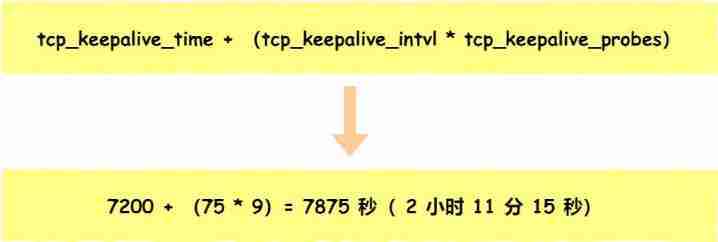
After unplugging the network cable, does the original TCP connection still exist?
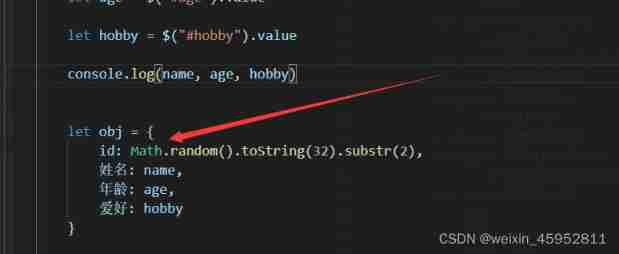
JS dynamic table creation
![[short time average zero crossing rate] short time average zero crossing rate of speech signal based on MATLAB [including Matlab source code 1721]](/img/4a/304f262c1c08800aa95f9e2d537e4d.jpg)
[short time average zero crossing rate] short time average zero crossing rate of speech signal based on MATLAB [including Matlab source code 1721]

Entry level use of flask

Keil debug view variable prompt not in scope

Baidu map - introductory tutorial
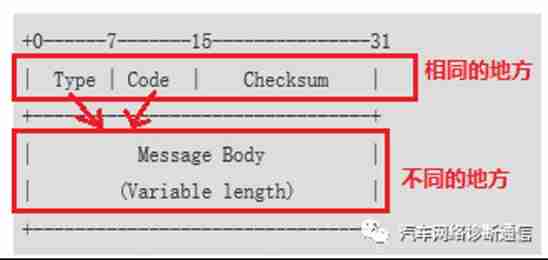
Understand what ICMP Protocol is

Single lithium battery 3.7V power supply 2x12w stereo boost audio power amplifier IC combination solution

【ROS2】为什么要使用ROS2?《ROS2系统特性介绍》
随机推荐
[speech discrimination] discrimination of speech signals based on MATLAB double threshold method [including Matlab source code 1720]
Streaming a large file using PHP
Difference between rest and WebServices
Meta universe is over, Web 3.0 will be fooled again?
レレ / 蕾蕾
The "&" character will destroy the data stored in the web The "&" character breaks passwords that are stored in the web config
[no title] dream notes 2022-02-20
3dmax软件的制作木桶过程:三步流程
What is cloud primordial?
集群常用群起脚本
Analysis of China's food cold chain logistics, output of quick-frozen noodles and rice products and operation of major enterprises in 2021 [figure]
Why did Yanjing Beer come here?
With a younger brother OCR, say no to various types of verification codes!
Leetcode 2163. Minimum difference of sum after element deletion
Cve-2022-23131 - bypass SAML SSO authentication
父爱的表达方式
How to chain multiple different InputStreams into one InputStream
Query process of MySQL secondary index
ACWING2013. 三条线
Ctfhub web information disclosure directory traversal