当前位置:网站首页>Directx11 advanced tutorial tiled based deffered shading
Directx11 advanced tutorial tiled based deffered shading
2022-06-12 06:01:00 【Senior brother Dai Dai】
Preface
There are a lot of point lights in many games (PointLight), Environmental artists want the game to simulate the atmosphere of reality , Put down thousands of point lights in a scene (PointLight) Not surprisingly .

The following describes the performance of a large number of point lights in the traditional rendering pipeline .
Traditional forward rendering (Traditional Forward Rendering) Point light calculation for

The general meaning is that each object is tested once renderPass, And put the point light sources that affect the object as an array in Shader Calculate

summary : Traditional forward rendering because the same pixel may cover a large number of objects , cause Overdraw Very high , A lot of calculation is wasted , Many calculations are unnecessary , Because of the Shading Only the first pixel appears on the screen . Therefore, delayed rendering is introduced .
Traditional delayed rendering (Traditional Deffered Rendering)


Traditional delayed rendering is simple , It is to render the objects of the whole scene and output multiple geometric maps , Then use the geometric map to draw in a full screen Shading Middle computation . The most popular way to render point light is to treat it as a geometric sphere (LightSphereVolume), Render to full screen , Effective calculation of the pixels affected within the radius of each point light source . And set up RT Is the accumulation mode ,N Light sources add up N Time , Finally, get the final effect of all point light shading .
Pixels inside , It is not necessary for each light source to calculate the full screen pixels once .


summary : Compared to forward rendering , Because we only render the first layer of pixels , overdraw A substantial reduction in , Wasteful calculations are also reduced , however N A point light means calculation N Secondary light sphere RenderPass, Every pass We all read a variety of gbuffer And write once shading result , This leads to GPU bandwidth Waste is serious . As shown below :


Therefore, graphics engineers propose a more efficient rendering pipeline for calculating point lights for delayed rendering :Tiled Deffered Shading
Slice based delayed rendering (Tiled Based Deffered Shading)
The above schematic diagram of traditional delayed rendering illustrates the GPU Bangwidth High defect , According to the ideal improved model, the following :

The ideal state is : For shading, each pixel should be read only once GBuffer And write only once Shading result
For this ideal state model , Graphics rendering engineer proposed Block (tiled) Thought : On the basis of delayed rendering, the whole screen is divided into NxN block , A piece of (tile) The resolution is 16x16, Take advantage of the powerful parallel capabilities computeShader Calculate which light sources and which blocks (tile), And these effective point lights are used to detect the pixels of the corresponding block Pixel To color
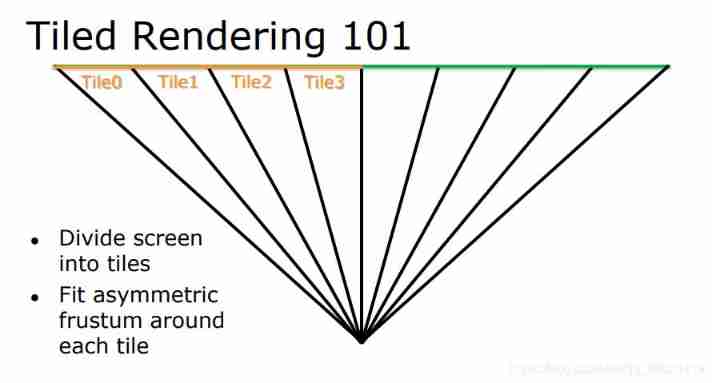


Hereinafter referred to as TiledBasedDefferedShading by TBDS
TBDS Rendering process of :
(1) Render the entire scene GBuffer

(2) stay computeShader Divide each piece in the (tile), One piece (tile) It's usually 16x16 perhaps 32x32, Calculate each tile All pixels ( General camera space is quite good ) The biggest and the smallest PosZ value
Texture2D<float4> DepthTex:register(t0);
Texture2D<float4> WorldPosTex:register(t1);
Texture2D<float4> WorldNormalTex:register(t2);
Texture2D<float4> SpecularRoughMetalTex:register(t3);
Texture2D<float4> AlbedoTex:register(t4);
SamplerState clampLinearSample:register(s0);
StructuredBuffer<PointLight> PointLights : register(t5);
RWTexture2D<float4> OutputTexture : register(u0);
groupshared uint minDepthInt;
groupshared uint maxDepthInt;
groupshared uint visibleLightCount = 0;
groupshared uint visibleLightIndices[1024];

[numthreads(GroundThreadSize, GroundThreadSize, 1)]
void CS(
	uint3 groupId :  SV_GroupID,
	uint3 groupThreadId : SV_GroupThreadID,
	uint groupIndex : SV_GroupIndex,
	uint3 dispatchThreadId : SV_DispatchThreadID)
//(2) Calculate each Tiled Camera space MaxZ and MinZ
	float depth = DepthTex[dispatchThreadId.xy].r;
	float viewZ = DepthBufferConvertToLinear(depth);
	uint depthInt = asuint(viewZ);
	minDepthInt = 0xFFFFFFFF;
	maxDepthInt = 0;
	GroupMemoryBarrierWithGroupSync();

	if (depth != 0.0)
	{
		InterlockedMin(minDepthInt, depthInt);
		InterlockedMax(maxDepthInt, depthInt);
	}

	GroupMemoryBarrierWithGroupSync();

	float minViewZ = asfloat(minDepthInt);
	float maxViewZ = asfloat(maxDepthInt);
(3) Calculate each block (tile) Corresponding frustum( View frustum in camera space )
	float3 frustumEqn0, frustumEqn1, frustumEqn2, frustumEqn3;
	uint tileResWidth = GroundThreadSize * GetNumTilesX();
	uint tileResHeight = GroundThreadSize * GetNumTilesY();
	uint pxm = GroundThreadSize * groupId.x;
	uint pym = GroundThreadSize * groupId.y;
	uint pxp = GroundThreadSize * (groupId.x + 1);
	uint pyp = GroundThreadSize * (groupId.y + 1);

	// four corners of the tile, clockwise from top-left
	float3 frustum0 = ConvertProjToView(float4(pxm / (float)tileResWidth*2.f - 1.f, (tileResHeight - pym) / (float)tileResHeight*2.f - 1.f, 1.f, 1.f)).xyz;
	float3 frustum1 = ConvertProjToView(float4(pxp / (float)tileResWidth*2.f - 1.f, (tileResHeight - pym) / (float)tileResHeight*2.f - 1.f, 1.f, 1.f)).xyz;
	float3 frustum2 = ConvertProjToView(float4(pxp / (float)tileResWidth*2.f - 1.f, (tileResHeight - pyp) / (float)tileResHeight*2.f - 1.f, 1.f, 1.f)).xyz;
	float3 frustum3 = ConvertProjToView(float4(pxm / (float)tileResWidth*2.f - 1.f, (tileResHeight - pyp) / (float)tileResHeight*2.f - 1.f, 1.f, 1.f)).xyz;
	frustumEqn0 = CreatePlaneEquation(frustum0, frustum1);
	frustumEqn1 = CreatePlaneEquation(frustum1, frustum2);
	frustumEqn2 = CreatePlaneEquation(frustum2, frustum3);
	frustumEqn3 = CreatePlaneEquation(frustum3, frustum0);
(4) For each piece (tile), Traverse all point lights , use frustum and Depth Double elimination , And the global index that affects the point light source is added to the block (tile) List of visible light sources


//(3) Calculate and each Tiled Number of intersecting point lights , And record their index
	uint threadCount = GroundThreadSize * GroundThreadSize;
	uint passCount = (int(lightCount) + threadCount - 1) / threadCount;

	for (uint i = 0; i < passCount; ++i)
	{
		uint lightIndex = i * threadCount + groupIndex;
		if (lightIndex >= lightCount)
			continue;

		PointLight light = PointLights[lightIndex];
		float3 viewLightPos = mul(float4(light.pos, 1.0), View).xyz;
		if(TestFrustumSides(viewLightPos, light.radius, frustumEqn0, frustumEqn1, frustumEqn2, frustumEqn3))
		{
			if (minViewZ - viewLightPos.z < light.radius && viewLightPos.z - maxViewZ < light.radius)
			{
				uint offset;
				InterlockedAdd(visibleLightCount, 1, offset);
				visibleLightIndices[offset] = lightIndex;
			}
		}
	}

	GroupMemoryBarrierWithGroupSync();
(5) Traversal block (tile) Of Light source of visible light source list , Shade all pixels in the block , such GBuffer Various RT Read only once , And write only once Shading result , GPU bandwidth low
	if (visibleLightCount > 0)
	{
		//G-Buffer-Pos( waste 1 float)
		float2 uv = float2(float(dispatchThreadId.x) / ScreenWidth, float(dispatchThreadId.y) / ScreenHeight);
		float3 worldPos = WorldPosTex.SampleLevel(clampLinearSample, uv, 0).xyz;

		//G-Buffer-Normal( waste 1 float)
		float3 worldNormal = WorldNormalTex.SampleLevel(clampLinearSample, uv, 0).xyz;
		worldNormal = normalize(worldNormal);

		float3 albedo = AlbedoTex.SampleLevel(clampLinearSample, uv, 0).xyz;

		//G-Buffer-Specual-Rough-Metal( waste 1 float)
		float3 gBufferAttrbite = SpecularRoughMetalTex.SampleLevel(clampLinearSample, uv, 0).xyz;
		float specular = gBufferAttrbite.x;
		float roughness = gBufferAttrbite.y;
		float metal = gBufferAttrbite.z;

		for (uint index = 0; index < visibleLightCount; ++index)
		{
			uint lightIndex = visibleLightIndices[index];
			PointLight light = PointLights[lightIndex];
			float3 pixelToLightDir = light.pos - worldPos;
			float distance = length(pixelToLightDir);
			float3 L = normalize(pixelToLightDir);
			float3 V = normalize(cameraPos - worldPos);
			float3 H = normalize(L + V);
			float4 attenuation = light.attenuation;
			float attenua = 1.0 / (attenuation.x + attenuation.y * distance + distance * distance * attenuation.z);
			float3 radiance = light.color * attenua;

			//f(cook_torrance) = D* F * G /(4 * (wo.n) * (wi.n))
			float D = DistributionGGX(worldNormal, H, roughness);
			float G = GeometrySmith(worldNormal, V, L, roughness);
			float3 fo = GetFresnelF0(albedo, metal);
			float cosTheta = max(dot(V, H), 0.0);
			float3 F = FresnelSchlick(cosTheta, fo);
			float3 ks = F;
			float3 kd = float3(1.0, 1.0, 1.0) - ks;
			kd *= 1.0 - metal;

			float3 dfg = D * G * F;
			float nDotl = max(dot(worldNormal, L), 0.0);
			float nDotv = max(dot(worldNormal, V), 0.0);
			float denominator = 4.0 * nDotv * nDotl;
			float3 specularFactor = dfg / max(denominator, 0.001);

			color.xyz += (kd * albedo / PI + specularFactor * specular) * radiance * nDotl * 2.2;
		}
	}

	OutputTexture[dispatchThreadId.xy] = color;
Comparison of rendering results
Traditional delayed rendering SphereLightVolume, 400 Point light source

Block delay rendering (TiledBasedDefferedShading),1024 Point light source

Project source link
https://github.com/2047241149/SDEngine
Reference
【1】https://newq.net/dl/pub/SA2014Practical.pdf
【2】DirectX 11 Rendering in Battlefield 3 - Frostbite
【3】OpenGL Step by Step - OpenGL Development
边栏推荐
- China Aquatic Fitness equipment market trend report, technical innovation and market forecast
- Available RTMP and RTSP test addresses of the public network (updated in March, 2021)
- Execute sh script to prompt "[[: not found" solution. The difference between Bash and sh
- Automatic annotation of target detection based on lffd model to generate XML file
- IO to IO multiplexing from traditional network
- Types, functions and applications of intelligent sensors
- XML parameter schema, the same MTK SW version is compatible with two different sets of audio parameters
- Un mois de DDD hépatique.
- Leetcode-1535. Find the winner of the array game
- Project management and overall planning
猜你喜欢

Introduction to Internet Protocol

Es6-es11 learning

Execute sh script to prompt "[[: not found" solution. The difference between Bash and sh
![[PowerShell] command line output and adding system environment variables](/img/49/b92175181aa4a3fddfa3adcacf1d72.jpg)
[PowerShell] command line output and adding system environment variables

The application could not be installed: INSTALL_ FAILED_ TEST_ ONLY

Stack and queue classic interview questions

BlockingQueue interface introduction

Individual application for ov type SSL certificate

Halcon 3D 1 Reading 3D data
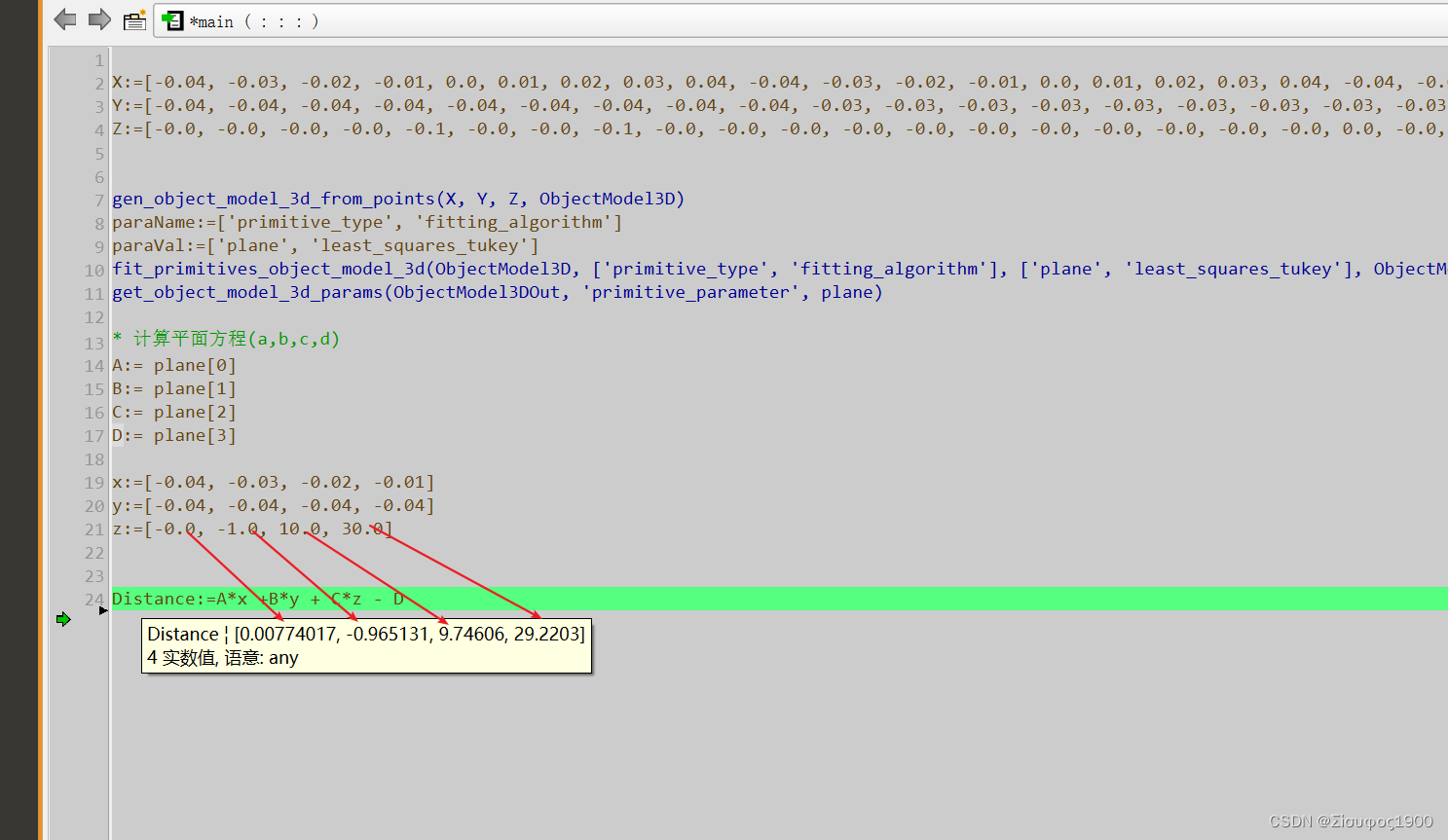
Halcon uses points to fit a plane
随机推荐
Jackson - how to convert the array string with only one map object to list < map >
MySQL master-slave, 6 minutes to master
Laravel8 when search
Leetcode-1535. Find the winner of the array game
Front desk display LED number (number type on calculator)
TCP and UDP introduction
China embolic coil market trend report, technical innovation and market forecast
Introduction to thread pool: ThreadPoolExecutor
Leetcode 第 80 场双周赛题解
Memory model, reference and function supplement of program
Quickly master makefile file writing
基于LFFD模型目标检测自动标注生成xml文件
为什么联合索引是最左匹配原则?
Who is more fierce in network acceleration? New king reappeared in CDN field
Chapter 7 - pointer learning
Leetcode-553. Optimal division
Introduction to sringmvc
Three years of sharpening a sword: insight into the R & D efficiency of ant financial services
Multiple ways 99.9% to solve the problem of garbled code after copying text from PDF
Redis cache data consistency and problems