当前位置:网站首页>Arduino Basic Syntax
Arduino Basic Syntax
2022-08-02 00:17:00 【2021 Nqq】
文章目录
点亮LED灯 basic01
// 初始化函数
void setup() {

  //将LED灯引脚(引脚值为13,被封装为了LED_BUTLIN)设置为输出模式
  pinMode(LED_BUILTIN, OUTPUT);
}

// 循环执行函数
void loop() {

  digitalWrite(LED_BUILTIN, HIGH);   // 打开LED灯
  delay(1000);                       // 休眠1000毫秒
  digitalWrite(LED_BUILTIN, LOW);    // 关闭LED灯
  delay(1000);                       // 休眠1000毫秒
}
通信
Communicate up and down
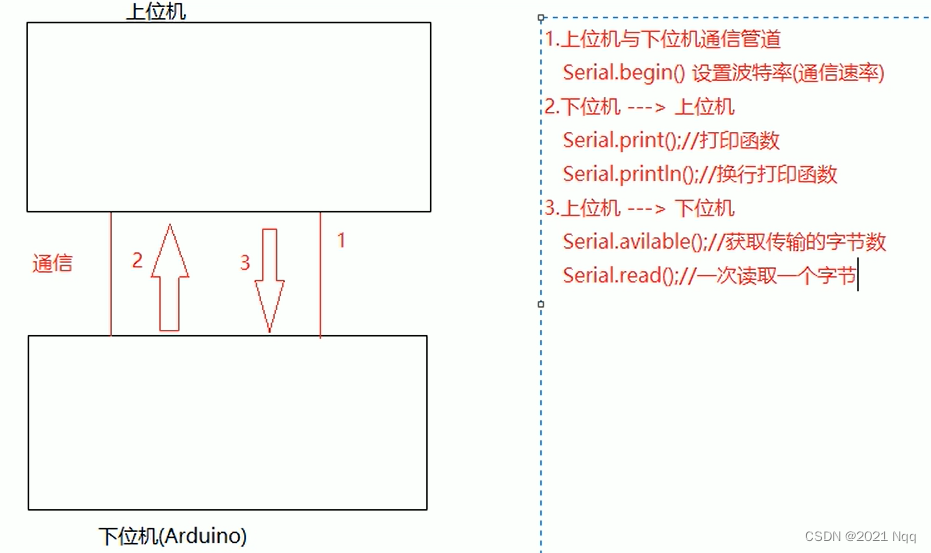
引脚操作
The processor writes data on the pin as an outputoutput
The processor reads data from the pins as inputsinput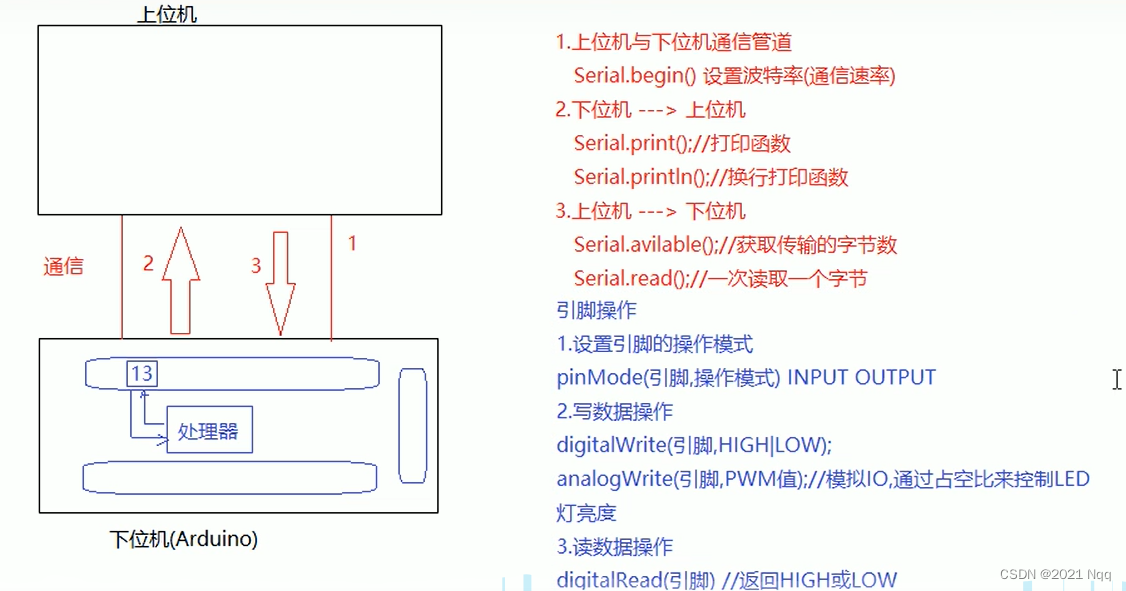
时间函数

串行通信
下位机到上位机 basic02
If the lower computer sends data to the upper computer,TXThe pin will blink
/* * 需求: 向 arduino 向PC 发送数据: hello world * 实现: * 1. 设置波特率 * 2. Serial.print()或println()发送数据 * */
void setup() {

  Serial.begin(57600);
}

void loop() {

  delay(3000);
  Serial.print("hello ");
  Serial.println("world");
}
From the upper computer to the lower computer basic03
If the upper computer sends data to the lower computer,RXThe pin will blink
/* * 需求: From the host computer arduino 发送数据 * 实现: * 1. 设置波特率 * 2. 在 loop 中读数据 * */
void setup() {

  Serial.begin(57600);
}

void loop() {

  if(Serial.available() > 0){

    char num = Serial.read();
    // output to the host computer
    Serial.print("I accept: ");
    Serial.println(num);
  }
}
数字IO操作(已演示)
模拟IO操作 basic04
控制LED灯亮度
PWM:脉冲宽度调制技术,设置占空比为LEDIntermittent power supply,PWM的取值范围是[0,255]
0——low,255——high
假设是PWM = 50,high比例是 50/255 约等于1/5,lowThe ratio is approximately4/5
假设是PWM = 100,high比例是 100/255 约等于2/5,lowThe ratio is approximately3/5
How much brightness is passedSet numbers with255相除,Then calculate the percentage
/* * 需求: 控制LED亮度 * 使用的知识点: PWM + analogWrite * * 1. 封装变量: led 引脚,Different brightness levels * 2. 设置LED操作模式 OUTPUT * 3. loop Set a different time intervalPWM值 * */

int led = 13;
int l1 = 255;
int l2 = 127;// 半亮
int l3 = 0;
void setup() {

  // put your setup code here, to run once:
  pinMode(led,OUTPUT);
}

void loop() {

  delay(2000);
  analogWrite(led,l1);
  delay(2000);
  analogWrite(led,l2);
  delay(2000);
  analogWrite(led,l3);
}
时间函数 basic05
/* * 演示时间函数: millis()与delay() * 需求: 每休眠 2000 ms, 调用一次 millis() 获取时刻,并打印 * */
void setup() {

  // put your setup code here, to run once:
  // Need to print toPC端,The baud rate needs to be set
  Serial.begin(57600);
}

void loop() {

  // put your main code here, to run repeatedly:
  delay(2000);
  unsigned long t = millis();
  Serial.print("time = ");
  Serial.println(t);
}
边栏推荐
猜你喜欢







随机推荐
CRS management and maintenance
Quick solution for infix to suffix and prefix expressions
回顾历史5次经济衰退时期:这一次可能会有何不同?
SphereEx苗立尧:云原生架构下的Database Mesh研发实践
els block deformation
TCP 可靠吗?为什么?
SphereEx Miao Liyao: Database Mesh R&D Practice under Cloud Native Architecture
【Leetcode】478. Generate Random Point in a Circle(配数学证明)
How to reinstall Win11?One-click method to reinstall Win11
els 方块变形判断。
Interview high-frequency test questions solution - stack push and pop sequence, effective parentheses, reverse Polish expression evaluation
为什么要使用MQ消息中间件?这几个问题必须拿下
Statement执行update语句
不就是个TCC分布式事务,有那么难吗?
After an incomplete recovery, the control file has been created or restored, the database must be opened with RESETLOGS, interpreting RESETLOGS.
工件SSMwar exploded 部署工件时出错。请参阅服务器日志了解详细信息
security CSRF Vulnerability Protection
接地气讲解TCP协议和网络程序设计
[头条]笔试题——最小栈
Simpson's paradox