当前位置:网站首页>PyTorch 模型 onnx 文件的导出和调用
PyTorch 模型 onnx 文件的导出和调用
2022-07-25 19:43:00 【荷碧·TongZJ】
Open Neural Network Exchange (ONNX,开放神经网络交换) 格式,是一个用于表示深度学习模型的标准,可使模型在不同框架之间进行转移
PyTorch 所定义的模型为动态图,其前向传播是由类方法定义和实现的
但是 Python 代码的效率是比较底下的,试想把动态图转化为静态图,模型的推理速度应当有所提升
PyTorch 框架中,torch.onnx.export 可以将父类为 nn.Module 的模型导出到 onnx 文件中,最重要的有三个参数:
- model:父类为 nn.Module 的模型
- args:传入 model 的 forward 方法的变量列表,类型应为 tuple
- f:onnx 文件名称的字符串
import torch
from torchvision.models import resnet50

file = 'resnet.onnx'
# 声明模型
resnet = resnet50(pretrained=False).eval()
image = torch.rand([1, 3, 224, 224])
# 导出为 onnx 文件
torch.onnx.export(resnet, (image,), file)
onnx 文件可被 Netron 打开,以查看模型结构
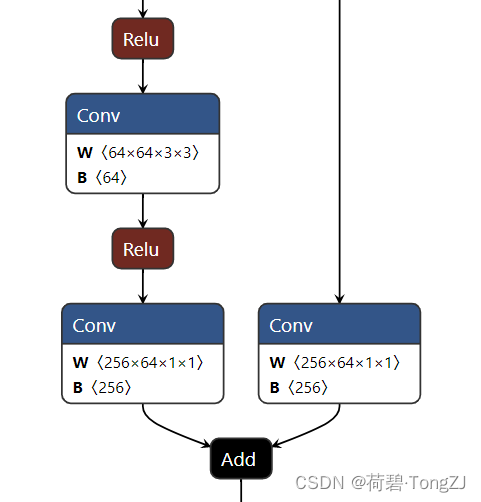
基本用法
要在 Python 中运行 onnx 模型,需要下载 onnxruntime
# 选其一即可
pip install onnxruntime        # CPU 版本
pip install onnxruntime-gpu    # GPU 版本
推理时需要借助其中的 InferenceSession,其中较为重要的实例方法有:
- get_inputs():得到输入变量的列表 (变量属性:name、shape、type)
- get_outputs():得到输入变量的列表 (变量属性:name、shape、type)
- run(output_names, input_feed):输入变量为 numpy.ndarray (注意 dtype 应为 float32),使用模型推理并返回输出
可得出 onnx 模型的基本用法:
import onnxruntime as ort
import numpy as np

file = 'resnet.onnx'
# 找到 GPU / CPU
provider = ort.get_available_providers()[
    1 if ort.get_device() == 'GPU' else 0]
print('设备:', provider)
# 声明 onnx 模型
model = ort.InferenceSession(file, providers=[provider])

# 参考: ort.NodeArg
for node_list in model.get_inputs(), model.get_outputs():
    for node in node_list:
        attr = {'name': node.name,
                'shape': node.shape,
                'type': node.type}
        print(attr)
    print('-' * 60)

# 得到输入、输出结点的名称
input_node_name = model.get_inputs()[0].name
ouput_node_name = [node.name for node in model.get_outputs()]

image = np.random.random([1, 3, 224, 224]).astype(np.float32)
print(model.run(output_names=ouput_node_name,
                input_feed={input_node_name: image}))
高级 API
为了简化使用步骤,使用类进行封装:
class Onnx_Module(ort.InferenceSession):
    ''' onnx 推理模型
        provider: 优先使用 GPU'''
    provider = ort.get_available_providers()[
        1 if ort.get_device() == 'GPU' else 0]

    def __init__(self, file):
        super(Onnx_Module, self).__init__(file, providers=[self.provider])
        # 参考: ort.NodeArg
        self.inputs = [node_arg.name for node_arg in self.get_inputs()]
        self.outputs = [node_arg.name for node_arg in self.get_outputs()]

    def __call__(self, *arrays):
        input_feed = {name: x for name, x in zip(self.inputs, arrays)}
        return self.run(self.outputs, input_feed)
在 PyTorch 中,对于卷积神经网络 model 与图像 image,推理的代码为 "model(image)",而使用这个封装的类也是类似:
import numpy as np

file = 'resnet.onnx'
model = Onnx_Module(file)

image = np.random.random([1, 3, 224, 224]).astype(np.float32)
print(model(image))
为了方便观察 Torch 模型与 onnx 模型的速度差异,同时检查两个模型的输出是否一致,又编写了 test 函数
test 方法的参数与 torch.onnx.export 一致,其基本流程为:
- 得到 Torch 模型的输出,并 print 推断耗时
- 将 Torch 模型导出为 onnx 文件,将输入变量中的 torch.tensor 转化为 numpy.ndarray
- 初始化 onnx 模型,得到 onnx 模型的输出,并 print 推断耗时
- 计算 Torch 模型与 onnx 模型输出的绝对误差的均值
- 将 onnx 模型 return
class Timer:
    repeat = 3

    def __new__(cls, fun, *args, **kwargs):
        import time
        start = time.time()
        for _ in range(cls.repeat): fun(*args, **kwargs)
        cost = (time.time() - start) / cls.repeat
        return cost * 1e3  # ms


class Onnx_Module(ort.InferenceSession):
    ''' onnx 推理模型
        provider: 优先使用 GPU'''
    provider = ort.get_available_providers()[
        1 if ort.get_device() == 'GPU' else 0]

    def __init__(self, file):
        super(Onnx_Module, self).__init__(file, providers=[self.provider])
        # 参考: ort.NodeArg
        self.inputs = [node_arg.name for node_arg in self.get_inputs()]
        self.outputs = [node_arg.name for node_arg in self.get_outputs()]

    def __call__(self, *arrays):
        input_feed = {name: x for name, x in zip(self.inputs, arrays)}
        return self.run(self.outputs, input_feed)

    @classmethod
    def test(cls, model, args, file, **export_kwargs):
        # 测试 Torch 的运行时间
        torch_output = model(*args).data.numpy()
        print(f'Torch: {Timer(model, *args):.2f} ms')
        # model: Torch -> onnx
        torch.onnx.export(model, args, file, **export_kwargs)
        # data: tensor -> array
        args = tuple(map(lambda tensor: tensor.data.numpy(), args))
        onnx_model = cls(file)
        # 测试 onnx 的运行时间
        onnx_output = onnx_model(*args)
        print(f'Onnx: {Timer(onnx_model, *args):.2f} ms')
        # 计算 Torch 模型与 onnx 模型输出的绝对误差
        abs_error = np.abs(torch_output - onnx_output).mean()
        print(f'Mean Error: {abs_error:.2f}')
        return onnx_model
对于 ResNet50 而言,Torch 模型的推断耗时为 172.67 ms,onnx 模型的推断耗时为 36.56 ms,onnx 模型的推断耗时仅为 Torch 模型的 21.17%
边栏推荐
- Network design and planning of a company
- 六轴传感器使用学习记录
- 03-树1 树的同构
- TFIDF examples and explanations
- 虹科分享|如何解决勒索软件安全漏洞
- 数字信息化(先枚举假设,再看是否满足条件)(1089 狼人杀-简单版)
- Common misunderstandings caused by a time reporting assistant of Blue Bridge Cup basic questions
- Detailed evaluation of current popular redis visual management tools
- Day7: ordered binary tree (binary search tree)
- Skiing mobile H5 game source code download
猜你喜欢

Old wine in new bottles -- sample analysis of recent apt32 (sea Lotus) organizational attacks

Scala基础【集合01】

基于海思3559 高效率的 0延时 0拷贝 qt播放器方案

Illegal mix of collations for operation ‘UNION‘(bug记录)

Flutter tips: optimizing the buildcontext you use

蓝桥杯基础练习——矩阵的回形取数(C语言)

Network design and planning of a company

Network packet multi-layer transmission demonstration
![[wp]ctfshow-web introductory information collection](/img/22/c2e5cca918800dda9df27272eb9871.png)
[wp]ctfshow-web introductory information collection

TFIDF examples and explanations
随机推荐
项目中new Promise和async、await中的使用,以及promise.all在项目中的实际应用
Scala foundation [set 01]
Website construction of information exchange platform for China Africa South South cooperation based on PHP
Grid layout frequently asked interview questions
[wp]ctfshow-web introductory information collection
Monitor MySQL based on MySQL exporter
TypeError: ‘str‘ object is not callable的错误原因
Amrita Institute of Engineering | reinforcement active learning method for optimizing sampling in terms extraction of emotional analysis
哪吒 D1-H 测试 microbench
KCon 2022 亮点及议程大揭秘!
Connecting to the database warning establishing SSL connection without server's identity verification is not recommended
IP地址的概念
Solve the problem that the win10 account has no administrator rights
哈希无向图可视化
Selenium运行慢 - 通过设置selenium加载策略加快运行速度
Add a subtitle of 3D effect to the container
Is there a "fingerprint" in the structure of AAAI 2022 | Gan? Generating network structure from forged image traceability
Six axis sensor use learning record
A good way to generate interface documents efficiently
由一个蓝桥杯基础题报时助手而引出的常见误区