当前位置:网站首页>Network packet multi-layer transmission demonstration
Network packet multi-layer transmission demonstration
2022-07-25 19:23:00 【biyezuopinvip】
Demonstration of multi-layer packet transmission
One 、 Local operation process
install Node.js ,LTS Version can
install yarn
- According to different operating systems , Perform the appropriate steps
- perform
yarn --versionTo confirm that the installation was successful
Get this project
- function
git clone https://github.com/KKZ20/TCP-UDP.gitPull project code - If you already have this project code ( For example, the cute brother who checks homework ) Skip this step
- function
Go to the project folder (
cd TCP-UDPperhapscd TCP-UDP-master, Look at the name of your local folder ), Installation dependency , Follow the steps below- perform
yarn add antdinstall Ant-Deisgn Component libraries depend on - perform
npm install rc-queue-anim --saveinstall Ant-Motion Animation library dependency ( In and out animation ) - perform
npm install rc-animate --saveinstall Ant-Motion Animation library dependency (CSS Style animation )
- perform
perform
yarn start, You can do it locally 3000 Port view !Enjoy it!
In addition, you can also check online through online access !
Two 、 General description of program design
1. Overall directory structure
|--node_modules      //  Library used in project engineering , according to package.json install , A very large , Follow the above running procedure to generate
   |--...
   `--...( Many documents are not listed one by one )
|--public            //  Resource file
   |--index.html     //  Page navigation
   `--...( Many documents are not listed one by one )
|--src
   |--backend 2      //  Calculation of various protocol header information ( Focus on !)
      |--Bridge.js   //  Getting data from a page , And send it to each protocol header for processing and calculation
      |--Ethernet.js //  Ethernet header information calculation
      |--IP.js       // IP Header calculation
      |--TCP.js      // TCP Header calculation
      |--UDP.js      // UDP Header calculation
      `--test.js     //  Test files
   |--App.css            //  Home page style
   |--App.js             //  The main page realizes ( Focus on !)
   |--App.test.js        //  Files generated when the project is created
   |--index.css			 //  Files generated when the project is created
   |--logo.svg           //  Files generated when the project is created
   |--reportWebVitals.js //  Files generated when the project is created
   `--setupTests.js      //  Files generated when the project is created
|--.gitignore             // git Ignore the configuration of tracking when submitting
|--package-lock.json      //  The project uses dependent configuration files ( Lock the version numbers of all modules )
|--package.json           //  The project uses dependent configuration files ( Modules used in the project )
|--yarn.lock              //  Flat presentation projects use dependent configuration files
`--README.md              // You're now reading this!
2. The algorithm part
About packets in TCP/IP The code of the continuously encapsulated process in the four layer protocol is stored in /src/backend 2/ Under the table of contents .
When inputting a piece of data , The program first converts the content of this data from ASCII Character conversion to binary , And then according to TCP/IP The protocol encapsulates data packets from top to bottom .
application layer : The binary string converted from the input data .
Transport layer : Add TCP/UDP The first one , among TCP Head length 20 byte 、UDP Head length 8 byte .TCP The content of the first part is set in TCP.js In file , Defines a class TCPSegment Used to generate a TCP Data segment ;UDP The content of the first part is set in UDP.js In file , Defines a class UDPDatagram Used to generate a UDP The datagram . Both of them need to create a “IP Fake head ” To calculate the checksum . The calculation of checksum takes TCP/UDP The first one ( Include IP Fake head ), Will each 16 Add bits , And will add more than 16 Shift the content of bit to the right 16 After the bit and then low 16 Add bits , So cycle until the sum does not exceed 16 position , Take the addition and negation at this time , Get the results .
The network layer : Add IP The first one . This demo program uses IPv4 The first part of the version , Chief, 20 byte , The content is set in IP.js In file , Defines a class IPv4Packet Used to generate a IPv4 Data packets . In the process of generating data packets, it is necessary to calculate the checksum . Calculation method: simultaneous interpreting layer .
Network interface layer : Add Ethernet header to the header of network layer content . This demo program uses Ethernet II Ethernet frame format header , Chief, 14 byte , The content is set in Ethernet.js In file , Defines a class EthernetFrame Used to generate an Ethernet frame . Because the minimum length of Ethernet frame is 60 byte , If the Ethernet frame length after packet is still insufficient 60 byte , At the end of the frame 0 fill . in addition , At the end of the Ethernet frame FCS Checksums fields , use CRC32 The algorithm performs the calculation of this check sum .
3、 ... and 、 Instructions
1. Overall operation flow chart
2. Examples demonstrate
According to one , Open the interface ( Access server or Local installation depends on + function )
After opening, you will see a concept introduction , Users can view the brief instructions for the use of this program and the knowledge introduction of each protocol header here

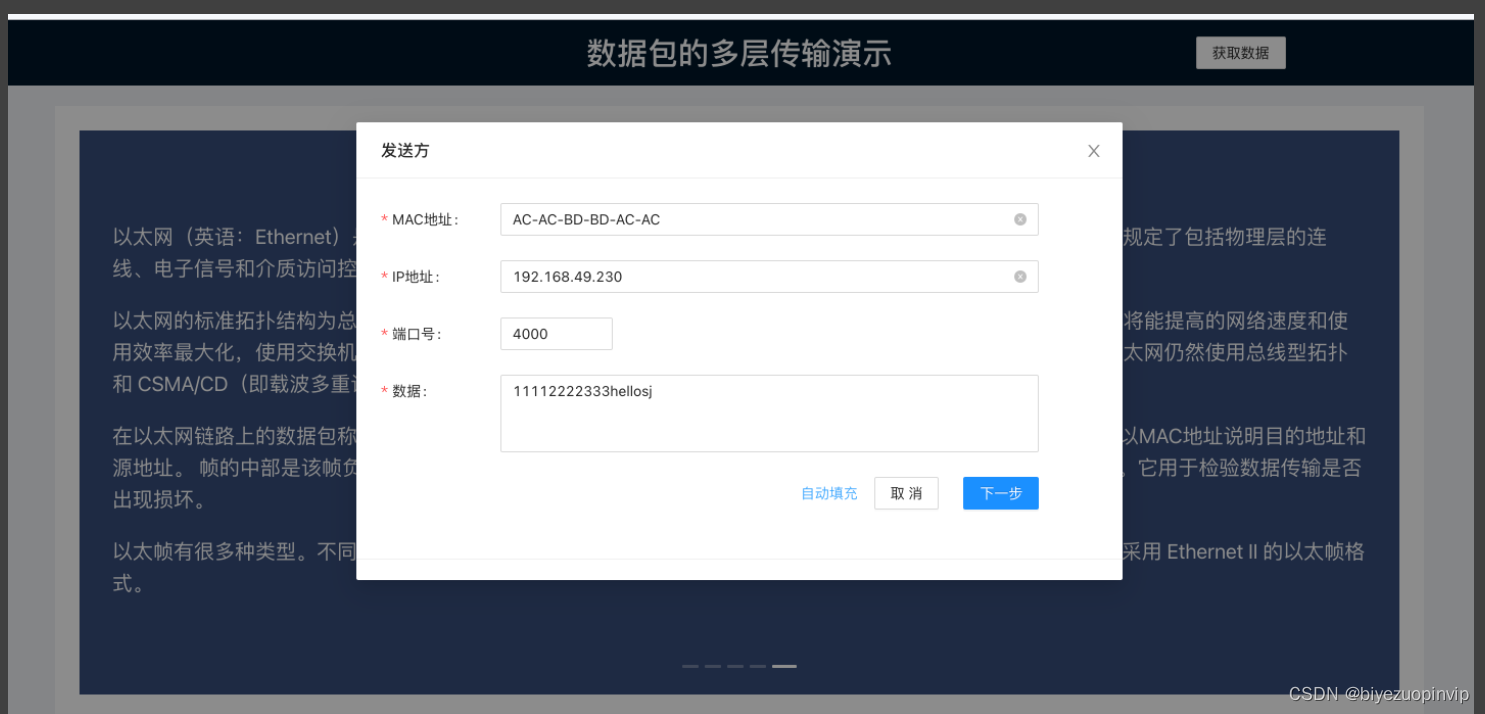
Click on the top right corner “ Get data button ”, The input form will pop up , The user sends here / Input Party's MAC Address 、IP Address and port number , And the data to be transmitted . Users can also click auto fill , To automatically fill in the default data
When the user input data format is wrong, it will give feedback , Include data not entered 、 Wrong input format 、 Illegal scope, etc ( example :IP Wrong address input )

After entering the data , The user can see a process of data packet transmission in multi-layer Protocol , Here is continuous animation

Users can click “ Detailed process ” page , To perform one-step control ( The previous step 、 next step 、 Reset )

Click on the specific agreement header / Data blocks , You can view the details

In addition, we are also interested in TCP/UDP Switch and fill bytes are supported

边栏推荐
- 小程序毕设作品之微信校园维修报修小程序毕业设计成品(3)后台功能
- Talk about 15 tips of SQL optimization
- 【DETR用于3D目标检测】3DETR: An End-to-End Transformer Model for 3D Object Detection
- Solve the problem that the win10 account has no administrator rights
- Small program completion work wechat campus maintenance application small program graduation design finished product (2) small program function
- Istio exposes applications to the Internet
- 微信小程序 28 热搜榜的完善①
- Eve - 0day Threat Intelligence
- JS learning notes 17: DOM query exercise
- 【Web技术】1391- 页面可视化搭建工具前生今世
猜你喜欢

Real estate enterprises have launched a "war of guarantee"

Openresty Lua resty mlcache multi-level cache
平衡二叉树

Wechat campus maintenance and repair application applet graduation design finished product of applet completion work (6) opening defense ppt

【DETR用于3D目标检测】3DETR: An End-to-End Transformer Model for 3D Object Detection

帝国CMS整站|手机号/QQ靓号商城源码|适配移动端
![[919. Complete binary tree inserter]](/img/d9/15a9af50893db955d9ebb4d7d4e3d1.png)
[919. Complete binary tree inserter]

How to ensure the consistency of double write between database and cache?

Monitor MySQL based on MySQL exporter

Alibaba cloud free SSL certificate application detailed process

随机推荐
Network design and planning of a company
鸿蒙-大喵计算画板-简介
Monitor MySQL based on MySQL exporter
SQL Server 2019 安装教程
网上商城系统MySql数据库设计项目实战
[applet development] common components and basic usage details
Flutter 小技巧之优化你使用的 BuildContext
Gan, why ".Length! == 3??
ERROR: role “admin“ cannot be dropped because some objects depend on itDETAIL:
Real estate industry reshuffle
Wechat campus maintenance and repair applet graduation design finished product of applet completion work (4) opening report
[web technology] 1391 page visualization building tool, previous life and present life
Fruit chain "siege": it's a journey of sweetness and bitterness next to apples
【iniparser】项目配置工具iniparser的简单使用
高并发下如何保证数据库和缓存双写一致性?
What is the application value of MES management system
无惧高温暴雨,有孚网络如何保您无忧?
Basic music theory -- configuring chords
李宏毅《机器学习》丨1. Introduction of this course(机器学习介绍)
微信小程序 26 播放音乐页的完善②