当前位置:网站首页>Create a simple battle game with photon pun
Create a simple battle game with photon pun
2022-06-30 04:42:00 【ToDoNothing】
Preface :
photon PUN It is a plug-in used to realize online combat , Through simple design , You can join the hall , Join the room , And fight , Players can synchronize animation, position and other parameters , At the same time through RPC Mechanism , Broadcast parameters , Realize player information sharing in the room .
The war is realized
1. open photon Official website , Then open the account , Sign in .
2. Click on Your Applications, Create an , choice PUN, Fill in as required , And then copy Appid, open unity Create project .
3. stay unity Search in the resource store of photon PUN, Download and import .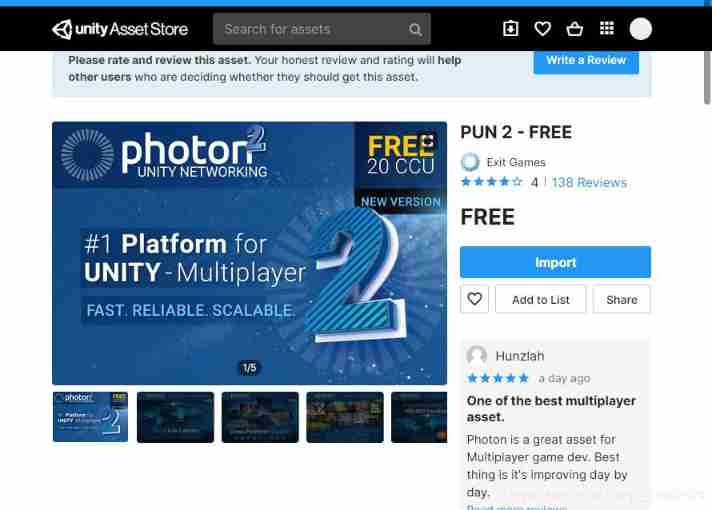
4. Paste what you just copied appid, Click on setup project—close
5. Create a new scene , Add the following UI Components , One is the name input panel , Click to enter the hall .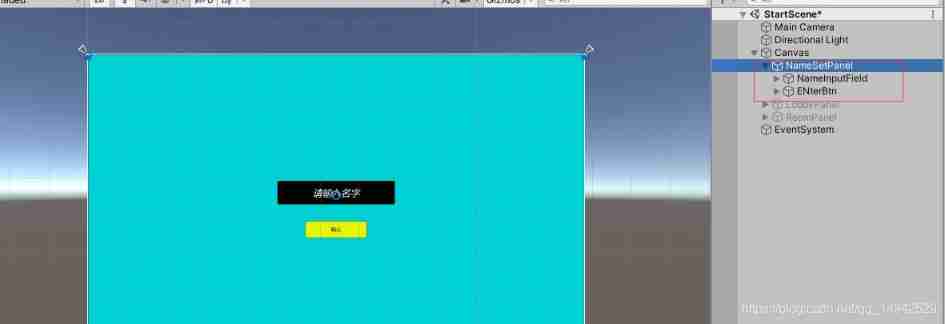


6. Create a new empty object in the scene , name NetWorkManager, Also create a new script NetworkManager, Fill in the namespace PUN, Change the inherited class to MonoBehaviourPunCallbacks, First, in the start Function . Connect to server , The specific code is as follows :
using System.Collections;
using System.Collections.Generic;
using UnityEngine;
using Photon.Pun;
using UnityEngine.UI;
using Photon.Realtime;

public class NetworkManager : MonoBehaviourPunCallbacks
{

    #region  Private variables
    #endregion
    #region  Open variables
    public static NetworkManager _instance;// Single case
    public InputField nameInputField;// Name input box
    public InputField RoomnameInputField;// Room name input box
    public GameObject readyBtn;// Ready button
    public GameObject startBtn;// Start game button

    public GameObject NamePanel;// Name setting panel
    public GameObject LobbyPanel;// Lobby panels
    public GameObject RoomPanel;// Room panels
    public GameObject StartInitPanel;// Start initializing the panel

    #endregion

    #region Mono function
    private void Awake()
    {

        if (_instance == null)
        {

            _instance = this;
        }
    }

    private void Start()
    {

        PhotonNetwork.ConnectUsingSettings();// Initialize settings , Connect to server
    }

    private void Update()
    {

        if (PhotonNetwork.LocalPlayer.IsMasterClient)// Judge whether it is the owner , If yes, the start game button will be displayed , The ready button is not displayed
        {

            readyBtn.SetActive(false);
            startBtn.SetActive(true);
        }
        else
        {

            readyBtn.SetActive(true);
            startBtn.SetActive(false);
        }
    }
    #endregion
    #region  Button function


    /// <summary>
    ///  Name setting button
    /// </summary>
    public void SetNicknameButton()
    {


        if (nameInputField.text.Length < 2)
            return;
        PhotonNetwork.NickName = nameInputField.text;// Upload the entered name to the network
        if(PhotonNetwork.InLobby)// Judge whether it is in the hall , On the display hall , Hide name panel
        {

            LobbyPanel.SetActive(true);
            NamePanel.SetActive(false);
            Debug.Log(" Already in the hall ");
        }


    }

    /// <summary>
    ///  Create or add room button
    /// </summary>
    public void joinOrCreateRoomBtn()
    {

        if(RoomnameInputField.text.Length<=2)
        {

            return;
        }
        LobbyPanel.SetActive(false);
        RoomOptions roomOptions = new RoomOptions {
     MaxPlayers = 4 };// The maximum number of people in the room 4 people
        PhotonNetwork.JoinOrCreateRoom(RoomnameInputField.text, roomOptions, default);
        RoomPanel.SetActive(true);

    }

    #endregion

    #region Photon function


    public override void OnJoinedRoom()
    {

        if (PhotonNetwork.LocalPlayer.IsMasterClient)// Judge whether it is the owner , If yes, the start game button will be displayed , The ready button is not displayed
        {

            readyBtn.SetActive(false);
            startBtn.SetActive(true);
        }
        else
        {

            readyBtn.SetActive(true);
            startBtn.SetActive(false);
        }


    }
    /// <summary>
    ///  When the server is successfully connected
    /// </summary>
    public override void OnConnectedToMaster()
    {

        NamePanel.SetActive(true);// Show name panel
        StartInitPanel.SetActive(false);// Hide the start initialization panel
        PhotonNetwork.JoinLobby();// Join the lobby
        Debug.Log(" Join the hall successfully ");
    }


    #endregion
}
7. Create a new one RoomManagerList The empty object of , Similarly, create a new RoomMnaager Script , It is mainly used to manage the display of room list :
using Photon.Pun;
using Photon.Realtime;
using System.Collections;
using System.Collections.Generic;
using UnityEngine;
using UnityEngine.UI;

public class RoomManager : MonoBehaviourPunCallbacks
{

    public GameObject roomNamePrefab;// Precast units shown in the room
    public Transform gridLayout;// The parent of the preform

    /// <summary>
    ///  Room update function , Every time the room disappears or increases , Will call , Therefore, special treatment shall be carried out for the disappearance
    /// </summary>
    /// <param name="roomList"> Returned room parameters </param>
    public override void OnRoomListUpdate(List<RoomInfo> roomList)
    {

        Debug.Log("roomlist:" + roomList.Count);

        for (int i = 0; i < gridLayout.childCount; i++)// Traverse the child objects under the parent object
        {

            if (gridLayout.GetChild(i).gameObject.GetComponentInChildren<Text>().text == roomList[i].Name)// Have the same object
            {

                Destroy(gridLayout.GetChild(i).gameObject);// The destruction
                if (roomList[i].PlayerCount == 0)// If the room player is 0
                {

                    roomList.Remove(roomList[i]);// Remove the room
                }
            }
        }
        foreach (var room in roomList)// Traverse the display of the generated room
        {


            GameObject newRoom = Instantiate(roomNamePrefab, gridLayout.position, Quaternion.identity, gridLayout);// Generate room button
            newRoom.GetComponent<RoomBtn>().roomName = room.Name;// Set room name
            newRoom.GetComponentInChildren<Text>().text = room.Name + "(" + room.PlayerCount + "/4)";// Display parameters

        }
    }
}
8. To click the room button , Access to the room , So add script events to the buttons , Create a new script RoomBtn, The room button is a prefabricated body , It needs to be set in advance , stay scroll view Inside content Click the new button , Then remember to give content add to Vertical layout group and content size fitter Components , Similarly, in the player panel , You also need to design the corresponding preform for the player , The method is similar to , The code is as follows :
using Photon.Pun;
using Photon.Realtime;
using System.Collections;
using System.Collections.Generic;
using UnityEngine;

public class RoomBtn : MonoBehaviourPunCallbacks
{

    public string roomName;
    void Start()
    {


    }

    /// <summary>
    ///  Click button , Join the room
    /// </summary>
    public void JoinRoomBtn()
    {


        PhotonNetwork.JoinRoom(roomName);// Join the room
        NetworkManager._instance.RoomPanel.SetActive(true);// Show room panels
        NetworkManager._instance.LobbyPanel.SetActive(false);// Hide lobby panels


    }

}
9. After entering the room , Players need to be updated , At the same time, it is necessary to judge whether it is the homeowner , If it is , Homeowners can start the game , If not , A prepare button is displayed . In fact, you can also do an online chat here , Add the following components , As input and display of chat .
Script InRoom Code :
using Photon.Pun;
using Photon.Realtime;
using System.Collections;
using System.Collections.Generic;
using UnityEngine;
using UnityEngine.UI;

public class InRoom : MonoBehaviourPunCallbacks
{

    public GameObject playerInfoPrefab;// Player button prefab
    public Transform conlayout;// The parent object
    List<GameObject> mplayers = new List<GameObject>();
    Player[] allplayers;

    bool ready = false;

    public InputField contentInput;// Chat input box
    public GameObject textPrefab;// Text prefab
    public Transform layoutContent;// The parent object
    void Start()
    {


    }
   /// <summary>
   ///  When you join a room
   /// </summary>
    public override void OnJoinedRoom()
    {


        allplayers = PhotonNetwork.PlayerList;
        foreach (var item in allplayers)
        {

            GameObject obj = Instantiate(playerInfoPrefab, conlayout);

            m_PlayerInfo _PlayerInfo = obj.GetComponent<m_PlayerInfo>();
            _PlayerInfo.playerName = item.NickName;
            obj.GetComponentInChildren<Text>().text = item.NickName + "(" + " Not prepared " + ")";
            mplayers.Add(obj);
        }
    }

    /// <summary>
    ///  When a player enters , Update player list
    /// </summary>
    /// <param name="newPlayer"></param>
    public override void OnPlayerEnteredRoom(Player newPlayer)
    {

        GameObject obj = Instantiate(playerInfoPrefab, conlayout);
        m_PlayerInfo _PlayerInfo = obj.GetComponent<m_PlayerInfo>();
        _PlayerInfo.playerName = newPlayer.NickName;
        obj.GetComponentInChildren<Text>().text = newPlayer.NickName+"("+" Not prepared "+")";
        mplayers.Add(obj);
    }
    /// <summary>
    ///  When a player leaves , Update player list
    /// </summary>
    /// <param name="otherPlayer"></param>
    public override void OnPlayerLeftRoom(Player otherPlayer)
    {

        foreach (var item in mplayers)
        {

            if (item.GetComponentInChildren<Text>().text.Contains(otherPlayer.NickName))
            {


                Destroy(item);
                break;
            }
        }
    }
    /// <summary>
    ///  When leaving the room , If there are people in the room , Then set others as the owners
    /// </summary>
    public override void OnLeftRoom()
    {

        foreach (var item in mplayers)
        {

            if (item.GetComponentInChildren<Text>().text.Contains(PhotonNetwork.LocalPlayer.NickName))
            {

                if (PhotonNetwork.LocalPlayer.IsMasterClient)
                {

                    foreach (var p in allplayers)
                    {

                        if (p != PhotonNetwork.LocalPlayer)
                        {

                            PhotonNetwork.CurrentRoom.SetMasterClient(p);
                            break;
                        }
                    }

                }

                Destroy(item);
                break;
            }
        }
    }


    Dictionary<string, bool> IsPlayerReady = new Dictionary<string, bool>();// Use dictionaries to broadcast data , Broadcast Dictionary
    /// <summary>
    ///  Prepare button events
    /// </summary>
   public void SetReadyBtn()
    {

        foreach (var item in mplayers)
        {

            m_PlayerInfo playerinfo = item.GetComponent<m_PlayerInfo>();
            if (!IsPlayerReady.ContainsKey(playerinfo.playerName))
            {

                IsPlayerReady.Add(playerinfo.playerName, false);
            }
        }
        ready = !ready;
        foreach (var item in IsPlayerReady)
        {

            if(item.Key== PhotonNetwork.LocalPlayer.NickName)
            {

                IsPlayerReady[item.Key] = ready;
                break;
            }
        }
        photonView.RPC("ReadyBtn", RpcTarget.All,PhotonNetwork.LocalPlayer.NickName,IsPlayerReady);
    }

    [PunRPC]
    void ReadyBtn(string xname,Dictionary<string,bool> keyValuePairs)
    {


        foreach (var item in keyValuePairs)
        {

            if(item.Value==true)
            {

                foreach (var p in mplayers)
                {

                    if(p.GetComponentInChildren<Text>().text.Contains(item.Key))
                    {

                        p.GetComponentInChildren<Text>().text = item.Key + "(" + " Already prepared " + ")";
                        break;
                    }
                }
            }
            else
            {

                foreach (var p in mplayers)
                {

                    if (p.GetComponentInChildren<Text>().text.Contains(item.Key))
                    {

                        p.GetComponentInChildren<Text>().text = item.Key + "(" + " Not prepared " + ")";
                        break;
                    }
                }
            }
        }

        //foreach (var item in mplayers)
        //{

        // Debug.Log(item.GetComponentInChildren<Text>().text);
        // if (item.GetComponentInChildren<Text>().text.Contains(xname))
        // {

        // if(ready)
        // {

        // item.GetComponentInChildren<Text>().text= xname + "(" + " Already prepared " + ")";
        // }
        // else
        // {

        // item.GetComponentInChildren<Text>().text = xname + "(" + " Not prepared " + ")";
        // }
        // break;
        // }
        //}
    }


    // Send a message
    public void SendMessInfoBtn()
    {

        string info = PhotonNetwork.LocalPlayer.NickName + " :" + contentInput.text;
        photonView.RPC("SendMess", RpcTarget.All,info);
    }

    [PunRPC]
    void SendMess(string mess)
    {

        GameObject textobj = Instantiate(textPrefab, layoutContent);
        textobj.GetComponentInChildren<Text>().text = mess;
    }

    // Start the game
    public void StartGameButton()
    {


        photonView.RPC("LoadGameScene", RpcTarget.All);
    }


    [PunRPC]
    void LoadGameScene()
    {

        PhotonNetwork.LoadLevel(1);
    }
}
There is also a code added here , Buttons bound to players ,
Code content :
using System.Collections;
using System.Collections.Generic;
using UnityEngine;

public class m_PlayerInfo : MonoBehaviour
{

    public string playerName;

}
10. Create a new scene , Remember to add in build setting Inside . In this scenario , Build a simple floor , At the same time, create a new capsule , As a player's prefab Player. Add the following components , Drag him to the following folder , Delete... In the scene Player:

11. Create a new script , Name it GameManager, It is mainly used to generate players , Remember to add , The code is as follows :
using Photon.Pun;
using Photon.Realtime;
using System.Collections;
using System.Collections.Generic;
using UnityEngine;

public class GameManager : MonoBehaviourPunCallbacks
{


    public static GameManager _insatnce;

    // Start is called before the first frame update
    void Awake()
    {

        _insatnce = this;

        int index = 0;
        Player[] players = PhotonNetwork.PlayerList;
        foreach (var item in players)
        {

            if (item.NickName == PhotonNetwork.NickName)
            {

                index = item.ActorNumber - 1;
                // PhotonNetwork.Instantiate("Player", m_spawns.mySpawns[index].spawnPos.position, Quaternion.identity);
                PhotonNetwork.Instantiate("Player", Vector3.zero, Quaternion.identity);
                Debug.Log("userid:" + item.ActorNumber);
            }
        }
    }
}
12. newly build mPlayer Script , Used to control player movement
using Photon.Pun;
using System.Collections;
using System.Collections.Generic;
using UnityEngine;

public class mPlayer : MonoBehaviourPunCallbacks
{

    void Update()
    {

        if (photonView.IsMine)
        {

            MoveController();
        }
    }
    public void MoveController()
    {

        float h = Input.GetAxis("Horizontal");
        float v = Input.GetAxis("Vertical");
        transform.Translate(new Vector3(h, 0, v) * 10 * Time.deltaTime);
    }
}
13. such , A basic online mechanism for small demo It's done. . In fact, on the whole ,photon This online mechanism , The introduction is very simple , But the later expansion and optimization will take some time .
Finally, the project source code : Source code address
边栏推荐
- Difference between request forwarding and redirection
- Five methods to clear floating and their advantages and disadvantages
- [UAV] kinematic analysis from single propeller to four rotor UAV
- 【Paper】2021_ Analysis of the Consensus Protocol of Heterogeneous Agents with Time-Delays
- Connect to the database and run node JS running database shows that the database is missing
- IO stream, byte stream read / write copy
- Troubleshooting of abnormal communication between FortiGate and fortiguard cloud
- Qt6 QML Book/Qt Quick 3D/Qt Quick 3D
- 图的一些表示方式、邻居和度的介绍
- Introduction to system programming
猜你喜欢

Marvel fan welfare: Singapore Madame Tussauds Wax Museum Marvel 4D experience Museum

Bean creation process and lazy init delay loading mechanism
The most comprehensive summary notes of redis foundation + advanced project in history

基于servlet+jsp+mysql实现的工资管理系统【源码+数据库】
Bean创建流程 与 lazy-init 延迟加载机制原理
![[UAV] kinematic analysis from single propeller to four rotor UAV](/img/32/1a88b102f832ffbbc1a7e57798260a.jpg)
[UAV] kinematic analysis from single propeller to four rotor UAV

This connection is not a private connection this website may be pretending to steal your personal or financial information

【Paper】2006_ Time-Optimal Control of a Hovering Quad-Rotor Helicopter

Singapore parent-child tour, these popular attractions must be arranged

Mongodb learning
随机推荐
What is SQL injection and how to avoid it?
Difference between TCP three handshakes and four waves and tcp/udp
One interview question and one joint index every day
One interview question a day - the underlying implementation of synchronize and the lock upgrade process
Directory operations and virtual file systems
Qos(Quality of Service)
Lambda&Stream
OneNote production schedule
OneNote software
Redis实现短信登入功能(二)Redis实现登入功能
FortiGate firewall configuration link detection link monitor and status query
图的一些表示方式、邻居和度的介绍
FortiGate firewall quick initialization administrator password
Threejs realizes the simulation of river, surface flow, pipe flow and sea surface
FortiGate firewall configuration log uploading regularly
【Paper】2021_ Analysis of the Consensus Protocol of Heterogeneous Agents with Time-Delays
QT creator 8 beta2 release
internship:接口案例实现
Fair lock and unfair lock
Paging query, using jdbc-- paging query