当前位置:网站首页>sentinel与nacos持久化
sentinel与nacos持久化
2022-07-31 14:05:00 【Leon_Jinhai_Sun】
在流量控制那篇文章中,我们在sentinel中配置好A服务对应的限流策略后,如果A服务重启就会导致sentinel中配置好的策略丢失,所以需要持久化操作。
流量控制可以有三种方法配置:一种是在sentinel控制台进行配置(服务重启则配置的策略丢失),一种是在代码中进行编写控制,还有就是从nacos中读取进行持久化配置。
限流配置
 [
{
“resource”:"/test", 需要限流的接口
“limitApp”:“default”,
“grade”:1, 阈值类型:1为QPS,0为线程数
“count”:3, 每秒钟单机阈值,超过就会报错
“strategy”:0, 流控模式 0直接,1关联,2链路
“controlBehavior”:0, 设置流控效果 ,0直接拒接,1 Warm up 预热,2排队等待
“clusterMode”:false
},
,
{
“resource”:“POST:http://manage-nacos/get/name”,
“limitApp”:“default”,
“grade”:1,
“count”:3,
“strategy”:0,
“controlBehavior”:0,
“clusterMode”:false
}
]
对应依赖
<dependency>
   <groupId>com.alibaba.cloud</groupId>
   <artifactId>spring-cloud-starter-alibaba-nacos-discovery</artifactId>
</dependency>
<!-- sentinel 流量控制依赖-->
<dependency>
   <groupId>com.alibaba.cloud</groupId>
   <artifactId>spring-cloud-starter-alibaba-sentinel</artifactId>
   <version>${spring-cloud-alibaba.version}</version>
</dependency>
<!-- sentinel 底层通过actuator来进行监控-->
<dependency>
   <groupId>org.springframework.boot</groupId>
   <artifactId>spring-boot-starter-actuator</artifactId>
</dependency>
<!-- 使用nacos作为sentinel持久化数据源 -->
<dependency>
   <groupId>com.alibaba.csp</groupId>
   <artifactId>sentinel-datasource-nacos</artifactId>
</dependency>
配置文件中进行配置,从nacos中读取配置信息
spring:
  jackson:
    default-property-inclusion: non_null # 全局jackson不对null做序列化输出
  cloud:
    # 将本服务与 sentinel监控进行绑定
    sentinel:
      transport:
        dashboard: 127.0.0.1:8080
      datasource:
        flow-ds: #sentinel从nacos获取指定的流控规则 这个名字可以自定义,不重复就可以
          nacos:
            server-addr: 127.0.0.1:8848
            dataId: flow-server
            groupId: DEFAULT_GROUP
            ruleType: flow # flow代表流程控制,degrade代表熔断规则
            username: nacos
            password: nacos
熔断配置
对应参数代表的含义请看 流程控制篇
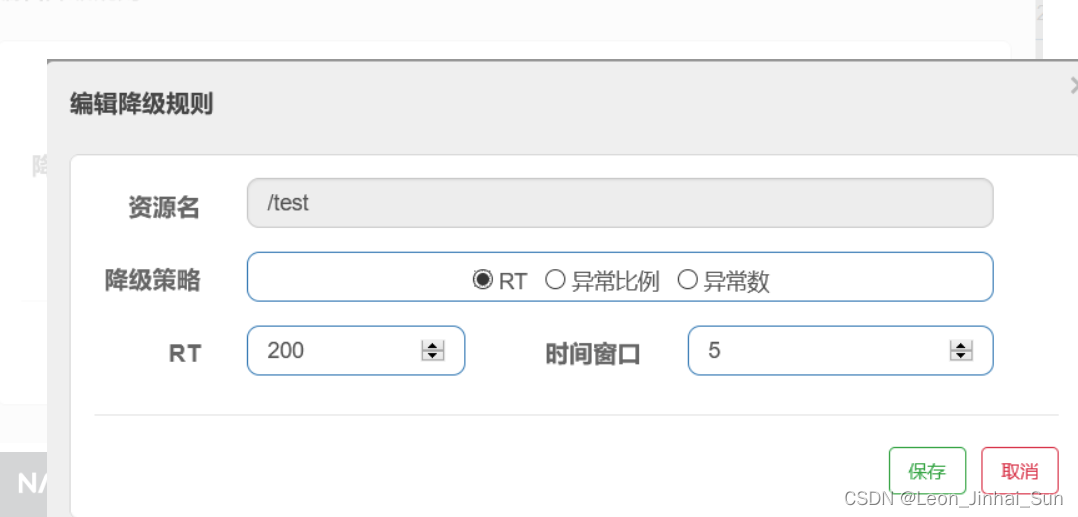

[
	  {
	       "resource":"/test", 请求路径
	       "count":200,  每秒钟请求响应的平均时间,200就是一秒处理五个请求
	       "grade":0,  降级策略,0为RT平均响应时间
	       "timeWindow":5  熔断时间为5秒
	   }

]
服务对应的配置文件
spring:
 jackson:
   default-property-inclusion: non_null # 全局jackson不对null做序列化输出
 cloud:
   # 将本服务与 sentinel监控进行绑定
   sentinel:
     transport:
       dashboard: 127.0.0.1:8080
     datasource:
       flow-ds: #sentinel从nacos获取指定的流控规则 这个名字可以自定义,不重复就可以
         nacos:
           server-addr: 127.0.0.1:8848
           dataId: flow-server
           groupId: DEFAULT_GROUP
           ruleType: flow # flow代表流程控制,degrade代表熔断规则
           username: nacos
           password: nacos
       grade-ds: #sentinel从nacos获取指定的熔断规则 这个名字可以自定义,不重复就可以
         nacos:
           server-addr: 127.0.0.1:8848
           dataId: degrade-server
           groupId: DEFAULT_GROUP
           ruleType: degrade # flow代表流程控制,degrade代表熔断规则
           username: nacos
           password: nacos
边栏推荐
- 技能大赛dhcp服务训练题
- C语言基础练(九九乘法表)与打印不同星号图案
- 多智能体协同控制研究中光学动作捕捉与UWB定位技术比较
- Miller_Rabin 米勒拉宾概率筛【模板】
- A detailed explanation of the usage of Async and Await in C#
- MySQL玩到这种程度,难怪大厂抢着要!
- mysql8, starttime的下一个值作为endtime的上一个值?
- C#高级--委托
- LeetCode只出现一次的数字
- For enterprises in the digital age, data governance is difficult, but it should be done
猜你喜欢
STM32的CAN过滤器
ADS communicate with c #

C# control ListView usage

1小时直播招募令:行业大咖干货分享,企业报名开启丨量子位·视点
An article makes it clear!What is the difference and connection between database and data warehouse?

已解决(pymysqL连接数据库报错)pymysqL.err.ProgrammingError: (1146,“Table ‘test.students‘ doesn‘t exist“)
![[Blue Bridge Cup Trial Question 46] Scratch Magnet Game Children's Programming Scratch Blue Bridge Cup Trial Question Explanation](/img/57/f23c21c7ed4b9701a3f6119bfd8493.png)
[Blue Bridge Cup Trial Question 46] Scratch Magnet Game Children's Programming Scratch Blue Bridge Cup Trial Question Explanation

Resnet&API

技能大赛训练题:MS15_034漏洞验证与安全加固

OAuth2:四种授权方式
随机推荐
Unity学习笔记 关于AVPro视频跳转功能(Seeking)的说明
For enterprises in the digital age, data governance is difficult, but it should be done
五个维度着手MySQL的优化
小试牛刀:Go 反射帮我把 Excel 转成 Struct
C# Get network card information NetworkInterface IPInterfaceProperties
【redis】发布和订阅消息
[QNX Hypervisor 2.2 User Manual] 9.13 rom
Shell script classic case: backup of files
49.【拷贝构造函数与重载】
Tortoise speed by "template"
百度网盘安装在c盘显示系统权限限制的解决方法
3.爬虫之Scrapy框架1安装与使用
对数字化时代的企业来说,数据治理难做,但应该去做
LeetCode·304竞赛·6132·使数组中所有元素都等于零·模拟·哈希
Linux bash: redis-server: command not found
Text similarity calculation (Chinese and English) detailed explanation of actual combat
The recently popular domestic interface artifact Apipost experience
[Pytorch] torch.argmax() usage
Buffer 与 拥塞控制
Shell脚本经典案例:文件的备份