当前位置:网站首页>Qcodeeditor - QT based code editor
Qcodeeditor - QT based code editor
2022-06-25 15:06:00 【Knowledge first】
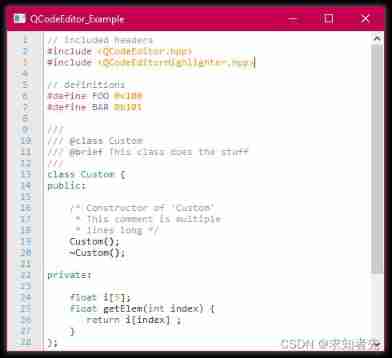
One Basic introduction
It’s not a project from a Qt example.
This is not qt Example project of !!! This is an introduction to the open source project
QCodeEditor Is a support for automatic completion 、 Code editor for syntax highlighting and line numbering .
It's for anyone who wants to support multiple languages , From programming languages to markup languages , Even custom scripting languages . In the present state , It can perfectly handle all the functions mentioned above , But there are still many things to be achieved .QCodeEditor Is based on Qt Of QPlainTextEdit, It already includes an interface for adding syntax highlighting and autocompletion .
Source code and sample code download links :https://download.csdn.net/download/weixin_42887343/76428055
Two Code using
Using the editor itself is simple . Can pass QPlainTextEdit Add... To the form a And elevate it to kgl::QCodeEditor( Please note that , Must be “ include/KGL/Widgets ” Add to INCLUDEPATH Variable and global include Must select “ ” Check box ) Or programmatically add it to the form :
using namespace kgl;

// ## MainWindow::MainWindow
QCodeEditor *editor = new QCodeEditor;
setCentralWidget(editor); // or: ui->someLayout->addWidget(editor);
By using QCodeEditorDesign This class can change the visual appearance of the editor . In the following example , Let's assume that the code editor is surrounded by multiple widgets , So a border is added to it . We also modified the appearance to have “ Dark ” style :
using namespace kgl;

// ## MainWindow::MainWindow
QCodeEditorDesign design;
design.setLineColumnVisible(false);
design.setEditorBackColor(0xff333333);
design.setEditorTextColor(0xffdddddd);
design.setEditorBorderColor(0xff999999);
design.setEditorBorder(QMargins(1,1,1,1)); // l t r b
editor->setDesign(design);
But how to actually add some syntax highlighting rules , As shown in the figure above ? There are two ways to do this : Add them programmatically or from XML Extract them from the file .
Programmatically :
using namespace kgl;

// ## MainWindow::MainWindow
QList<QSyntaxRule> rules;
QSyntaxRule rule;
rule.setForeColor(QColor(Qt::blue));
rule.setRegex("\\bFoo\\b");
rule.setId("Foo");
rules.push_back(rule);
editor->setRules(rules);
XML file :
using namespace kgl;
// ## MainWindow::MainWindow
QCodeEditorDesign design;
// modify design ...
QList<QSyntaxRule> rules =
QSyntaxRules::loadFromFile(":/rule_cpp.xml", design);
editor->setRules(rules);
// Note: ':/rule_cpp.xml' refers to the path of a QRC resource
The next chapter provides how to create these XML A guide to the rules . But first of all , Our editor needs some autocomplete keywords :
// ## MainWindow::MainWindow
QStringList keywords = {
     "printf", "scanf" };
editor->setKeywords(keywords);
If you want to add an icon to indicate that the keyword is a function / member / macro /… QStandardItemModel, You need to create a custom and pass it to “ QCodeEditor::setKeywordModel(model)”.
3、 ... and establish XML Rules file
XML The rules file contains the topmost element composed of multiple child elements . Each child element must contain a regular expression or a list of keywords , All other properties are optional :
<rules>
    <rule>
        <regex>\bFoo\b</regex>
        <keywords>foo bar key</keywords>
    </rule>
</rules>
References to all available attributes , Please go to rules_template.xml Of github page .QCodeEditor Even rules with more than one row are supported . Although they are useful for implementing multiline annotations , But they can also be used for other purposes .
Four ID Usefulness
from rules_template.xml It can be seen that , Rules can even define custom ID. In this section , I'll show you how to use ID And why they are so useful . People may have noticed , Adding keywords statically is not a good practice , Especially if your language allows you to include other files or define variables .
“onMatch” The signal
QCodeEditorHighlighteronMatch as long as a string- Find... Through regular expressions - Be highlighted , Will send out a message called ’ ’ The signal of . This enables us to retrieve information with string The problem of :
// ## MainWindow.h
using namespace kgl;
class MainWindow : public QMainWindow {

Q_OBJECT
public:
...

private slots:

    void addMacro(const QSyntaxRule &rule, QString seq, QTextBlock block);

private:

    QMap<QTextBlock, QSyntaxRule> m_RuleMap;
    QMap<QTextBlock, QString> m_MacroMap;
    QCodeEditor *m_Editor;
};

// ## MainWindow::MainWindow
QSyntaxRule defineRule;
defineRule.setRegex("(#define\\s+)\\K(\\D\\w*)(?=\s+\S+)");
defineRule.setId("define");
editor->setRules({
     defineRule });
connect(m_Editor->highlighter(), SIGNAL(onMatch(QSyntaxRule,QString,QTextBlock)),
                            this, SLOT(addMacro(QSyntaxRule,QString,QTextBlock)));

// ## MainWindow::addMacro
if (rule.id() == "define") {

    foreach (const QTextBlock &b, m_RuleMap.keys()) {

        if (b.userData() != NULL && block.userData() != NULL) {

            auto *d1 = static_cast<QCodeEditorBlockData *>(block.userData());
            auto *d2 = static_cast<QCodeEditorBlockData *>(b.userData());
            if (d1->id == d2->id) {

                return;
            }
        }
    }

    // Not existing yet; add it
    QString def = seq.split(' ').at(0);
    m_RuleMap.insert(block, rule);
    m_MacroMap.insert(block, def);
    m_Editor->addKeyword(def);
}
such , Can be a custom class 、 Variables and definitions provide automatic completion , Or include other files and import symbols from them .
“onRemove” The signal
Deleting macros that have been added can be a bit tricky , because QTextBlock Its design makes it almost impossible for us to track it .QCodeEditorHighlighter Provide ’ onRemove’ The signal , Once the highlighter detects that the previously matched rule no longer matches , Will send the signal :
// ## MainWindow.h
private slots:

    void addMacro(const QSyntaxRule &rule, QString seq, QTextBlock block);
    void removeMacro(QCodeEditorBlockData *data); // Add this to the slots

// ## MainWindow::MainWindow
// Add another connection
connect(m_Editor->highlighter(), SIGNAL(onRemove(QCodeEditorBlockData*)),
                        this, SLOT(removeMacro(QCodeEditorBlockData*)));

// ## MainWindow::removeMacro
foreach (const QTextBlock &b, m_RuleMap.keys()) {

    if (b.userData()) {

        auto *d = static_cast<QCodeEditorBlockData *>(b.userData());
        if (d->id == data->id) {

            // Data is the same; block must be the one from before!
            m_Editor->removeKeyword(m_MacroMap.value(b));
            m_RuleMap.remove(b);
            m_MacroMap.remove(b);
        }
    }
}
It is a difficult task to implement such a signal which is relatively simple to use . see “ Point of interest ” Chapter for more information .
5、 ... and Compilation instructions
To compile QCodeEditor, You need to define ’ KGL_BUILD’ To export symbols to the dynamic library . If you want to build a static library , Just define ’ KGL_STATIC’. Also make sure you use Qt5 Or later .
6、 ... and Points of concern
One of the biggest obstacles is to render line numbers correctly . Although it is very easy to add rows and columns as child widgets , However, this is not the case for determining all the line numbers visible when scrolling . In the reading Qt After a long period of time , I think I can skip to the next line in the iteration , And stop the iteration immediately when the current row is no longer visible .
Another big obstacle is indenting multiple selected rows when the tab key is pressed . I use really amazing ’ QTextCursor::movePosition’ Method solved the problem , This makes it possible to implement this function ( And back indent ) It's easy .
QTextBlock
Even though QTextBlock It has amazing functions and possibilities , But it still has a weakness : For us , Track... In a text widget QTextBlock It's almost impossible . To implement a signal that allows the deletion of keywords , I first try to copy the problem QTextBlock, Then use overloaded ‘==’ Operator to check for equality . It doesn't work , Because the line number may change and cause the equation to fail . track QTextBlock The only possibility is to use ’ setUserData’ Function to assign QTextBlockUserData. To achieve this , I inherited QTextBlockUserData And will auuid and the Storage regex string In which the .uuid(+ some do-while loop ) Ensure that the block is truly unique throughout the application . Through these measurements ,‘onRemove’ The signal is finally reliable and error free .
Article reference link :https://www.codeproject.com/Articles/1139741/QCodeEditor-Widget-for-Qt
边栏推荐
- Biscuit distribution
- basic_ String mind map
- Is it safe to open a stock account online?
- 分饼干问题
- Luogu p5707 [deep foundation 2. example 12] late for school
- [Ocean University of China] information sharing for the first and second examinations of postgraduate entrance examination
- NBD Network Block Device
- System Verilog - function and task
- (translation) json-rpc 2.0 specification (Chinese version)
- Build a minimalist gb28181 gatekeeper and gateway server, establish AI reasoning and 3D service scenarios, and then open source code (I)
猜你喜欢





随机推荐
Review of arrays and pointers triggered by a topic
Source code analysis of zeromq lockless queue
QQ love talk candy love talk content acquisition and storage
QT opens the print dialog box in a text editor
Breakpad usage and DMP analysis
System Verilog - data type
Common classes in QT
One question per day,
14 -- 验证回文字符串 Ⅱ
Dynamic memory allocation
3. Sequential structure multiple choice questions
QT database connection deletion
Why should the coroutine be set to non blocking IO
Mining procedure processing
[untitled] PTA check password
QT inline dialog
Modal and modeless dialogs for QT
开餐馆
One question per day, a classic simulation question
Gif动图如何裁剪?收下这个图片在线裁剪工具