当前位置:网站首页>Gd32f303 firmware library development (10) -- dual ADC polling mode scanning multiple channels
Gd32f303 firmware library development (10) -- dual ADC polling mode scanning multiple channels
2022-07-28 22:41:00 【Post】
GD32F303 Firmware library development .10---- double ADC Polling mode scans multiple channels
summary
Main configuration in this chapter , double ADC Polling mode scans multiple channels , Print through serial port .
Consult the manual to know ,PA9、PA10 It is a serial port 0 Output and input ports of .
Consult the manual to know ,PA9、PA10 It is a serial port 0 Output and input ports of . need GD The samples can be applied for group addition :615061293 .
Video teaching
GD32F303 Firmware library development (10)---- double ADC Polling mode scans multiple channels
https://www.bilibili.com/video/BV1N94y1D7Yh/
csdn Course
The course is more detailed .
https://download.csdn.net/course/detail/37144
Hardware preparation
Here we are 1 Block development board for verification , Namely GD32303C_START Development board .
keil To configure
microlib Highly optimized to make the code small . Its function is better than the default C Library less , And don't have some ISO C characteristic . Some library functions also run slowly , If you want to use printf(), Must be turned on .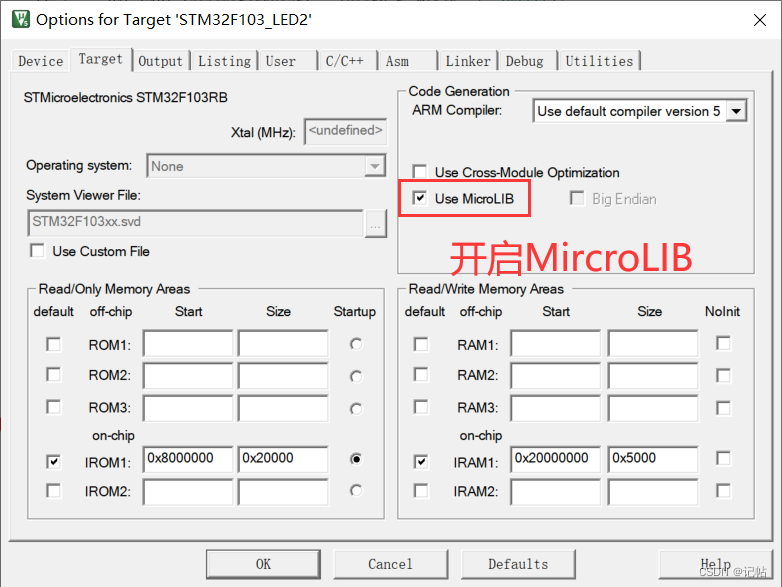
Enable serial port
  /*  Can make GPI0A, use PA9、PA10 It is a serial port  */
    rcu_periph_clock_enable(RCU_GPIOA);

    /* Enable serial port 0 The clock of  */
    rcu_periph_clock_enable(RCU_USART0);

    /* To configure USARTx_Tx(PA9) Push pull output for reuse */
    gpio_init(GPIOA, GPIO_MODE_AF_PP, GPIO_OSPEED_50MHZ, GPIO_PIN_9);

    /* To configure USARTx_RxPA9) Enter... For the float  */
    gpio_init(GPIOA, GPIO_MODE_IN_FLOATING, GPIO_OSPEED_50MHZ, GPIO_PIN_10);

    /* USART  To configure  */
    usart_deinit(USART0);// Reset serial port 0
    usart_baudrate_set(USART0, 115200U);// Set the serial port 0 The baud rate of is 115200
    usart_word_length_set(USART0, USART_WL_8BIT);      	//  Frame data word length
		usart_stop_bit_set(USART0, USART_STB_1BIT);      	 	//  Stop bit 1 position
    usart_parity_config(USART0, USART_PM_NONE);       	//  No parity bit
    usart_receive_config(USART0, USART_RECEIVE_ENABLE);// Enable the receiver
    usart_transmit_config(USART0, USART_TRANSMIT_ENABLE);// Enable the transmitter
    usart_enable(USART0);// Can make USART
Serial port redirection
/* retarget the C library printf function to the USART */
int fputc(int ch, FILE *f)
{

    usart_data_transmit(USART0, (uint8_t)ch);
    while(RESET == usart_flag_get(USART0, USART_FLAG_TBE));
    return ch;
}
The serial port can be used after resetting printf Print .
ADC Channel settings


ADC0 initialization
///************* Clock configuration ******************/

    /* Can make GPIOA The clock  */
    rcu_periph_clock_enable(RCU_GPIOA);
    /* Can make ADC The clock  */
    rcu_periph_clock_enable(RCU_ADC0);
    /*  To configure ADC rate  */
    rcu_adc_clock_config(RCU_CKADC_CKAPB2_DIV8);
ADC0 To configure
/*------------------ADC GPIO To configure ------------------*/
//  Must be analog input
    gpio_init(GPIOA, GPIO_MODE_AIN, GPIO_OSPEED_MAX, GPIO_PIN_0|GPIO_PIN_1|GPIO_PIN_2);

/*------------------ADC Working mode configuration ------------------*/
		//  Set up adc Working in independent mode
		adc_mode_config(ADC_MODE_FREE);
		//  Scan mode for multi-channel
		// adc_special_function_config(ADC0, ADC_SCAN_MODE, ENABLE);
		//  Continuous conversion mode for single channel
// adc_special_function_config(ADC0, ADC_CONTINUOUS_MODE, ENABLE);


		//  Result conversion right alignment
		adc_data_alignment_config(ADC0, ADC_DATAALIGN_RIGHT);
		//  Switching channels 1 individual
		adc_channel_length_config(ADC0, ADC_REGULAR_CHANNEL, 3);

    /* ADC regular channel config */
    adc_regular_channel_config(ADC0, 0, ADC_CHANNEL_0, ADC_SAMPLETIME_55POINT5);
    adc_regular_channel_config(ADC0, 1, ADC_CHANNEL_1, ADC_SAMPLETIME_55POINT5);
    adc_regular_channel_config(ADC0, 2, ADC_CHANNEL_2, ADC_SAMPLETIME_55POINT5);


		//  No external trigger conversion , Just open the software
		adc_external_trigger_source_config(ADC0, ADC_REGULAR_CHANNEL, ADC0_1_2_EXTTRIG_REGULAR_NONE);
		adc_external_trigger_config(ADC0, ADC_REGULAR_CHANNEL, ENABLE);

		//  Can make ADC
		adc_enable(ADC0);
		delay_1ms(1);                                                   //  wait for 1ms
		//  Can make ADC calibration
		adc_calibration_enable(ADC0);
ADC1 initialization
/************* Clock configuration ******************/

    /* Can make GPIOA The clock  */
    rcu_periph_clock_enable(RCU_GPIOB);
    /* Can make ADC The clock  */
    rcu_periph_clock_enable(RCU_ADC1);
    /*  To configure ADC rate  */
    rcu_adc_clock_config(RCU_CKADC_CKAPB2_DIV8);
ADC1 To configure
/*------------------ADC GPIO To configure ------------------*/
//  Must be analog input
    gpio_init(GPIOA, GPIO_MODE_AIN, GPIO_OSPEED_MAX, GPIO_PIN_7);
    gpio_init(GPIOB, GPIO_MODE_AIN, GPIO_OSPEED_MAX, GPIO_PIN_0 | GPIO_PIN_1);
/*------------------ADC Working mode configuration ------------------*/
		//  Set up adc Working in independent mode
		adc_mode_config(ADC_MODE_FREE);
		//  Scan mode for multi-channel
		// adc_special_function_config(ADC0, ADC_SCAN_MODE, ENABLE);
		//  Continuous conversion mode for single channel
// adc_special_function_config(ADC0, ADC_CONTINUOUS_MODE, ENABLE);


		//  Result conversion right alignment
		adc_data_alignment_config(ADC1, ADC_DATAALIGN_RIGHT);
		//  Switching channels 1 individual
		adc_channel_length_config(ADC1, ADC_REGULAR_CHANNEL, 3);

    /* ADC regular channel config */
    adc_regular_channel_config(ADC1, 0, ADC_CHANNEL_7, ADC_SAMPLETIME_55POINT5);
    adc_regular_channel_config(ADC1, 1, ADC_CHANNEL_8, ADC_SAMPLETIME_55POINT5);
    adc_regular_channel_config(ADC1, 2, ADC_CHANNEL_9, ADC_SAMPLETIME_55POINT5);


		//  No external trigger conversion , Just open the software
		adc_external_trigger_source_config(ADC1, ADC_REGULAR_CHANNEL, ADC0_1_2_EXTTRIG_REGULAR_NONE);
		adc_external_trigger_config(ADC1, ADC_REGULAR_CHANNEL, ENABLE);

		//  Can make ADC
		adc_enable(ADC1);
		delay_1ms(1);                                                   //  wait for 1ms
		//  Can make ADC calibration
		adc_calibration_enable(ADC1);
ADC Data collection
uint16_t  get_adc(uint32_t adc_periph , uint8_t adc_channel)
{

/*  Configure regular channel collection */
    adc_regular_channel_config(adc_periph, 0, adc_channel, ADC_SAMPLETIME_55POINT5);
		//  Because there is no external trigger , So use software to trigger ADC transformation
		adc_software_trigger_enable(adc_periph, ADC_REGULAR_CHANNEL);

		while(!adc_flag_get(adc_periph, ADC_FLAG_EOC));                       //  Wait for sampling to complete
		adc_flag_clear(adc_periph, ADC_FLAG_EOC);                             //  Clear end flag

		return  adc_regular_data_read(adc_periph);                         //  Read ADC data
}
Data collection
    while (1){


		uint16_t adc0Value0 = 0;
		uint16_t adc0Value1 = 0;
		uint16_t adc0Value2 = 0;

		adc0Value0=get_adc(ADC0 ,ADC_CHANNEL_0);
		adc0Value1=get_adc(ADC0 ,ADC_CHANNEL_1);
		adc0Value2=get_adc(ADC0 ,ADC_CHANNEL_2);


	printf("\nadc0_IN0(PA0)=%4.0d, voltage =%1.4f",adc0Value0,adc0Value0*3.3f/4095);
	printf("\nadc0_IN1(PA1)=%4.0d, voltage =%1.4f",adc0Value1,adc0Value1*3.3f/4095);
	printf("\nadc0_IN2(PA2)=%4.0d, voltage =%1.4f",adc0Value2,adc0Value2*3.3f/4095);

		uint16_t adc1Value0 = 0;
		uint16_t adc1Value1 = 0;
		uint16_t adc1Value2 = 0;

		adc1Value0=get_adc(ADC1 ,ADC_CHANNEL_7);
		adc1Value1=get_adc(ADC1 ,ADC_CHANNEL_8);
		adc1Value2=get_adc(ADC1 ,ADC_CHANNEL_9);

	printf("\nadc1_IN7(PA7)=%4.0d, voltage =%1.4f",adc1Value0,adc1Value0*3.3f/4095);
	printf("\nadc1_IN8(PB0)=%4.0d, voltage =%1.4f",adc1Value1,adc1Value1*3.3f/4095);
	printf("\nadc1_IN9(PB1)=%4.0d, voltage =%1.4f",adc1Value2,adc1Value2*3.3f/4095);
	delay_1ms(1000);
    }
test result
Input a fixed voltage for testing .

The test results are as follows .

Last
The above code will be in Q Share in the group .QQ Group :615061293.
Or WeChat official account 『 Note 』, Continuously update articles and learning materials , You can add the author's wechat communication and learning !
边栏推荐
- 容器化配置启动redis集群 单机6节点 3主3从
- Solve various problems of sudo rosdep init and rosdep update
- 职场pua但有道理
- Use webworker to perform background tasks
- Solve the problem that TS node xxx.ts executes TS code and reports errors
- Sword finger offer II 066. sum of words (medium prefix tree design string)
- [CVPR 2021] cylinder3d: cylindrical asymmetric 3D convolution network for LIDAR point cloud segmentation
- 6K6w5LiA5qyh5pS75Ye75YiG5p6Q
- Imx6q GPIO multiplexing
- Att & CK preliminary understanding
猜你喜欢
![[connect set-top box] - use ADB command line to connect ec6108v9 Huawei Yuehe box wirelessly](/img/ab/624e9a3240416f8445c908378310ad.png)
[connect set-top box] - use ADB command line to connect ec6108v9 Huawei Yuehe box wirelessly

STM32_ Hal library driven framework

MySQL built-in functions

How about the actual use effect of common source oscilloscope
Integrating database Ecology: using eventbridge to build CDC applications
![[connect your mobile phone wirelessly] - debug your mobile device wirelessly via LAN](/img/7f/c49fd8c2cbe21585a080852833dcb4.png)
[connect your mobile phone wirelessly] - debug your mobile device wirelessly via LAN

STM32 - Communication
How do we do full link grayscale on the database?

npm ERR code ETIMEDOUT npm ERR syscall connect npm ERR errno ETIMEDOUT npm ERR network reques...
Target segmentation learning


随机推荐
Netease Yunxin 2022q2 product supply station, come and get your product supply plan!
fatal error: io. h: No such file or directory
Concise history of graphic technology
Changes in the history of oscilloscope development
98. Verify binary search tree (medium binary search tree DFS)
Imx6q GPIO multiplexing
PHP库neo4j怎么安装及使用
PaddleNLP基于ERNIR3.0文本分类:WOS数据集为例(层次分类)
Sword finger offer II 066. sum of words (medium prefix tree design string)
Closure, prototype and original link
Qt+FFmpeg环境搭建
[virtual machine _2]-hyper-v and vmware/virtualbox cannot coexist
[CVPR 2021] cylinder3d: cylindrical asymmetric 3D convolution network for LIDAR point cloud segmentation
ES6 concept
【转载】token令牌在登录场景使用
Att & CK Threat Intelligence
ngx+sql环境离线安装日志(rpm安装)
771. 字符串中最长的连续出现的字符
775. 倒排单词
GD32F303固件库开发(10)----双ADC轮询模式扫描多个通道