当前位置:网站首页>(1) Keras handwritten numeral recognition and recognition of self written numbers
(1) Keras handwritten numeral recognition and recognition of self written numbers
2022-06-26 15:58:00 【X1996_】
Training data is mnist, This is an example of the official website , I ran it over and saved the model parameters , Then use parameters to identify their own picture numbers .
The procedure consists of three main parts :
- Run the official website instance to save model parameters
- Make your own pictures , Convert to the required format
- Load model parameters , Test your photos
One 、 Model training and parameter saving
from __future__ import print_function
import keras
from keras.datasets import mnist
from keras.models import Sequential
from keras.layers import Dense, Dropout, Flatten
from keras.layers import Conv2D, MaxPooling2D
from keras import backend as K

batch_size = 128
num_classes = 10
epochs = 12

# input image dimensions
#  Enter the image dimension
img_rows, img_cols = 28, 28

# the data, shuffled and split between train and test sets
#  Data sets for training and testing , After screening ( cleaning 、 The sequence of data samples is disordered ) And segmentation ( Split into training and test sets )
(x_train, y_train), (x_test, y_test) = mnist.load_data()

#  Convert to the format required for input
if K.image_data_format() == 'channels_first':  # Theano frame , Image channel in front
    x_train = x_train.reshape(x_train.shape[0], 1, img_rows, img_cols)
    x_test = x_test.reshape(x_test.shape[0], 1, img_rows, img_cols)
    input_shape = (1, img_rows, img_cols)
else:  # TensorFlow frame , The image channel is in the back
    x_train = x_train.reshape(x_train.shape[0], img_rows, img_cols, 1)
    x_test = x_test.reshape(x_test.shape[0], img_rows, img_cols, 1)
    input_shape = (img_rows, img_cols, 1)

#  Floating point numbers
x_train = x_train.astype('float32')
x_test = x_test.astype('float32')
x_train /= 255
x_test /= 255
#  Number of training and testing
print('x_train shape:', x_train.shape)
print(x_train.shape[0], 'train samples')
print(x_test.shape[0], 'test samples')

# convert class vectors to binary class matrices
#  The category vector is converted to 2 Classification matrix
y_train = keras.utils.to_categorical(y_train, num_classes)
y_test = keras.utils.to_categorical(y_test, num_classes)

#  Build network
model = Sequential()
model.add(Conv2D(32, kernel_size=(3, 3),
                 activation='relu',
                 input_shape=input_shape))
model.add(Conv2D(64, (3, 3), activation='relu'))
model.add(MaxPooling2D(pool_size=(2, 2)))
model.add(Dropout(0.25))
model.add(Flatten())
model.add(Dense(128, activation='relu'))
model.add(Dropout(0.5))
model.add(Dense(num_classes, activation='softmax'))

#  Loss function , Optimizer
model.compile(loss=keras.losses.categorical_crossentropy,
              optimizer=keras.optimizers.Adadelta(),
              metrics=['accuracy'])
#  Start training
model.fit(x_train, y_train,
          batch_size=batch_size,
          epochs=epochs,
          verbose=1,
          validation_data=(x_test, y_test))
#  test
score = model.evaluate(x_test, y_test, verbose=0)
print('Test loss:', score[0])
print('Test accuracy:', score[1])

#  Save model parameters
model.save('model.h5')
 The training parameters are saved in the directory where the program is located model.h5 In the document
Two 、 Make your own pictures
The size is 2828 size , Black background , The font is white , It can be made in the drawing in the computer , First write the numbers with a black pen , Then reverse the color , Take a screenshot of each number , And then it's processed into 2828, Black and white photos . I use Opencv Image processing done :
What have I done 0-9 Named 10 A picture , In the same directory as the program , Of course, you can also deal with it in other ways
import cv2 as cv

for i in range(10):
    img = cv.imread("%d"%(i)+".png")
    img = cv.cvtColor(img, cv.COLOR_BGR2GRAY)

    res=cv.resize(img,(28,28),interpolation=cv.INTER_CUBIC)
    cv.imwrite("%d"%(i)+".png", res)
cv.waitKey(0)

3、 ... and 、 Identify your photos
Now load the model parameters , Then predict your own picture and output the predicted value
from __future__ import print_function
import matplotlib.pyplot as plt
import tensorflow as tf
import numpy as np

#  Import model
model = tf.keras.models.load_model('./model.h5')

for i in range(10):
    test_my_img = plt.imread('%d'%(i)+'.png')
    img = test_my_img
    test_my_img = test_my_img.reshape(1,28,28,1)
    p = model.predict(test_my_img)
    print(np.argmax(p[0]))
    plt.imshow(img)
    plt.show()
The predicted values and input images are as follows :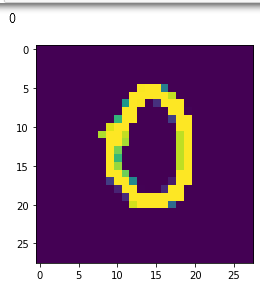


hold 9 Predicted success 7 了 , It is easy for the human eye to recognize , But it's a little difficult to distinguish the program
Recognize that there are many numbers on a large picture :https://blog.csdn.net/X1996_/article/details/108889366
边栏推荐
- js创意图标导航菜单切换背景色
- Selenium chrome disable JS disable pictures
- How to identify contractual issues
- Failed to get convolution algorithm. This is probably because cuDNN failed to initialize
- canvas三个圆点闪烁动画
- 6 自定义层
- 11 cnn简介
- 零知识 QAP 问题的转化
- Particle filter PF -- Application in maneuvering target tracking (particle filter vs extended Kalman filter)
- 【leetcode】701. 二叉搜索树中的插入操作
猜你喜欢

Audio and video learning (III) -- SIP protocol

Canvas three dot flashing animation

Summary of students' learning career (2022)

NFT contract basic knowledge explanation

Panoramic analysis of upstream, middle and downstream industrial chain of "dry goods" NFT

Have you ever had a Kindle with a keyboard?

NFT交易原理分析(1)
手写数字体识别,用保存的模型跑自己的图片

NFT 项目的开发、部署、上线的流程(1)

Ansible自动化的运用
随机推荐
IntelliJ idea -- Method for formatting SQL files
JS events
Is it safe to open an account for mobile stock registration? Is there any risk?
Auto Sharding Policy will apply Data Sharding policy as it failed to apply file Sharding Policy
[file] VFS four structs: file, dentry, inode and super_ What is a block? difference? Relationship-- Editing
feil_ The working directory on the left of uvission4 disappears
How to handle 2gcsv files that cannot be opened? Use byzer
人人都当科学家之免Gas体验mint爱死机
Development, deployment and online process of NFT project (1)
CNN优化trick
svg野人动画代码
【leetcode】48.旋转图像
Solana扩容机制分析(2):牺牲可用性换取高效率的极端尝试 | CatcherVC Research
C语言读取数据
查词翻译类应用使用数据接口api总结
js创意图标导航菜单切换背景色
svg canvas画布拖拽
5000字解析:实战化场景下的容器安全攻防之道
[graduation season · advanced technology Er] what is a wechat applet, which will help you open the door of the applet
JS creative icon navigation menu switch background color