当前位置:网站首页>Filter filter
Filter filter
2022-06-27 08:07:00 【2022 come on】
Catalog
One 、 What is? Filter filter ?
Two 、 Application, for example,
5、 ... and 、FilterConfig class
7、 ... and 、Filter The interception path of
8、 ... and 、 ThreadLocal Introduction to
One 、 What is? Filter filter ?

When the browser sends a request to the server to browse a resource , First of all, it will go through Filter filter , Determine whether the permission is met
1、Filter Filter it's JavaWeb One of the three components of . The three components are :Servlet Program 、Listener Monitor 、Filter filter
Two 、 Application, for example,
Suppose we were web There is a admin Catalog , There are some resources 【 picture ,html, page ....】 , We want to log in to access , Jump to the login interface without logging in .
So according to what we learned before : It should be when the login is successful , take user Save to session domain , When jumping resources , Judge session Whether the user in the domain is empty , If it is empty, it means that you have not logged in yet , Then jump to the login interface . If it is not empty, you can access resources .
    <%
        /* Judge , If user It's empty , Then go to the login page .*/
        Object user = session.getAttribute("user");
        if (user == null){
            request.getRequestDispatcher("/login.jsp").forward(request,response);
            return;
        }
    %>
When we visit jsp When the page is , If he doesn't log in, he will jump to the login page .
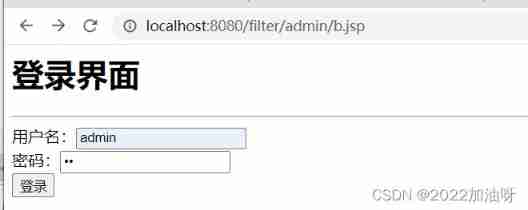
When we are not logged in , Still have access to a.html The page also has pictures , So this method has limitations .

It can only be jsp On the page ,html, Pictures cannot be judged session Whether the domain is empty . So we need to use Filter filter .
3、 ... and 、 To use a filter
1、 Write a class implementation javax.servlet.Filter Interface , And realize Filter Three methods in the interface .init,doFilter,destroy .
2、 stay doFilter In the method , Write the interception operation .
@Override
    public void doFilter(ServletRequest servletRequest, ServletResponse servletResponse, FilterChain filterChain) throws IOException, ServletException {
        //
        HttpServletRequest request  = (HttpServletRequest) servletRequest;
        Object user = request.getSession().getAttribute("user");
        if (user == null){
            // Intercept operation : If user It's empty , No sign in .
            // Jump to the login screen servletRequest.getRequestDispatcher("/login.jsp").forward(servletRequest,servletResponse);
            return;
        }else{
            // Can access resources
            // Which resources can be accessed , stay  web.xml  Configuration in file
            //  This code is very important , If you do not write, you will not be able to access any resources even if you log in successfully .
            filterChain.doFilter(servletRequest,servletResponse);
        }
    }
3、 stay web.xml Configure which resources can be accessed in the file . And configuration Servlet similar .
The intercepted path can write multiple addresses .
    <filter>
        <!-- to  filter  Make up an alias -->
        <filter-name>FilterTest</filter-name>
        <!-- Full class name -->
        <filter-class>yangzhaoguang.FilterTest</filter-class>
    </filter>
    <filter-mapping>
        <filter-name>FilterTest</filter-name>
        <!--
             Configure interception path :
                / :  Express :http;//ip:port/ Project path /
                /admin/* :  Said to admin All resources under the directory are intercepted .
        -->
        <url-pattern>/admin/*</url-pattern>
        <url-pattern>/admin/b.jsp</url-pattern>
    </filter-mapping>
At this time we are visiting admin Resources under : Can be intercepted . If you can still access resources , It means that the browser also has a cache , Just clean it up .

The above is the case of successful interception without login , The following shows how to log in successfully , Can you access .
Provide a login page and LoginServlet :
<form action="/filter/loginServlet" method="post">
 user name :<input type="text" name="username" ><br>
 password :<input type="password" name="password" ><br>
    <input type="submit" value=" Sign in ">
</form>
public class LoginServlet extends HttpServlet {
@Override
protected void doPost(HttpServletRequest request, HttpServletResponse response) throws ServletException, IOException {
String username = request.getParameter("username");
String password = request.getParameter("password");
if ("admin".equals(username) && "admin".equals(password)){
// Login successful , Save user information to session domain
request.getSession().setAttribute("user",username);
request.getRequestDispatcher("/login_success.jsp").forward(request,response);
}else{
// No login success , Call back to the login interface
request.getRequestDispatcher("/login.jsp").forward(request,response);
}
}
} After successful login ,admin All resources under can be accessed , There is no problem .
,
Four 、Filter Life cycle of
Be similar to Servlet Medium init ,service ,destroy Method .


5、 ... and 、FilterConfig class
        <!-- stay  filter  In the label , To configure FilterConfig Parameters .-->
        <init-param>
            <param-name>name1</param-name>
            <param-value>value1</param-value>
        </init-param>
        <!-- You can also configure multiple -->
        <init-param>
            <param-name>name2</param-name>
            <param-value>value2</param-value>
</init-param>filterConfig.getFilterName()filterConfig.getInitParameter("name")filterConfig.getServletContext()Get parameters during initialization :
 @Override
    public void init(FilterConfig filterConfig) throws ServletException {
        System.out.println("2 init Initialize method execution ");
//         1、 obtain  Filter  The name of  filter-name  The content of
        System.out.println(" obtain  filter-name:"+ filterConfig.getFilterName());
//         2、 To get in  Filter  Configured in  init-param  Initialize parameters
        System.out.println("init-param Medium  name1  Of value" + filterConfig.getInitParameter("name1"));
        System.out.println("init-param Medium  name2  Of value" + filterConfig.getInitParameter("name2"));
//         3、 obtain  ServletContext  object
        System.out.println("ServletContext object :"+filterConfig.getServletContext());

    }
6、 ... and 、FilterChain class

We can see that the execution sequence is the same as that in the figure

1、 The order in which multiple filters are executed is determined by web.xml It's decided by the document , Which filter should be configured first , Which filter will execute first .
If you configure first Filter2 .

First configure Filter2,Filter2 It will be executed first .

2、 Filter in by filterChain.doFilter(); To continue accessing the next resource , Without this code , Later resources will not be accessed , The code will not be executed .
take Filter1 Medium filterChain.doFilter() Get rid of , So the back Filter2 and b.jsp The page will not execute to .

3、 It can also be seen from the picture , The whole process is completed in one request , That is, they share the same request domain .
7、 ... and 、Filter The interception path of
8、 ... and 、 ThreadLocal Introduction to
ThreadLocal yes JDK A class in ,ThreadLocal Commonly referred to as Thread local variable , It's a special thread binding mechanism , Put the variable 【( It can be a normal variable , It can be the object , It can also be an array , aggregate 】 With threads binding together , Maintain an independent copy of variables for each thread . adopt ThreadLocal You can limit the visibility of an object to the same thread .
And synchronized The relationship between :
Some articles take ThreadLocal and synchronized Compare , In fact, their realization ideas are different .
- synchronized At most one thread can execute at the same time , So only one copy of the variable needs to be saved , It is a kind of thought that time changes space
- ThreadLocal Multiple threads do not affect each other , So each thread stores a variable , It is a kind of space for time
| Construction method summary | |
|---|---|
ThreadLocal()Create a thread local variable . | |
T | get()Get the variable value in the current thread pool |
void | remove()Remove the value of the current thread from this thread local variable . |
void | set(T value)Deposit in Thread pool The variable value of is value |
Use ThreadLocal No need to set key Value ,key Is the name of the current thread .
public class ThreadLocalTest {
    public static void main(String[] args) {
        for (int i = 0; i < 3; i++) {
            // Create multiple threads
            new Thread(new Task()).start();
        }
    }

    /* <>  refer to  value The type of */
    public  static ThreadLocal<Object> threadLocal = new ThreadLocal<>();
    private static Random random = new Random();

    // Create a thread task
    public static class Task implements Runnable {
        @Override
        public void run() {
            // Get the name of the current thread
            String name = Thread.currentThread().getName();
            // Get a random number
            int i = random.nextInt(200);
            //  Match the current thread with   A value   Related to .
            threadLocal.set(i);
            System.out.println(" Save thread [ " + name + " ]  The value of the Association :" + threadLocal.get());

            try {
                Thread.sleep(2000);
            } catch (InterruptedException e) {
                e.printStackTrace();
            }

            // Take out the associated value
            System.out.println(" Take out the thread [ " + name + " ]  The value of the Association :" + threadLocal.get());
        }
    }
}
We can see ThreadLocal Not only is it safe , And it does not affect the use of multiple threads . And each thread will save a variable .

边栏推荐
- JS to judge the odd and even function and find the function of circular area
- SQL Sever column name or number of supplied values does not match the table definition
- ArrayList和LinkedList的区别
- All tutor information on one page
- js打印99乘法表
- [paper reading] internally semi supervised methods
- Refer to | the computer cannot access the Internet after the hotspot is turned on in win11
- ACM course term summary
- Ready to migrate to the cloud? Please accept this list of migration steps
- JS print 99 multiplication table
猜你喜欢
八大误区,逐个击破(终篇):云难以扩展、定制性差,还会让管理员失去控制权?

【12. 最大连续不重复子序列】

JS to print prime numbers between 1-100 and calculate the total number of optimized versions

All tutor information on one page

JS to determine whether the number entered by the user is a prime number (multiple methods)

lvgl使用demo及说明2

UE5神通--POI解决方案
JS to determine whether the result is qualified, the range is 0-100, otherwise re-enter

No matter how good LCD and OLED display technologies are, they cannot replace this ancient display nixie tube
![[10. difference]](/img/15/ffd93da75858943fe887de1718e0f6.png)
[10. difference]
随机推荐
Mapping of Taobao virtual product store opening tutorial
JS use the switch statement to output the corresponding English day of the week according to 1-7
PayPal account has been massively frozen! How can cross-border sellers help themselves?
【c ++ primer 笔记】第3章 字符串、向量和数组
What is a magnetic separator?
【批处理DOS-CMD命令-汇总和小结】-将文件夹映射成虚拟磁盘——subst
L'enquête en aveugle a montré que les femmes étaient meilleures que les hommes.
C how to call line and rows when updating the database
认识O(NlogN)的排序
[11. two dimensional difference]
If xn > 0 and X (n+1) /xn > 1-1/n (n=1,2,...), Prove that the series Σ xn diverges
爬一个网页的所有导师信息
JS to determine whether the result is qualified, the range is 0-100, otherwise re-enter
(note) Anaconda navigator flashback solution
期货反向跟单—交易员的培训问题
After working in a large factory for ten years with an annual salary of 400000 yuan, I was suddenly laid off. If the company wanted to abandon you, it wouldn't leave any kindness
Etcd tutorial - Chapter 5 etcd etcdctl usage
js中判断成绩是否合格,范围在0-100,否则重新输入
[batch dos-cmd command - summary and summary] - map folder to virtual disk - subst
University database mysql