当前位置:网站首页>[unity3d] rocker
[unity3d] rocker
2022-07-26 18:04:00 【little_ fat_ sheep】
1 Demand fulfillment
1) Demand fulfillment
- Drag the joystick ball with the mouse to control the movement of the tank ;
- Up, down, left and right buttons can also control tank movement , And the rocker ball also moves synchronously ;
- Right mouse button sliding , Control the tank steering ;
- The position of the camera above the back of the player , Always follow the player , Look directly in front of the player ;
- Click the left mouse button to control the tank to launch shells .
2) It's about the technology stack
- Transform Components
- human-computer interaction Input
- Rigid body components Rigidbody
- The camera follows
- Canvas Rendering mode and anchor
- UGUI And Image
2 The game object
1) Game interface

2) GameObject hierarchy

3)Transform Component parameters
1. The player Transform Component parameters
| Name | Type | Position | Rotation | Scale | Color/Texture |
|---|---|---|---|---|---|
| Player | Empty | (0, 0.25, -5) | (0, 0, 0) | (1, 1, 1) | #228439FF |
| Botton | Cube | (0, 0, 0) | (0, 0, 0) | (2, 0.5, 2) | #228439FF |
| Top | Cube | (0, 0.5, 0) | (0, 0, 0) | (1, 0.5, 1) | #228439FF |
| Gun | Cylinder | (0, 0, 1.5) | (90, 0, 0) | (0.2, 1, 0.4) | #228439FF |
| FirePoint | Empty | (0, 1.15, 0) | (0, 0, 0) | (1, 1, 1) | —— |
Add :Player Game object added rigid body components .
2. Ground and shells Transform Component parameters
| Name | Type | Position | Rotation | Scale | Color/Texture |
|---|---|---|---|---|---|
| Plane | Plane | (0, 0, 0) | (0, 0, 0) | (10, 10, 10) | GrassRockyAlbedo |
| Bullet | Sphere | (0, 0.5, -5) | (0, 0, 0) | (0.3, 0.3, 0.3) | #228439FF |
Add : The shell is dragged as a preset body to Assets/Resources/Prefabs Under the table of contents , And added rigid body components .
3. rocker RectTransform Component parameters
| Name | Type | Width/Height | Pos | Anchors |
|---|---|---|---|---|
| Stick | Canvas | —— | —— | —— |
| Background | Image | (100, 100) | (75, 75, 0) | (0, 0), (0, 0) |
| Ball | Image | (40, 40) | (75, 75, 0) | (0, 0), (0, 0) |
3 Script components
1)CameraController
CameraController.cs
using UnityEngine;

public class CameraController : MonoBehaviour {
	private Transform player; //  The player
	private Vector3 relaPlayerPos; //  The position of the camera in the player's coordinate system
	private float targetDistance = 15f; //  The camera looks at the position in front of the player

	private void Start() {
		relaPlayerPos = new Vector3(0, 4, -8);
		player = GameObject.Find("Player/Top").transform;
	}

	private void LateUpdate() {
		CompCameraPos();
	}

	private void CompCameraPos() { //  Calculate camera coordinates
		Vector3 target = player.position + player.forward * targetDistance;
		transform.position = transformVecter(relaPlayerPos, player.position, player.right, player.up, player.forward);
		transform.rotation = Quaternion.LookRotation(target - transform.position);
	}

	//  Seeking for origin Origin , locX, locY, locZ  Is the vector in the local coordinate system of the coordinate axis  vec  The corresponding vector in the world coordinate system
	private Vector3 transformVecter(Vector3 vec, Vector3 origin, Vector3 locX,  Vector3 locY,  Vector3 locZ) {
		return vec.x * locX + vec.y * locY + vec.z * locZ + origin;
	}
}
explain : CameraController The script component is hung on MainCamera On the object of the game .
2)PlayerController
PlayerController.cs
using System;
using UnityEngine;

public class PlayerController : MonoBehaviour {
	private Transform firePoint; //  Firing point
	private GameObject bulletPrefab; //  Shell preset
	private StickController stick; //  Rocker controls
	private float tankMoveSpeed = 4f; //  Tank moving speed
	private float tankRotateSpeed = 2f; //  The turning speed of the tank
	private Vector3 predownMousePoint; //  Position when the mouse is pressed
	private Vector3 currMousePoint; //  Current mouse position
	private float fireWaitTime = float.MaxValue; //  The waiting time since the last firing
	private float bulletCoolTime = 0.15f; //  Shell cooling time

 	private void Start() {
		firePoint = transform.Find("Top/Gun/FirePoint");
		bulletPrefab = (GameObject) Resources.Load("Prefabs/Bullet");
		stick = GameObject.Find("Stick/Ball").GetComponent<StickController>();
	}

	private void Update() {
		Move();
		Rotate();
		Fire();
	}

	private void Move() { //  Tank movement
		float hor = Input.GetAxis("Horizontal");
        float ver = Input.GetAxis("Vertical");
		Move(hor, ver);
	}

	public void Move(float hor, float ver) { //  Tank movement
		if (Mathf.Abs(hor) > float.Epsilon || Mathf.Abs(ver) > float.Epsilon) {
			Vector3 vec = transform.forward * ver + transform.right * hor;
			GetComponent<Rigidbody>().velocity = vec * tankMoveSpeed;
			// stick.UpdateStick(new Vector3(hor, 0, ver));
			Vector3 dire = new Vector3(hor, ver, 0);
			dire =  dire.normalized * Mathf.Min(dire.magnitude, 1);
			stick.UpdateStick(dire);
		}
	}

	private void Rotate() { //  The tank rotates
		if (Input.GetMouseButtonDown(1)) {
			predownMousePoint = Input.mousePosition;
		} else if (Input.GetMouseButton(1)) {
			currMousePoint = Input.mousePosition;
			Vector3 vec = currMousePoint - predownMousePoint;
			GetComponent<Rigidbody>().angularVelocity = Vector3.up * tankRotateSpeed * vec.x;
			predownMousePoint = currMousePoint;
		}
	}

	private void Fire() { //  The tank fired
		fireWaitTime += Time.deltaTime;
		if (Input.GetMouseButtonDown(0) && !IsMouseInUIArea() || Input.GetKeyDown(KeyCode.Space)) {
			if (fireWaitTime > bulletCoolTime) {
				BulletInfo bulletInfo = new BulletInfo("PlayerBullet", Color.red, transform.forward, 10f, 15f);
				GameObject bullet = Instantiate(bulletPrefab, firePoint.position, Quaternion.identity);
				bullet.AddComponent<BulletController>().SetBulletInfo(bulletInfo);
				fireWaitTime = 0f;
			}
		}
	}

	private bool IsMouseInUIArea() { //  Mouse in UI Control area
		Vector3 pos = Input.mousePosition;
		return pos.x < 150 && pos.y < 150;
	}
}
explain : PlayerController The script component is hung on Player On the object of the game .
3)StickController
StickController.cs
using UnityEngine;
using UnityEngine.UI;
using UnityEngine.EventSystems;

public class StickController : MonoBehaviour, IDragHandler, IEndDragHandler {
	private Vector3 originPos; //  Position when the mouse starts dragging
	private Vector3 currPos; //  Current mouse position
	private float radius; //  Remote rod radius
	private PlayerController player; //  Player controller
	private Vector3 dire = Vector3.zero; //  The orientation of the rocker ball

	private void Start () {
		originPos = transform.position;
		radius = 50;
		player = GameObject.Find("Player").GetComponent<PlayerController>();
	}

	private void Update () {
		player.Move(dire.x, dire.y);
	}

	public void OnDrag(PointerEventData eventData) {
		Vector3 vec = Input.mousePosition - originPos;
		dire = vec.normalized * Mathf.Min(vec.magnitude / radius, 1);
		UpdateStick(dire);
	}

	public void OnEndDrag(PointerEventData eventData) {
		transform.position = originPos;
		dire = Vector3.zero;
	}

	public void UpdateStick(Vector3 dire) { //  Update the rocker position
		transform.position = originPos + dire * radius;
	}
}
explain : StickController The script component is hung on Ball On the object of the game .
4)BulletController
BulletController.cs
using UnityEngine;
using UnityEngine.UI;

public class BulletController : MonoBehaviour {
	private BulletInfo bulletInfo; //  Shell information

	private void Start () {
		gameObject.name = bulletInfo.name;
		GetComponent<MeshRenderer>().material.color = bulletInfo.color;
		float lifeTime = bulletInfo.fireRange / bulletInfo.speed; //  Survival time
		Destroy(gameObject, lifeTime);
	}

	private void Update () {
		transform.GetComponent<Rigidbody>().velocity = bulletInfo.flyDir * bulletInfo.speed;
	}

	public void SetBulletInfo(BulletInfo bulletInfo) {
		this.bulletInfo = bulletInfo;
	}
}
explain : BulletController The script component is hung on Bullet On the object of the game ( Dynamic addition in the code ).
5)BulletInfo
BulletInfo.cs
using UnityEngine;

public class BulletInfo {
	public string name; //  Shell name
	public Color color; //  Shell color
	public Vector3 flyDir; //  The direction in which the shell flew
	public float speed; //  Projectile speed
	public float fireRange; //  Shell range

	public BulletInfo(string name, Color color, Vector3 flyDir, float speed, float fireRange) {
		this.name = name;
		this.color = color;
		this.flyDir = flyDir;
		this.speed = speed;
		this.fireRange = fireRange;
	}
}
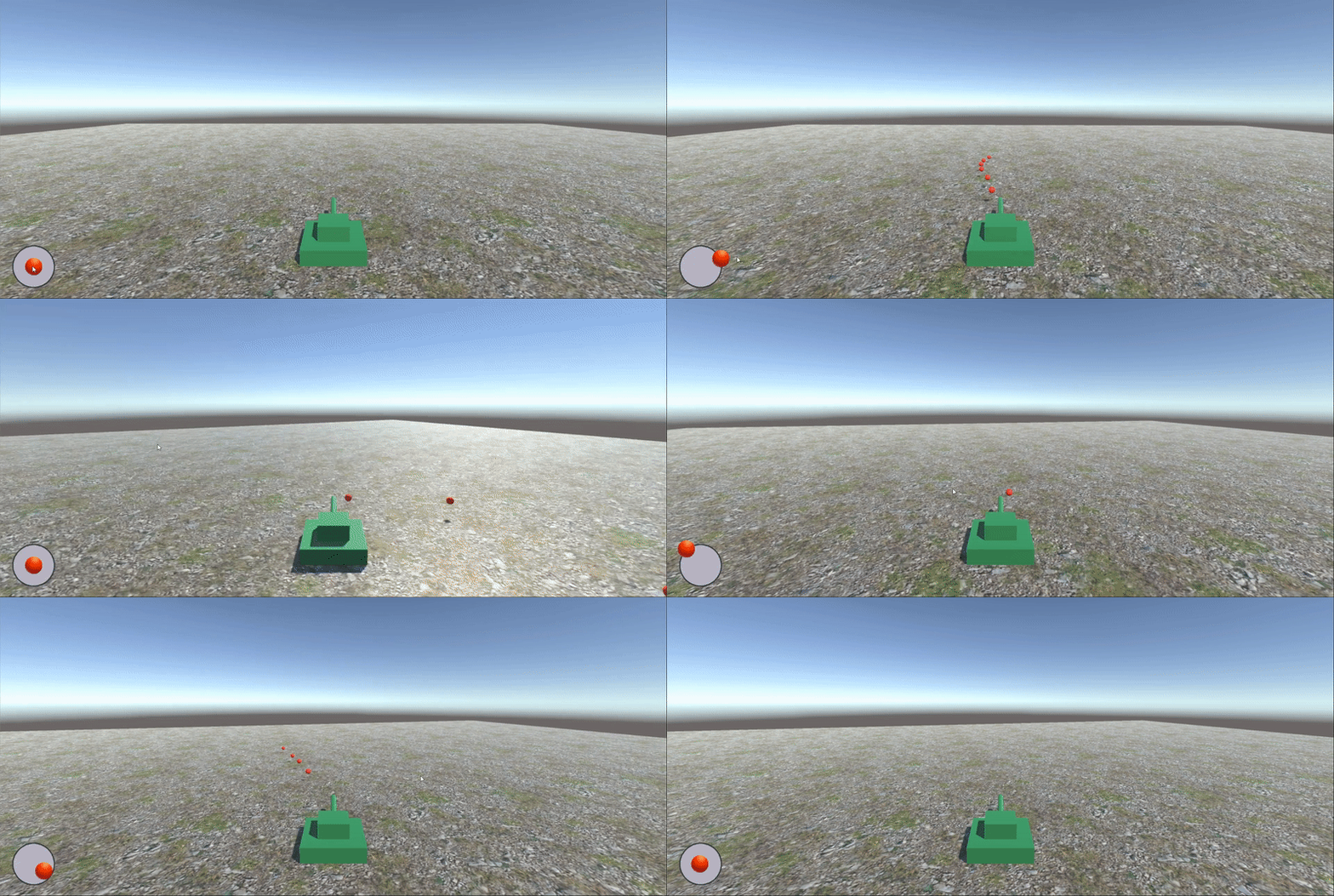
4 Running effect
边栏推荐
- 第17周自由入侵 指针练习--输出最大值
- 1、 C language program structure, compilation and operation, data type related
- ICML 2022(第四篇)|| 图分层对齐图核实现图匹配
- 【Unity3D】摇杆
- The Agile Manifesto has four values and twelve principles
- 重磅!《2022中国开源发展蓝皮书》正式发布
- 如何通过学会提问,成为更加优秀的数据科学家
- 如何组装一个注册中心?
- 【集训Day3】delete
- Machine learning by Li Hongyi 2. Regression
猜你喜欢

kaggle猫狗数据集开源——用于经典CNN分类实战

Sign up now | oar hacker marathon phase III midsummer debut, waiting for you to challenge

Diagram of seven connection modes of MySQL

第17周自由入侵 指针练习--输出最大值

8.1 Diffie-Hellman密钥交换

LeetCode50天刷题计划(Day 5—— 最长回文子串 10.50-13:00)
来吧开发者!不只为了 20 万奖金,试试用最好的“积木”来一场头脑风暴吧!

URL跳转漏洞
![[static code quality analysis tool] Shanghai daoning brings you sonarource/sonarqube download, trial and tutorial](/img/09/209a405953d99d7d8b347c01873eba.png)
[static code quality analysis tool] Shanghai daoning brings you sonarource/sonarqube download, trial and tutorial
# MySQL 七种连接方式图解
随机推荐
Cross site scripting attack (XSS)
《敏捷宣言》四大价值观,十二大原则
3、 Topic communication: create your own information format
COSCon'22城市/学校/机构出品人征集令
【集训Day3】section
openssl
【集训Day3】delete
PMP考试详解,新考纲有什么变化?
RedisDesktopManager去除升级提示
老子云携手福昕鲲鹏,首次实现3D OFD三维版式文档的重大突破
China polyisobutylene Market Research and investment value report (2022 Edition)
LeetCode50天刷题计划(Day 4—— 最长回文子串 14.00-16:20)
Win10 连接无线不能输入密码字符,一输入就卡死
【集训Day3】Reconstruction of roads
7月30号PMP考试延期后我们应该做什么?
Hosts this file has been set to read-only solution
[Digital IC] understand Axi Lite protocol in simple terms
Centos安装docker以及mysql和redis环境
URL jump vulnerability
openssl