当前位置:网站首页>百款拿来就能用的网页特效,不来看看吗?
百款拿来就能用的网页特效,不来看看吗?
2022-07-02 09:45:00 【新一代卷王】
写在前面:
我特别喜欢收集前端好看的特效代码,前端好用的网站。今天给大家分享出来,如果觉得有帮助可以点赞收藏支持一下,如果能关注一下就再好不过了ヾ(≧▽≦*)o,之后还会分享许多干货,话不多说,上动图:
目录
非新手可以跳过
考虑到看此文章的小伙伴有一些是新手。
先来一个简介:
前端是创建Web页面或app等前端界面呈现给用户的过程,通过HTML,CSS及JavaScript以及衍生出来的各种技术、框架、解决方案,来实现互联网产品的用户界面交互。它从网页制作演变而来,名称上有很明显的时代特征。在互联网的演化进程中,网页制作是Web1.0时代的产物,早期网站主要内容都是静态,以图片和文字为主,用户使用网站的行为也以浏览为主。随着互联网技术的发展和HTML5、CSS3的应用,现代网页更加美观,交互效果显著,功能更加强大。
有些小伙伴0基础小伙伴担心,我没有编程工具怎么办?
可以参照这篇文章:http://t.csdn.cn/fB8yF
如果小伙伴想一起来学习前端知识,那么就从这篇文章开始吧
前端HTML:
1.动态菜单
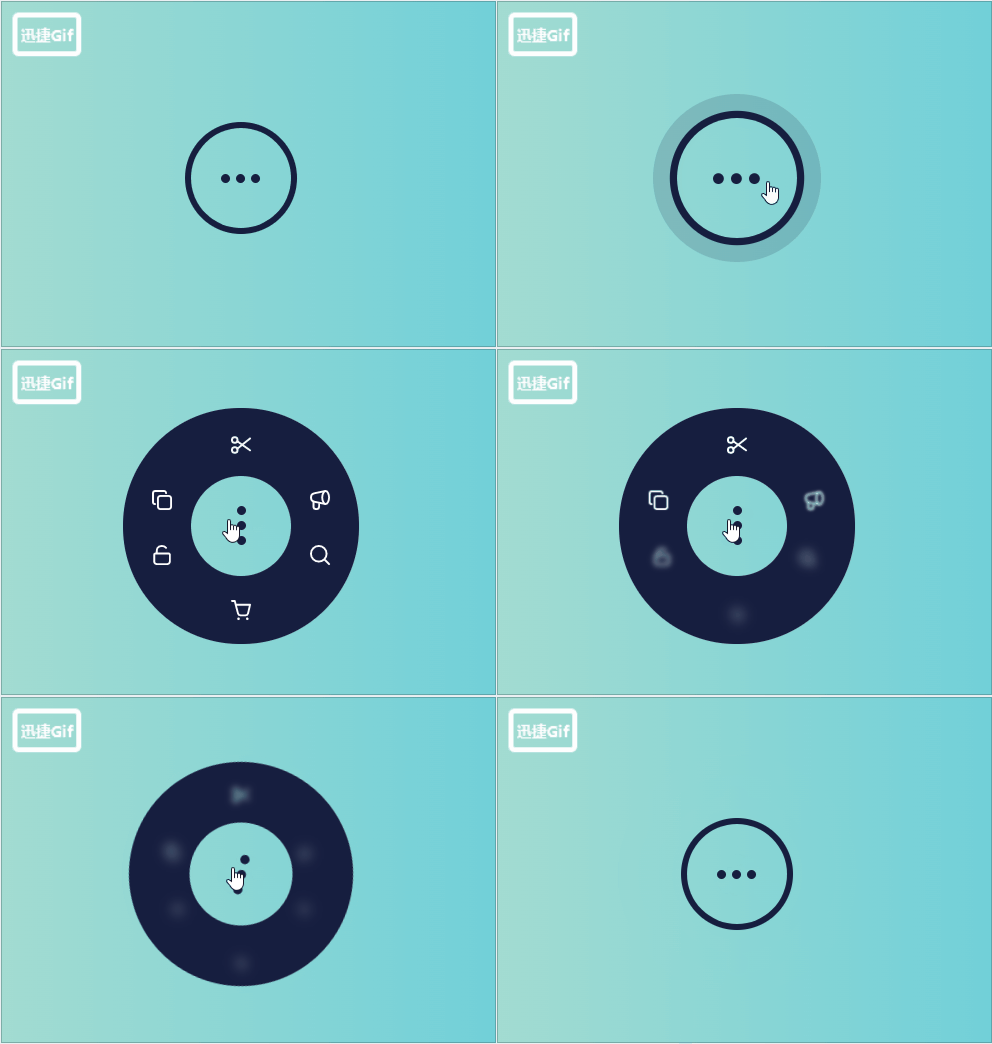
把此菜单特效放到网站上是不是很炫酷,快来行动吧!
HTML代码:
<input class="menu-checkbox" id="menu" type="checkbox" name="menu" />
<nav class="menu">
  <label class="menu-dots" for="menu">
    <span class="menu-dot"></span>
    <span class="menu-dot"></span>
    <span class="menu-dot"></span>
  </label>
  <ul class="menu-items">
    <li class="menu-item">
      <svg width="24" height="24" viewBox="0 0 24 24" fill="none" xmlns="http://www.w3.org/2000/svg">
        <path d="M9.25 8C9.25 9.24264 8.24264 10.25 7 10.25C5.75736 10.25 4.75 9.24264 4.75 8C4.75 6.75736 5.75736 5.75 7 5.75C8.24264 5.75 9.25 6.75736 9.25 8Z" stroke="currentColor" stroke-width="1.5" stroke-linecap="round" stroke-linejoin="round"></path>
        <path d="M9.25 16C9.25 17.2426 8.24264 18.25 7 18.25C5.75736 18.25 4.75 17.2426 4.75 16C4.75 14.7574 5.75736 13.75 7 13.75C8.24264 13.75 9.25 14.7574 9.25 16Z" stroke="currentColor" stroke-width="1.5" stroke-linecap="round" stroke-linejoin="round"></path>
        <path d="M9 15L19.25 6.75" stroke="currentColor" stroke-width="1.5" stroke-linecap="round" stroke-linejoin="round"></path>
        <path d="M9 9L19.25 16.25" stroke="currentColor" stroke-width="1.5" stroke-linecap="round" stroke-linejoin="round"></path>
      </svg>
    </li>
    <li class="menu-item">
      <svg width="24" height="24" fill="none" viewBox="0 0 24 24">
        <path stroke="currentColor" stroke-linecap="round" stroke-linejoin="round" stroke-width="1.5" d="M6.5 15.25V15.25C5.5335 15.25 4.75 14.4665 4.75 13.5V6.75C4.75 5.64543 5.64543 4.75 6.75 4.75H13.5C14.4665 4.75 15.25 5.5335 15.25 6.5V6.5"></path>
        <rect width="10.5" height="10.5" x="8.75" y="8.75" stroke="currentColor" stroke-linecap="round" stroke-linejoin="round" stroke-width="1.5" rx="2"></rect>
      </svg>
    </li>
    <li class="menu-item">
      <svg width="24" height="24" fill="none" viewBox="0 0 24 24">
        <path stroke="currentColor" stroke-width="1.5" d="M19.25 10C19.25 12.7289 17.85 15.25 16.5 15.25C15.15 15.25 13.75 12.7289 13.75 10C13.75 7.27106 15.15 4.75 16.5 4.75C17.85 4.75 19.25 7.27106 19.25 10Z"></path>
        <path stroke="currentColor" stroke-width="1.5" d="M16.5 15.25C16.5 15.25 8 13.5 7 13.25C6 13 4.75 11.6893 4.75 10C4.75 8.31066 6 7 7 6.75C8 6.5 16.5 4.75 16.5 4.75"></path>
        <path stroke="currentColor" stroke-width="1.5" d="M6.75 13.5V17.25C6.75 18.3546 7.64543 19.25 8.75 19.25H9.25C10.3546 19.25 11.25 18.3546 11.25 17.25V14.5"></path>
      </svg>
    </li>
    <li class="menu-item">
      <svg width="24" height="24" fill="none" viewBox="0 0 24 24">
        <path stroke="currentColor" stroke-linecap="round" stroke-linejoin="round" stroke-width="1.5" d="M5.75 11.75C5.75 11.1977 6.19772 10.75 6.75 10.75H17.25C17.8023 10.75 18.25 11.1977 18.25 11.75V17.25C18.25 18.3546 17.3546 19.25 16.25 19.25H7.75C6.64543 19.25 5.75 18.3546 5.75 17.25V11.75Z"></path>
        <path stroke="currentColor" stroke-linecap="round" stroke-linejoin="round" stroke-width="1.5" d="M7.75 10.5V9.84343C7.75 8.61493 7.70093 7.29883 8.42416 6.30578C8.99862 5.51699 10.0568 4.75 12 4.75C14 4.75 15.25 6.25 15.25 6.25"></path>
      </svg>
    </li>
    <li class="menu-item">
      <svg width="24" height="24" fill="none" viewBox="0 0 24 24">
        <path stroke="currentColor" stroke-linecap="round" stroke-linejoin="round" stroke-width="1.5" d="M19.25 19.25L15.5 15.5M4.75 11C4.75 7.54822 7.54822 4.75 11 4.75C14.4518 4.75 17.25 7.54822 17.25 11C17.25 14.4518 14.4518 17.25 11 17.25C7.54822 17.25 4.75 14.4518 4.75 11Z"></path>
      </svg>
    </li>
    <li class="menu-item">
      <svg width="24" height="24" fill="none" viewBox="0 0 24 24">
        <path stroke="currentColor" stroke-linecap="round" stroke-linejoin="round" stroke-width="1.5" d="M7.75 7.75H19.25L17.6128 14.7081C17.4002 15.6115 16.5941 16.25 15.666 16.25H11.5395C10.632 16.25 9.83827 15.639 9.60606 14.7618L7.75 7.75ZM7.75 7.75L7 4.75H4.75"></path>
        <circle cx="10" cy="19" r="1" fill="currentColor"></circle>
        <circle cx="17" cy="19" r="1" fill="currentColor"></circle>
      </svg>
    </li>
  </ul>
  <label for="menu" class="menu-closer-overlay"></label>
</nav>
CSS代码:
body {
  height: 100vh;
  display: flex;
  flex-direction: column;
  align-items: center;
  justify-content: center;
  background: linear-gradient(to left, #2bc0e4, #eaecc6);
}

.menu-checkbox {
  display: none;
}

.menu {
  position: relative;
}

.menu-dots {
  width: 5rem;
  height: 5rem;
  border-radius: 50%;
  box-shadow: 0 0 0 0.3rem #161e3f;
  display: flex;
  flex-direction: column;
  align-items: center;
  justify-content: center;
  transform: rotate(90deg);
  transition: 0.3s;
  cursor: pointer;
}

.menu-dots:hover {
  box-shadow: 0 0 0 0.3rem #161e3f, 0 0 0 1rem rgba(#161e3f, 0.16);
  transform: scale(1.2) rotate(90deg);
}

.menu-dot {
  width: 0.45rem;
  height: 0.45rem;
  background-color: #161e3f;
  border-radius: 50%;
}

.menu-dot + .menu-dot {
  margin-top: 0.3rem;
}

.menu-items {
  position: absolute;
  top: -2.3rem;
  left: -2.2rem;
  width: 9.4rem;
  height: 11rem;
  color: #fff;
  pointer-events: none;
  display: grid;
  grid-template-columns: 1fr 1fr;
  opacity: 0;
  transition: 0.3s;
}

.menu-item {
  transform: scale(0.5);
  filter: blur(10px);
  transition: 0.3s;
}

.menu-item:nth-child(odd) {
  text-align: right;
}

.menu-item:nth-child(even) {
  text-align: left;
}

.menu-item:first-child,
.menu-item:last-child {
  grid-column: span 2;
  text-align: center;
}

.menu-checkbox:checked + .menu > .menu-dots {
  transform: none;
  box-shadow: 0 0 0 3.4rem #161e3f;
}

.menu-checkbox:checked + .menu > .menu-items {
  opacity: 1;
  pointer-events: auto;
}

.menu-closer-overlay {
  position: absolute;
  left: 0;
  top: 0;
  width: 100%;
  height: 100%;
  background-color: transparent;
  border-radius: 50%;
  z-index: 2;
  pointer-events: none;
}

.menu-checkbox:checked + .menu > .menu-items > .menu-item {
  opacity: 1;
  transform: none;
  filter: none;
}

.menu-checkbox:checked + .menu > .menu-items > .menu-item:nth-child(1) {
  transition-delay: 0.05s;
}

.menu-checkbox:checked + .menu > .menu-items > .menu-item:nth-child(2) {
  transition-delay: 0.1s;
}

.menu-checkbox:checked + .menu > .menu-items > .menu-item:nth-child(3) {
  transition-delay: 0.15s;
}

.menu-checkbox:checked + .menu > .menu-items > .menu-item:nth-child(4) {
  transition-delay: 0.2s;
}

.menu-checkbox:checked + .menu > .menu-items > .menu-item:nth-child(5) {
  transition-delay: 0.25s;
}

.menu-checkbox:checked + .menu > .menu-items > .menu-item:nth-child(6) {
  transition-delay: 0.3s;
}

.menu-checkbox:checked + .menu > .menu-closer-overlay {
  pointer-events: auto;
  cursor: pointer;
}
2.会动的龙卷风
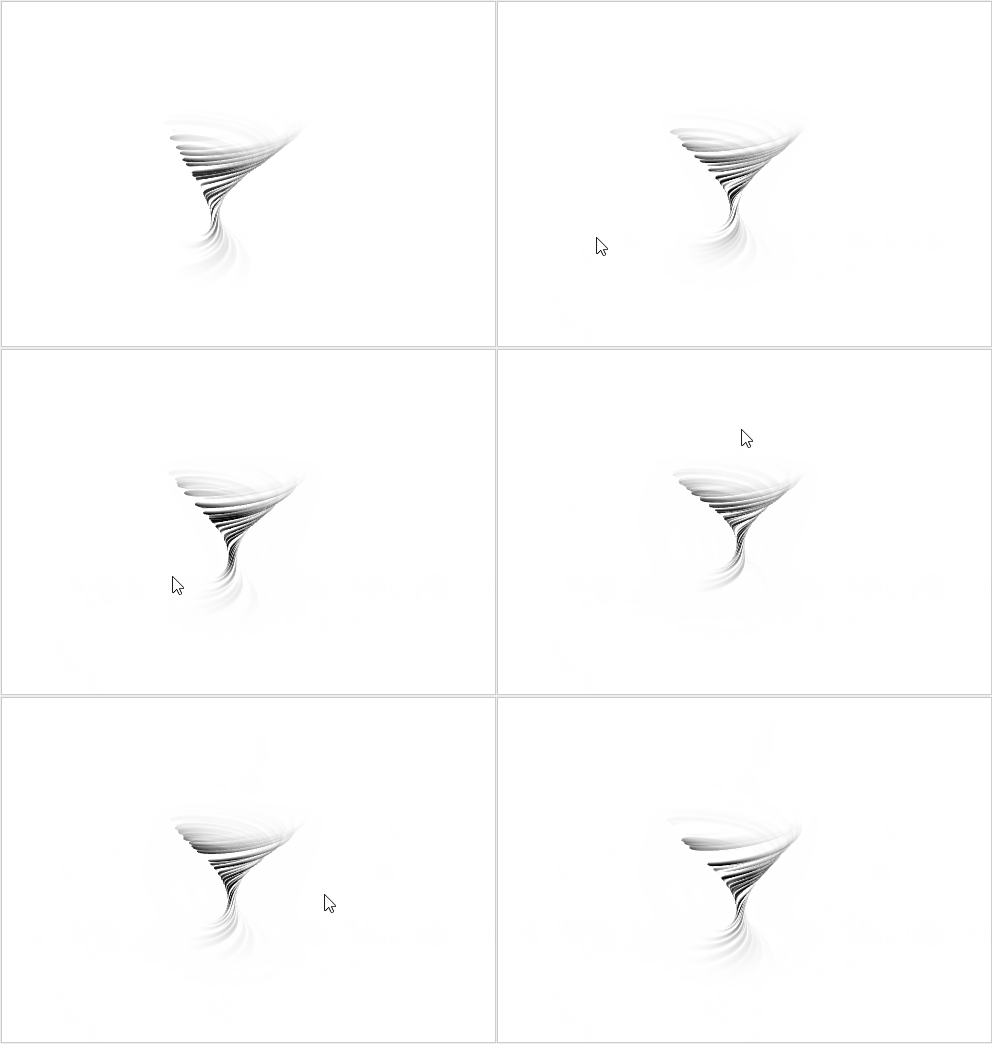
JS:
import * as THREE from "https://cdn.skypack.dev/[email protected]/build/three.module";
import { GUI } from "https://cdn.skypack.dev/[email protected]";

const container = document.querySelector('.container');

const config = {
    height: 1.1,
    density: 2.5,
    curl: 12,
};

class Controls {
    constructor() {
        const gui = new GUI();
        if (window.innerWidth < 600) gui.close();

        gui.add(config, 'height', 1, 1.8).step(.01).onChange(v => {
            viz.material.uniforms.u_height.value = v;
        });
        gui.add(config, 'density', 1, 4).step(.1).onChange(v => {
            viz.material.uniforms.u_density.value = v;
        });
        gui.add(config, 'curl', 4, 20).step(.1).onChange(v => {
            viz.material.uniforms.u_curl.value = v;
        });
    }
}

class Viz {

    constructor() {
        this.renderer = new THREE.WebGLRenderer({ antialias: true, alpha: true });

        container.appendChild(this.renderer.domElement);

        this.scene = new THREE.Scene();
        this.camera = new THREE.PerspectiveCamera(45, window.innerWidth / window.innerHeight, 1, 1000);
        this.camera.position.z = 2.9;
        this.camera.position.y = 1.1;
        this.camera.lookAt(0, 0, 0);

        this.rotationY = -.4 * Math.PI;

        this.raycaster = new THREE.Raycaster();

        this.mouse = new THREE.Vector2(0, 0);
        this.mouseTarget = new THREE.Vector2(0, 0);

        this.clock = new THREE.Clock();

        this.setupScene();
        this.render();
    }

    setupScene() {

        const planeMaterial = new THREE.MeshBasicMaterial({
            color: 0xffffff
        });
        const planeGeometry = new THREE.PlaneGeometry(2000, 1000);
        this.floor = new THREE.Mesh(planeGeometry, planeMaterial);
        this.floor.position.set(0, -2, 0);
        this.floor.rotation.set(-.2 * Math.PI, 0, 0);
        this.scene.add(this.floor);

        this.material = new THREE.ShaderMaterial({
            uniforms: {
                u_time: { type: 'f', value: 0 },
                u_height: { type: 'f', value: config.height },
                u_density: { type: 'f', value: config.density },
                u_curl: { type: 'f', value: config.curl },
                u_wind: { type: 'v2', value: new THREE.Vector2(0, 0) },
            },
            vertexShader: document.getElementById("vertexShader").textContent,
            fragmentShader: document.getElementById("fragmentShader").textContent,
            side: THREE.DoubleSide,
            transparent: true
        });
        const curve = new THREE.LineCurve3(
            new THREE.Vector3(0, 0, 0),
            new THREE.Vector3(0, 1, 0),
        );
        const geometry = new THREE.TubeGeometry(curve, 512, .55, 512, false);
        this.mesh = new THREE.Mesh(geometry, this.material);
        this.mesh.position.set(0, -.65, 0);
        this.mesh.rotation.set(0, this.rotationY, 0);
        this.scene.add(this.mesh);
    }


    addCanvasEvents() {
        container.addEventListener('mousemove', (e) => {
            updateMousePosition(e.clientX, e.clientY, this);
        });
        container.addEventListener('touchmove', (e) => {
            updateMousePosition(e.touches[0].pageX, e.touches[0].pageY, this);
        });


        function updateMousePosition(eX, eY, viz) {
            const x = eX - container.offsetLeft;
            const y = eY - container.offsetTop;
            viz.mouseTarget.x = x / container.offsetWidth * 2 - 1;
            viz.mouseTarget.y = -(y / container.offsetHeight) * 2 + 1;
        }
    }

    render() {
        this.material.uniforms.u_time.value = 1.3 * this.clock.getElapsedTime();

        this.mouse.x += (this.mouseTarget.x - this.mouse.x) * .1;
        this.mouse.y += (this.mouseTarget.y - this.mouse.y) * .1;

        this.raycaster.setFromCamera(this.mouse, this.camera);
        const intersects = this.raycaster.intersectObject(this.floor);
        if (intersects.length) {
            this.material.uniforms.u_wind.value = new THREE.Vector2(intersects[0].uv.x - .5, .5 - intersects[0].uv.y)
                .rotateAround(new THREE.Vector2(0, 0), this.rotationY)
                .multiplyScalar(200);
        }

        this.renderer.render(this.scene, this.camera);
    }

    loop() {
        this.render();
        requestAnimationFrame(this.loop.bind(this));
    }

    updateSize() {
        this.camera.aspect = window.innerWidth / window.innerHeight;
        this.camera.updateProjectionMatrix();
        this.renderer.setSize(window.innerWidth, window.innerHeight);
        this.renderer.setPixelRatio(Math.min(window.devicePixelRatio, 2));
    }
}


const controls = new Controls();
const viz = new Viz();
viz.addCanvasEvents();
viz.updateSize();
viz.loop();

window.addEventListener('resize', () => viz.updateSize());
需要完整代码,请滑倒本文最后面
3.围绕太阳转圈圈
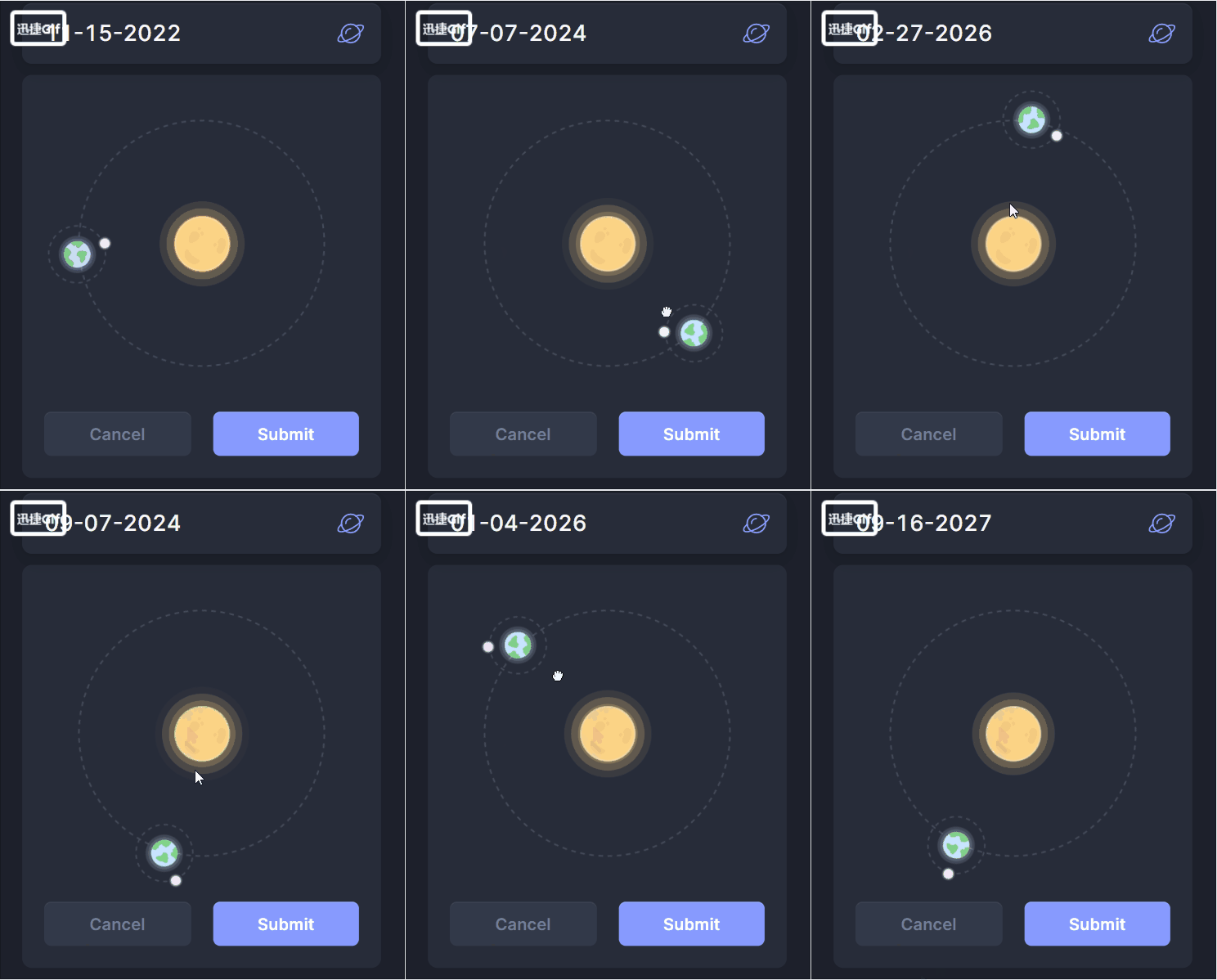
JS:
gsap.registerPlugin(Draggable);

const getDateFormat = (date) => {
  return `${(date.getMonth() + 1).toString().padStart(2, "0")}-${date
    .getDate()
    .toString()
    .padStart(2, "0")}-${date.getFullYear()}`;
};

const daysInYear = (year) => {
  return (year % 4 === 0 && year % 100 > 0) || year % 400 == 0 ? 366 : 365;
};

document.querySelectorAll(".useful-datepicker").forEach((datepicker) => {
  const input = datepicker.querySelector("input");

  const today = new Date();

  input.value = getDateFormat(today);

  function updateDate() {
    gsap.set(datepicker.querySelector(".earth"), {
      rotate: `${this.rotation * 3}deg`,
    });

    const percent = (this.rotation / 360) * 100;
    const days = (percent / 100) * daysInYear(today.getFullYear());
    const newDate = new Date();

    newDate.setDate(today.getDate() + days);

    input.value = getDateFormat(newDate);
  }

  Draggable.create(datepicker.querySelector(".rotate"), {
    type: "rotation",
    inertia: true,
    throwResistance: 0.5,
    onDrag: updateDate,
    onThrowUpdate: updateDate,
  });
});
需要完整代码,请滑倒本文最后面
4.更多动态特效
上面的3个特效都是来源于此网站,需要代码的小伙伴,可以访问此网站来获取代码。
并且里面有好多动态特效:CodePen: Online Code Editor and Front End Web Developer Community
网站介绍:
CodePen是一个面向前端设计师和开发人员的社会开发环境。构建和部署一个网站,展示你的工作,构建测试用例来学习和调试,并找到灵感。
构建、测试和发现前端代码的最佳场所
边栏推荐
- OpenCV中cv2.VideoWriter_fourcc()函数和cv2.VideoWriter()函数的结合使用
- MySQL indexes and transactions
- 哈希表 AcWing 841. 字符串哈希
- Fluent fluent library encapsulation
- arcgis js 4. Add pictures to x map
- Leetcode - < dynamic planning special> Jianzhi offer 19, 49, 60
- Lekao.com: experience sharing of junior economists and previous candidates in customs clearance
- JS10day(api 阶段性完结,正则表达式简介,自定义属性,过滤敏感词案例,注册模块验证案例)
- Redis bloom filter
- Leetcode - Sword finger offer 59 - I, 59 - II
猜你喜欢
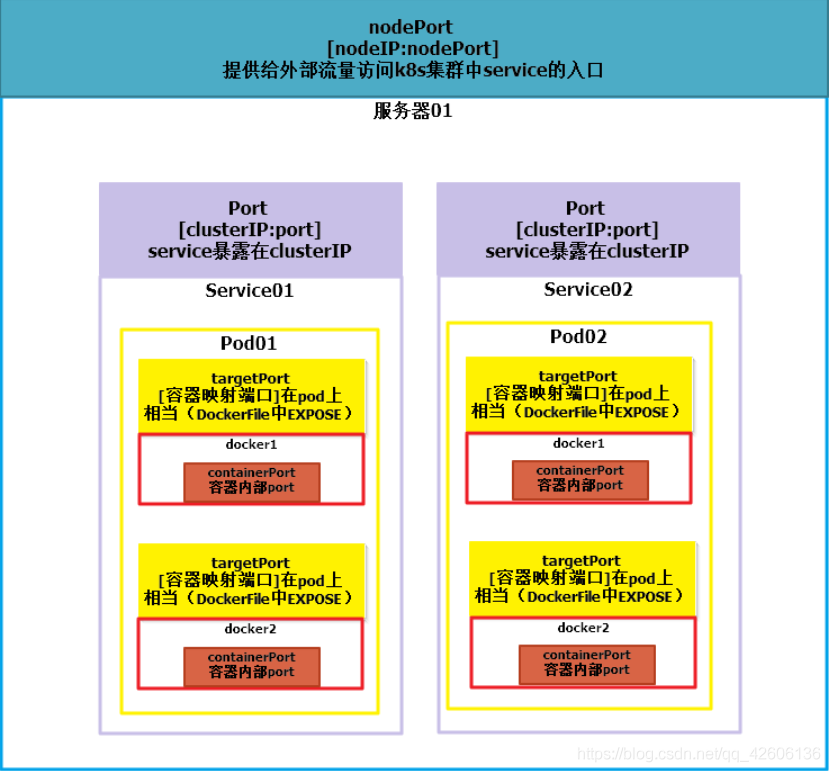
kubenetes中port、targetPort、nodePort、containerPort的区别与联系
The differences and relationships among port, targetport, nodeport and containerport in kubenetes
Redis bloom filter

SparkContext: Error initializing SparkContext解决方法
Discrimination of the interval of dichotomy question brushing record (Luogu question sheet)

哈希表 AcWing 841. 字符串哈希
Bom Dom
堆 AcWing 839. 模拟堆
![[FFH] little bear driver calling process (take calling LED light driver as an example)](/img/e7/153ae9f1befc12825d277620049f9d.jpg)
[FFH] little bear driver calling process (take calling LED light driver as an example)

JS10day(api 阶段性完结,正则表达式简介,自定义属性,过滤敏感词案例,注册模块验证案例)
随机推荐
[I'm a mound pytorch tutorial] learning notes
Why do programmers have the idea that code can run without moving? Is it poisonous? Or what?
Drools executes string rules or executes a rule file
高性能纠删码编码
ASP. Net MVC default configuration, if any, jumps to the corresponding program in the specified area
Fastdateformat why thread safe
. Net, C # basic knowledge
Redis transaction mechanism implementation process and principle, and use transaction mechanism to prevent inventory oversold
drools执行完某个规则后终止别的规则执行
"As a junior college student, I found out how difficult it is to counter attack after graduation."
AI mid stage technology research
String palindrome hash template question o (1) judge whether the string is palindrome
防抖 节流
Lekao.com: experience sharing of junior economists and previous candidates in customs clearance
哈希表 AcWing 840. 模拟散列表
Go learning notes - go based interprocess communication
JS6day(DOM结点的查找、增加、删除。实例化时间,时间戳,时间戳的案例,重绘和回流)
Redis bloom filter
JS7day(事件对象,事件流,事件捕获和冒泡,阻止事件流动,事件委托,学生信息表案例)
Go学习笔记—基于Go的进程间通信