当前位置:网站首页>JS8day(滚动事件(scroll家族),offset家族,client家族,轮播图案例(待做))
JS8day(滚动事件(scroll家族),offset家族,client家族,轮播图案例(待做))
2022-07-02 09:43:00 【荻风溪畔】
文章目录
滚动事件
当页面进行滚动时触发的事件
- 为什么要学?
很多网页需要检测用户把页面滚动到某个区域后做一些处理, 比如固定导航栏,比如返回顶部 - 事件名:
scroll - 监听整个页面滚动:
给window或document添加scroll事件
监听某个元素的内部滚动直接给某个元素加即可
      window.addEventListener('scroll', function () {

          console.log('scroll')
      })
加载事件
方法1
加载外部资源(如图片、外联CSS和JavaScript等)加载完毕时触发的事件
- 为什么要学?
有些时候需要等页面资源全部处理完了做一些事情
老代码喜欢把 script 写在 head 中,这时候直接找 dom 元素找不到 - 事件名:
load - 监听页面所有资源加载完毕:
给 window 添加load事件
      window.addEventListener('load', function () {

          console.log('load')
      })
- 注意:不光可以监听整个页面资源加载完毕,也可以针对某个资源绑定
load事件
方法2
- 当初始的
HTML文档被完全加载和解析完成之后,DOMContentLoaded事件被触发,而无需等待样式表、图像等完全加载。 - 事件名:
DOMContentLoaded - 监听页面DOM加载完毕:
给document添加DOMContentLoaded事件
        window.addEventListener('DOMContentLoaded', function () {

            console.log('DOMContentLoaded')
        })
scroll家族(scroll dimensions 滚动尺寸)
- 获取宽高:
获取元素的内容总宽高(不包含滚动条)返回值不带单位scrollWidth和scrollHeight - 获取位置:
获取元素内容往左、往上滚出去看不到的距离scrollLeft和scrollTop
这两个属性是 可以修改的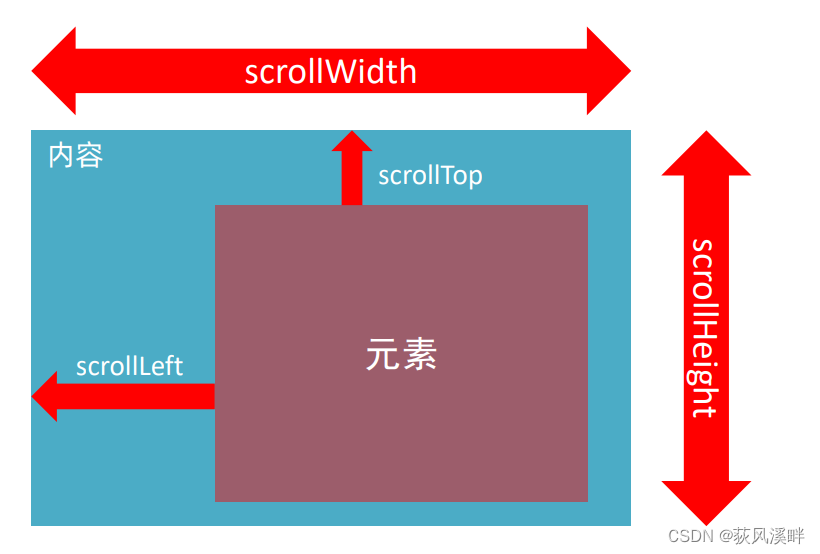
     div.addEventListener('scroll', function () {

         console.log(this.scrollTop)
     })

- scrollWidth和scrollHeight是得到元素什么的宽高?
内容宽高,不包含滚动条- 被卷去的头部或者左侧用那个属性?是否可以读取和修改?
scrollTop / scrollLeft
可以读取,也可以修改(赋值)- 检测页面滚动的头部距离(被卷去的头部)用那个属性?
document.documentElement.scrollTop
页面滚动显示返回顶部按钮(案例)

部分代码:
<body>
    <div class="content"></div>
    <div class="backtop">
        <img src="./images/close2.png" alt="">
        <a href="javascript:;"></a>
    </div>
    <script>
        let backtop = document.querySelector('.backtop')
        window.addEventListener('scroll', function () {
      //页面滚动检测
            let num = document.documentElement.scrollTop
            console.log(num)
            if (num >= 500) {

                backtop.style.display = 'block';
            }
            else {

                backtop.style.display = 'none';

            }
        })
        //不要写在里面,效率低(滚动依次监听一次)
        backtop.children[1].addEventListener('click', function () {

            document.documentElement.scrollTop = 0
        })

    </script>
</body>
offset家族(offset dimensions偏移尺寸)

- 获取宽高:
获取元素的自身宽高、包含元素自身设置的宽高、padding、borderoffsetWidth和offsetHeight - 获取位置:
获取元素距离自己定位父级元素的左、上距离offsetLeft和offsetTop注意是只读属性(非要给值就用margin-top,margin-left或者定位中的top和left)
1.offsetWidth和offsetHeight是得到元素什么的宽高?
内容 + padding + border
2.offsetTop和offsetLeft得到位置以谁为准?
(1)带有定位的父级
(2)如果都没有则以文档左上角 为准
电梯导航案例部分代码:
     // 1. 获元取素
     let items = document.querySelectorAll('.item')
     // 内容的盒子获取
     let neirongs = document.querySelectorAll('.neirong')
     // 2. 左侧aside 模块 点击谁,谁高亮
     for (let i = 0; i < items.length; i++) {

         items[i].addEventListener('click', function () {

             // 找到上一个active 移除类
             document.querySelector('.aside .active').classList.remove('active')
             // 点击谁谁添加类
             this.classList.toggle('active')
             // 3. 右侧内容跟随走动 让页面滚动到对应的offsetTop值位置
             // console.log(neirongs[i].offsetTop) 不用给单位
             document.documentElement.scrollTop = neirongs[i].offsetTop
         })
     }
client家族(client dimensions客户端尺寸)
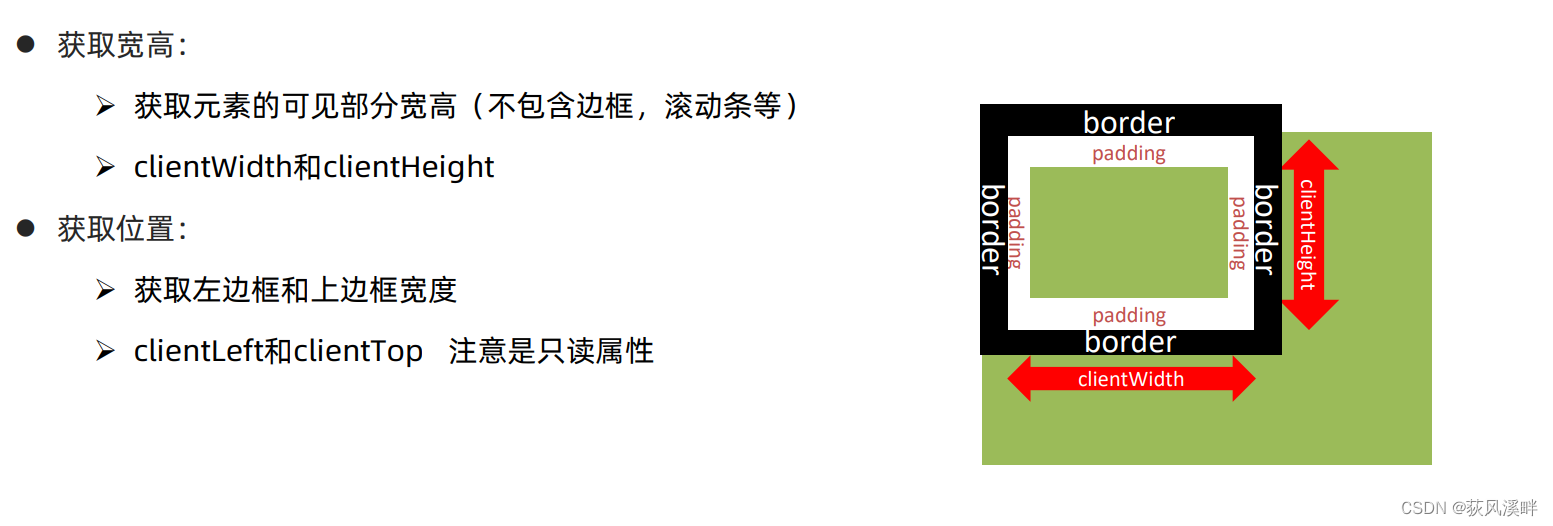
浏览器背景颜色改变案例部分代码
        window.addEventListener('resize', function () {
       //resize 监听浏览器可是窗口变化
            let w = document.documentElement.clientWidth
            console.log(w)
            if (w >= 1920) {
        //浏览器可视窗口clientWidth发生变化则背景颜色改变
                document.body.style.backgroundColor = 'blue'
            }
            else if (w > 540) {

                document.body.style.backgroundColor = 'hotpink'

            }
            else {

                document.body.style.backgroundColor = 'red'

            }
        })
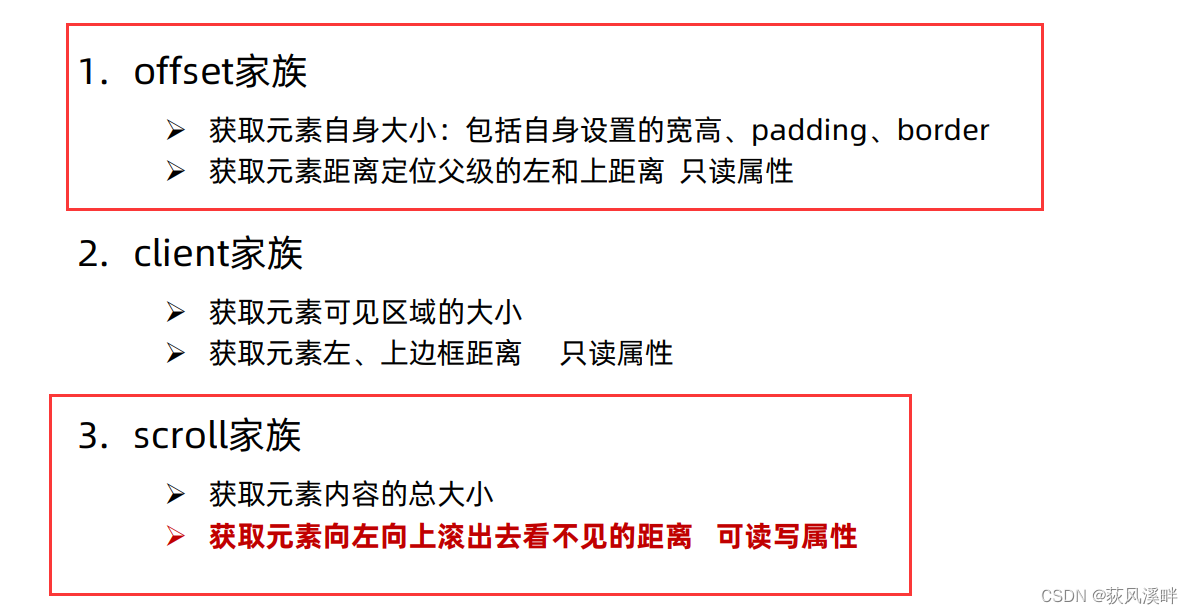
总结
        // scrollWidth scrollHeight 内容 宽高 (了解)
        let div = document.querySelector('div')
        console.log(div.scrollWidth)  // 150 不带单位
        console.log(div.scrollHeight)  // 336 不带单位
        console.log('----------------------------')
        // offset 盒子元素的大小 = 盒子本身的宽度和高度 + padding + border
        console.log(div.offsetWidth)  // 150 不带单位
        console.log(div.offsetHeight)  // 150 不带单位
        // console.log(div.offsetTop) //
        // console.log(div.offsetLeft)
        // client 当前可视区域 不包含滚动条 边框等等
        console.log('----------------------------')
        console.log(div.clientWidth)
        console.log(div.clientHeight)
        console.log(div.clientTop)  // 边框的宽度 了解
        console.log(div.clientLeft)
边栏推荐
- What data types does redis have and their application scenarios
- Find the factorial of a positive integer within 16, that is, the class of n (0= < n < =16). Enter 1111 to exit.
- Deep understanding of P-R curve, ROC and AUC
- Initial JDBC programming
- LeetCode—<动态规划专项>剑指 Offer 19、49、60
- The programmer and the female nurse went on a blind date and spent 360. He packed leftovers and was stunned when he received wechat at night
- drools执行String规则或执行某个规则文件
- Interview with meituan, a 34 year old programmer, was rejected: only those under the age of 30 who work hard and earn little overtime
- Day12 control flow if switch while do While guessing numbers game
- The second composition template of postgraduate entrance examination English / chart composition, English chart composition is enough
猜你喜欢

Rust search server, rust quick service finding tutorial
Deep Copy Event bus
kubenetes中port、targetPort、nodePort、containerPort的区别与联系
BOM DOM

bellman-ford AcWing 853. 有边数限制的最短路
Heap (priority queue)
This "little routine" is set on the dough cake of instant noodles. No wonder programmers are always hungry

SparkContext: Error initializing SparkContext解决方法
![JDBC 预防sql注入问题与解决方法[PreparedStatement]](/img/32/f71f5a31cdf710704267ff100b85d7.png)
JDBC 预防sql注入问题与解决方法[PreparedStatement]
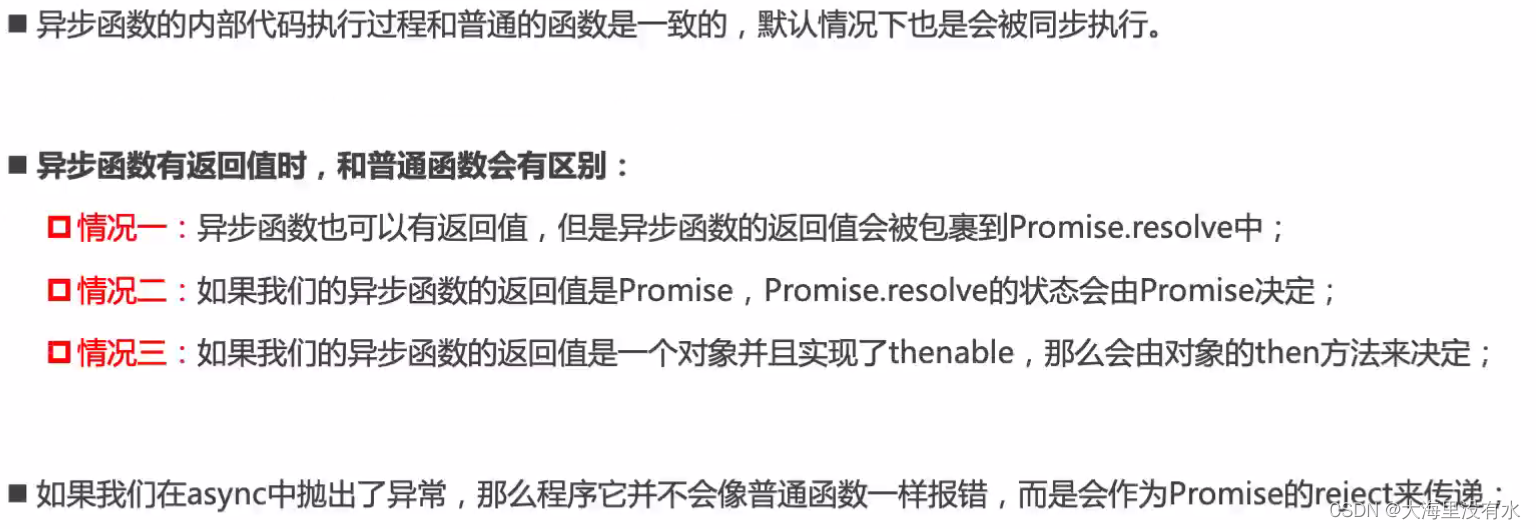
async/await 异步函数
随机推荐
Drools executes the specified rule
Openssh remote enumeration username vulnerability (cve-2018-15473)
Leetcode - Sword finger offer 59 - I, 59 - II
Adding database driver to sqoop of cdh6
Experiment of connecting mobile phone hotspot based on Arduino and esp8266 (successful)
drools执行完某个规则后终止别的规则执行
js 迭代器 生成器 异步代码处理 promise+生成器 -> await/async
(C language) 3 small Codes: 1+2+3+ · · +100=? And judge whether a year is a leap year or a normal year? And calculate the circumference and area of the circle?
Go learning notes - go based interprocess communication
SparkContext: Error initializing SparkContext解决方法
Docker-compose配置Mysql,Redis,MongoDB
What is the relationship between NFT and metauniverse? How to view the market? The future market trend of NFT
This "little routine" is set on the dough cake of instant noodles. No wonder programmers are always hungry
2.6 using recursion and stack - [tower of Hanoi problem]
LeetCode—<动态规划专项>剑指 Offer 19、49、60
What data types does redis have and their application scenarios
bellman-ford AcWing 853. 有边数限制的最短路
Fastdateformat why thread safe
spfa AcWing 851. spfa求最短路
Sse/avx instruction set and API of SIMD