当前位置:网站首页>Alist+raidrive gives the computer a complete 8billion GB hard disk drive
Alist+raidrive gives the computer a complete 8billion GB hard disk drive
2022-06-28 21:20:00 【Youjiu】
Preface
When we use the computer, we often lament that the hard disk space is insufficient , Especially when I saved a lot of little sisters ……
The cost of hardware expansion is too high , That can only consider some white whoring methods
Previously, I shared with you how to convert an alicloud disk to a local hard disk
But because this tool is not open source , It also relies on the author's server , There are some deficiencies in security and stability
Today I recommend another one that can make most of gu0 The method of converting all network disks to local hard disk space
Although the configuration is a little more complicated , But no matter what kind of network disk it supports 、 Better security and stability , Highly recommended to you
Alist+RaiDrive
Many students have used RaiDrive Mount the network disk as a local hard disk , But if you want to use it for gu0 For intranet disks, the server is also required , More trouble
Share with another open source tool today Alist The method used together , It can also be mounted gu0 The purpose of the production network disk
Alist Is a versatile multi network disk management program
Support alicloud disk 、 Sky wing cloud disk 、 Baidu SkyDrive 、 Quark net 、 Thunderbolt cloud disk 、123 Cloud disk 、 Blue clouds 、 Minute second frame 、 And color cloud and other common network disk management
Github There are 6.6k+stars, Still hot , Together, they can mount all kinds of network disks locally 
There are three steps
For everyone to understand , This article is written in great detail
Although it seems troublesome , But there are only three steps , You only need to configure it once
1. utilize Alist Set up locally Webdav service
2. Use RaiDrive Mount the network disk service to the local drive
3. hide Alist Interface and setting startup
Let's talk about each of them , It's still very good to use ~
Alist To configure
Xiaobian provides two Alist Program ,386 And amd64 Of , Use whatever works
Double click directly to run “alist.exe”, And then in CMD Our service interface and password will be displayed in the interface
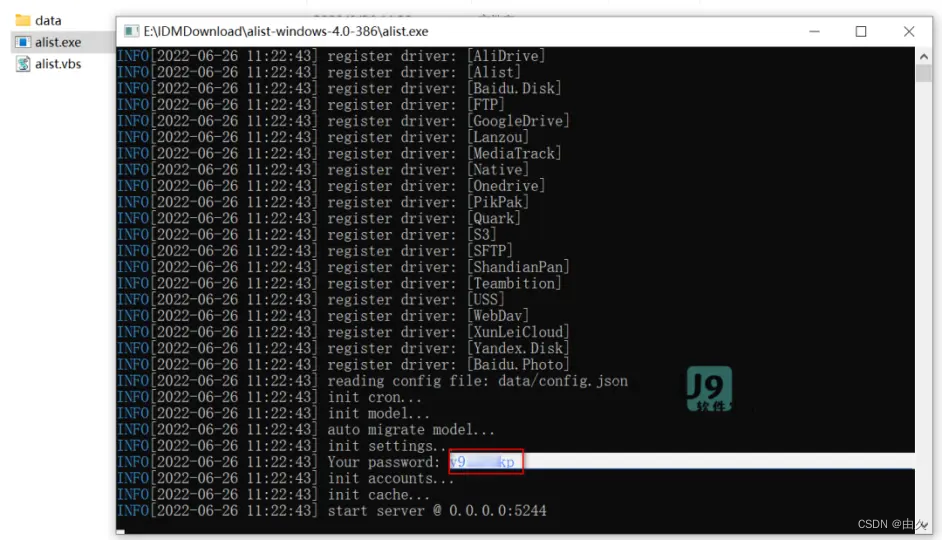
Copy this password . Then open the URL in the browser :
http://127.0.0.1:5244/
Enter the password you just copied , You can enter Alist The background management page of
notes : Don't close the black interface just now , After closing, the background interface cannot be accessed 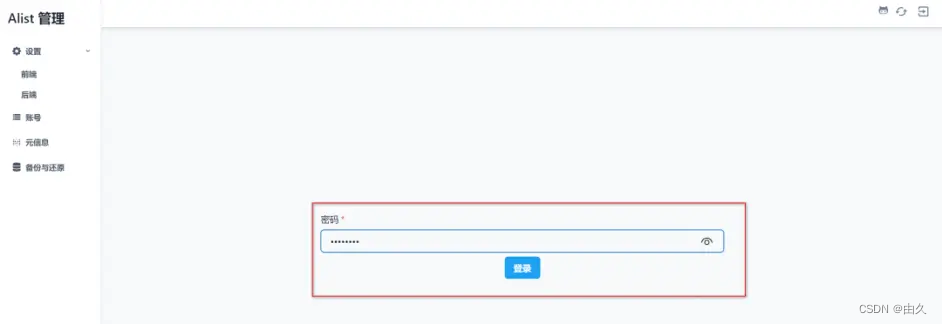
Then we can add an account that needs to be attached to the local network disk , Take Alibaba cloud disk as an example
Click the respectively “ account number ”->“ add to ”, Select... From the type drop-down options “ Alicloud disk ”
Here are two things that must be filled out , Virtual path and refresh token (Token)
The virtual path is the name of the folder displayed on the disk , Feel free to fill in , Generally, it is good to fill in the name of the net tray 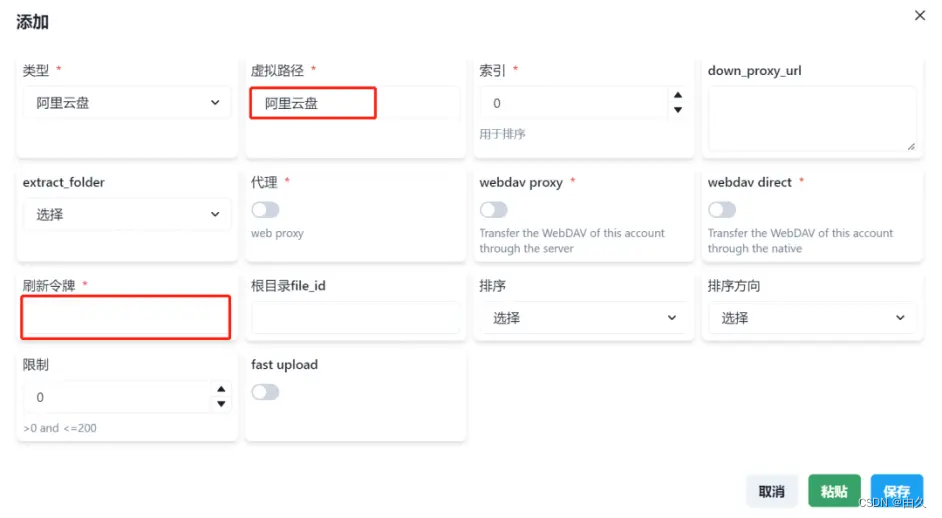
The refresh token can only use the mobile terminal Token, You need to get it manually , Go to the link below
https://alist-doc.nn.ci/docs/driver/aliyundrive
Click on GetToken Button , Scan the QR code by using the mobile Alibaba cloud disk 
And then click “UseAliyunDriveAPPToScanThenClick” Button , That's all right.
In the interface “RefreshToken” Is to refresh the token
notes : Different online disks add accounts in slightly different ways , But they can all be above alistdoc Find the method to get parameters on the left side of the document

After adding the account number , Open it again
http://127.0.0.1:5244/
Now more than half of the configuration has been completed , You can manage multiple network disks in web pages ~
Then you need to mount it to the system 
RaiDrive mount
This RaiDrive Xiaobian also keeps the old and new versions , Old version used by myself , Sufficient use , There are few advertisements
Just run the installation directly , After startup, you can switch to Chinese in the settings
The configuration is also relatively simple , Except for the password, please refer to the following figure to fill in 
The location of the account password is Alist Back end settings of the management interface
It can be copied directly
After adding, I can find the network hard disk in my computer
I don't know what happened to this size , Show 8EB
1EB=1024PB,1PB=1024TB,1TB=1024GB
therefore 1EB About equal to 10 Billion GB……
We can operate the files in the network disk just like the local files
Like moving in and out 、 Compression decompression 、 Call the system program to open the resource 、 It can even realize the file transfer between different network disks ~
So far, it can be used normally , but Alist The black frame of the has to be kept open , Shutting down will cause our services to fail and become unusable , Quite eye-catching ……
So let's share a little script to hide it 
hide Alist Interface and startup
alist.vbs It's an automatic startup Alist And RaiDrive, Hide... At the same time Alist Interface script program , Need and “alist.exe” In the same directory
Be careful not to put them in C disc , There should be no Chinese in the path
At the same time, it needs to be configured slightly , take alist.vbs Open in Notepad , Then change the path from the box to your own RaiDrive The installation path 
Run this script to hide the startup first Alist, And then it starts RaiDrive 了
Create a shortcut to this script , Add the boot to the system boot directory , The configuration is complete
notes : Be sure to put the shortcut there , Not the original document 
The system startup directory can be set as “Ctrl+Win” Shortcut key , Then input shell:startup Get into 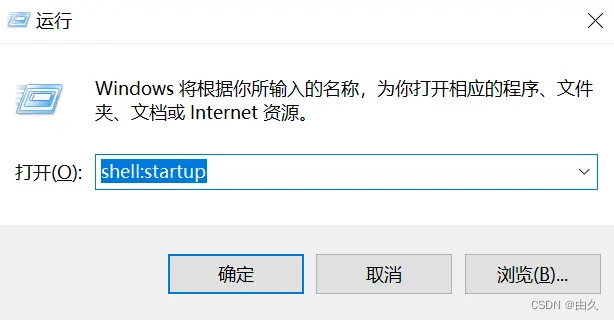
Last
Quark Links (PC Web pages can be downloaded without speed limit ):
https://pan.quark.cn/s/0359cbd51d3d
Baidu network disk link :
https://pan.baidu.com/s/1-yPJtRHXzXEh0xmECLqj8A?pwd=2gd8
It is also to make everyone understand , So I wrote more , Actually, it's not difficult …
Set... With script RaiDrive After startup , Pay attention to turn off the boot that comes with it ,RaiDrive Must be in alist After that, it can be used normally
In fact, if there is a server, it will Alist It is more convenient to deploy directly on it , Refer to official documents
https://alist-doc.nn.ci/docs/intro
Today's sharing is here
If it works for you , You can help me make up a three company , How can you even drip ~
边栏推荐
- Leetcode56. consolidation interval
- 什么是接口?什么是接口测试?
- 题解 The Blocks Problem(UVa101)紫书P110vector的应用
- LeetCode877. Stone game
- 接口用例设计
- Understand the construction of the entire network model
- Flatten of cnn-lstm
- Alibaba cloud MSE full link grayscale solution practice based on Apache apisik
- 关于不完全类型的认识
- Is it safe to open a dig money account? Is it reliable?
猜你喜欢

Learn Tai Chi maker mqtt Chapter 2 (VIII) esp8266 mqtt user password authentication

Pie (poj3122) super detailed and easy to understand binary introduction
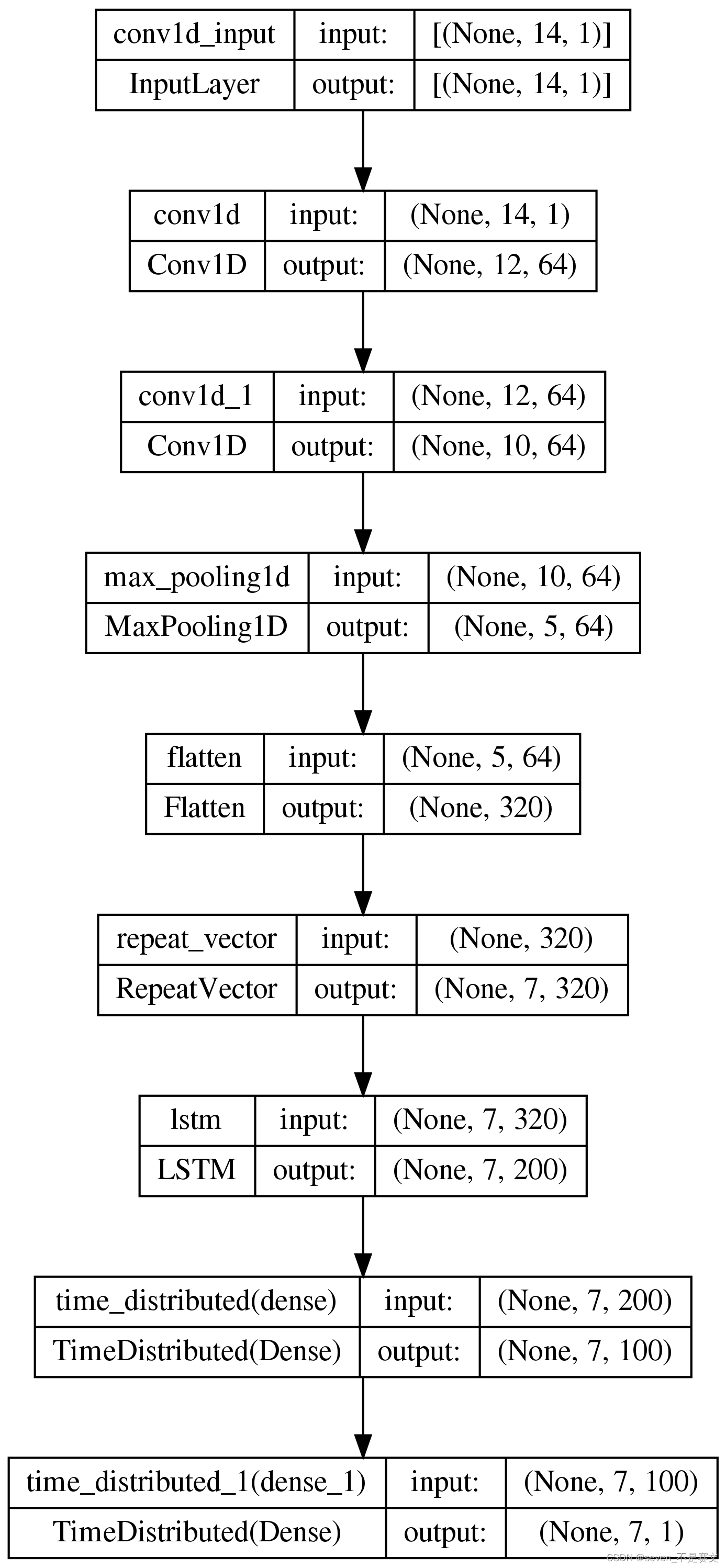
Visualization of neural network structure in different frames

Application practice | 1billion data second level correlation. Huolala's OLAP System Evolution Based on Apache Doris (with PPT download)

Study on bifunctional crosslinker lumiprobe sulfoacyanine 7 dicarboxylic acid
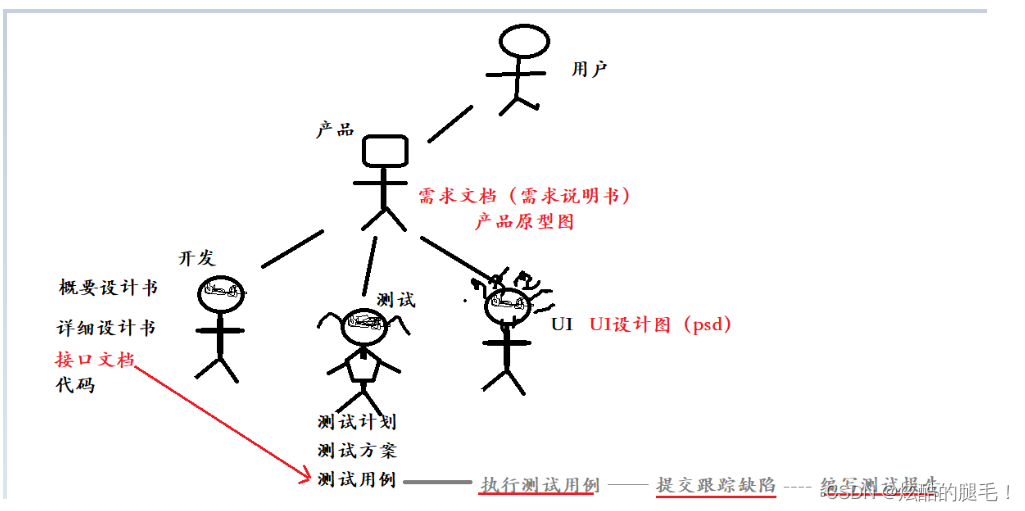
Interface test process

LeetCode每日一题——515. 在每个树行中找最大值
![[try to hack] cobalt strike (I)](/img/2b/5d274078b7d7ebd05b7c6d9e020868.png)
[try to hack] cobalt strike (I)

QJsonObject的使用示例
![[Note: circuit intégré MOS analogique] référence de bande Gap (principe de base + mode courant + circuit en mode tension)](/img/cd/be62272d465ca990456c222b38df67.png)
[Note: circuit intégré MOS analogique] référence de bande Gap (principe de base + mode courant + circuit en mode tension)
随机推荐
LeetCode116. 填充每个节点的下一个右侧节点指针
LeetCode213. 打家劫舍II
【笔记:模拟MOS集成电路】带隙基准(基本原理+电流模+电压模电路详解)
阿里云 MSE 基于 Apache APISIX 的全链路灰度方案实践
LeetCode560. 和为K的子数组
基于 Apache APISIX 的自动化运维平台
LeetCode1114. Print in sequence
Is it safe to open a dig money account? Is it reliable?
Interface test process
Anr no response introduction
Understanding web automated testing
ANR分析--问题1
题解 The SetStack Computer(UVa12096)紫书P116STL的综合应用
LeetCode117. Populate the next right node pointer for each node_ II
MongoDB——副本集与分片
Understanding of incomplete types
LeetCode122. The best time to buy and sell stocks II
2. integrate filter
[try to hack] cobalt strike (I)
力扣树的进一步应用