当前位置:网站首页>Sliding conflict of view
Sliding conflict of view
2022-07-27 08:38:00 【I'm irrational】
One . Conflict type
There are three types of sliding conflicts , The first is that the external and internal sliding directions are inconsistent , The second type is that the external and internal sliding directions are consistent , The third category is the first two nested patterns .
Rules dealing with these three types fall into two categories , For the first type , We can deal with it according to the sliding direction , Assign to the corresponding control according to the processing direction ; about 2、3 Types , It must be handled according to business differences , The processing event of a certain state is distributed to the corresponding control to process .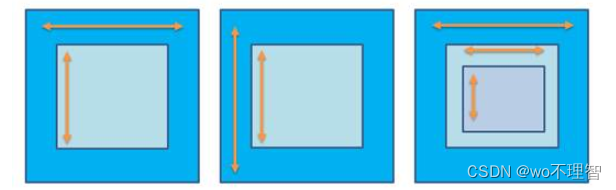
When the user slides left and right , Need to let the external View Intercept click events , When users slide up and down , Need to let the inside View Intercept click events . Simply put, whoever slides will intercept . Pictured , According to the sliding process The coordinates of the start and end points We can get whether it is horizontal sliding or vertical sliding .
- According to the included angle formed by the sliding path and the horizontal direction
- According to the distance difference between the horizontal direction and the vertical direction
- According to the speed difference between horizontal and vertical directions

Two . resolvent
1. External interception
So-called External interception Refer to Click events must first be intercepted by the parent container , If the parent container needs this event, it intercepts , Don't intercept if you don't need it , This method is more consistent with the click event distribution mechanism . The external interception method needs to override the parent container's onInterceptTouchEvent Method , Do the corresponding interception inside , The pseudocode is as follows :
public boolean onInterceptTouchEvent(MotionEvent ev) {

    boolean intercepted = false;
    switch (ev.getAction()){

        case MotionEvent.ACTION_DOWN:
            intercepted = false;
            break;
        case MotionEvent.ACTION_MOVE:
            if( The parent control needs the current click event ){

                intercepted = true;
            } else{

                intercepted = false;
            }
            break;
        case MotionEvent.ACTION_UP:
            intercepted = false;
            break;
    }

    return intercepted;
}
For different sliding conflicts , You only need to modify the condition that the parent container needs the current click event .
stay onInterceptTouchEvent In the method , First of all ACTION_DOWN This event , Parent container must return false, That is, don't intercept ACTION_DOWN event , This is because once the parent container intercepts the event , So the following ACTION_MOVE and ACTION_UP Events are all handled directly by the parent container , Events cannot be passed to child elements ; Next is ACTION_MOVE event , This event can be intercepted as needed , If the parent container needs Intercept Just go back to true, conversely Don't intercept Just go back to false; And finally ACTION_UP event , Here we have to go back to false, because ACTION_UP The event itself doesn't make much sense .
2. Internal interception
Internal interception means that the parent container does not intercept any events , All events are passed to child elements , If the child element needs this event, it consumes , Otherwise, it will be handled by the parent container , This method is inconsistent with the event distribution mechanism , Need to cooperate with requestDisallowInterceptTouchEvent Method can work normally , It's a little more complicated than the external interception method . The pseudocode is as follows :
Subelement :
public boolean dispatchTouchEvent(MotionEvent ev) {


    switch (ev.getAction()){

        case MotionEvent.ACTION_DOWN:
            getParent().requestDisallowInterceptTouchEvent(true);
            break;
        case MotionEvent.ACTION_MOVE:
            if( The parent control needs this click event ){

                getParent().requestDisallowInterceptTouchEvent(false);
            }
            break;
        case MotionEvent.ACTION_UP:
            break;
    }
    return super.dispatchTouchEvent(event);
}
For different sliding conflicts , You only need to modify the condition that the parent container needs the current click event .
Except for the child elements that need to be processed , The parent element is also blocked by default ACTION_DOWN Other events , So when the child element calls getParent().requestDisallowInterceptTouchEvent(true) When the method is used , The parent container can continue to intercept the required events .
Parent element :
@Override
public boolean onInterceptTouchEvent(MotionEvent ev) {

    int action = ev.getAction();
    if(action == MotionEvent.ACTION_DOWN){

        return false;
    } else {

        return true;
    }
}
边栏推荐
- JWT authentication and login function implementation, exit login
- I drew a Gu ailing with characters!
- Dirsearch[directory scanning tool]
- 3311. 最长算术
- Flink1.15源码阅读flink-clients客户端执行流程(阅读较枯燥)
- Map structure
- 面试官:什么是脚手架?为什么需要脚手架?常用的脚手架有哪些?
- Eval and assert execute one sentence Trojan horse
- On Valentine's day, I drew an object with characters!
- Chapter 2 foreground data display
猜你喜欢

我用字符画出了一个谷爱凌!

Use of "PHP Basics" delimiters

Flask request data acquisition and response

Oppo self-developed large-scale knowledge map and its application in digital intelligence engineering

All in one 1251 - Fairy Island for medicine (breadth first search)

Solution of database migration error

Chapter 2 foreground data display

User management - restrictions

openGauss之TryMe初体验

Login to homepage function implementation
随机推荐
Attack and defense world MFW
Openresty + keepalived 实现负载均衡 + IPV6 验证
Flutter 渲染机制——GPU线程渲染
永久设置source的方法
Background image related applications - full, adaptive
Alibaba cloud international receipt message introduction and configuration process
Realize SKU management in the background
“寻源到结算“与“采购到付款“两者有什么不同或相似之处?
Use of elastic box / expansion box (Flex)
Using ecological power, opengauss breaks through the performance bottleneck
Initial summary of flask framework creation project
Help send some recruitment. If you are interested, you can have a look
Apache SSI remote command execution vulnerability
Flask's operations on model classes
Implementation of adding function of background user management display
How to merge multiple columns in an excel table into one column
Day3 -- flag state holding, exception handling and request hook
List delete collection elements
Realization of background channel group management function
[MRCTF2020]Ezpop 1