当前位置:网站首页>【漫天烟花】绚烂烟花点亮夜空也太美了叭、某程序员携带烟花秀给大家拜年啦~
【漫天烟花】绚烂烟花点亮夜空也太美了叭、某程序员携带烟花秀给大家拜年啦~
2022-06-10 22:42:00 【程序员梨子】
前言
作者 :“程序员梨子”
**文章简介 **:本篇文章主要讲解制作一个新年界面化放烟花特效啦。
**文章源码获取 **: 为了感谢每一个关注我的小可爱每篇文章的项目源码都是无偿分
享滴
点这里蓝色这行字体自取,需要什么源码记得说标题名字哈!私信我也可!
欢迎小伙伴们 点赞、收藏、留言

正文
燃放烟花爆竹是我们的一种迎新辞旧的习俗,然而,大量的燃放行为,会大大地降低空气质量,造
成空气污染还伴随着火灾、伤人等安全隐患。所以很早开始大部分地区都禁止放烟花了~
现在已然是开工高峰期了撒,很多小伙伴儿可能烟花都没见过,呐呐呐 小编今天给大家用代码放
烟花,让大家一次过够烟花隐

一、效果展示
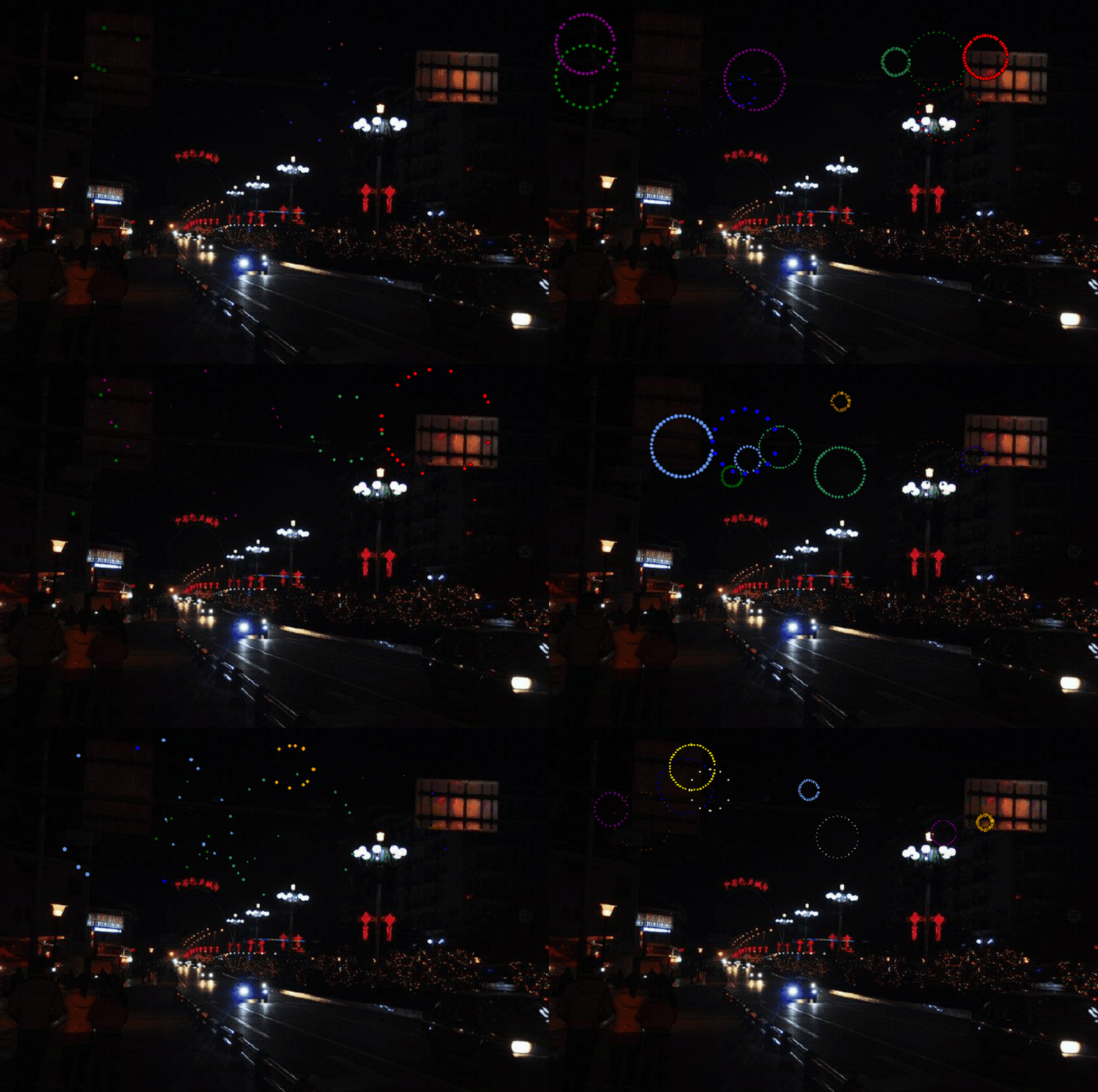
二、源码展示
1)功能实现用到的 Python 库包括:tkinter、PIL、time、random、math,如果之前没有装过第三
方库的话,使用 pip install + 模块名字 装一下即可。
2)首先,我们使用 tkinter 来创建一个画布
root = tk.Tk()
# 绘制一个画布
cv = tk.Canvas(root, height=457, width=690)
# 背景图
image = Image.open("bg.jpeg")
photo = ImageTk.PhotoImage(image)
# 在画板上绘制一张图片
cv.create_image(0, 0, image=photo, anchor='nw')
cv.pack()
3)接着我们来实现烟花燃放的效果并在画布上显示。先来定义一个烟花类 fireworks,类中主要包
括:初始化方法和更新数据方法。
初始化方法主要参数包括:烟花绽放坐标轴、速度、颜色、粒子数和时间等,代码实现如下:
def __init__(self, cv, idx, total, explosion_speed, x=0., y=0.,
vx=0., vy=0., size=2., color='red', lifespan=2, **kwargs):
self.id = idx
# 烟花绽放 x 轴
self.x = x
# 烟花绽放 x 轴
self.y = y
self.initial_speed = explosion_speed
# 外放 x 轴速度
self.vx = vx
# 外放 y 轴速度
self.vy = vy
# 绽放的粒子数
self.total = total
# 已停留时间
self.age = 0
# 颜色
self.color = color
# 画布
self.cv = cv
self.cid = self.cv.create_oval(x - size, y - size, x + size, y + size,
fill=self.color)
self.lifespan = lifespan
4)当烟花燃放过后需要进行刷新,看一下更新方法,代码实现如下:
def update(self, dt):
self.age += dt
# 粒子膨胀
if self.alive() and self.expand():
move_x = cos(radians(self.id * 360 / self.total)) * self.initial_speed
move_y = sin(radians(self.id * 360 / self.total)) * self.initial_speed
self.cv.move(self.cid, move_x, move_y)
self.vx = move_x / (float(dt) * 1000)
# 膨胀到最大下落
elif self.alive():
move_x = cos(radians(self.id * 360 / self.total))
self.cv.move(self.cid, self.vx + move_x, self.vy + 0.5 * dt)
self.vy += 0.5 * dt
# 过期移除
elif self.cid is not None:
cv.delete(self.cid)
self.cid = None
5)再接着来看烟花燃放的实现,主要元素包括:烟花的个数、爆炸的范围和速度、停留时间和刷
新时间等,代码实现如下:
def ignite(cv):
t = time()
# 烟花列表
explode_points = []
wait_time = randint(10, 100)
# 爆炸的个数
numb_explode = randint(6, 10)
for point in range(numb_explode):
# 爆炸粒子列表
objects = []
# 爆炸 x 轴
x_cordi = randint(50, 550)
# 爆炸 y 轴
y_cordi = randint(50, 150)
speed = uniform(0.5, 1.5)
size = uniform(0.5, 3)
color = choice(colors)
# 爆炸的绽放速度
explosion_speed = uniform(0.2, 1)
# 爆炸的粒子数半径
total_particles = randint(10, 50)
for i in range(1, total_particles):
r = fireworks(cv, idx=i, total=total_particles,
explosion_speed=explosion_speed, x=x_cordi, y=y_cordi,
vx=speed, vy=speed, color=color, size=size,
lifespan=uniform(0.6, 1.75))
# 添加进粒子列表里
objects.append(r)
# 把粒子列表添加到烟花列表
explode_points.append(objects)
total_time = .0
# 在 1.8 秒时间帧内保持更新
while total_time < 1.8:
# 让画面暂停 0.01s
sleep(0.01)
# 刷新时间
tnew = time()
t, dt = tnew, tnew - t
# 遍历烟花列表
for point in explode_points:
# 遍历烟花里的粒子列表
for item in point:
# 更新时间
item.update(dt)
# 刷新页面
cv.update()
total_time += dt
root.after(wait_time, ignite, cv)


总结
这么多的烟花.gif 够看了嘛 代码还可以自己制作,想怎么来怎么来~
关注小编获取更多精彩内容!记得点击传送门哈
记得三连哦! 如需打包好的源码+素材免费分享滴!!传送门

边栏推荐
- LabVIEW determines the position of the control in the display coordinate system
- LabVIEW获取Clamp函数找到的所有点的信息
- Excel essential toolbox 17.0 Free Edition
- Lambda learning records
- Dark horse headlines - Tencent's salary system reform has caused controversy; Intel expanded the recruitment of female engineers nationwide; Black horse is 100% employed really
- LabVIEW pictures look bright or dark after being cast from 16 bits to 8 bits
- [opencv practice] this seal "artifact" is awesome, saving time and improving efficiency. It is powerful ~ (complete source code attached)
- 插入排序
- 【Pygame小遊戲】別找了,休閑遊戲專題來了丨泡泡龍小程序——休閑遊戲研發推薦
- Is it safe for changtou school to open an account? Is it reliable?
猜你喜欢

An adaptive size / full screen display method for iframe frames
LabVIEW obtains the information of all points found by the clamp function

vtk.js中vtp下载

HyperLeger Fabric安装

LabVIEW change the shape or color of point ROI overlay
LabVIEW图片在从16位强制转换为8位后看起来要亮或暗
Leetcode 501: mode in binary search tree

LeetCode+ 21 - 25

curl导入postman报错小记

Data and information resource sharing platform (V)
随机推荐
ILRuntime热更框架 安装以及断点调试
Redis installation and common problem solving based on centeros7 (explanation with pictures)
【Pygame小游戏】Chrome上的小恐龙竟可以用代码玩儿了?它看起来很好玩儿的样子~
Method of converting file to multipartfile
Hyperleger fabric installation
LabVIEW图片在从16位强制转换为8位后看起来要亮或暗
【Pygame合集】滴~穿越童年游戏指南 请查收:这里面有你玩过的游戏嘛?(附五款源码自取)
LabVIEW在波形图或波形图表上显示时间和日期
LabVIEW pictures look bright or dark after being cast from 16 bits to 8 bits
OpenResty安装
IGBT and third generation semiconductor SiC double pulse test scheme
Interface test learning notes
MySQL命令行导入导出数据
MultipartFile重命名上传
【Opencv实战】这个印章“神器”够牛,节省了时间提高了效率,厉害~(附完整源码)
OSS stores and exports related content
[paper sharing] pata: fuzzing with path aware Taint Analysis
LabVIEW获取Clamp函数找到的所有点的信息
Six procurement challenges perplexing Enterprises
【Pygame小遊戲】別找了,休閑遊戲專題來了丨泡泡龍小程序——休閑遊戲研發推薦